Giriş
The X-Rite i1iO is a robotic, automatic chart reading system designed to work seamlessly with X-Rite i1Pro 3 spectrophotometers. This system is engineered to streamline the process of creating custom color profiles by automating the measurement of printer test charts, eliminating the need for manual strip reading. It is suitable for professionals in photography, design, and printing who require precise and efficient color management.
The i1iO system is capable of measuring various substrates up to 10 mil thick, including challenging materials such as thin polybag material, ceramics, and textiles, offering broad versatility for different printing applications.
Quraşdırma
Proper setup of your X-Rite i1iO is crucial for optimal performance and accurate measurements. Follow these steps to prepare your device for use.
1. Qablaşdırma və Yerləşdirmə
Carefully remove all components from the packaging. Place the i1iO base unit on a stable, flat surface, ensuring there is adequate space around it for operation and cable connections. Avoid placing it in direct sunlight or near heat sources.
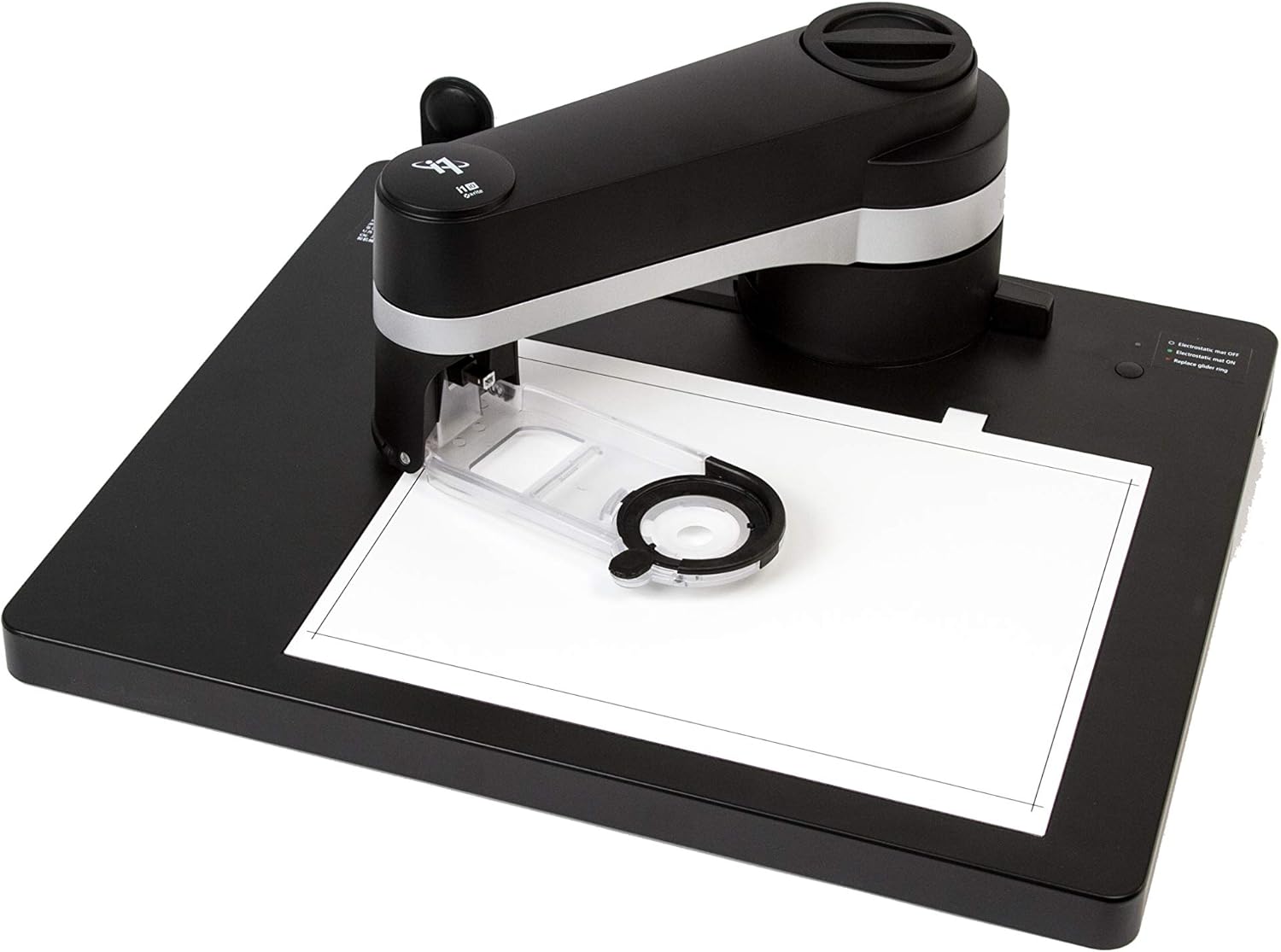
Şəkil 1: The X-Rite i1iO base unit with its robotic arm extended, ready for a measurement. A blank sheet of paper is positioned on the measurement bed, indicating the area where test charts will be placed. This image shows the general setup and footprint of the device.
2. Connecting the i1Pro 3 Spectrophotometer
The i1iO system requires an X-Rite i1Pro 3 spectrophotometer (sold separately) for operation. Gently insert your i1Pro 3 device into the designated slot on the i1iO robotic arm. Ensure it is securely seated to prevent movement during measurements.

Şəkil 2: Ətraflı view of the X-Rite i1iO with the i1Pro 3 spectrophotometer securely attached to its robotic arm. The spectrophotometer is positioned directly over a color test chart, demonstrating its readiness to begin automated measurements. This image highlights the integration of the i1Pro 3 with the i1iO system.
3. Power and USB Connection
Connect the provided power adapter to the i1iO unit and plug it into a suitable power outlet. Then, connect the i1iO to your computer using the supplied USB cable. Ensure the USB connection is firm at both ends.
Once connected, install the necessary X-Rite software (e.g., i1Profiler) on your computer. Follow the on-screen instructions during software installation to ensure proper driver setup and communication with the i1iO device.
Əməliyyat Təlimatları
The X-Rite i1iO automates the process of reading color charts, significantly speeding up profile creation. This section outlines the general operating procedure.
1. Preparing the Test Chart
Print your desired color test chart using your printer and media. Ensure the chart is flat and free of creases or damage. Place the printed chart onto the i1iO measurement bed, aligning it with the guides provided on the surface. The system can handle various media types, including thin polybag material, ceramics, and textiles, up to 10 mil thick.

Şəkil 3: The X-Rite i1iO with a color test chart precisely positioned on its measurement surface. The chart is aligned within the designated area, indicating it is ready for the automated scanning process. This image illustrates the correct placement of a test chart before measurement.
2. Initiating Measurement
Launch the X-Rite i1Profiler software on your connected computer. Within the software, select the option to create a new printer profile or measure a test chart. The software will guide you through the process of selecting the chart layout and initiating the measurement sequence.

Şəkil 4: The X-Rite i1iO in action, with its robotic arm and attached i1Pro 3 spectrophotometer moving across a color test chart. This image captures the device during a measurement scan, demonstrating the automated process of reading color patches. The arm's position suggests it is actively collecting data from the chart.
3. Automated Scanning Process
Once initiated, the i1iO's robotic arm will automatically move the i1Pro 3 spectrophotometer across the test chart, measuring each color patch. The system is designed for rapid data acquisition, capable of reading over 500 patches per minute in scanning mode under M0 measurement conditions. This hands-free automation ensures consistent and accurate readings.

Şəkil 5: The X-Rite i1iO with its robotic arm in motion, performing a full scan of a color test chart. This image illustrates the automated movement of the spectrophotometer across the entire chart, highlighting the efficiency and hands-free operation of the system during the measurement process.
4. Profile yaradılış
After the measurement is complete, the i1Profiler software will process the collected data to create a custom ICC profile for your printer and media combination. Save the profile to your system and apply it in your color management workflow for accurate and consistent color reproduction.

Şəkil 6: An overhead perspective of the X-Rite i1iO, showing the i1Pro 3 spectrophotometer resting on a color test chart. This view emphasizes the compact design and the precise positioning of the measurement head over the chart, indicating the completion of a scan or readiness for the next one.

Şəkil 7: A close-up shot focusing on the measurement head of the X-Rite i1iO and a section of a color test chart. This detailed view highlights the individual color patches being measured, showcasing the precision with which the spectrophotometer interacts with the chart surface to capture color data.
Baxım
Regular maintenance helps ensure the longevity and accuracy of your X-Rite i1iO system.
- Təmizləmə: Periodically wipe the exterior of the i1iO and the measurement bed with a soft, dry, lint-free cloth. For stubborn marks, a slightly damp cloth with mild soap can be used, followed by drying. Do not use abrasive cleaners or solvents.
- Spectrophotometer Care: Refer to the i1Pro 3 user manual for specific cleaning and maintenance instructions for the spectrophotometer itself. Keep the aperture clean and free of dust.
- Yaddaş: When not in use for extended periods, store the i1iO in a clean, dry environment, preferably in its original packaging or a protective cover to prevent dust accumulation.
- Kalibrləmə: The i1Pro 3 spectrophotometer requires regular calibration. Always perform the calibration procedure as instructed by the i1Profiler software before critical measurements to ensure accuracy. The i1iO itself does not require user calibration beyond ensuring the i1Pro 3 is correctly calibrated.
Problemlərin aradan qaldırılması
If you encounter issues with your X-Rite i1iO, consider the following common troubleshooting steps:
- Cihaz tanınmır:
- Ensure the USB cable is securely connected to both the i1iO and the computer.
- Kompüterinizdə fərqli USB portunu sınayın.
- Restart your computer and the i1iO.
- Verify that the X-Rite software and drivers are correctly installed and up to date.
- Ölçmə Xətaları:
- Check that the i1Pro 3 spectrophotometer is properly seated in the i1iO arm.
- Ensure the test chart is flat and correctly aligned on the measurement bed.
- Clean the aperture of the i1Pro 3 spectrophotometer.
- Perform a calibration of the i1Pro 3 spectrophotometer within the software.
- Ensure the media thickness is within the supported range (up to 10 mil).
- Robotic Arm Not Moving:
- Check the power connection to the i1iO.
- Ensure the device is recognized by the software.
- Restart the software and the i1iO.
If these steps do not resolve the issue, refer to the comprehensive troubleshooting guide in the i1Profiler software help documentation or contact X-Rite technical support.
Spesifikasiyalar
Key technical specifications for the X-Rite i1iO for i1Pro 3 (EO3AST):
| Xüsusiyyət | Detal |
|---|---|
| Məhsul Ölçüləri | 10 x 24 x 23 düym |
| Maddə Çəkisi | 14.96 funt sterlinq |
| ASIN | B07WMBC2XG |
| Element Model nömrəsi | EO3AST |
| İstehsalçı | X-RITE |
| Çəkiliş rejimləri | Avtomatik |
| Ekspozisiyaya Nəzarət Tipi | Manual |
| Rəng | qara |
| Bağlantı texnologiyası | USB |
| Brend | X-Rite |
| İlk Mövcud | 12 avqust 2019-cü il |
| Supported Media Thickness | 10 mln |
| Ölçmə sürəti | Over 500 patches per minute (M0 condition) |
Qutuda nə var:
- X-Rite i1iO for i1Pro 3 (EO3AST) Unit
- Güc adapteri
- USB kabel
- (Note: X-Rite i1Pro 3 Spectrophotometer sold separately)
Zəmanət Məlumatı
Specific warranty terms and conditions for the X-Rite i1iO (EO3AST) are provided by the manufacturer, X-Rite. For detailed warranty coverage, duration, and claim procedures, please refer to the official warranty documentation included with your product or visit the official X-Rite website. It is recommended to register your product upon purchase to ensure full warranty benefits.
Dəstək
For technical assistance, software updates, and additional resources, please visit the official X-Rite support channels:
- X-Rite Official Websayt: www.xrite.com
- X-Rite Store on Amazon: Visit the X-Rite Store
- Consult the help section within the i1Profiler software for context-sensitive assistance and detailed guides.
When contacting support, please have your product model number (EO3AST) and serial number ready.


