Giriş
This manual provides comprehensive instructions for the proper use and maintenance of your ELECTROPRIME 8GB Rechargeable USB LCD Digital Voice Recorder, Model ASH20BEBUBEB26998. Please read this manual thoroughly before operating the device to ensure optimal performance and longevity. Keep this manual for future reference.
Məhsul Bitdiview
The ELECTROPRIME Digital Voice Recorder is a compact and versatile device designed for high-quality audio recording and MP3 playback. It features an LCD screen for easy navigation, 8GB of internal storage, and a rechargeable battery.
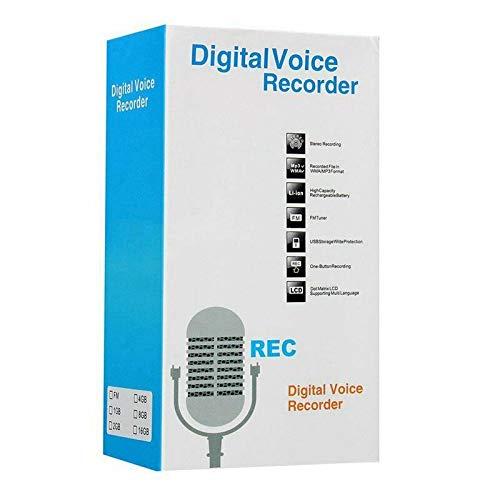
Figure 1: ELECTROPRIME Digital Voice Recorder with included accessories, including earphones, USB cable, and telephone adapter.
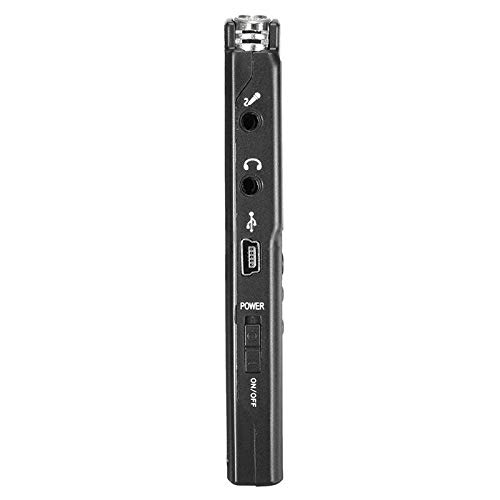
Şəkil 2: Yan view of the recorder, highlighting the USB port, headphone jack, microphone input, and power switch.
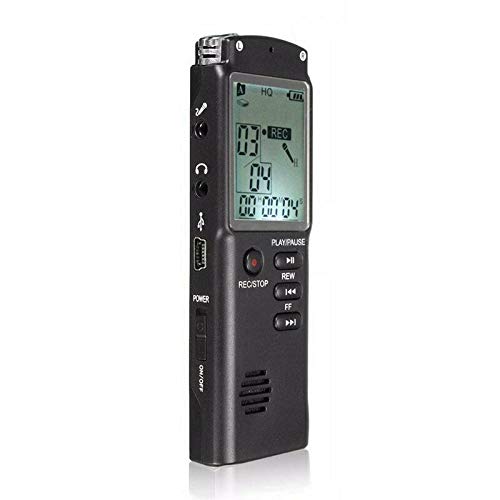
Şəkil 3: Ön view of the recorder, displaying the LCD screen with recording information and control buttons.
Quraşdırma
- Cihazın doldurulması: Connect the recorder to a computer's USB port or a USB wall adapter using the provided USB cable. The LCD screen will indicate charging status. A full charge typically takes 2-3 hours.
- Yandırma/Söndürmə: Locate the ON/OFF switch on the side of the device. Slide it to the "ON" position to power on and to the "OFF" position to power off.
- İlkin Quraşdırma: Upon first power-on, you may need to set the date and time. Use the navigation buttons (REW, FF) and Play/Pause button to adjust and confirm settings.
Əməliyyat Təlimatları
Səs yazmaq
- Qeydə Başla: Cihaz işə salındıqda, düyməsini basın REC/STOP button once. The LCD will display "REC" and a timer, indicating that recording has started.
- Qeydi dayandırın: Yazma zamanı düyməsini basın OYNA/FASIL EDİN button to pause. Press it again to resume.
- Qeydi dayandırın: düyməsini basın REC/STOP button again to stop recording. The recording will be saved automatically.
Səsyazmaları Oynadılır
- Qeydlərə daxil olun: In standby mode, use the REW or FF buttons to navigate through your saved recordings.
- Oynat/Pauza: düyməsini basın OYNA/FASIL EDİN button to start playback of the selected recording. Press again to pause.
- Səs səviyyəsini tənzimləyin: Use the volume control buttons (if present, typically on the side or via menu) to adjust playback volume.
Transfer edilir FileKompüterə
- Qoşulun: Connect the recorder to your computer using the USB cable.
- Access Device: The recorder will appear as a removable disk drive on your computer.
- Transfer: Open the drive, locate your audio files (usually in a folder like "RECORD" or "VOICE"), and copy them to your computer.
Using as an MP3 Player
The device supports MP3 audio playback. Transfer MP3 files to the device's internal storage via USB connection. Use the REW və FF buttons to select tracks and OYNA/FASIL EDİN oxutmanı idarə etmək üçün.
Baxım
- Təmizləmə: Cihazın xarici hissəsini təmizləmək üçün yumşaq, quru bir parça istifadə edin. Maye təmizləyicilərdən və ya həlledicilərdən istifadə etməyin.
- Batareyaya qulluq: Batareyanın ömrünü uzatmaq üçün cihazı tez-tez tam boşaltmaqdan çəkinin. Uzun müddət istifadə edilməsə belə, cihazı müntəzəm olaraq doldurun.
- Yaddaş: Cihazı birbaşa günəş işığından, həddindən artıq temperaturdan və yüksək rütubətdən uzaq sərin, quru yerdə saxlayın.
- Təsirdən qaçın: Cihazı daxili komponentlərə zərər verə biləcək düşmələrdən və zərbələrdən qoruyun.
Problemlərin aradan qaldırılması
| Problem | Mümkün Həll |
|---|---|
| Cihaz işə düşmür. | Ensure the battery is charged. Connect to a USB power source and try again. Check the ON/OFF switch position. |
| Səs yazmaq mümkün deyil. | Check if the device has sufficient memory. Delete old files if necessary. Ensure the microphone is not obstructed. |
| Cihaz kompüter tərəfindən tanınmır. | Başqa bir USB portu və ya kabeli sınayın. Qoşulduqda cihazın işlək olduğundan əmin olun. Kompüterinizi yenidən başladın. |
| Zəif səs keyfiyyəti. | Ensure the recording environment is quiet. Keep the device close to the audio source. Check recording settings (if adjustable). |
Spesifikasiyalar
- Brend: ELEKTROPRIME
- Model nömrəsi: ASH20BEBUBEB26998
- Yaddaş Saxlama Tutumu: 8 GB
- Audio Format: MP3
- Avadanlıq interfeysi: USB
- Uyğun Cihazlar: MP3 pleyer
- Güc mənbəyi: Yenidən doldurulan batareya (USB şarj)
Zəmanət və Dəstək
Specific warranty information for this product is not provided in the available documentation. For warranty claims or technical support, please contact your retailer or the manufacturer, ELECTROPRIME, directly. Retain your proof of purchase for any warranty-related inquiries.
For further assistance, please refer to the official ELECTROPRIME websaytına daxil olun və ya müştəri xidməti şöbəsi ilə əlaqə saxlayın.