Giriş
This manual provides detailed instructions for the setup, operation, maintenance, and troubleshooting of your Bushnell 119938m Low Glow Trail Camera. This camera is designed for reliable outdoor surveillance, capturing high-quality images and videos of wildlife or property. It features 24-megapixel resolution, low-glow infrared LEDs for discreet night vision, and adjustable trigger intervals to suit various monitoring needs.
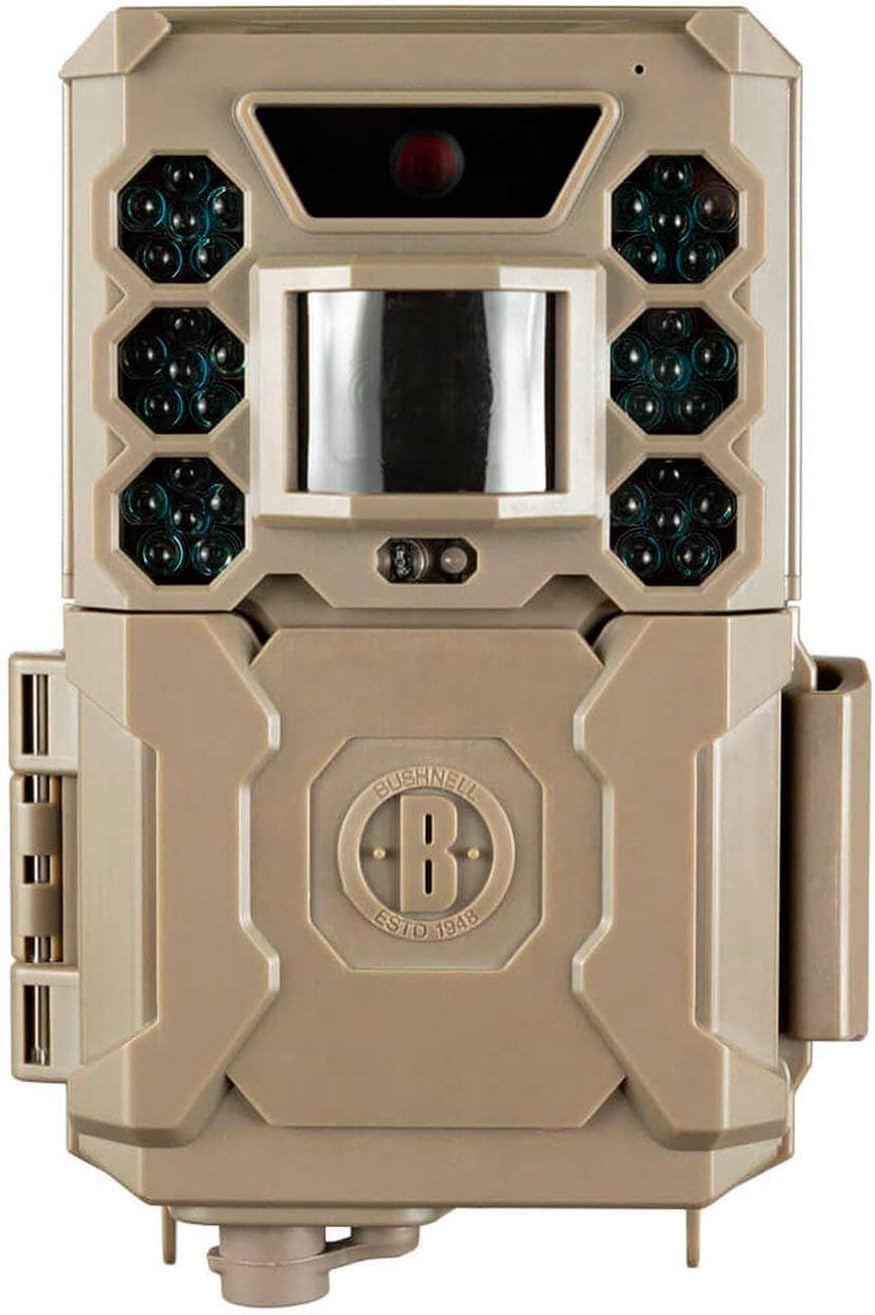
Şəkil: Ön view of the Bushnell 119938m Low Glow Trail Camera, showing the lens, PIR sensor, and infrared LEDs.
Quraşdırma
1. Batareyanın quraşdırılması
- Kamerada batareya bölməsini tapın.
- Open the compartment. Note that the battery housing may be delicate; exercise caution during opening and closing.
- Insert 6 AA batteries, ensuring correct polarity (+/-) as indicated inside the compartment. Batteries are not included with the camera.
- Batareya bölməsini etibarlı şəkildə bağlayın.
2. SD Kart Quraşdırma
- Locate the SD card slot, typically found near the battery compartment or on the side of the camera.
- Insert a compatible SD card (up to 32GB, not included) into the slot until it clicks into place. Ensure the card is inserted in the correct orientation.
3. Kameranın quraşdırılması
- Identify a suitable location for camera placement, considering the desired monitoring area and potential obstructions.
- Use the provided mounting strap to secure the camera to a tree or post. Thread the strap through the camera's mounting points and tighten it firmly.
- Adjust the camera's angle to ensure optimal coverage of the target area.
Əməliyyat Təlimatları
1. Açma / Söndürmə
- To power on the camera, slide the power switch to the 'ON' position.
- Söndürmək üçün açarı "OFF" vəziyyətinə sürüşdürün.
2. Menyu Naviqasiyası və Parametrlər
The camera features an easy-to-navigate menu system. Use the directional buttons (Up, Down, Left, Right) and the 'OK' button to browse and select options on the display.
- Rejim seçimi: Choose between 'Photo' for still images, 'Video' for video clips, or 'Hybrid' for both.
- Şəkil parametrləri: Adjust image resolution (default 24MP), photo burst (1-3 images per trigger).
- Video parametrləri: Set video length (5-60 seconds) and resolution (1080p).
- Tetikleyici Aralığı: Configure the delay between triggers, ranging from one second to 60 minutes.
- Həssaslıq: Adjust the PIR sensor sensitivity to prevent false triggers or missed events.
- Saat və tarix: Dəqiq vaxt üçün cari vaxtı və tarixi təyin edinamping of captured media.
- Automatic Day/Night Sensor: The camera automatically adjusts for optimal image capture in varying light conditions.
3. Medianın Əldə Edilməsi
- Kimə view captured images and videos, power off the camera and remove the SD card.
- Insert the SD card into a computer or compatible device to access the files.
Baxım
1. Təmizləmə
- Gently wipe the camera lens and PIR sensor window with a soft, lint-free cloth to remove dirt or smudges.
- Clean the camera casinreklam ilə gamp lazım olduqda parça ilə təmizləyin. Sərt kimyəvi maddələrdən və ya aşındırıcı materiallardan istifadə etməkdən çəkinin.
2. Batareyanın idarə edilməsi
- Regularly check battery levels, especially before extended deployment.
- Replace all batteries simultaneously with fresh, high-quality AA batteries to ensure consistent performance.
- Remove batteries if the camera will be stored for a prolonged period to prevent leakage.
3. Saxlama
- Kameranı birbaşa günəş işığından və həddindən artıq temperaturdan uzaq sərin, quru yerdə saxlayın.
- Ensure the camera is clean and dry before storage.
Problemlərin aradan qaldırılması
- Kamera işə düşmür:
- Ensure batteries are correctly installed with proper polarity and are fully charged. Check that the power switch is in the 'ON' position.
- Poor image or video quality:
- Clean the camera lens and ensure it is free from dirt or condensation. Verify that the camera settings (resolution, mode) are appropriate for the lighting conditions. Ensure the camera is within optimal range (up to 5 meters).
- False triggers or excessive recordings:
- Adjust the PIR sensor sensitivity to a lower setting. Reposition the camera to avoid areas with moving branches, tall grass, or direct sunlight that can cause false detections.
- No images or videos captured:
- Check if the SD card is properly inserted and has sufficient free space. Ensure the camera is in the correct operating mode (Photo or Video). Verify that the trigger interval is not set too long.
- Sound issues in videos:
- Some users have reported sound issues. Ensure the microphone port is clear of obstructions. If issues persist, contact customer support.
- Battery housing is fragile:
- Exercise extreme care when opening and closing the battery compartment to prevent damage to the plastic housing.
Spesifikasiyalar
| Model Adı | 119938 m |
| Element Model nömrəsi | BN119936M |
| Brend | Bushnell |
| Qətnamə | 24 meqapiksel |
| Video çəkiliş həlli | 1080p |
| Çərçivə Tezliyi | Saniyədə 30 kadr |
| Ekran Ölçüsü | 3.9 santimetr |
| Məhsulun Ölçüləri (U x G x Y) | 6.5 x 10.5 x 15 sm |
| Maddə Çəkisi | 309 q |
| Batareyalar Tələb olunur | 6 AA batareya (daxil deyil) |
| Material | plastik |
| Rəng | Sand Brown |
| Aralığı | 5 Metr |
| Wattage | 1 vatt |
| Cildtage | 12 volt |
Zəmanət Məlumatı
Bushnell products are manufactured to high standards and are backed by a manufacturer's warranty. For specific details regarding the warranty period and coverage for your Bushnell 119938m Low Glow Trail Camera, please refer to the warranty card included with your product or visit the official Bushnell websayt.
Müştəri dəstəyi
If you encounter any issues not covered in this manual or require further assistance, please contact Bushnell customer support. Contact information, including phone numbers and email addresses, can typically be found on the official Bushnell websaytda və ya məhsulun qablaşdırmasında.


