Giriş
This manual provides comprehensive instructions for the setup, operation, and maintenance of your waveshare 7-inch Capacitive Touch LCD Display Kit for Raspberry Pi 4 Model B. Please read this manual thoroughly before use to ensure proper functionality and to maximize your product experience.
Paketin məzmunu
Aşağıda sadalanan bütün elementlərin paketinizə daxil olduğunu yoxlayın:
- 7-inch Capacitive Touch LCD Display
- Raspberry Pi 4 Model B (4GB RAM version)
- MicroSD Card (pre-loaded with system, typically 16GB)
- USB Güc Adapteri
- USB-A to USB-C Cable (for power)
- HDMI Cable (Micro HDMI to Standard HDMI)
- USB-A to Micro USB Cable (for touch functionality)
- Acrylic Case components (top, bottom, side panels, stand)
- Mounting hardware (screws, standoffs)
- MicroSD kart oxuyucusu

Image: All components included in the waveshare 7-inch Display Kit, including the LCD, Raspberry Pi 4, cables, power adapter, acrylic case parts, and a microSD card with reader.
Quraşdırma Təlimatları
Follow these steps to assemble and set up your display kit:
- Prepare the Raspberry Pi: Insert the provided MicroSD card into the Raspberry Pi 4 Model B.
- Mount the Raspberry Pi: Secure the Raspberry Pi 4 to the back of the 7-inch LCD display using the provided standoffs and screws. Ensure proper alignment with the display's connectors.
- Connect Display Cables:
- Connect one end of the Micro HDMI cable to the Raspberry Pi's Micro HDMI port and the other end to the display's HDMI input.
- Connect the USB-A to Micro USB cable from a USB 2.0 port on the Raspberry Pi to the Micro USB port on the display. This provides power for the display's backlight and enables touch functionality.
- Assemble the Acrylic Case: Carefully attach the acrylic case components around the assembled display and Raspberry Pi. Refer to the case assembly diagram for correct orientation.
- Güc bağlayın: Plug the USB power adapter into a wall outlet and connect the USB-A to USB-C cable to the Raspberry Pi's USB-C power input.
- İlkin yükləmə: The system should power on automatically. The display will show the boot sequence.

Image: The fully assembled waveshare 7-inch Display Kit, showing the Raspberry Pi 4 mounted behind the screen, connected with cables, and powered by an adapter.
Əməliyyat
Once the display kit is powered on, the pre-installed operating system (typically Raspbian) will boot. You can interact with the system using the capacitive touch screen.
- Toxunma funksiyası: The 7-inch display supports up to five-point capacitive touch when running Raspbian. For other supported operating systems like Ubuntu, Kali, or WIN10 IoT, it typically supports single-point touch.
- Periferiyaları birləşdirən: Use the USB ports on the Raspberry Pi to connect a keyboard, mouse, or other USB devices as needed.
- Şəbəkə bağlantısı: The Raspberry Pi 4 supports Gigabit Ethernet and 2.4/5GHz Wi-Fi for internet access.
- Audio Çıxış: Audio can be output via the 3.5mm audio jack or HDMI.
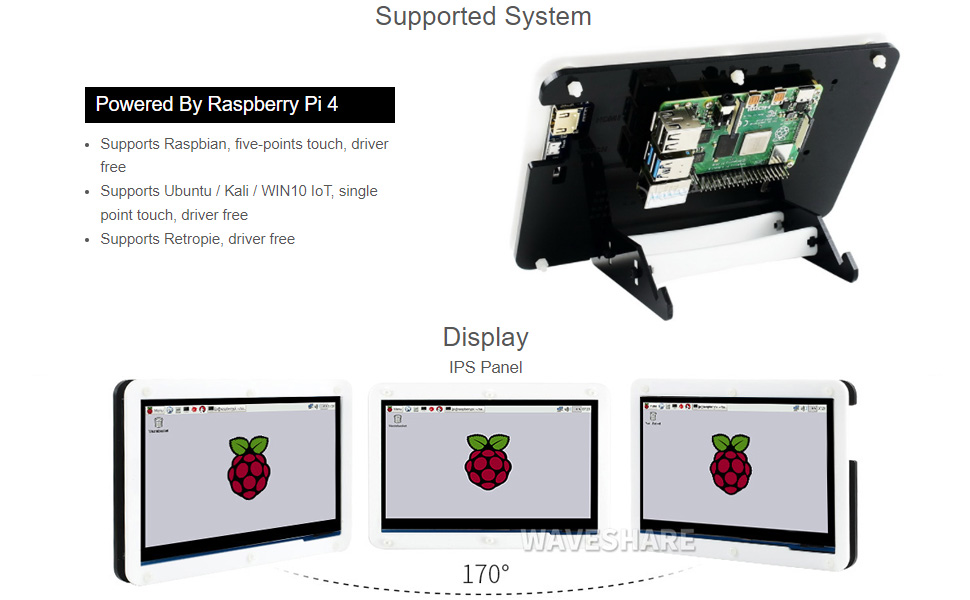
Image: A hand interacting with the capacitive touch screen, demonstrating its functionality with a graphical user interface.
Dəstəklənən Əməliyyat Sistemləri
The waveshare 7-inch Display Kit is compatible with various operating systems for the Raspberry Pi 4 Model B:
- Raspbian: Supports five-point touch, driver-free.
- Ubuntu / Kali / WIN10 IoT: Supports single-point touch, driver-free.
- Retropie: Driver-free support.

Image: Visual representation of the display showing different viewing angles and indicating support for various operating systems like Raspbian, Ubuntu, Kali, and Windows 10 IoT.
Əsas Xüsusiyyətlər
- 7 düymlük IPS Ekran: Geniş viewing angle with 1024x600 resolution.
- Kapasitiv toxunuş: Supports 5-point touch (with Raspbian) for intuitive interaction.
- Integrated Raspberry Pi 4: Powered by Broadcom BCM2711B0 Quad-core 64-bit SoC.
- Yaddaş: 4 GB LPDDR4 RAM.
- Bağlantı: Dual-band 2.4/5GHz Wi-Fi, Bluetooth 5.0, Gigabit Ethernet.
- Limanlar: 2x USB 3.0, 2x USB 2.0, 2x Micro HDMI (up to 4Kp60), 4-pole stereo audio, 2-lane MIPI DSI display port, 2-lane MIPI CSI camera port, 40-pin GPIO header.
- Güc Girişi: USB-C 5V/3A.
- Yaddaş: Mikro SD kart yuvası.

Image: Detailed diagram of the Raspberry Pi 4 Model B board, highlighting its processor, RAM, various ports (USB, HDMI, Ethernet, GPIO), and wireless capabilities.
Baxım
- Təmizləmə: Use a soft, dry cloth to clean the display and case. For stubborn smudges on the screen, a slightly damp, lint-free cloth can be used. Avoid abrasive cleaners or solvents.
- Proqram təminatı yeniləmələri: Regularly update the operating system and installed software on your Raspberry Pi to ensure optimal performance and security.
- Ekoloji Şərtlər: Operate the device in a clean, dry environment. Avoid extreme temperatures, direct sunlight, and high humidity.
- Güc idarəetməsi: Always shut down the Raspberry Pi gracefully through the operating system before disconnecting power to prevent data corruption.
Problemlərin aradan qaldırılması
- Ekran çıxışı yoxdur:
- Ensure the Micro HDMI cable is securely connected to both the Raspberry Pi and the display.
- Verify the Raspberry Pi is receiving power (check the power LED on the Pi).
- Confirm the MicroSD card is properly inserted and contains a valid operating system image.
- Touch screen not responding:
- Check that the USB-A to Micro USB cable is connected from the Raspberry Pi to the display.
- Ensure the operating system supports touch functionality and that necessary drivers (if any, though typically driver-free for supported OS) are loaded.
- Restart the Raspberry Pi.
- System not booting:
- Confirm the power supply is adequate (5V/3A recommended for Raspberry Pi 4).
- Re-flash the operating system image onto the MicroSD card.
- Hər hansı boş bağlantıları və ya zədələnmiş komponentləri yoxlayın.
Texniki Spesifikasiyalar
| Ekran Ölçüsü | 7 düym |
| Qətnamə | 1024 x 600 |
| Panel növü | IPS |
| Növə toxunun | Capacitive (5-point with Raspbian, 1-point with others) |
| Prosessor | Broadcom BCM2711B0, Quad-core 64-bit SoC |
| RAM | 4 GB LPDDR4 |
| Saxlama | 16 GB MicroSD Card (included) |
| Simsiz Bağlantı | 2.4/5GHz Wi-Fi, Bluetooth 5.0 |
| Simli Bağlantı | Gigabit Ethernet |
| Video Çıxışı | 2x Micro HDMI (up to 4Kp60) |
| Audio Çıxış | 4-pole stereo audio jack |
| USB Portları | 2x USB 3.0, 2x USB 2.0 |
| Güc Girişi | USB-C 5V/3A |
| Ölçülər (Paket) | 9.06 x 6.69 x 2.76 düym |
| Maddə Çəkisi | 1.43 funt sterlinq |

Image: Technical drawing showing the dimensions of the 7-inch display in millimeters and illustrating the two available stand angles (45° and 60°) for the acrylic case.
Zəmanət və Dəstək
For warranty information and technical support, please refer to the official waveshare websaytına daxil olun və ya birbaşa müştəri xidmətləri ilə əlaqə saxlayın. Satınalma qəbzinizi hər hansı zəmanət iddiaları üçün satınalmanın sübutu kimi saxlayın.
Onlayn Resurslar: For additional documentation, tutorials, and community support, visit the waveshare official websayt.


