Giriş
This manual provides essential information for setting up, operating, maintaining, and troubleshooting your Acer Aspire XC-886 desktop personal computer. Please read this manual thoroughly before using your new system to ensure proper operation and to maximize its lifespan.
Paketin məzmunu
Verify that all items listed below are included in your package. If any items are missing or damaged, contact your retailer.
- Acer Aspire XC-886 Desktop PC
- Simsiz Klaviatura
- Simsiz Siçan
- Elektrik kabeli
- Sənədlər (Tez Başlanğıc Təlimatı, Zəmanət Kartı)
- McAfee Internet Security (3-year physical card)
Quraşdırma
Follow these steps to set up your Acer Aspire XC-886 desktop PC.
1. Periferik cihazları birləşdirin
- Monitoru qoşun: Use an HDMI or D-Sub cable to connect your monitor to the corresponding port on the rear of the desktop. The system has two HDMI ports and one D-Sub port.
- Klaviatura və Siçanı Qoşun: Insert the wireless receiver for your keyboard and mouse into an available USB port. Both USB 2.0 and USB 3.1 Gen 1 ports are available on the front and rear of the system.
- Güc bağlayın: Plug the power cord into the power connector on the rear of the desktop, then plug the other end into a power outlet.
- Könüllü Bağlantılar:
- Şəbəkə: For a wired connection, connect an Ethernet cable to the LAN port on the rear. For wireless, the system supports 802.11ac Wi-Fi and Bluetooth.
- Audio: Connect speakers or headphones to the audio jacks on the front or rear.
- USB Cihazları: Connect other USB devices (e.g., external hard drives, printers) to the available USB ports. The front panel includes one USB 3.1 Gen 1 port and one USB Type-C port. The rear panel has two USB 3.1 Gen 1 ports and four USB 2.0 ports.

Şəkil 1: Ön view of the Acer Aspire XC-886 desktop PC, showing the optical drive, card reader, USB ports (including Type-C), and audio jacks.
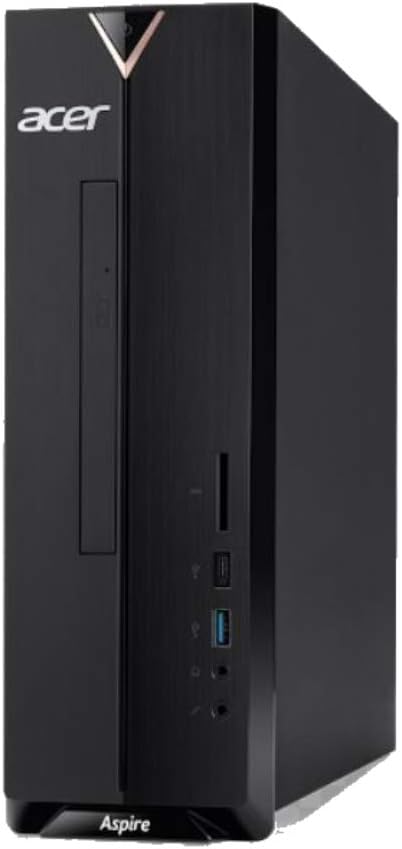
Şəkil 2: Sağ tərəf view of the Acer Aspire XC-886 desktop PC, illustrating the compact tower form factor and side panel design.
2. Yandırın
Press the power button located on the top front of the desktop to turn on the system. The power indicator light will illuminate.
3. Initial Operating System Setup
Upon first boot, you will be guided through the Windows 10 Home setup process. Follow the on-screen instructions to configure your language, region, network settings, and user account.
Əməliyyat Təlimatları
This section covers basic operation of your desktop PC.
Gücü yandırın/söndürün və yenidən başladın
- Yandırmaq üçün: Ön paneldəki güc düyməsini basın.
- Bağlamaq üçün: Windows-da Başlat düyməsini basın, sonra Güc > Bağla seçin.
- Yenidən Başlamaq üçün: Windows-da Başlat düyməsini klikləyin, sonra Güc > Yenidən Başlat seçin.
- Yatmaq üçün: Windows-da Başlat düyməsini basın, sonra Güc > Yuxu Rejimi seçin.
Using the DVD Writer
The integrated DVD writer allows you to read and write CDs and DVDs. Press the eject button on the drive to open the tray, place your disc, and gently push the tray back in.
İnternetə qoşulma
- Simli Bağlantı: Connect an Ethernet cable from your router or modem to the LAN port on the rear of the desktop.
- Simsiz Bağlantı: Windows 10 will automatically detect available Wi-Fi networks. Click the network icon in the taskbar, select your desired network, and enter the password if prompted.
Using USB Ports and Card Reader
Connect USB devices such as flash drives, external hard drives, or printers to any available USB port. The integrated card reader on the front panel supports various memory card formats for easy data transfer.
Baxım
Proper maintenance helps ensure the longevity and optimal performance of your desktop PC.
- Təmiz saxlayın: Regularly clean the exterior of the desktop with a soft, dry cloth. Ensure ventilation openings are free from dust and obstructions to prevent overheating.
- Proqram təminatı yeniləmələri: Keep your Windows operating system and drivers updated. Windows Update can be accessed via Settings > Update & Security.
- Antivirus Mühafizəsi: Utilize the included McAfee Internet Security to protect your system from malware and viruses. Ensure its definitions are regularly updated.
- Məlumatların Yedəklənməsi: Məlumat itkisinin qarşısını almaq üçün vacib məlumatların müntəzəm olaraq xarici diskə və ya bulud yaddaşına ehtiyat nüsxəsini çıxarın.
- Ekoloji Şərtlər: Operate the desktop in a well-ventilated area, away from direct sunlight, heat sources, and excessive moisture.
Problemlərin aradan qaldırılması
If you encounter issues with your desktop, try these basic troubleshooting steps.
- Güc yoxdur:
- Ensure the power cord is securely connected to both the desktop and the power outlet.
- Elektrik rozetkasının işlək olduğunu başqa bir cihaza qoşaraq yoxlayın.
- Ekran yoxdur:
- Check that the monitor is powered on and its video cable is securely connected to the desktop.
- Monitorunuzda düzgün giriş mənbəyinin seçildiyinə əmin olun.
- Klaviatura/Siçan Cavab Vermir:
- For wireless devices, check battery levels and ensure the wireless receiver is properly inserted into a USB port.
- Qəbuledicini başqa bir USB portuna qoşmağa cəhd edin.
- İnternet bağlantısı yoxdur:
- For wired connections, check the Ethernet cable and router/modem status.
- For wireless connections, ensure Wi-Fi is enabled in Windows and you are connected to the correct network with the correct password.
- Restart your router/modem and the desktop.
- Sistem Yavaşlaması:
- Lazımsız tətbiqləri bağlayın.
- Antivirus proqramınızla tam sistem taramasını işə salın.
- Gözlənilən Windows yeniləmələrini yoxlayın və quraşdırın.
If these steps do not resolve your issue, please refer to the Acer support websayt və ya müştəri xidməti ilə əlaqə saxlayın.
Spesifikasiyalar
Detailed technical specifications for the Acer Aspire XC-886 desktop PC.
| Xüsusiyyət | Detal |
|---|---|
| Model nömrəsi | i594MR81TS73 |
| Prosessor | 9th Gen Intel Core i5-9400 (up to 4.1GHz, 9MB cache) |
| Əməliyyat sistemi | Windows 10 Home (64 bit) |
| RAM | 8 GB DDR4 RAM |
| Saxlama | 1TB PCIe NVMe SSD |
| Qrafika | NVIDIA GeForce GT 730, 2GB GDDR3 RAM |
| Optik Sürücü | DVD Yazıçı |
| Simsiz Bağlantı | Integrated AC Wireless LAN (802.11ac), Bluetooth |
| Front/Side I/O Ports |
|
| Arxa I/O Portları |
|
| Forma faktoru | qala |
| Ölçülər (Paket) | 49.8 x 40.8 x 17.4 sm |
| Çəki (Paket) | 5.9 kq |
| Cildtage | 220 volt |
Zəmanət və Dəstək
Your Acer Aspire XC-886 desktop PC comes with a 1-year On-site Local Singapore WarrantyBu zəmanət normal istifadə şəraitində istehsal qüsurlarını və aparat nasazlıqlarını əhatə edir.
For technical support, warranty claims, or service inquiries, please visit the official Acer support website or contact Acer customer service in Singapore. Keep your proof of purchase for warranty validation.
Acer Dəstəyi Websayt: https://www.acer.com/sg-en/support


