1. Giriş
Aldığınız üçün təşəkkür edirikasing the TWS i17 Dual Earbuds. This manual provides essential information for setting up, operating, and maintaining your new wireless earbuds. Please read this manual thoroughly before use to ensure optimal performance and longevity of your device.
2. Təhlükəsizlik Məlumatı
To prevent damage to your earbuds or injury to yourself or others, please observe the following precautions:
- Qulaqlıqları və ya doldurma qutusunu həddindən artıq temperatura, rütubətə və ya mayelərə məruz qoymayın.
- Cihazı atmaqdan, vurmaqdan və ya sökməkdən çəkinin.
- Do not use abrasive cleaners or solvents. Clean with a soft, dry cloth.
- Eşitmə qabiliyyətinə zərər verməmək üçün orta səs səviyyəsində qulaq asın.
- Uşaqların əli çatmayan yerdə saxlayın.
- This product is not water resistant. Avoid exposure to water or excessive moisture.
3. Paketin məzmunu
Bütün əşyaların paketinizdə olduğunu yoxlayın:
- TWS i17 Dual Earbuds (Left and Right)
- Doldurma qutusu
- USB şarj kabeli
- İstifadəçi təlimatı

Image: The TWS i17 Dual Earbuds, with one earbud partially removed from its charging case, showcasing zərif qara dizayn.
4. Quraşdırma
4.1 Qulaqlıqların və qutunun doldurulması
İlk istifadə etməzdən əvvəl qulaqcıqları və doldurma qutusunu tam doldurun.
- Hər iki qulaqcığı şarj qutusuna qoyun. Onların düzgün oturduğundan əmin olun.
- Connect the USB charging cable to the charging port on the bottom of the case and the other end to a USB power source (e.g., computer, wall adapter).
- The indicator light on the case will show charging status. It will turn off or change color when fully charged.
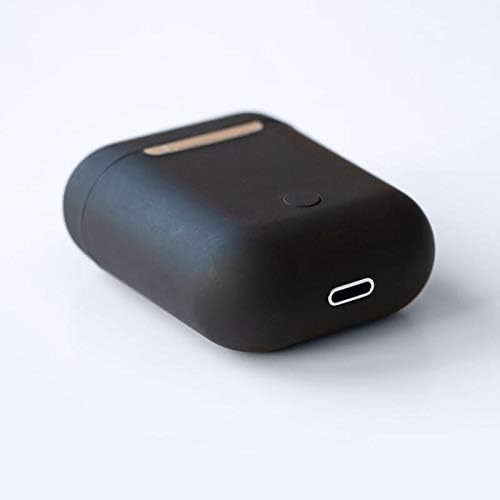
Şəkil: Yaxın plan view of the bottom of the TWS i17 charging case, highlighting the USB charging port and a small button.
4.2 Cihazınızla Qoşulma
The i17 earbuds use Bluetooth for wireless connection.
- Qulaqlıqların doldurulduğundan əmin olun.
- Şarj qutusunu açın. Qulaqlıqlar avtomatik olaraq qoşma rejiminə keçəcək (göstərici işıqlar yanıb-sönəcək).
- On your mobile phone or Bluetooth-enabled device, go to Bluetooth settings and turn Bluetooth on.
- axtarın available devices. Select "i17" from the list.
- Once connected, the indicator lights on the earbuds will stop flashing. You are now ready to use your earbuds.

Image: The TWS i17 Dual Earbuds resting inside their open charging case, ready for pairing or use.
5. Əməliyyat Təlimatları
5.1 Yandırma/Söndürmə
- Güc Aktivdir: Take the earbuds out of the charging case. They will automatically power on and connect to the last paired device.
- Söndürmək: Qulaqlıqları yenidən şarj qutusuna yerləşdirin. Onlar avtomatik olaraq sönəcək və şarj etməyə başlayacaq.
5.2 Musiqi oxutma
- Oynat/Pauza: İstənilən qulaqcığa bir dəfə toxunun.
- Növbəti trek: Sağ qulaqcığa iki dəfə toxunun.
- Əvvəlki Track: Sol qulaqcığa iki dəfə toxunun.
5.3 Zənglərin idarə edilməsi
- Zəngə Cavab Vermək/Bitirmək: İstənilən qulaqcığa bir dəfə toxunun.
- Zəngi rədd edin: İstənilən qulaqcığı 2 saniyə basıb saxlayın.
5.4 Səs köməkçisi
- Səs köməkçisini (Siri/Google köməkçisi) aktivləşdirin: Hər iki qulaqcığa üç dəfə toxunun.
6. Baxım
Proper maintenance ensures the longevity of your earbuds:
- Təmizləmə: Use a soft, dry, lint-free cloth to clean the earbuds and charging case. Do not use liquids or sprays.
- Yaddaş: İstifadə edilmədikdə, qulaqcıqları qorumaq və doldurulmaması üçün onları şarj qutusunda saxlayın. Sərin və quru yerdə saxlayın.
- Batareyaya qulluq: Batareyanın ömrünü uzatmaq üçün qulaqcıqları tez-tez tam boşaltmaqdan çəkinin. Onları müntəzəm olaraq doldurun.

Image: The TWS i17 Dual Earbuds securely stored within their closed charging case, ready for transport or charging.
7. Giderme
| Problem | Mümkün Səbəb | Həll |
|---|---|---|
| Qulaqlıqlar birləşdirilmir | Low battery; Out of range; Not in pairing mode; Bluetooth off on device. | Charge earbuds; Move closer to device; Ensure case is open for pairing; Turn on Bluetooth on device. |
| Yalnız bir qulaqcıq işləyir | One earbud not charged; Earbuds not properly synced. | Ensure both earbuds are charged; Place both earbuds back in case, close, then reopen to re-sync. |
| Səs yoxdur | Volume too low; Not connected; Media paused. | Increase volume on device; Reconnect earbuds; Check media playback status. |
| Doldurma qutusu doldurulmur | Faulty cable/adapter; Loose connection. | Try a different USB cable or power adapter; Ensure cable is securely plugged in. |
8. Spesifikasiyalar
| Xüsusiyyət | Detal |
|---|---|
| Model nömrəsi | i17 |
| Brend | TWS |
| Bağlantı texnologiyası | Simsiz (Bluetooth) |
| Qulaqlıqlar Form Faktoru | Qulaqdaxili |
| Mikrofon Daxildir | Bəli |
| Səs-küyün ləğvi | yox |
| İlə uyğundur | Mobil Telefonlar |
| Rəng | Qara |
| Material | plastik |
| Kabel Xüsusiyyəti | Cable-free |
| Suya davamlılıq səviyyəsi | Suya davamlı deyil |
| Göndərmə Ölçüləri | 12.6 x 8.8 x 3.6 sm |
| Çəki | 96 qram |
| İlk Mövcud Tarix | 15 yanvar 2020-cü il |
9. Zəmanət və Dəstək
For warranty information and customer support, please refer to the contact details provided on the product packaging or the official TWS websayt. Zəmanət iddiaları üçün satınalma sübutunuzu saxlayın.
For further assistance, please contact TWS customer service.