1. Giriş
The LAUNCH CRP239 is an intelligent and networkable automotive diagnostic tool designed for passenger cars. It offers comprehensive OBD II full functionality and rapid testing capabilities for four major vehicle systems: Engine, Automatic Transmission (A/T), Anti-lock Braking System (ABS), and Supplemental Restraint System (SRS). Additionally, the CRP239 includes advanced reset functions such as Oil Reset, Steering Angle Reset, Brake-Pad Reset, Battery Matching, Throttle Adaptation, and Diesel Particulate Filter (DPF) Regeneration, catering to the needs of professional technicians and DIY enthusiasts.
2. Təhlükəsizlik Məlumatı
Always observe the following safety precautions when operating the LAUNCH CRP239:
- Ensure the vehicle's ignition is off before connecting or disconnecting the diagnostic tool.
- Aləti yaş şəraitdə və ya tezalışan mayelərin və ya qazların yaxınlığında istifadə etməyin.
- Nəqliyyat vasitələrində işləyərkən təhlükəsizlik eynəkləri kimi müvafiq fərdi qoruyucu vasitələrdən istifadə edin.
- Xüsusi diaqnostik prosedurlar və təhlükəsizlik xəbərdarlıqları üçün nəqliyyat vasitəsinin xidmət təlimatına baxın.
- Keep the tool away from strong magnetic fields.
- Only use the provided cables and accessories.
3. Paketin məzmunu
Bütün əşyaların paketdə olduğunu yoxlayın:
- LAUNCH CRP239 Main Unit
- OBD II Diaqnostik Kabel
- USB kabel
- İstifadəçi təlimatı
- Daşıma çantası

Figure 3.1: Contents of the LAUNCH CRP239 package, showing the diagnostic tool, cables, and storage case.
4. Məhsul bitdiview
The LAUNCH CRP239 features a robust design with a 5.0-inch 720p touch screen for intuitive navigation. It includes physical buttons for common operations and a durable rubber exterior for protection.

Şəkil 4.1: Ön view of the LAUNCH CRP239, highlighting the touch screen display and navigation buttons.
4.1. Komponentlər
- 5.0 düymlük sensor ekran: High-resolution display for clear data presentation and touch input.
- Naviqasiya düymələri: Directional pad, OK button, and Return button for menu navigation.
- OBD II Connector: Standard 16-pin connector for vehicle communication.
- USB Port: Yeniləmələr və ya məlumat ötürülməsi üçün kompüterə qoşulmaq üçün.
- Güc göstəricisi: Enerji vəziyyətini göstərən LED işığı.
5. Quraşdırma
Follow these steps for initial setup of your LAUNCH CRP239:
- Cihazı doldurun: Connect the CRP239 to a power source using the provided USB cable to ensure the internal 4000mAh lithium-polymer battery is fully charged before first use.
- Güc Aktivdir: Cihazı yandırmaq üçün güc düyməsini basıb saxlayın.
- Dil seçimi: On the initial setup screen, select your preferred language. The device supports multilingual operation.
- Wi-Fi Bağlantısı: Navigate to the 'Settings' menu and select 'Wi-Fi'. Connect to an available wireless network to enable online updates and diagnostic report sharing.
- Proqram təminatı yeniləməsi: It is recommended to perform a software update immediately after connecting to Wi-Fi to ensure you have the latest features and vehicle coverage. Navigate to the 'Update' section and follow the on-screen prompts.

Figure 5.1: The LAUNCH CRP239 with its diagnostic cable connected, ready for vehicle communication.
6. Əməliyyat Təlimatları
The LAUNCH CRP239 provides a comprehensive suite of diagnostic functions. Below are instructions for common operations.
6.1. Nəqliyyat vasitəsinə qoşulma
- Locate the vehicle's 16-pin OBD II diagnostic port (usually under the dashboard).
- Avtomobilin alışma sisteminin SÖNDÜRÜLÜB olduğundan əmin olun.
- Connect the OBD II diagnostic cable to the vehicle's OBD II port and to the CRP239.
- Turn the vehicle's ignition to the ON position (engine off). The CRP239 will power on automatically.
6.2. Əsas Menyu Naviqasiyası
From the main menu, you can access various functions:
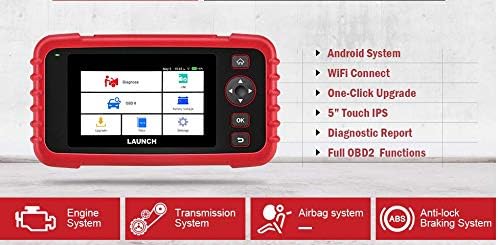
Figure 6.1: The main menu interface of the LAUNCH CRP239, providing access to all primary functions.
- Diaqnoz: For full system diagnostics (Engine, A/T, ABS, SRS).
- Mən/Mən: Readiness status for emissions.
- OBD II: Standard OBD II functions (read/clear DTCs, live data, freeze frame, O2 sensor test, etc.).
- Sıfırlayın: Access various maintenance reset functions.
- Batareya həcmitage: Real vaxt rejimində avtomobilin batareya həcmini göstərirtage.
- Yeniləmə: For software and firmware updates via Wi-Fi.
- Məlumat: Review saved diagnostic data and reports.
- Parametrlər: Configure device settings such as language, Wi-Fi, and display.
6.3. Diaqnostik Skanlamanın Aparılması
- Əsas menyudan seçin "Diaqnoz".
- The tool will attempt to automatically identify the vehicle via VIN scan. If unsuccessful, you may need to manually select the vehicle make, model, and year.
- Choose the system you wish to diagnose (e.g., Engine, Transmission, ABS, SRS).
- seçin "Read Fault Codes" üçün view Diagnostic Trouble Codes (DTCs).
- seçin "Clear Fault Codes" to erase DTCs after repairs have been made. Caution: Clearing codes without addressing the underlying issue will result in the codes reappearing.
- seçin "Read Data Stream" üçün view live sensor data.
6.4. Using Reset Functions
The CRP239 supports several common maintenance reset functions:
- Yağ sıfırlaması: Yağ dəyişikliyindən sonra yağ ömrü xatırlatmasını sıfırlayır.
- Sükan Bucağının Sıfırlanması: Resets the steering angle sensor after alignment or component replacement.
- Brake-Pad Reset (EPB): Əyləc yastığı dəyişdirildikdən sonra elektron dayanacaq əyləc sistemini yenidən qurur.
- Batareya Uyğunlaşdırması (BMS): Registers a new battery with the vehicle's Battery Management System.
- Qaz Uyğunlaşması: Təmizlədikdən və ya dəyişdirildikdən sonra qaz pedalının vəziyyətini yenidən öyrənir.
- DPF Regenerasiyası: Dizel Hissəcik Filtrinin regenerasiya prosesini başladır.
To use a reset function, select "Reset" from the main menu, then choose the desired function and follow the on-screen instructions.
6.5. Proqram təminatı yeniləmələri
The CRP239 supports one-click Wi-Fi updates for software and vehicle coverage, ensuring you always have the latest diagnostic capabilities.
- Cihazın sabit Wi-Fi şəbəkəsinə qoşulduğundan əmin olun.
- Əsas menyudan seçin "Update".
- The device will check for available updates. Select the updates you wish to install and confirm.
- Allow the update process to complete without interruption. The device may restart during this process.

Figure 6.2: The update screen on the LAUNCH CRP239, showing available software updates for various vehicle brands.
6.6. Diagnostic Report Generation
The CRP239 can automatically generate diagnostic reports, which can be shared via email.
- After completing a diagnostic session, the tool will prompt you to generate a report.
- Confirm to generate the report.
- -a keçin "Data" üçün menyu view saved reports.
- Select a report and choose the option to share via email. Ensure your Wi-Fi is connected and email settings are configured in the 'Settings' menu.
7. Baxım
Proper maintenance ensures the longevity and optimal performance of your LAUNCH CRP239:
- Təmizləmə: Cihazı təmizləmək üçün yumşaq, quru parça istifadə edin. Aşındırıcı təmizləyicilərdən və ya həlledicilərdən istifadə etməyin.
- Yaddaş: Store the device in its carrying case in a cool, dry place when not in use. Avoid extreme temperatures.
- Batareyaya qulluq: Charge the battery regularly, even if the device is not in frequent use, to maintain battery health. Avoid fully discharging the battery for extended periods.
- Kabel yoxlaması: Periodically inspect the diagnostic and USB cables for any signs of damage. Replace damaged cables immediately.
8. Giderme
This section addresses common issues you might encounter with the LAUNCH CRP239.
| Problem | Mümkün Səbəb | Həll |
|---|---|---|
| Cihaz işə düşmür. | Low battery; faulty connection to vehicle. | Charge the device fully. Ensure the OBD II cable is securely connected to both the CRP239 and the vehicle. Check vehicle's ignition is ON. |
| Nəqliyyat vasitəsi ilə əlaqə qurmaq mümkün deyil. | Incorrect vehicle protocol; faulty OBD II port; damaged cable. | Verify vehicle compatibility. Check the vehicle's OBD II port for power. Try a different vehicle or cable if available. Ensure vehicle ignition is ON. |
| Proqram təminatı yeniləməsi uğursuz olur. | Qeyri-sabit Wi-Fi bağlantısı; yaddaş kifayət deyil. | Ensure a strong and stable Wi-Fi connection. Check available storage space on the device. Restart the update process. |
| Ekran cavab vermir. | Proqram təminatı xətası; fiziki ziyan. | Perform a soft reset by holding the power button until the device restarts. If the issue persists, contact customer support. |
9. Spesifikasiyalar
| Xüsusiyyət | Detal |
|---|---|
| Model | CRP239 (CREADER PROFESSIONAL 239) |
| Ekran | 5.0-inch 720p Touch Screen |
| Batareya | 4000mAh təkrar doldurulan litium polimer (daxildir) |
| Bağlantı | OBD II, Wi-Fi, USB |
| Avtomobilin əhatə dairəsi | Domestic, Asian, European vehicles (1996 and newer OBD2) |
| Dəstəklənən Sistemlər | Engine, Automatic Transmission (A/T), ABS, SRS |
| Xüsusi funksiyalar | Oil Reset, Steering Angle Reset, Brake-Pad Reset (EPB), Battery Matching (BMS), Throttle Adaptation, DPF Regeneration |
| Ölçülər | 32.4 x 25.4 x 8 sm (Paket) |
| Maddə Çəkisi | 560 q |
| Xarici material | Rezin |
10. Zəmanət Məlumatı
The LAUNCH CRP239 comes with a standard manufacturer's warranty. For specific warranty terms and conditions, please refer to the warranty card included in your product package or visit the official Launch websayt. Satınalma qəbzinizi zəmanət iddiaları üçün satınalmanın sübutu kimi saxlayın.
Extended warranty options may be available from third-party providers. For example, 1-Year and 2-Year Extended Warranties by Salama Care are offered for this product.
11. Dəstək
For technical assistance, product inquiries, or support, please contact Launch customer service through their official website or the contact information provided in your product documentation. Ensure you have your product model number (CRP239) and serial number ready when contacting support.
Əlavə mənbələr üçün ziyarət edin Launch Official Websayt.


