1. Giriş
This manual provides detailed instructions for the safe and efficient use of your Maxcom MM471 Senior Portable Phone. Designed with ease of use in mind, this device features large characters, big buttons, and an ergonomic design, making it ideal for seniors. Please read this manual thoroughly before operating your phone.

Şəkil 1: Ön view of the Maxcom MM471 Senior Portable Phone.
2. Quraşdırma
2.1 Paketin məzmunu
Bütün əşyaların paketdə olduğundan əmin olun:
- Maxcom MM471 Senior Portable Phone
- Batareya
- Şarj adapteri
- İstifadəçi təlimatı
2.2 SİM kartın və batareyanın daxil edilməsi
The Maxcom MM471 supports dual SIM cards. Follow these steps to install your SIM card(s) and battery:
- Turn off the phone and disconnect it from any power source.
- Telefonun arxa qapağını ehtiyatla çıxarın.
- SIM kart(lar)ınızı qızılı kontakt ucları aşağı olmaqla təyin olunmuş yuvaya(lara) yerləşdirin.
- Kontaktların düzgün düzülməsini təmin edərək batareyanı daxil edin.
- Arxa qapağı etibarlı şəkildə yerinə oturana qədər dəyişdirin.

Şəkil 2: Geri view with battery and SIM card area.
2.3 Batareyanın doldurulması
Before first use, fully charge the phone's battery:
- Connect the charging adapter to the phone's charging port or place the phone in its charging dock.
- Adapteri elektrik rozetkasına qoşun.
- Ekrandakı batareya göstəricisi doldurulma vəziyyətini göstərəcək.
- Tam doldurulduqdan sonra şarj cihazını ayırın.
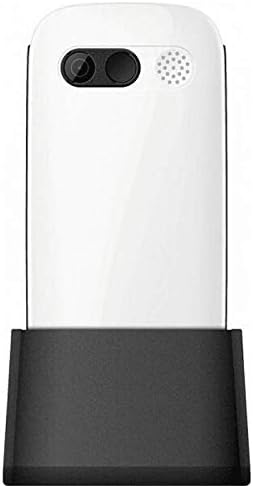
Figure 3: Phone in charging dock.
3. Əməliyyat Təlimatları
3.1 Yandırma/Söndürmə
- Yandırmaq üçün: basın və saxlayın Güc/Zəngi bitir ekran işıqlanana qədər düyməsini basın.
- Söndürmək üçün: basın və saxlayın Güc/Zəngi bitir button until the power-off options appear, then select 'Power Off'.
3.2 Zənglərin edilməsi
- Əsas ekrandan klaviaturadan istifadə edərək telefon nömrəsini daxil edin.
- düyməsini basın Zəng edin Zəngi başlatmaq üçün düyməni (yaşıl düymə) basın.
- Zəngi bitirmək üçün düyməsini basın Güc/Zəngi bitir düymə (qırmızı düymə).
3.3 Zənglərin qəbulu
- When a call comes in, the phone will ring and display the caller's number or name.
- düyməsini basın Zəng edin button (green button) to answer.
- Zəngi rədd etmək üçün düyməsini basın Güc/Zəngi bitir düymə (qırmızı düymə).
3.4 Mesajların Göndərilməsi və Qəbulu
- Əsas ekrandan "Mesajlar" menyusuna keçin.
- Select 'New Message' to compose a text message.
- Enter the recipient's number and your message.
- 'Göndər' düyməsini basın.
- Alınan mesajlar "Gələnlər Qutunuzda" görünəcək.
3.5 Kontaktların idarə edilməsi
The phonebook can store up to 300 names.
- Go to the 'Contacts' or 'Phonebook' menu.
- Yeni nömrəni yadda saxlamaq üçün "Yeni Əlaqə Əlavə Et" seçimini edin.
- Ad və telefon nömrəsini daxil edin, sonra yadda saxlayın.
- To call a contact, select their name from the list and press the Zəng edin düyməsi.
3.6 Bluetooth-dan istifadə
Bluetooth cihazlarına qoşulmaq üçün:
- 'Parametrlər' > 'Bluetooth' bölməsinə keçin.
- Bluetooth-u "Aktivləşdirin".
- Seçin 'axtarın devices' to find available Bluetooth accessories.
- Select the desired device and pair them.
3.7 Fənərdən istifadə
The phone includes a built-in flashlight for convenience.
- To turn on the flashlight, locate the dedicated flashlight button (if available) or access it through the 'Tools' menu.
- Press the button or select the option again to turn it off.
4. Baxım və qulluq
To ensure the longevity and optimal performance of your Maxcom MM471 phone, follow these maintenance guidelines:
- Təmizləmə: Telefonun səthini təmizləmək üçün yumşaq, quru parça istifadə edin. Maye təmizləyicilərdən və ya aşındırıcı materiallardan çəkinin.
- Temperatur: Do not expose the phone to extreme temperatures (hot or cold) or direct sunlight for extended periods.
- Nəmlik: Keep the phone dry. Do not immerse it in water or expose it to high humidity.
- Yaddaş: When not in use for a long time, store the phone in a cool, dry place with the battery partially charged.
- Təsir: Telefonu yerə atmaqdan və ya güclü təsirlərə məruz qalmaqdan çəkinin.
5. Giderme
Telefonunuzla bağlı problemlərlə qarşılaşsanız, ümumi problemlər və həllər üçün aşağıdakı cədvələ baxın:
| Problem | Mümkün Səbəb | Həll |
|---|---|---|
| Telefon açılmır | Batareya bitib və ya düzgün daxil edilməyib. | Batareyanı doldurun. Batareyanın düzgün daxil olduğundan əmin olun. |
| Zəng etmək və ya qəbul etmək mümkün deyil | No network signal, SIM card not inserted, or SIM card faulty. | Check network coverage. Reinsert SIM card(s). Contact your service provider. |
| Zəng keyfiyyətinin aşağı olması | Weak network signal, interference. | Daha yaxşı siqnal olan bir əraziyə keçin. Maneələrdən qaçın. |
| Batareya tez tükənir | Excessive usage, background applications, old battery. | Ekranın parlaqlığını azaldın. İstifadə olunmamış tətbiqləri bağlayın. Batareya köhnədirsə, onu dəyişdirməyi düşünün. |
| Klaviatura cavab vermir | Proqram təminatında nasazlıq, fiziki zədələnmə. | Restart the phone. If the problem persists, contact support. |
6. Texniki spesifikasiyalar
Key technical details of the Maxcom MM471 Senior Portable Phone:
- Model: MM471
- Brend: Maxcom
- Rəng: Ağ
- Bağlantı: Bluetooth
- SIM dəstəyi: İki SIM
- Telefon kitabçasının tutumu: 300 names
- Danışıq vaxtı: 14 saata qədər
- İnterfeys: Fiziki Düymələr
- Xüsusi Xüsusiyyətlər: Large characters, Big buttons, Ergonomic design, Speaker, Flashlight
7. Zəmanət və Dəstək Məlumatı
For detailed warranty information, please refer to the warranty card included with your product or visit the official Maxcom website. For technical support or service inquiries, please contact your retailer or the manufacturer's customer service department.


