Giriş
This manual provides essential instructions for setting up, operating, maintaining, and troubleshooting your Blackview Tab 10 Android Tablet. The Blackview Tab 10 features a 10.1-inch FHD+ display, an MTK8768 Octa-Core processor, 4GB RAM, 64GB internal storage, and runs on Android 11 (Doke OS_P 1.0). It supports dual SIM cards for 4G phone calls and data, Wi-Fi, and Bluetooth 5.0 connectivity.
Please read this manual thoroughly to ensure proper use and to maximize your tablet's performance and longevity.

Image: The Blackview Tab 10 tablet shown from the rear in three color options: gray, golden, and silvery, highlighting its sleek design.
Quraşdırma
Paketin məzmunu
Bütün əşyaların paketdə olduğundan əmin olun:
- Qaraview Tab 10 Tablet PC
- USB Kabel (C Tipi)
- Enerji Adapteri (9V 2A)
- İstifadəçi təlimatı
Batareyanın doldurulması
Before first use, fully charge the tablet. Connect the USB Type-C cable to the tablet's Type-C port and the other end to the provided power adapter. Plug the adapter into a power outlet. The charging indicator will show the charging status. The tablet supports 18W fast charging.
Inserting SIM and TF Cards
Qaraview Tab 10 supports dual Nano SIM cards or one Nano SIM card and one TF (microSD) card for expandable storage up to 128GB.
- Locate the SIM/TF card tray on the side of the tablet.
- Təqdim olunan SİM ejektor alətindən istifadə edərək qabı açın.
- Carefully place the Nano SIM card(s) and/or TF card into the designated slots on the tray. Ensure the cards are correctly oriented.
- Gently push the tray back into the tablet until it clicks into place.
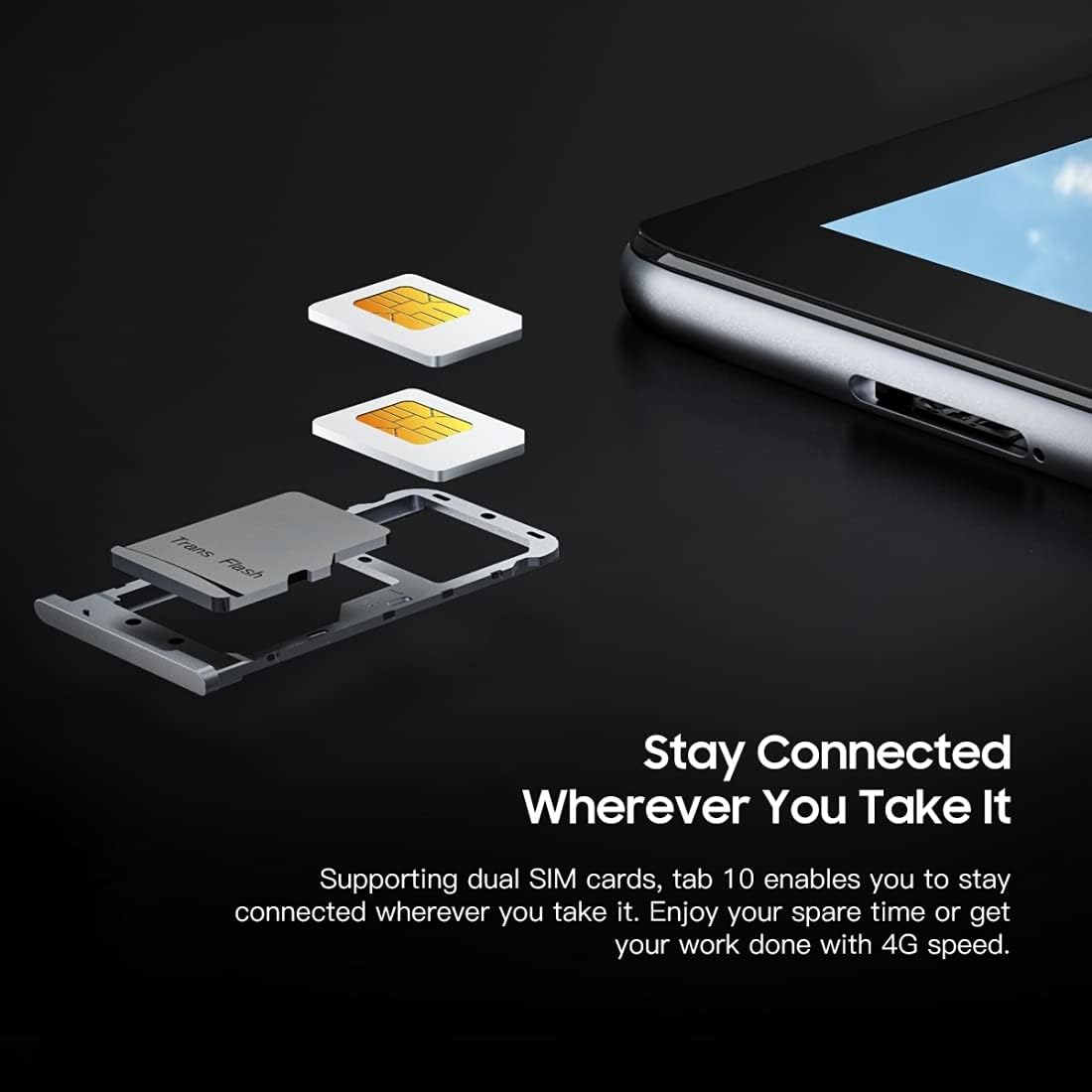
Şəkil: ətraflı view of the Blackview Tab 10's SIM card tray, showing how two Nano SIM cards are inserted, illustrating the dual SIM support.
Yandırılır/Söndürülür
- Yandırmaq üçün: Press and hold the Power button until the Blackview logo appears.
- Söndürmək üçün: Güc seçimləri menyusu görünənə qədər Güc düyməsini basıb saxlayın, sonra "Söndür" seçin.
- Yenidən Başlamaq üçün: Enerji seçimləri menyusu görünənə qədər Güc düyməsini basıb saxlayın, sonra "Yenidən başladın" seçin.
İlkin Quraşdırma
İlk dəfə işə saldıqda, ilkin quraşdırmanı tamamlamaq üçün ekrandakı təlimatları izləyin:
- Dilinizi seçin.
- Wi-Fi şəbəkəsinə qoşulun.
- Google hesabınızla daxil olun və ya yenisini yaradın.
- Ekran kilidini (PIN, model, parol) qurun.
- Review və şərtləri qəbul edin.
Əməliyyat Təlimatları
Əsas Naviqasiya
- Klikləyin: Tətbiqi açmaq, element seçmək və ya düyməni basmaq üçün ekrana bir dəfə toxunun.
- Toxun və saxlayın: Daha çox seçimə daxil olmaq və ya köçürmək üçün elementi basıb saxlayın.
- Çalmak: Drag your finger across the screen to scroll through pages or content.
- Çimdik: Şəkilləri böyütmək və ya kiçiltmək üçün iki barmaqdan istifadə edin və web səhifələr.
Şəbəkələrə qoşulma
- Wi-Fi: gedin Parametrlər > Şəbəkə və internet > Wi-FiWi-Fi-ı yandırın, istədiyiniz şəbəkəni seçin və tələb olunarsa, parolu daxil edin.
- Bluetooth: gedin Parametrlər > Qoşulmuş cihazlar > Bluetooth. Turn Bluetooth on, then select a device from the list to pair.
- Mobil Məlumat (4G): If a SIM card is inserted, go to Parametrlər > Şəbəkə və internet > Mobil şəbəkə to enable mobile data and configure settings.
Kameradan istifadə
Qaraview Tab 10 features a 13.0MP rear camera and a 5.0MP front camera.
- açın Kamera proqram.
- Ön və arxa kameralar arasında keçid etmək üçün kamera işarəsinə toxunun.
- Şəkil çəkmək və ya video yazmağa başlamaq/dayandırmaq üçün çekim düyməsini klikləyin.
- Explore various camera modes and settings within the app.

Image: The Blackview Tab 10 displaying its camera features, including an 8MP front camera and a 13MP rear camera, emphasizing its photographic capabilities.
Android 11 and Doke OS_P 1.0
Your tablet runs on Android 11 with Blackview's Doke OS_P 1.0 interface, offering enhanced privacy controls, improved notification management, and a more intuitive user experience. Explore the Parametrlər menu to customize your device, manage apps, and optimize performance.

Image: The Blackview Tab 10 screen showing the Doke OS_P 1.0 interface based on Android 11, with various settings and app screens visible.
Baxım
Cihazın Təmizlənməsi
- Planşetin ekranını və gövdəsini təmizləmək üçün yumşaq, tüksüz bir parça istifadə edin.
- İnadkar ləkələr üçün, bir az dampsu və ya elektronika üçün nəzərdə tutulmuş ekran təmizləyicisi ilə parça.
- Tabletin üzərində birbaşa sərt kimyəvi maddələr, aşındırıcı materiallar və ya aerozol spreylərindən istifadə etməkdən çəkinin.
Batareyaya qulluq
- Avoid exposing the tablet to extreme temperatures (hot or cold), as this can affect battery life.
- Do not leave the tablet charging for extended periods after it is fully charged.
- Use only the original charger and cable provided with the tablet.
Proqram təminatı yeniləmələri
Planşetinizin ən son xüsusiyyətlərə, təhlükəsizlik yamalarına və performans təkmilləşdirmələrinə malik olduğundan əmin olmaq üçün proqram yeniləmələrini mütəmadi olaraq yoxlayın və quraşdırın. gedin Parametrlər > Sistem > Sistem yeniləməsi.
Problemlərin aradan qaldırılması
Cihaz Açılmır
- Ensure the battery is charged. Connect the tablet to the charger for at least 30 minutes.
- Yenidən başlamağa məcbur etmək üçün Güc düyməsini 10-15 saniyə basıb saxlayın.
Wi-Fi Bağlantı Problemləri
- Wi-Fi routerinizi və planşetinizi yenidən başladın.
- Wi-Fi parametrlərində şəbəkəni unudun və yenidən qoşulun.
- Wi-Fi siqnalının əhatə dairəsində olduğunuzdan əmin olun.
Yavaş Performans
- Arxa fonda işləyən istifadə olunmamış proqramları bağlayın.
- Clear cache data for apps that are frequently used.
- Ensure sufficient storage space is available. Delete unnecessary files və ya proqramlar.
- Consider a factory reset as a last resort (back up your data first).
Proqram çökür və ya donur
- Proqramı bağlamağa məcbur edin: gedin Parametrlər > Proqramlar və bildirişlər, select the app, then tap Dayanmağa məcbur edin.
- Clear the app's cache and data (this will reset the app).
- Proqramı silin və yenidən quraşdırın.
Spesifikasiyalar
| Model | Tab 10 |
| Ekran Ölçüsü | 10.1 düym |
| Ekran Çözünürlüğü | 1920 x 1200 (FHD+) |
| Prosessor | MTK8768 Octa Core Cortex-A53 2.0GHz |
| RAM | 4 GB |
| Daxili yaddaş | 64 GB |
| Genişləndirilə bilən yaddaş | 128GB-a qədər TF kartı (daxil deyil) |
| Əməliyyat sistemi | Android 11 (Doke OS_P 1.0) |
| Arxa Kamera | 13.0MP with AF, LED flash |
| Ön kamera | 5.0 MP |
| Batareya Tutumu | 7480 mAh |
| Doldurulur | 9V 2A, 18W Fast Charging |
| Şəbəkə Rabitəsi | 4G LTE, Wi-Fi (802.11a/b/g/n/ac), Bluetooth V5.0 |
| SIM növü | İkili Nano SIM |
| İnterfeyslər | 1 x 3.5mm Earphone Port, 1 x Type-C, 1 x Magnetic Port |
| Ölçülər (U x G x Y) | 243 x 162 x 8.4mm (9.57 x 6.38 x 0.33 düym) |
| Çəki | 523 q (1.15 funt) |

Şəkil: İnfoqrafiya şousuasing the Blackview Tab 10's main features, including its 13MP rear camera, Octa-core processor, 7480mAh battery, 10.1-inch FHD display, 8.8mm slim body, and support for dual SIM cards.
Zəmanət və Dəstək
Qaraview Tab 10 comes with a standard manufacturer's warranty. Please refer to the warranty card included in your package for specific terms and conditions, including warranty period and coverage details.
For technical support, service inquiries, or additional product information, please visit the official Blackview websaytına daxil olun və ya müştəri xidməti şöbəsi ilə əlaqə saxlayın. Dəstək axtararkən alış qəbzinizi və məhsulun seriya nömrəsini əlinizdə saxlayın.
Official Blackview Mağaza: Qaraview Amazonda mağaza


