1. Məhsul bitdiview
The Anderic OEM NSRCFNA21 Smart Remote is an original equipment manufacturer (OEM) replacement remote control specifically designed for various Insignia TV models. This remote provides seamless functionality and user-friendly operation, ensuring reliable control over your television.
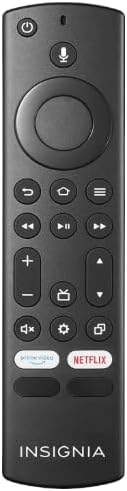
Şəkil 1.1: The Anderic OEM NSRCFNA21 Smart Remote. This image displays the front view of the black remote control, featuring various buttons for power, voice control, navigation, volume, channel, and dedicated streaming service buttons.
Əsas xüsusiyyətlərə aşağıdakılar daxildir:
- Original Quality: An authentic OEM product, ensuring performance and reliability comparable to the remote originally supplied with your TV.
- İstifadəçi dostu dizayn: Intuitive buttons and controls for easy navigation, volume adjustment, channel changes, and access to various TV functions.
- Etibarlı Performans: Provides a stable and responsive connection for accurate command execution.
2. Quraşdırma və Cütləşdirmə Təlimatları
To ensure proper functionality, the remote control must be paired with your Insignia TV. Follow these steps carefully:
- TV-ni sıfırlayın: Unplug your Insignia TV from its power source. Wait for approximately 30 seconds.
- Televizoru Yandırın: Plug the TV back into the power source and turn it on. Allow the TV to fully boot up.
- Cütləşdirməyə başlayın: Once the TV has completely booted up and is displaying content, press and hold the Ev button on the Anderic NSRCFNA21 remote control for up to 30 seconds.
- Remote Update (if prompted): Your TV may display a message indicating that the remote needs an update. If prompted, allow the TV to proceed with the update. This process may take 1 to 3 minutes to complete.
- Doğrulama: After the update (if any) and pairing process, test the remote's functions (e.g., volume, channel, navigation) to confirm successful pairing.
If the remote does not pair after following these steps, repeat the process or refer to the troubleshooting section.
3. Uzaqdan idarəetmə pultunun idarə edilməsi
The Anderic NSRCFNA21 remote control features an intuitive layout for easy operation of your Insignia TV. Below are the general functions of the primary buttons:
- Güc düyməsi: Televizoru yandırır və ya söndürür.
- Səslə İdarəetmə Düyməsi: Activates voice commands for searching content or controlling the TV.
- Navigation Pad (Directional Buttons and Select): Menyular arasında hərəkət etmək və elementləri seçmək üçün istifadə olunur.
- Ev düyməsi: Returns to the TV's main home screen.
- Geri düyməsi: Əvvəlki ekrana və ya menyuya qayıdır.
- Menu/Options Button: Accesses additional menu options or settings.
- Səs artır/aşağı: Televiziyanın səs səviyyəsini tənzimləyir.
- Kanal Yuxarı/Aşağı: Televiziya kanallarını dəyişir.
- Səssiz düymə: Televizorun səsini səssizləşdirir və ya aktivləşdirir.
- Ayarlar düyməsi: Televizorun parametrlər menyusunu açır.
- Daxiletmə/Mənbə düyməsi: Changes the TV's input source (e.g., HDMI 1, HDMI 2).
- Dedicated Streaming Service Buttons: Provides quick access to popular streaming applications (e.g., Amazon Prime Video, Netflix).
4. Uyğunluq
The Anderic OEM NSRCFNA21 Smart Remote is compatible with the following Insignia TV models:
- NS24DF310NA21
- NS39DF310NA21
- NS50DF710NA21
- NS55DF710NA21
This remote also replaces the following models:
- NSRCFNA19 Rev B Fire
- NSRCFNA19revB
- NSRCFNA21 Fire
- NSRCFNA21 Rev E
- NSRCFNA21-Rev-E
Ensure your TV model is listed above for optimal performance.
5. Baxım
Proper maintenance can extend the life and functionality of your remote control.
- Batareyanın dəyişdirilməsi: The remote requires two AAA batteries. Replace batteries when the remote's responsiveness decreases or it stops functioning. Ensure correct polarity when inserting new batteries.
- Təmizləmə: Use a soft, dry cloth to clean the remote's surface. Avoid using liquid cleaners or abrasive materials, as these can damage the remote.
- Yaddaş: Pultu quru yerdə, həddindən artıq temperaturdan və birbaşa günəş işığından uzaqda saxlayın.
6. Giderme
If you encounter issues with your Anderic NSRCFNA21 Smart Remote, try the following troubleshooting steps:
- Pult Cavab Vermir:
- Check the batteries. Replace them with fresh AAA batteries, ensuring correct polarity.
- Pultla televizorun sensoru arasında heç bir maneə olmadığından əmin olun.
- Bölmə 2-də təsvir olunduğu kimi cütləşdirmə prosesini yenidən cəhd edin.
- Fasiləli funksionallıq:
- Bu, aşağı batareya gücünü göstərə bilər. Batareyaları dəyişdirin.
- Ensure you are within the effective range of the TV's sensor.
- Pairing Fails:
- Confirm your TV model is listed in the compatibility section (Section 4).
- Ensure the TV is fully booted up before attempting to hold the Home button.
- Try unplugging the TV for a longer period (e.g., 1-2 minutes) before plugging it back in and re-attempting pairing.
Bu addımları sınadıqdan sonra problemlər davam edərsə, əlavə yardım üçün müştəri dəstəyi ilə əlaqə saxlayın.
7. Spesifikasiyalar
| Brend | Anderik |
| Model nömrəsi | NSRCFNA21 Rev B |
| Uyğun Cihazlar | Insignia Televisions |
| Güc mənbəyi | 2 AAA batareya (tələb olunur) |
| Maddə Çəkisi | 1.76 unsiya |
| Paket Ölçüləri | 6.3 x 2.95 x 0.67 düym |
| Rəng | Qara |
| İstehsalçı | Dan's Electronics Etc., Inc. |
8. Zəmanət və Dəstək
For warranty information or technical support, please contact the manufacturer, Anderic (Dan's Electronics Etc., Inc.). Refer to the product packaging or the official Anderic webXüsusi əlaqə məlumatları və zəmanət şərtləri üçün sayta daxil olun.
ziyarət edə bilərsiniz Anderic Store on Amazon əlavə məlumat üçün.


