1. Giriş
This manual provides comprehensive instructions for the TOPXCDZ LED Smart WiFi Controller. This device allows you to control single color LED strip lights via a smartphone application, voice commands, and a remote control. It is compatible with Android and iOS devices, and supports integration with Amazon Alexa and Google Assistant for enhanced control.
Please read this manual carefully before installation and operation to ensure proper use and to maximize the product's functionality.

Image 1.1: TOPXCDZ LED Smart WiFi Controller with included user instruction sheet.
2. Məhsul parametrləri
| Parametr | Dəyər |
|---|---|
| Kateqoriya | LED Controller |
| Hakimiyyət prinsipi | WiFi |
| APP | Magic Home Pro |
| Əməliyyat platforması | Android 6.0 və ya iOS 11.0 və ya sonrakı versiyası |
| Kanallar | Tək Rəng |
| Giriş həcmitage | DC 5-28V |
| Maksimum Çıxış Gücü | 96W |
| Qoşulma üsulu | Ümumi Anod |
| İşləmə temperaturu | -20 ilə +55°C arasında |
| Nəzarət məsafəsi | Görünən məsafə 30M |
| Sertifikatlaşdırma | CE, RoHS, FCC |
| Xalis Çəki | 24 q |
| Dimensions (L*B*H) | 53mm * 24mm * 11mm |
3. Quraşdırma və Quraşdırma
3.1. Tel bağlantısı
Ensure all power is disconnected before making any connections. The controller connects between your power adapter and the LED strip light.

Image 3.1: Connection schematic diagram showing power adapter, controller, and LED strip.
- Connect the power adapter output to the input side of the WiFi controller.
- Connect the output side of the WiFi controller to your single color LED strip or other constant voltage işıqlar.
- Ensure correct polarity (positive to positive, negative to negative) for all connections.

Şəkil 3.2: Yaxından view of controller connections, indicating connection to transformer and light strip.
3.2. Proqramın yüklənməsi və quraşdırılması
The controller operates using the "Magic Home Pro" application. You can download it by scanning the QR code or visiting the provided link.

Image 3.3: Instructions for downloading the Magic Home Pro app and connecting to Wi-Fi.
- Download the free "Magic Home Pro" APP by scanning the QR code on the product packaging or manual, or by visiting http://app.magichue.net/download/mgchomepro/AppDown.aspx.
- Install the device and switch on the power.
3.3. Connecting to Wi-Fi Network
To enable smart control features, connect the controller to your home Wi-Fi network (2.4GHz Wi-Fi only).
- Open your smartphone's Wi-Fi settings and connect to the signal named "LEDnetxxxxxx".
- Run the "Magic Home Pro" APP.
- Register or log in to your Magic Home account.
- In the app, tap the "+" button on the top right corner, then select "connect device to Wi-Fi network".
- The app will prompt you to enable Bluetooth for direct connection to Wi-Fi router. Confirm by selecting "OK" to turn on Bluetooth.
- Select your device and add it to your Wi-Fi router. Follow the corresponding device from the pop-up list and complete the prompts to add the device to the router.
For a detailed user guide on app setup, scan the QR code provided in the manual or visit https://faqsys.magichue.net:4489/wifi/controller/monochrome.
4. Əməliyyat Təlimatları
4.1. Uzaqdan idarəetmə funksiyaları
The controller may come with a remote control for basic functions. The remote control is configured by the manufacturer.
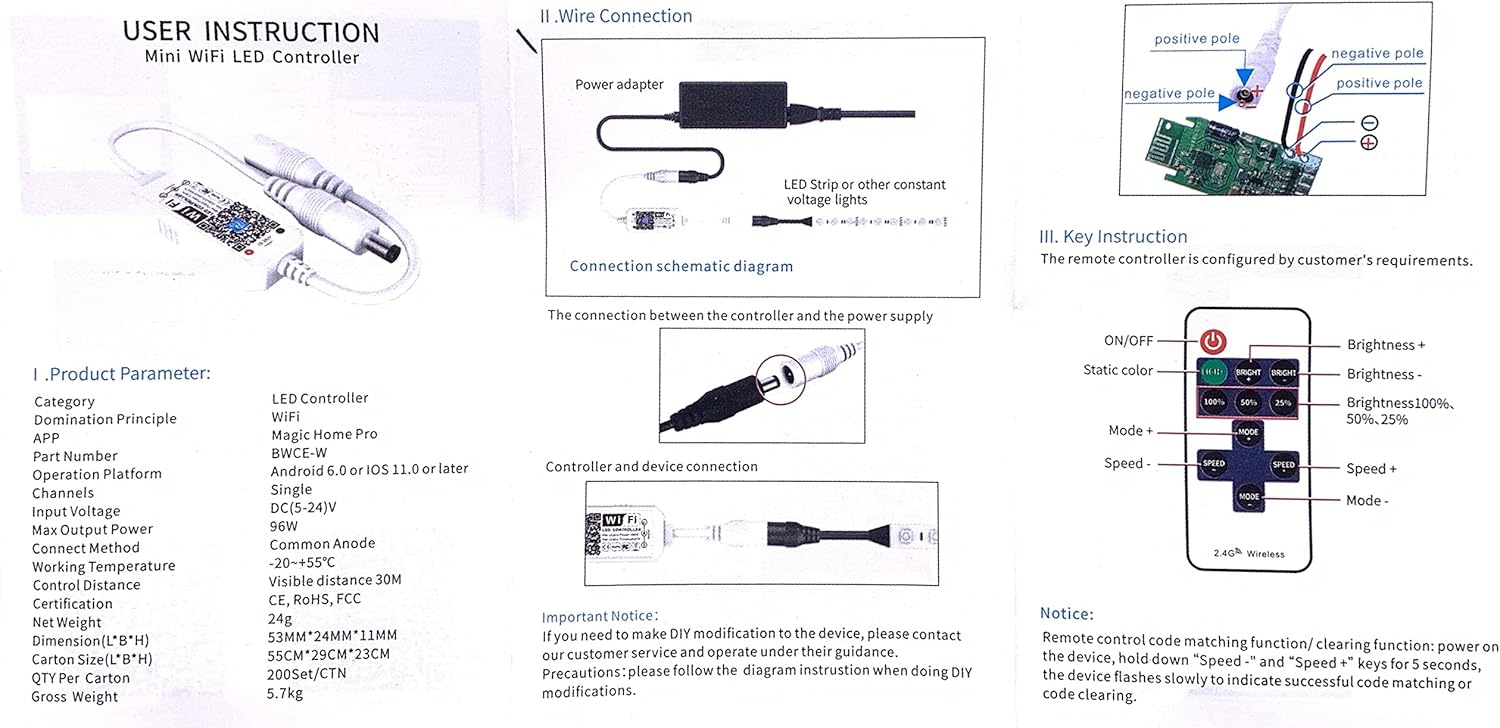
Image 4.1: Remote control layout with buttons for ON/OFF, brightness adjustment, static color selection, mode changes, and speed control.
- ON/OFF: Power on or off the LED strip.
- Parlaqlıq +/-: İşığın parlaqlığını tənzimləyin.
- Static Color Buttons: Select preset static colors (if applicable for single color controllers, this might refer to different shades of white or intensity levels).
- Brightness %: Quick selection for 100%, 50%, 25% brightness.
- Rejim +/-: Cycle through different lighting modes (e.g., flashing, fading).
- Sürət +/-: Adjust the speed of dynamic lighting modes.
Remote Control Code Matching/Clearing: Power on the device, then hold down "Speed-" and "Speed+" keys for 5 seconds. The device flashes slowly to indicate successful code matching or clearing.
4.2. Proqrama nəzarət
Once connected to the "Magic Home Pro" app, you can access advanced control features:
- Parlaqlığın tənzimlənməsi: Precisely control the brightness level of your LED strip.
- Taymer rejimi: Set schedules for your lights to automatically turn on or off at specified times.
- Səslə Nəzarət: Integrate with Amazon Alexa or Google Assistant to control your lights using voice commands (e.g., "Alexa, turn on the lights", "Hey Google, dim the lights to 50%").
- Uzaqdan Giriş: Control your LED strip from anywhere using your smartphone, as long as both your phone and the controller are connected to the internet.
5. Baxım
The TOPXCDZ LED Smart WiFi Controller requires minimal maintenance. Follow these guidelines:
- Nəzarət cihazını quru mühitdə, nəmdən və həddindən artıq temperaturdan uzaq saxlayın.
- Cihazı uzun müddət birbaşa günəş işığına məruz qoymayın.
- Clean the exterior with a soft, dry cloth if necessary. Do not use liquid cleaners or solvents.
- Həddindən artıq istiləşmənin qarşısını almaq üçün cihazın ətrafında düzgün havalandırma təmin edin.
6. Giderme
If you encounter issues with your TOPXCDZ LED Smart WiFi Controller, refer to the following troubleshooting steps:
| Problem | Mümkün Səbəb | Həll |
|---|---|---|
| LED şeridi yanmır. | No power, incorrect wiring, faulty LED strip. | Check power adapter connection. Verify all wiring connections for correct polarity. Test LED strip with a different power source if possible. |
| Cannot connect to "LEDnetxxxxxx" Wi-Fi. | Controller not powered on, out of range. | Ensure controller is powered. Move closer to the controller. Reset the controller by power cycling. |
| App cannot find the device after connecting to "LEDnetxxxxxx". | Bluetooth not enabled, app permissions. | Ensure Bluetooth is enabled on your smartphone. Check app permissions for location and Bluetooth access. |
| Device fails to connect to home Wi-Fi (2.4GHz). | Yanlış Wi-Fi parolu, 5GHz şəbəkəsi, zəif siqnal. | Double-check Wi-Fi password. Ensure your router is broadcasting a 2.4GHz network. Move controller closer to the router. |
| Səsli idarəetmə işləmir. | Incorrect integration setup, device offline. | Verify that the controller is successfully linked in your Amazon Alexa or Google Home app. Ensure the controller is connected to Wi-Fi. |
| Uzaqdan idarəetmə cavab vermir. | Battery low/dead, remote not paired. | Replace remote battery. Perform remote control code matching as described in Section 4.1. |
If issues persist, please refer to the support section for further assistance.
7. Zəmanət və Dəstək
7.1. Zəmanət Məlumatı
Please retain your proof of purchase for warranty claims. The warranty period and terms are subject to the retailer's policy where the product was purchased. For specific warranty details, please contact your point of purchase.
7.2. Müştəri dəstəyi
For technical support, troubleshooting assistance, or general inquiries, please contact TOPXCDZ customer service through the retailer's platform or refer to the official Magic Home Pro app support resources.
Additional resources and FAQs can be found at: https://faqsys.magichue.net:4489/wifi/controller/monochrome
