1. Giriş
Thank you for choosing the Dalton 2000VA Uninterruptible Power Supply (UPS). This device is designed to provide reliable power backup and protection for your electronic equipment against power outages, surges, and fluctuations. Please read this manual thoroughly before installation and operation to ensure optimal performance and safety.
2. Əhəmiyyətli Təhlükəsizlik Təlimatları
Yanğın, elektrik şoku və yaralanma riskini azaltmaq üçün həmişə bu əsas təhlükəsizlik tədbirlərinə əməl edin:
- UPS cihazını açmayınasing. İçəridə istifadəçi tərəfindən təmir edilə bilən hissələr yoxdur. Xidməti ixtisaslı xidmət personalına həvalə edin.
- Do not use the UPS in environments with excessive dust, humidity, or extreme temperatures.
- UPS-in torpaqlanmış elektrik rozetkasına qoşulduğundan əmin olun.
- Do not connect non-computer related items like medical equipment, life support equipment, or household appliances to the UPS.
- Position the UPS in a well-ventilated area, away from direct sunlight or heat sources.
- In case of emergency, press the power button to turn off the UPS and disconnect it from the AC power source.
3. Paketin məzmunu
Bütün əşyaların paketinizdə olduğunu yoxlayın:
- Dalton 2000VA UPS Unit
- Elektrik kabeli
- USB Communication Cable (if applicable)
- İstifadəçi Təlimatı (bu sənəd)

Şəkil 3.1: Ön view of the Dalton 2000VA UPS unit, showing the display screen and power button.
4. Quraşdırma və Quraşdırma
Follow these steps to set up your UPS:
- Qablaşdırma: UPS-i qablaşdırmasından diqqətlə çıxarın. Göndərmə zamanı hər hansı bir zədənin olub olmadığını yoxlayın.
- Yerləşdirmə: Place the UPS on a flat, stable surface in a cool, dry, and well-ventilated area. Ensure there is adequate space around the unit for airflow.
- İlkin ödəniş: Before connecting any devices, plug the UPS power cord into a grounded wall outlet. Allow the unit to charge for at least 8 hours to ensure the battery is fully charged. The display will indicate charging status.
- Birləşdirən Cihazlar:
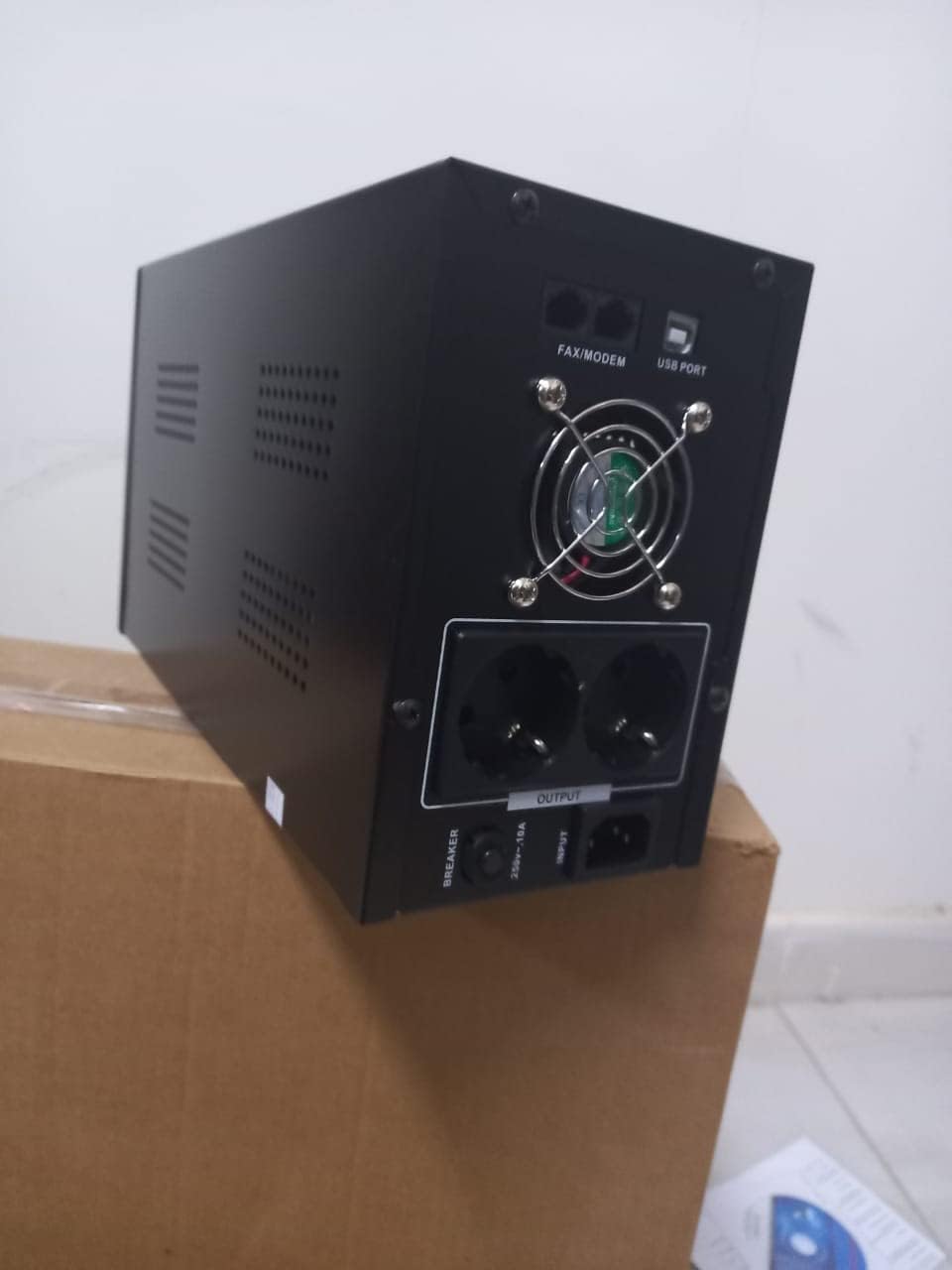
Şəkil 4.1: Arxa view of the Dalton 2000VA UPS, highlighting the input power port, output sockets, and USB/Modem ports.
- Once the battery is charged, connect your computer, monitor, and other critical electronic devices to the UPS output sockets.
- Do not overload the UPS. Refer to the specifications section for maximum load capacity.
- If applicable, connect the USB communication cable from the UPS to your computer for monitoring software (software not included, check manufacturer's webSayt).
5. UPS-in istismarı
5.1 Yandırma/Söndürmə
- Yandırmaq üçün: After connecting to AC power and charging, press and hold the power button on the front panel for approximately 3 seconds until you hear a beep and the display illuminates.
- Söndürmək üçün: Press and hold the power button for approximately 3 seconds until you hear a beep and the display turns off. If the UPS is running on battery, it will shut down immediately. If connected to AC, it will switch to bypass mode before shutting down.
5.2 Ekranın başa düşülməsi
The front panel LCD display provides real-time status information:
- IN: Giriş həcmini göstərirtage from the utility power.
- ÇIXIŞ: Çıxış həcmini göstərirtage provided by the UPS to connected devices.
- NORMAL: Indicates the UPS is operating on utility power.
- yarasa: Cari batareya doldurma səviyyəsini göstərir.
- Yüklə: Faiz göstərirtagqoşulmuş cihazlar tərəfindən istifadə edilən UPS-in tutumunun e.
- Battery Mode Icon: Appears when the UPS is running on battery power during an outage.

Şəkil 5.1: Yan view of the UPS, showing the illuminated display with power status indicators.
5.3 Battery Backup Function
Bir güc halında utage, the UPS will automatically switch to battery power, providing continuous power to your connected devices. The duration of backup power depends on the load connected and the battery's charge level. The UPS will emit an audible alarm during battery operation.
When utility power returns, the UPS will automatically switch back to AC power and begin recharging its battery.
6. Baxım
- Batareyaya qulluq: To maximize battery life, ensure the UPS is always connected to an AC outlet to keep the battery charged. If the UPS is stored for an extended period, recharge it every three months for at least 8 hours.
- Təmizləmə: Disconnect the UPS from all power sources before cleaning. Use a soft, dry cloth to wipe the exterior. Do not use liquid or aerosol cleaners.
- Havalandırma: Regularly check that the ventilation openings are not blocked by dust or debris to prevent overheating.
7. Giderme
Ümumi problemlər və onların həlli yolları üçün aşağıdakı cədvələ baxın:
| Problem | Mümkün Səbəb | Həll |
|---|---|---|
| UPS açılmır. | Battery not charged or power cord disconnected. | Ensure power cord is securely plugged in and allow battery to charge for 8 hours. |
| UPS beeps continuously in normal mode. | Həddindən artıq yükləmə vəziyyəti. | Disconnect non-essential equipment until the alarm stops. Check total load. |
| Qısa ehtiyat nüsxələmə müddəti. | Battery not fully charged or battery nearing end of life. | Allow UPS to charge for 8 hours. If issue persists, battery may need replacement (contact service center). |
| UPS does not provide power during outage. | Battery discharged or internal fault. | Ensure UPS was fully charged. If problem persists, contact authorized service center. |
8. Texniki spesifikasiyalar
| Xüsusiyyət | Detal |
|---|---|
| Məhsul Ölçüləri | 12.5 x 22.5 x 38 sm |
| İstehsalçı | Dalton |
| Brend adı | Ümumi |
| Rəng | Qara |
| Material | Metal |
| Cari | 5 Ampere |
| Forma faktoru | Raf |
| Tezlik diapazonu | 50-60 Hz |
| Çıxış həcmitage | 220 volt |
| Bağlayıcı növü | AC |
9. Zəmanət və Dəstək
Dalton provides an authorized maintenance center for all Uninterruptible Power Supply units. For warranty claims, technical support, or service inquiries, please contact your local Dalton authorized distributor or service center. Keep your purchase receipt as proof of purchase for warranty validation.
For further assistance, please visit the official Dalton websayt və ya müştəri dəstəyi ilə əlaqə saxlayın.


