1. Giriş
The V-MODA Crossfade 2 Wireless headphones offer a versatile audio experience, combining both wireless Bluetooth connectivity and pure analog wired mode. Designed for audiophiles, gamers, musicians, and DJs, these headphones deliver high-resolution audio and exceptional comfort for extended listening sessions. The robust construction, featuring a combination of steel and vegan leather, ensures durability, while the foldable design enhances portability.

Image: V-MODA Crossfade 2 Wireless headphones in Tattoo -Black edition, showcasinUnikal dizayn g.
2. Qutuda nə var
Your V-MODA Crossfade 2 Wireless headphones package includes the following items:
- V-MODA Crossfade 2 Wireless Headphones
- Protective Exoskeleton Carry Case
- Kevlar-reinforced 1-button Speakeasy Audio Cable (for wired use)
- V-Micro USB Charging Cable
- İstifadəçi Təlimatı (bu sənəd)
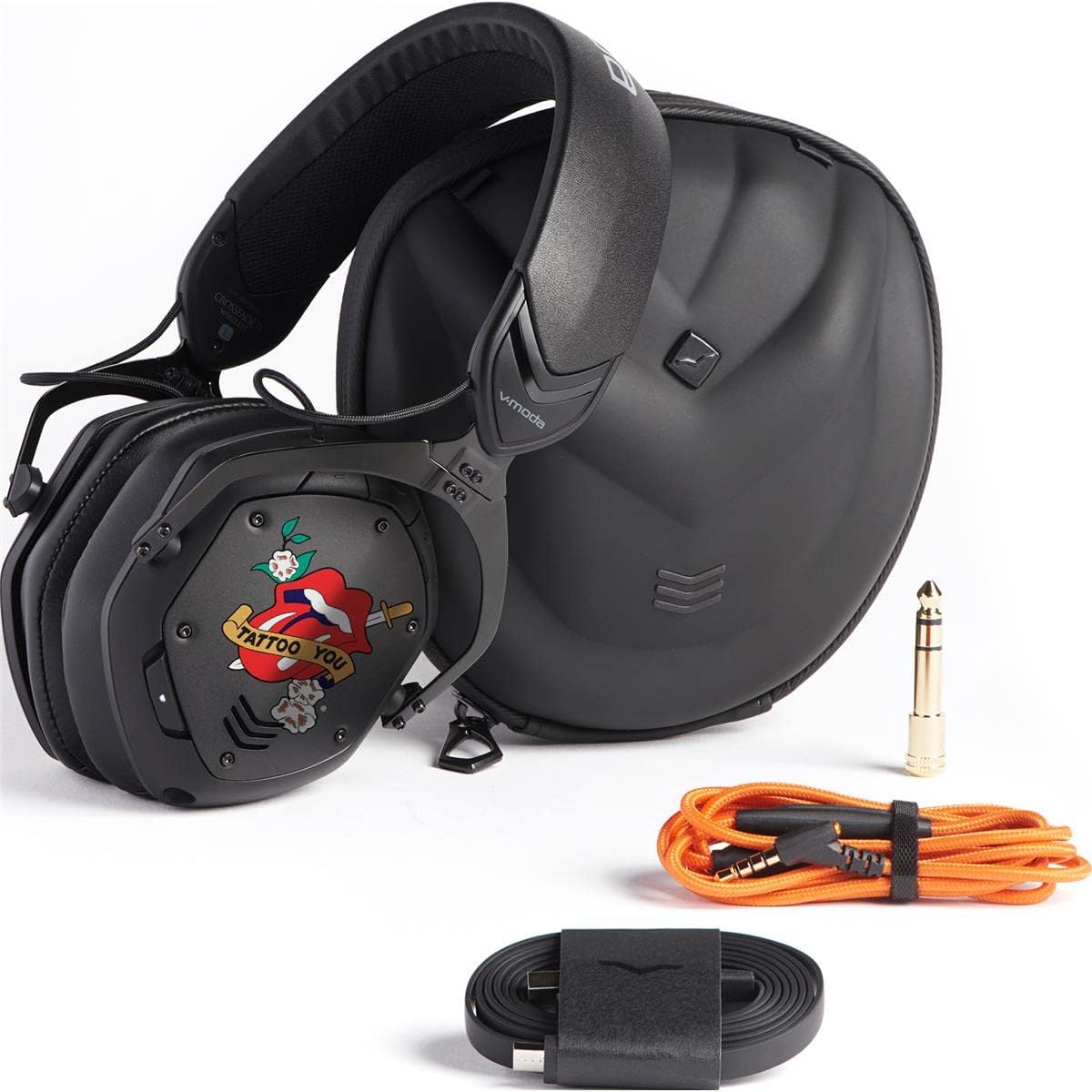
Image: The V-MODA Crossfade 2 Wireless headphones alongside their protective case, audio cable, and charging cable.
3. Xüsusiyyətlər
The V-MODA Crossfade 2 Wireless headphones are engineered with advanced features to provide a superior audio experience:
- Dual-Diaphragm 50mm Drivers: Deliver V-MODA's signature sound with deep, rich bass and clear highs.
- Hi-Resolution CCAW Japanese Coils: Certified by Japan Audio Society (JAS) for Hi-Res Audio when used in wired mode.
- Bluetooth bağlantısı: Seamless wireless audio experience with a range of up to 33 feet (10 meters).
- Çox nöqtəli əlaqə: Pair with two Bluetooth sources simultaneously (e.g., smartphone and laptop).
- Pure Analog Wired Mode: Zero latency audio for critical listening, gaming, and professional use.
- Uzadılmış Batareya Ömrü: Up to 14+ hours of continuous music playback, entertainment, and calls on a single charge.
- Comfortable Ear Cushions: Large memory foam ear cushions provide ergonomic comfort and natural noise isolation.
- SteelFlex Headband: Durable and flexible headband adapts to your head for a secure and comfortable fit.
- CliqFold Hinge: Patented hinge design allows the headphones to fold into a compact size for portability.
- Quraşdırılmış Mikrofon: Hidden microphone optimized for phone calls and voice recognition.
- Davamlı tikinti: Luxuriously crafted with steel and vegan leather, meeting V-MODA's strict durability standards.
4. Quraşdırma
4.1 Qulaqlıqların doldurulması
Before initial use, fully charge your Crossfade 2 Wireless headphones.
- Connect the V-Micro USB charging cable to the charging port on the left earcup of the headphones.
- USB kabelinin digər ucunu elektrikli USB portuna (məsələn, kompüter, divar adapteri) qoşun.
- The LED indicator will show charging status. A full charge typically takes about 100 minutes.
- Once fully charged, the LED indicator will change (refer to the LED indicator section in the full manual for specific light patterns).
4.2 Bluetooth Qoşulması
Qulaqlıqlarınızı cihaza simsiz qoşmaq üçün:
- Qulaqlıqların söndürüldüyünə əmin olun.
- Press and hold the power button on the right earcup until the LED indicator flashes blue rapidly, indicating pairing mode.
- Cihazınızda (smartfon, noutbuk və s.) Bluetooth-u aktivləşdirin və mövcud cihazları axtarın.
- Select "V-MODA Crossfade 2 Wireless" from the list of found devices.
- Qoşulduqdan sonra LED göstərici mavi rəngə çevriləcək.
For multi-point pairing, connect to the first device, then put the headphones back into pairing mode and connect to the second device. The headphones will remember both connections.
5. işlək
5.1 Yandırma/Söndürmə
- To power on: Press and hold the power button until the LED lights up.
- To power off: Press and hold the power button until the LED turns off.
5.2 Simli rejim
For pure analog audio with zero latency, use the included Speakeasy Audio Cable.
- Insert the smaller end of the audio cable into the 3.5mm jack on the right earcup.
- Connect the other end of the cable to your audio source (e.g., phone, computer, audio interface).
- In wired mode, the headphones operate passively, and the battery is not used.
5.3 Nəzarət vasitələri
The headphones feature intuitive controls on the right earcup:
- Səs artır/aşağı: Xüsusi səs düymələrindən istifadə edin.
- Oynat/Pauza: Çoxfunksiyalı düyməni bir dəfə basın.
- Növbəti trek: Çox funksiyalı düyməni iki dəfə basın.
- Əvvəlki Track: Çox funksiyalı düyməni üç dəfə basın.
- Zəngə Cavab Vermək/Bitirmək: Daxil olan zəng və ya aktiv zəng zamanı çoxfunksiyalı düyməni bir dəfə basın.
- Zəngi rədd edin: Daxil olan zəng zamanı çoxfunksiyalı düyməni basıb saxlayın.
- Səs köməkçisini aktivləşdirin: Press and hold the multi-function button (e.g., Siri, Google Assistant).
Video: Qısa bir tanıtım videosuasing the V-MODA Crossfade 2 Wireless Rolling Stones Edition headphones, highlighting their design and features.
6. Baxım
6.1 Təmizləmə
- Qulaqlıqları yumşaq, quru bir parça ilə silin.
- For ear cushions, gently wipe with a damp parça və lazım olduqda yumşaq sabun, sonra hərtərəfli qurudun.
- Sərt kimyəvi maddələr və ya aşındırıcı materiallardan istifadə etməyin.
6.2 Saxlama
When not in use, store the headphones in their protective exoskeleton carry case to prevent damage.
Image: The V-MODA Crossfade 2 Wireless headphones folded compactly, ready to be stored in their durable exoskeleton case.
7. Giderme
| Problem | Mümkün Səbəb | Həll |
|---|---|---|
| No power/won't turn on | Aşağı batareya | Charge the headphones using the V-Micro USB cable. |
| Bluetooth vasitəsilə cütləşdirmək mümkün deyil | Headphones not in pairing mode; device Bluetooth off; too far from device | Ensure headphones are in pairing mode (rapid blue flashing LED). Turn on Bluetooth on your device. Move headphones closer to the device (within 10 meters). |
| Simli rejimdə səs yoxdur | Cable not fully inserted; incorrect cable connection | Ensure the audio cable is securely plugged into both the headphone jack and the audio source. |
| Zəif səs keyfiyyəti | Interference; low battery; source audio quality | Move away from sources of interference. Charge the headphones. Check the quality of your audio source. |
8. Spesifikasiyalar
- Model Adı: Çarpaz keçid 2
- Bağlantı texnologiyası: Simsiz (Bluetooth), Simli (3.5 mm Jack)
- Audio Sürücü Növü: Dual-Diaphragm 50mm Dynamic Driver
- Tezlik diapazonu: 5 - 40,000 Hz
- Batareyanın ömrü: Up to 14+ Hours (Wireless)
- Doldurma vaxtı: Təxminən 100 dəqiqə
- Bluetooth Aralığı: 10 Metr (33 fut)
- Material: Faux Leather, Memory Foam, Steel
- Maddə çəkisi: 1.63 funt sterlinq
- Məhsul Ölçüləri: 7.2 x 6.1 x 4.4 düym
- Səs-küyə nəzarət: Səs izolyasiyası
- Daxil olan komponentlər: Headphones, Protective Case, Cable
9. Zəmanət və Dəstək
V-MODA offers a 1-Year Premier Warranty for the Crossfade 2 Wireless headphones, covering manufacturing defects. Additionally, V-MODA provides an "Immortal Life Replacement Program" where you can get a 50% discount on a replacement pair if your headphones are damaged outside of warranty.
For detailed warranty information, technical support, or to inquire about the Immortal Life Replacement Program, please visit the official V-MODA websaytına daxil olun və ya birbaşa müştəri dəstəyi ilə əlaqə saxlayın.
ziyarət edin V-MODA Store on Amazon daha çox məhsul və məlumat üçün.


