Məhsul Bitdiview
The One For All URC 3661 is a universal remote control designed to consolidate multiple remote controls into a single, easy-to-use device. It is compatible with a wide range of electronic devices, including televisions, set-top boxes, audio systems, DVD players, and Blu-ray players. This remote features backlit keys for improved visibility in low-light conditions and includes a learning function to copy commands from original remotes.

Şəkil 1: Bucaqlı view of the URC 3661 Universal Remote Control.
Quraşdırma
1. Batareyanın quraşdırılması
The URC 3661 remote control requires two (2) AA batteries for operation. Follow these steps to install them:
- Pultun arxasındakı batareya bölməsini tapın.
- Slide the battery cover downwards and lift it off.
- Insert two AA batteries, ensuring the positive (+) and negative (-) terminals align with the markings inside the compartment.
- Batareya qapağını təhlükəsiz şəkildə klik səsi eşidilənə qədər yerinə sürüşdürərək yenidən yerləşdirin.
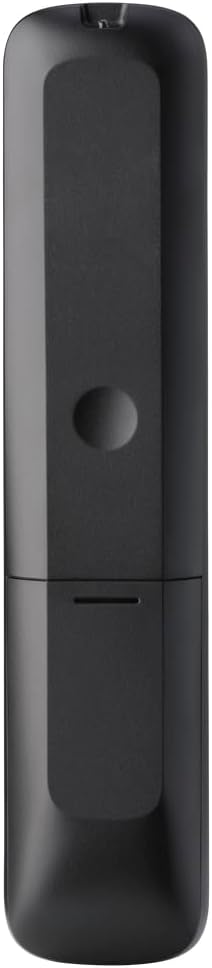
Şəkil 2: Geri view of the remote, highlighting the battery compartment.
2. Uzaqdan İdarəetmənin Proqramlaşdırılması
The URC 3661 can be programmed using direct code entry, auto code search, or the learning function. It is recommended to try direct code entry first.
Birbaşa Kod Girişi:
- İdarə etmək istədiyiniz cihazı (məsələn, TV, DVD pleyer) yandırın.
- basın və saxlayın QURULUM button until the LED light under the device key (e.g., TV, DVD) blinks twice and stays lit.
- Press the device key you want to program (e.g., TV). The LED will remain lit.
- Enter the 4-digit or 5-digit setup code for your brand and device. Refer to the code list provided with your remote or visit the One For All website for the most up-to-date codes.
- After entering the code, the LED will blink twice and turn off if the code is valid. If it blinks once and stays lit, the code is invalid; re-enter the code.
- Pultu düyməsinə basaraq sınayın GÜC button. If the device turns off, try other functions like volume or channel. If it works, programming is complete. If not, try the next code for your brand or use the Auto Code Search.
Avtomatik Kod Axtarışı:
- Nəzarət etmək istədiyiniz cihazı açın.
- basın və saxlayın QURULUM button until the LED blinks twice and stays lit.
- Press the device key you want to program.
- Pultu cihaza yönəldin və düyməni basın GÜC Cihaz sönənə qədər düyməni təkrar-təkrar (təxminən hər 3 saniyədən bir) basın.
- Cihaz söndükdən sonra dərhal düyməni basın QURULUM button to save the code. The LED will blink twice and turn off.
- Test the remote. If it doesn't work correctly, repeat the process.
Öyrənmə funksiyası:
The learning function allows the URC 3661 to copy functions directly from your original remote control, which is useful for commands not available via direct code entry or auto search.
- Place the URC 3661 and your original remote on a flat surface, facing each other, about 1-2 inches apart.
- basın və saxlayın QURULUM button until the LED blinks twice and stays lit.
- Press the button on the URC 3661 that you want to teach a function to (e.g., a specific input button). The LED will blink rapidly.
- Press and hold the corresponding button on your original remote control until the LED on the URC 3661 blinks twice, indicating successful learning.
- İstədiyiniz bütün düymələr üçün təkrarlayın.
- To exit learning mode, press the QURULUM button. The LED will blink twice and turn off.
Uzaqdan İdarəetmə İdarəsi
The URC 3661 is designed for intuitive operation. Familiarize yourself with the button layout and their primary functions.

Şəkil 3: Ön view of the URC 3661 with button layout.
Əsas funksiyalar:
- Device Keys (TV, STB, AUDIO, BLURAY, DVD, STREAM): Select the device you wish to control. The LED under the selected device key will illuminate.
- GÜÇ: Seçilmiş cihazı yandırır və ya söndürür.
- VOL +/-: Səs səviyyəsini tənzimləyir.
- CH +/-: Kanalları dəyişir.
- Navigation Pad (UP, DOWN, LEFT, RIGHT, OK): Menyu naviqasiyası və seçimi üçün istifadə olunur.
- Menyu: Opens the device's main menu.
- Bələdçi: Displays the electronic program guide (if supported by the device).
- MƏLUMAT: Cari proqram və ya daxiletmə haqqında məlumatı göstərir.
- EV: Cihazın ana ekranına qayıdır.
- Çıxış: Exits menus or applications.
- Playback Controls (PLAY, PAUSE, STOP, REWIND, FAST FORWARD, SKIP): Media oxutmasına nəzarət edin.
- Nömrə Düymələri (0-9): For direct channel entry or numerical input.
- App Shortcut Keys (Netflix, Prime Video, YouTube): Direct access to popular streaming services.
- Arxa işıq: The keys are backlit for easy use in dark environments. The backlight activates automatically when a button is pressed.
Baxım
Cleaning the Remote:
To maintain the remote's appearance and functionality, clean it regularly:
- Use a soft, dry cloth to wipe the surface of the remote.
- İnadkar kirlər üçün bir az dampparçanı su və ya yumşaq, aşındırıcı olmayan təmizləyici ilə yuyun. Həddindən artıq nəmdən çəkinin.
- Sərt kimyəvi maddələr, həlledicilər və ya aşındırıcı təmizləyici vasitələrdən istifadə etməyin, çünki bunlar pultun səthinə və ya daxili komponentlərinə zərər verə bilər.
Batareyanın dəyişdirilməsi:
Replace batteries when the remote's performance degrades or the LED indicator blinks unusually. Refer to the "Battery Installation" section under Setup for detailed instructions.
Problemlərin aradan qaldırılması
If you encounter issues with your URC 3661 remote control, try the following troubleshooting steps:
| Problem | Mümkün Səbəb | Həll |
|---|---|---|
| Remote does not operate the device. | Yanlış cihaz seçilib. Batareyalar azdır və ya səhv yerləşdirilib. Incorrect code programmed. | Ensure the correct device key (TV, DVD, etc.) is pressed. Batareyanın istiqamətini yoxlayın və lazım olduqda dəyişdirin. Re-program the remote using a different code or the Auto Code Search/Learning function. |
| Bəzi düymələr işləmir. | Incomplete programming. Device does not support the function. | Use the Learning function to copy specific commands from your original remote. Verify if the original remote has that function. |
| LED blinks once and stays lit during code entry. | Invalid code entered. | Ensure you are entering the correct 4 or 5-digit code. Try another code from the list or use Auto Code Search. |
| Remote LED does not light up. | Ölü batareyalar. | Replace the batteries with new AA batteries. |
For further assistance, visit the official One For All support website or consult the comprehensive online manual.
Spesifikasiyalar
| Xüsusiyyət | Detal |
|---|---|
| Model nömrəsi | URC 3661 |
| Brend | Hamı üçün Bir |
| Məhsul Ölçüləri | 0.39 x 0.39 x 0.39 düym |
| Maddə Çəkisi | 6.7 unsiya |
| Batareyalar Tələb olunur | 2 AA batareya |
| Dəstəklənən Cihazların Maks. Sayı | 6 cihaza qədər |
| Uyğun Cihazlar | Television, Set-top Box, Audio, Blu-ray, DVD, Streaming devices |
| Xüsusi Xüsusiyyət | Universal, Learning Function, Backlit Keys |

Figure 4: Product packaging indicating compatibility with up to 6 devices.
Zəmanət və Dəstək
Warranty information for the One For All URC 3661 Universal Remote Control is typically provided with your purchase documentation. Please refer to the warranty card or leaflet included in the product packaging for details regarding coverage, terms, and conditions.
For technical support, frequently asked questions, or to find the latest programming codes, please visit the official One For All website. Contact information for customer service may also be found on the manufacturer's websaytda və ya məhsul sənədlərinizdə.
One For All Official Websayt: www.oneforall.com