Giriş
This manual provides essential information for setting up, operating, maintaining, and troubleshooting your Xiaomi Redmi Note 11S smartphone. Please read this guide thoroughly to ensure optimal performance and longevity of your device.
Bir bitdiview of the Redmi Note 11S, highlighting its 108MP pro-grade main camera, 90Hz FHD+ AMOLED DotDisplay, and 33W Pro fast charging capabilities.
Quraşdırma
1. Qutudan Çıxarma və İlkin Yoxlama
Carefully unpack your Redmi Note 11S. Ensure all items are present:
- Xiaomi Redmi Note 11S smartfonu
- Sürətli avtomobil şarj cihazı
- SİM Tablasının Ejektoru
- Divar şarj cihazı
2. SİM kartın quraşdırılması
The Redmi Note 11S supports dual nano SIM cards. To install:
- Cihazın yan tərəfində SİM kart tepsisini tapın.
- SİM qabın ejektor alətini nimçənin yanındakı kiçik çuxura daxil edin və nimçə çıxana qədər yumşaq bir şəkildə basın.
- Place your nano SIM card(s) into the designated slots on the tray. Ensure the gold contacts face downwards.
- Diqqətlə qabı telefona yenidən daxil edin.
3. İlkin Doldurulma və Yandırma
Before first use, it is recommended to fully charge your device. Connect the wall charger to the phone and a power outlet. The Redmi Note 11S supports 33W Pro fast charging for quick recharging of its 5000mAh battery.

Illustration of the 33W Pro fast charging feature for the 5000mAh battery, showing charging efficiency and estimated usage times for video, calling, and music.
To power on, press and hold the power button located on the side of the device until the Xiaomi logo appears.
Əməliyyat Təlimatları
1. Əsas Naviqasiya
The Redmi Note 11S features a responsive touchscreen. Use gestures such as tap, swipe, pinch, and spread to navigate the MIUI 12 operating system. The power button controls screen on/off and device power, while the volume buttons adjust audio levels.
2. Ekran Xüsusiyyətləri
Your device is equipped with a 6.43-inch FHD+ AMOLED DotDisplay with a 90Hz high refresh rate for smooth visuals. It also includes Sunlight Display for readability in bright conditions and Reading Mode 3.0 to reduce eye strain.

The 6.43-inch FHD+ AMOLED DotDisplay of the Redmi Note 11S, emphasizing its 90Hz high refresh rate for a responsive touchscreen experience.
3. Kamera Sistemi
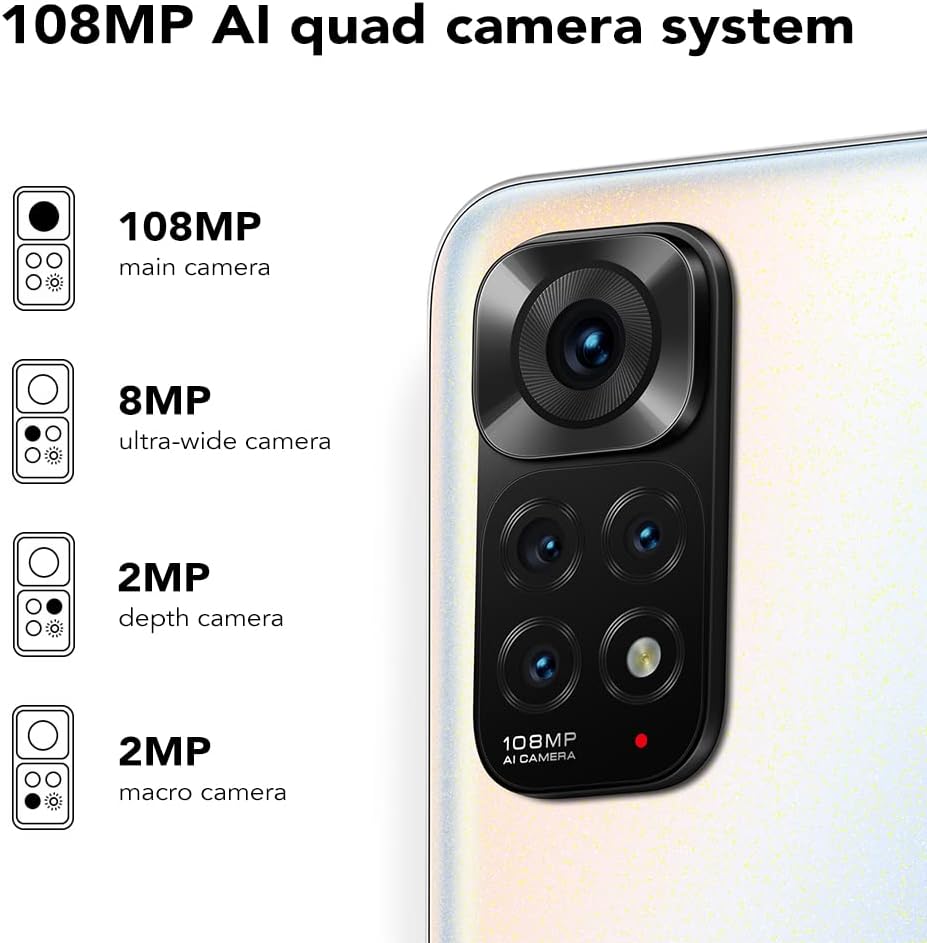
The Redmi Note 11S features a 108MP AI quad camera system on the rear and a 16MP selfie camera. The rear camera setup includes:
- 108 MP Əsas kamera
- 8 MP Ultra geniş kamera
- 2 MP Makro kamera
- 2 MP Dərinlik kamerası
Open the Camera application to access various modes such as Photo, Video, Portrait, Night Mode, and more.

Ətraflı view of the 108MP AI quad camera system on the Redmi Note 11S, featuring a 108MP main camera, 8MP ultra-wide camera, 2MP depth camera, and 2MP macro camera.
4. Saxlama və Performans
The device comes with 128GB of internal storage, expandable up to 1TB via a microSD card (sold separately). It is powered by the MediaTek Helio G96 processor, ensuring smooth performance for daily tasks and gaming.
5. Bağlantı
The Redmi Note 11S supports 4G cellular networks, Wi-Fi, and GPS for navigation and location services.
Baxım
1. Cihazınızın Təmizlənməsi
Telefonunuzun ekranını və gövdəsini təmizləmək üçün yumşaq, tüksüz bir parça istifadə edin. Sərt kimyəvi maddələrdən və ya aşındırıcı materiallardan istifadə etməkdən çəkinin. Cihazı həddindən artıq nəmə məruz qoymayın.
2. Proqram təminatı yeniləmələri
Cihazınızın ən son xüsusiyyətlərə, təhlükəsizlik yamalarına və performans təkmilləşdirmələrinə malik olduğundan əmin olmaq üçün proqram yeniləmələrini mütəmadi olaraq yoxlayın və quraşdırın. -a keçin Parametrlər > Telefon haqqında > MIUI versiyası yeniləmələri yoxlamaq üçün.
3. Batareyaya qulluq
Batareya ömrünü uzatmaq üçün:
- Həddindən artıq temperaturdan çəkinin.
- Tez-tez batareyanın tamamilə boşalmasına icazə verməyin.
- Cihazla birlikdə verilən orijinal şarj cihazından istifadə edin.
4. İstiliyin yayılması
The Redmi Note 11S incorporates LiquidCool technology with multiple layers of graphite and copper foil for efficient heat dissipation. Ensure proper airflow around the device during heavy usage to prevent overheating.

Daxili view illustrating the multi-dimensional heat dissipation system using LiquidCool technology, which incorporates multiple layers of graphite and copper foil for efficient cooling.
Problemlərin aradan qaldırılması
This section addresses common issues you might encounter with your Redmi Note 11S.
Cihaz Açılmır
- Batareyanın doldurulduğundan əmin olun. Cihazı ən azı 30 dəqiqə şarj cihazına qoşun.
- Məcburi yenidən başlatmaq üçün güc düyməsini 10-15 saniyə basıb saxlayın.
Apps Freezing or Crashing
- Problemli tətbiqi bağlayın və yenidən açın.
- Proqramın önbelleğini və məlumatlarını vasitəsilə silin Parametrlər > Tətbiqlər > Tətbiqləri idarə et > [Tətbiq Adı] > Məlumatları silin.
- Ensure your apps and operating system are up to date.
Zəif Batareya Həyatı
- Adjust screen brightness and reduce screen timeout.
- Lazım olmadıqda Wi-Fi, Bluetooth və ya GPS kimi istifadə olunmamış funksiyaları deaktiv edin.
- Arxa planda işləyən enerji sərf edən tətbiqləri müəyyən edin və bağlayın.
Şəbəkə Bağlantısı Problemləri
- Cihazınızı yenidən başladın.
- SIM kartınızın düzgün daxil edilib-edilmədiyini yoxlayın.
- Şəbəkə parametrlərini yenidən qurun Parametrlər > Bağlantı və paylaşım > Wi-Fi, mobil şəbəkələri və Bluetooth-u sıfırlayın.
Spesifikasiyalar
The following table outlines the key specifications for the Xiaomi Redmi Note 11S (Model: 2201117SY).
| Xüsusiyyət | Spesifikasiya |
|---|---|
| Model Adı | NOTE 11s |
| Element Model nömrəsi | 2201117 SY |
| Brend | XIAOMI |
| Əməliyyat sistemi | MIUI 12 |
| Ekran Ölçüsü | 6.43 düym |
| Ekran növü | FHD+ AMOLED DotDisplay, 90Hz Refresh Rate |
| Arxa Kamera | 108MP Main, 8MP Ultra-wide, 2MP Macro, 2MP Depth |
| Ön kamera | 16 MP |
| RAM | 6 GB |
| Yaddaş Saxlama Tutumu | 128 GB (1 TB-a qədər genişləndirilə bilər) |
| Batareya Tutumu | 5000 milyonamper Saat (mAh) |
| Doldurulur | 33W Pro Sürətli Şarj (tam şarj üçün 58 dəqiqə) |
| Hüceyrə Texnologiyası | 4G |
| Simsiz Taşıyıcı | Bütün daşıyıcılar üçün kilidsizdir |
| Bağlantı Texnologiyaları | Wi-Fi, Mobil |
| Xüsusi Xüsusiyyətlər | Dual SIM, GPS, Smartphone |
| Məhsul Ölçüləri | 2.9 x 0.32 x 6.29 düym |
| Maddə Çəkisi | 6.3 unsiya (179 qram) |
| Rəng | İnci Ağ |

The aesthetic flat-frame design of the Redmi Note 11S, highlighting its slim profile (8.09mm thickness) and light weight (179g) for a comfortable grip.
Zəmanət Məlumatı
Specific warranty terms and conditions for the Xiaomi Redmi Note 11S may vary by region and retailer. Please refer to the warranty card included with your product packaging or visit the official Xiaomi website for detailed warranty information applicable to your purchase. Retain your proof of purchase for warranty claims.
Dəstək
For further assistance, technical support, or service inquiries regarding your Xiaomi Redmi Note 11S, please visit the official Xiaomi support website or contact their customer service. You can typically find contact information and FAQs on the manufacturer's official websayt.