1. Giriş
The Waveshare ESP32-S2 MCU WiFi Development Board is a compact and versatile module designed for Internet of Things (IoT) applications. It integrates a low-power Wi-Fi System-on-Chip (SoC) and mass memory, making it suitable for various embedded projects. This manual provides essential information for setting up, operating, and maintaining your development board.
2. Əsas Xüsusiyyətlər
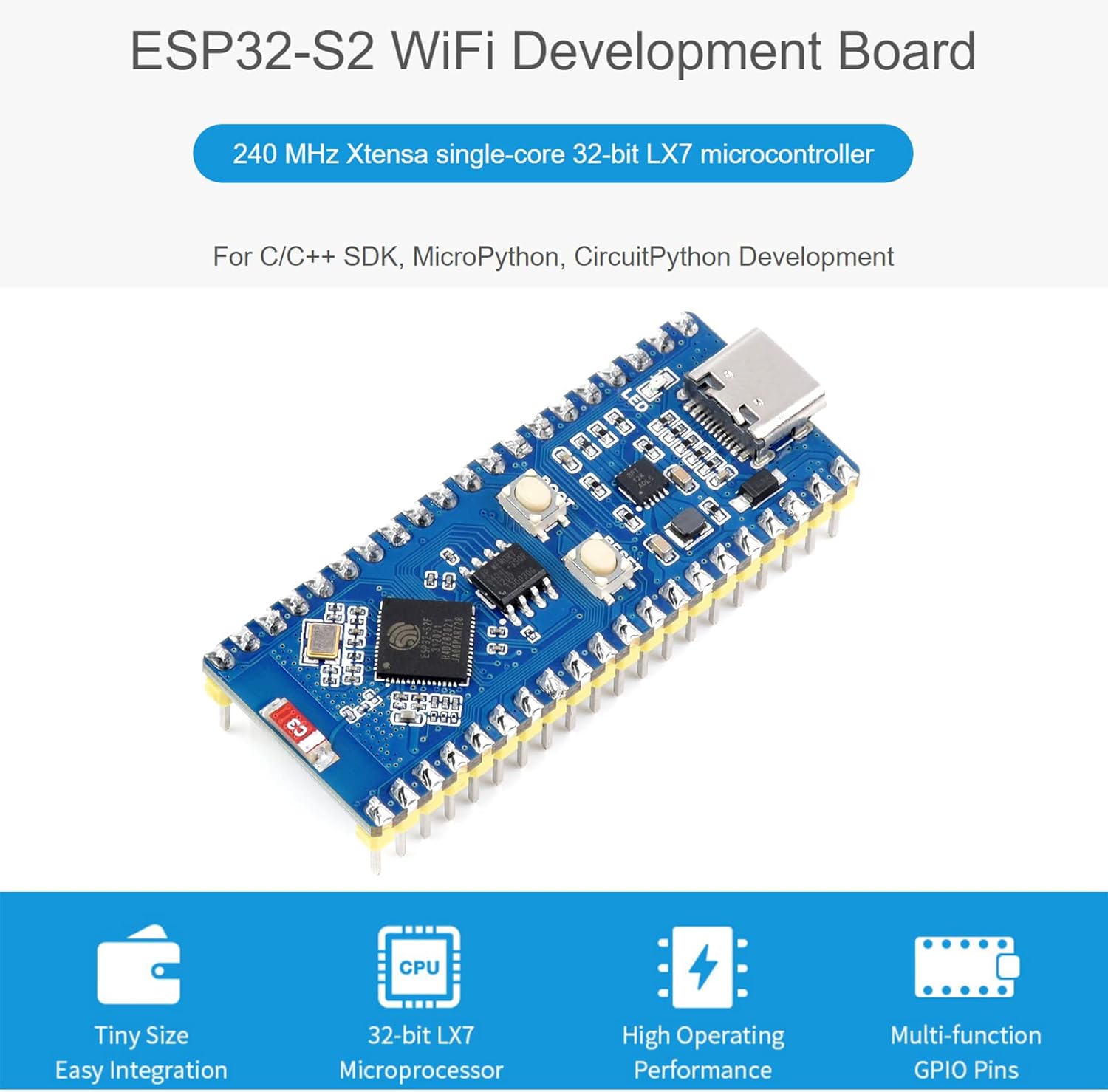
Şəkil: Bitdiview of the ESP32-S2 WiFi Development Board highlighting its core features.
- 2.4 GHz WiFi Development Board: Supports Raspberry Pi Pico expansion board ecosystem for IoT application development.
- Mikroprosessor: Based on single-core 32-bit LX7 microprocessor ESP32-S2FH4, with a clock frequency up to 240 MHz.
- Yaddaş: Integrated 320KB SRAM, 128KB ROM, 8MB PSRAM, and 4MB Flash memory.
- Simsiz əlaqə: Supports IEEE802.11 b/g/n with an on-board 2.4 GHz WiFi ceramic antenna, offering up to 150 Mbps data transfer rate.
- USB-C bağlayıcı: Features a USB-C connector for convenient connection and on-chip integrated full-speed USB OTG interface.
- Periferik qurğular: Includes LCD interface (8-bit serial RGB/8080/6800), TWAI controller (ISO11898-1 compatible), capacitive sensor GPIO, temperature sensor, and RMT (TX/RX).
- İnkişaf Dəstəyi: Compatible with C/C++, MicroPython, and CircuitPython, with comprehensive SDK and development resources.
- Kompakt dizayn: Small form factor with castellated module for direct soldering to user-designed carrier boards.
3. Avadanlıq bitdiview
This section details the main components and their functions on the ESP32-S2 Standard Version development board.
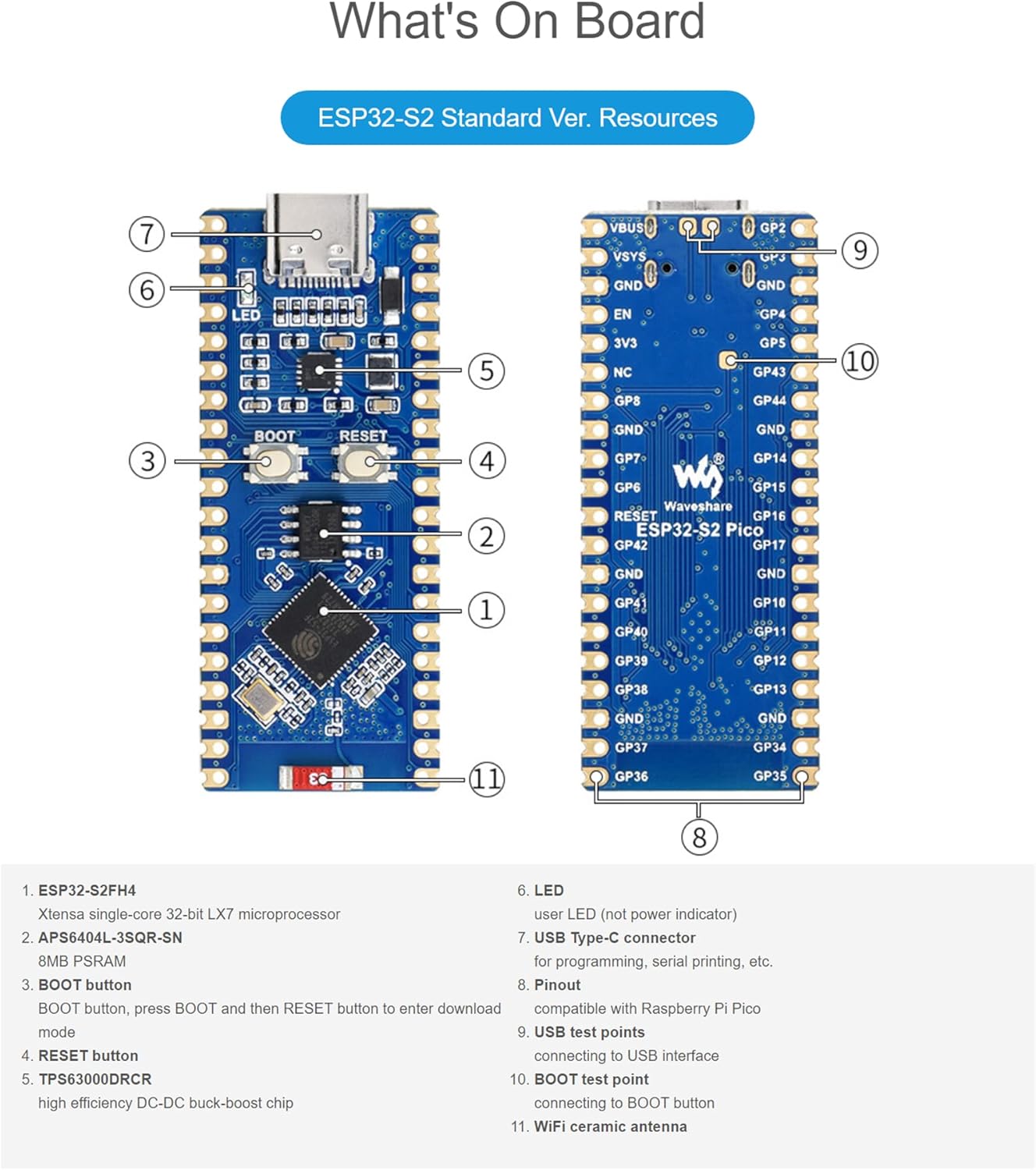
Image: Labeled diagram of the ESP32-S2 Standard Version board components.
- ESP32-S2FH4: Xtensa single-core 32-bit LX7 microprocessor.
- APS6404L-3SQR-SN: 8MB PSRAM.
- BOOT düyməsi: Button to enter download mode (press BOOT, then RESET).
- RESET düyməsi: Lövhəni sıfırlayır.
- TPS63000DRCR: High efficiency DC-DC buck-boost chip.
- LED: User LED (not power indicator).
- USB Type-C konnektoru: For programming, serial printing, etc.
- Pinout: Compatible with Raspberry Pi Pico.
- USB test points: For connecting to USB interface.
- BOOT test point: For connecting to BOOT button.
- WiFi ceramic antenna: On-board antenna for wireless communication.
4. Pinout diaqramı
The ESP32-S2 development board features configurable pin functions, allowing flexible development and integration. Below are the pinout diagrams for the Standard Version and LCD Version.

Image: Pinout diagrams for the ESP32-S2 Standard Version and ESP32-S2 LCD Version, indicating various pin functions.
The pinout includes various interfaces such as Power, Ground, UART, GPIO, ADC, SPI, System Control, and I2C. Refer to the diagram for specific pin assignments and functions.
5. Texniki spesifikasiyalar
| Xüsusiyyət | Spesifikasiya |
|---|---|
| Mikroprosessor | ESP32-S2FH4 (Single-core 32-bit LX7) |
| Saat tezliyi | 240 MHz-ə qədər |
| SRAM | 320KB |
| ROM | 128KB |
| PSRAM | 8MB |
| Flash Yaddaş | 4MB |
| Simsiz standart | IEEE802.11 b/g/n (2.4 GHz) |
| Məlumat ötürmə dərəcəsi | 150 Mbps-ə qədər |
| Bağlantı İnterfeysi | USB Type-C (OTG), GPIO, UART, SPI, I2C, ADC, LCD, TWAI |
| Ölçülər | 3.5 x 2.05 x 0.87 düym (Paket) |
| Maddə Çəkisi | 0.493 unsiya |
| İstehsalçı | Waveshare |
6. Quraşdırma Təlimatları
To begin using your Waveshare ESP32-S2 development board, follow these basic setup steps:
- Enerji təchizatı: Connect the board to a computer or a suitable 5V power adapter using a USB Type-C cable. The board will draw power through the USB connection.
- Sürücünün quraşdırılması: Depending on your operating system, you may need to install USB-to-serial drivers (e.g., CP210x or CH340 drivers) if the board is not recognized automatically. Refer to the official ESP-IDF documentation or Waveshare's product page for specific driver links.
- İnkişaf mühiti: Install the necessary development tools. The ESP32-S2 supports the Espressif IoT Development Framework (ESP-IDF), Arduino IDE with ESP32 core, MicroPython, or CircuitPython. Choose the environment that best suits your project requirements.
- İlk Proqram: Once the development environment is set up, you can upload your first program (e.g., a "blink" example) to verify the board's functionality. Use the USB Type-C connection for programming.
7. İdarə Heyətinin İdarə Edilməsi
The ESP32-S2 board is designed for flexible operation across various programming paradigms.
- Proqramlaşdırma Dilləri: Develop applications using C/C++, MicroPython, or CircuitPython.
- SDKs: Utilize the comprehensive SDKs provided by Espressif or community-driven libraries for specific functionalities.
- GPIO Control: Access and control the various General Purpose Input/Output (GPIO) pins for connecting sensors, actuators, and other peripherals. Refer to the pinout diagram for available pins.
- WiFi Bağlantısı: Implement Wi-Fi functionalities to connect to local networks, cloud services, or create access points for IoT applications.
- USB OTG: Leverage the USB On-The-Go (OTG) interface for advanced USB functionalities, such as acting as a USB host or device.
Detailed programming guides and examples are available on the Waveshare wiki and Espressif documentation websaytlar.
8. Baxım və qulluq
Proper care ensures the longevity and reliable operation of your development board:
- İdarəetmə: Handle the board by its edges to avoid touching components, especially the pins, which can be sensitive to static electricity.
- Yaddaş: Store the board in an anti-static bag when not in use, in a cool, dry environment away from direct sunlight and extreme temperatures.
- Təmizləmə: Lazım gələrsə, lövhəni yumşaq, quru fırça və ya sıxılmış hava ilə yumşaq bir şəkildə təmizləyin. Maye və ya aşındırıcı materiallardan istifadə etməkdən çəkinin.
- Enerji təchizatı: Always use a stable and appropriate 5V power supply. Over-voltage lövhəyə zərər verə bilər.
- Firmware Güncellemeleri: Regularly check for and apply firmware updates for the ESP32-S2 chip and your chosen development environment to benefit from bug fixes and new features.
9. Giderme
If you encounter issues with your ESP32-S2 development board, consider the following common troubleshooting steps:
- Lövhə aşkarlanmadı:
- Ensure the USB Type-C cable is securely connected to both the board and your computer.
- Verify that the correct USB-to-serial drivers are installed on your computer.
- Fərqli USB portu və ya kabeli sınayın.
- Failed to Upload Program:
- Check that the correct board and COM port are selected in your development environment.
- Ensure the board is in download mode. For the ESP32-S2, this typically involves pressing and holding the BOOT button, then pressing and releasing the RESET button, and finally releasing the BOOT button.
- Verify your code for syntax errors or compilation issues.
- WiFi Bağlantı Problemləri:
- Double-check your Wi-Fi credentials (SSID and password).
- Ensure the board is within range of the Wi-Fi access point.
- Verify that the Wi-Fi antenna is not obstructed or damaged.
- Gözlənilməz Davranış:
- Review məntiqi səhvlər üçün kodunuz.
- Enerji təchizatının sabitliyini yoxlayın.
- Consult online forums and the Waveshare/Espressif community for similar issues and solutions.
10. Zəmanət və Dəstək
Specific warranty details for the Waveshare ESP32-S2 MCU WiFi Development Board are not provided within this manual. For warranty information, technical support, and additional resources, please refer to the official Waveshare website or contact their customer service directly. Online documentation, forums, and community support are also valuable resources for development assistance.
Waveshare Rəsmi Websayt: www.waveshare.com


