DAREU EK807G

DAREU EK807G Wireless TKL Mechanical Keyboard User Manual

Model: EK807G | Brand: DAREU

1. Giriş

This manual provides comprehensive instructions for the DAREU EK807G Wireless TKL Mechanical Keyboard. Designed for office use, this keyboard features an aluminum alloy panel, function keys, and stable 2.4G wireless connectivity, compatible with PC, Mac, and Windows systems. Please read this manual thoroughly to ensure proper use and longevity of your device.

Qutuda nə var

  • DAREU EK807G Wireless TKL Mechanical Keyboard
  • USB Receiver (2.4G)
  • Düymə qapağı çəkicisi
  • İstifadəçi təlimatı
DAREU EK807G Wireless TKL Mechanical Keyboard on a desk setup

Image 1.1: The DAREU EK807G Wireless TKL Mechanical Keyboard in a typical office setup.

2. Quraşdırma

2.1 Inserting Batteries and USB Receiver

The DAREU EK807G keyboard requires two AAA batteries (not included) for operation. The 2.4G USB receiver is conveniently stored within the keyboard's battery compartment.

  1. Locate the battery compartment cover on the underside of the keyboard.
  2. Remove the cover to access the battery slots and the stored USB receiver.
  3. Carefully remove the 2.4G USB receiver from its storage slot.
  4. Insert two AAA batteries into the compartment, ensuring correct polarity (+/-).
  5. Batareya bölməsinin qapağını dəyişdirin.
Underside of DAREU EK807G keyboard showing battery compartment and USB receiver

Image 2.1: The battery compartment and USB receiver storage on the keyboard's underside.

2.2 Cihazınıza Qoşulur

The keyboard uses a 2.4G wireless connection for stable and reliable performance.

  1. Plug the 2.4G USB receiver into an available USB port on your computer, laptop, or tablet.
  2. Locate the ON/OFF switch on the upper side of the keyboard.
  3. Düyməni "ON" vəziyyətinə sürüşdürün.
  4. Your device should automatically detect and connect to the keyboard. No additional drivers are typically required.
DAREU EK807G keyboard overview with 2.4G wireless icon

Image 2.2: The keyboard features 2.4G wireless connectivity.

3. Əməliyyat Təlimatları

3.1 Basic Typing and Ergonomics

The DAREU EK807G features a classic TKL (Tenkeyless) 87-key layout, providing a comfortable typing experience. The keyboard is designed with an ergonomic 5° optimum slope when the folding holder is used, preventing wrist strain during long typing sessions. Anti-slide pads ensure stability.

This model is equipped with DAREU Red Switches, known for their linear and quiet operation, making them suitable for office and study environments where minimal noise is preferred.
Close-up of DAREU Red Switches on the keyboard

Image 3.1: The DAREU EK807G features quiet Red Switches for comfortable typing.

3.2 Function (Fn) Key Shortcuts

The keyboard includes 12 hotkeys accessible via the Fn key, allowing for quick access to various functions.

  • Fn+F1: Mənim Kompüterim
  • Fn+F2: Əsas səhifə
  • Fn+F3: E-poçt
  • Fn+F4: Kalkulyator
  • Fn+F5: Dayandır (Media)
  • Fn+F6: Last Song (Media)
  • Fn+F7: Play/Pause (Media)
  • Fn+F8: Next Song (Media)
  • Fn+F9: Səsi azaldın
  • Fn+F10: Səs artır
  • Fn+F11: Səssiz
  • Fn+F12: Switch Left Win & Left Alt keys
Diagram showing Fn key combinations for shortcuts

Image 3.2: Shortcut keys activated by pressing the Fn key in combination with F1-F12.

3.3 Anti-Ghosting Technology

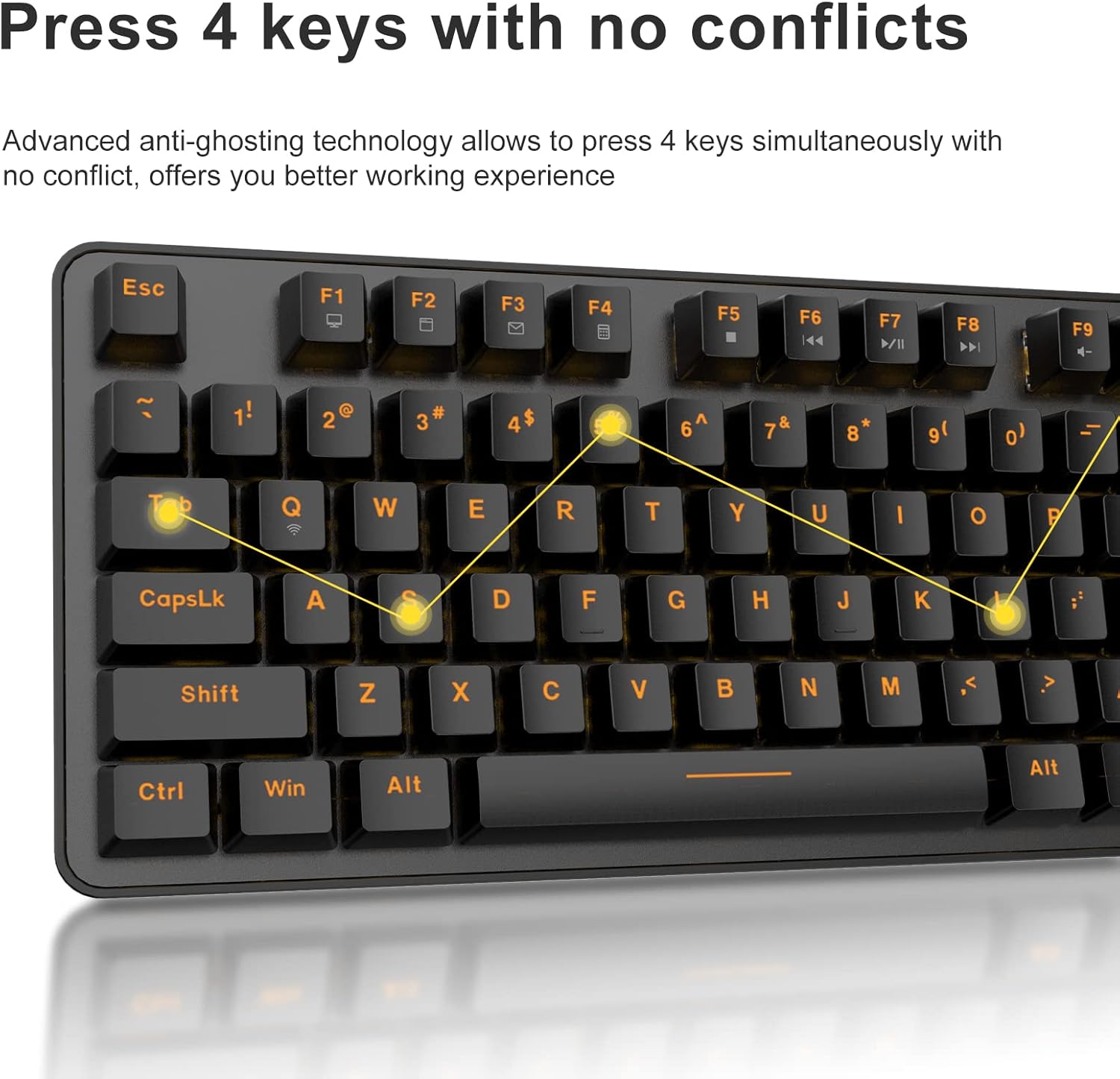
The DAREU EK807G features advanced anti-ghosting technology, allowing up to 6 keys to be pressed simultaneously without conflict. This ensures all your commands are registered accurately, improving efficiency.

Diagram illustrating anti-ghosting technology on the keyboard

Image 3.3: Anti-ghosting technology ensures multiple key presses are registered accurately.

3.4 Automatic Power Saving

To conserve battery life, the keyboard enters an automatic sleeping mode after 6 seconds of inactivity. To wake the keyboard, simply press any key. With this feature, the keyboard can last approximately 90 days of continuous use, and up to half a year between battery changes.

Image depicting long battery life and automatic sleep mode

Image 3.4: The keyboard features automatic power saving for extended battery life.

4. Baxım

4.1 Klaviaturanın təmizlənməsi

Daimi təmizləmə klaviaturanın işini və görünüşünü qorumağa kömək edir.

  • Ümumi təmizləmə: Use a soft, dry cloth to wipe the surface of the keyboard. For stubborn dirt, a slightly damp Klaviaturaya mayenin daxil olmaması üçün yumşaq sabunlu parça istifadə oluna bilər.
  • Klaviaturanın təmizlənməsi: The DAREU EK807G features removable double-shot keycaps, which are resistant to fading and easy to clean. Use the included keycap puller to carefully remove keycaps. Clean them with a soft brush or a damp Parça. Açar qapaqlarını yenidən taxmazdan əvvəl tamamilə quru olduğundan əmin olun.
  • Aluminum Alloy Panel: The aluminum alloy panel is designed to be sweat-resistant and anti-rust. Wipe it with a soft cloth to keep it clean.

5. Giderme

5.1 Bağlantı problemləri

  • Klaviatura cavab vermir:
    • Ensure the keyboard's ON/OFF switch is in the "ON" position.
    • Check if the AAA batteries are correctly inserted and have sufficient charge. Replace if necessary.
    • Verify that the 2.4G USB receiver is securely plugged into a working USB port on your device. Try a different USB port.
    • Kompüterinizi və ya cihazınızı yenidən başladın.
  • Fasiləli əlaqə:
    • Ensure the keyboard is within the operating distance of 33 feet (10m) from the USB receiver.
    • Avoid placing the keyboard near strong electromagnetic interference sources (e.g., Wi-Fi routers, other wireless devices).

5.2 Əsas Funksional Problemlər

  • Açarların qeydiyyatı və ya görüntüləməsi yoxdur:
    • While the keyboard has anti-ghosting for up to 6 keys, excessive simultaneous presses beyond this limit may not register.
    • Ensure keycaps are properly seated. If a key feels stuck, gently remove the keycap with the puller and reattach it.
    • Clean any debris under the keycaps (refer to Maintenance section).
  • Fn key shortcuts not working:
    • Ensure you are pressing the Fn key simultaneously with the desired F-key.
    • If Fn + F12 (Switch L-Win & L-Alt) was accidentally activated, press it again to revert the key functions.

6. Spesifikasiyalar

BrendDAREU
Model nömrəsiEK807G
Klaviatura TəsviriMechanical (Red Switch)
Bağlantı texnologiyası2.4G Simsiz
Əməliyyat məsafəsi33 fut (10 m) qədər
Uyğun CihazlarLaptop, PC, Tablet (Mac, Windows, Chromebook)
Güc mənbəyi2 x AAA Batareya (Daxil deyil)
MaterialAluminum Alloy Panel
Məhsul Ölçüləri14.17"U x 5.31"E x 1.57"Y (36.0 x 13.5 x 4.0 sm)
Maddə Çəkisi1.65 funt (0.75 kq)
Xüsusi XüsusiyyətlərErgonomic design, Hotkeys, Multimedia Keys, Anti-ghosting, Removable Double-shot Keycaps

7. Zəmanət və Dəstək

7.1 Zəmanət xidməti

DAREU provides a 180-day warranty service for the EK807G Wireless TKL Mechanical Keyboard from the date of purchase. This warranty covers manufacturing defects and issues arising from normal use.

7.2 Müştəri dəstəyi

If you encounter any problems during the use of your DAREU keyboard, please contact DAREU customer support. Our team is available to assist you with troubleshooting, product inquiries, and warranty claims.

Please refer to the contact information provided on the product packaging or the official DAREU webən müasir dəstək kanalları üçün sayt.

Əlaqədar Sənədlər - EK807G

Preview Dareu EK807G klaviatura istifadəçi təlimatı
Dareu EK807G klaviaturası üçün istifadəçi təlimatı, məhsulun təfərrüatları views, quraşdırma təlimatları, əsas qısa yollar, spesifikasiyalar və FCC uyğunluğu məlumatı.
Preview Dareu Z82 Mexanik Klaviatura İstifadəçi Təlimatı və Bələdçisi
Dareu Z82 mexaniki klaviaturası üçün ətraflı istifadəçi təlimatı, təfərrüatlı quraşdırma, qoşulma seçimləri (2.4G, Bluetooth, simli), sürücünün quraşdırılması və optimal performans üçün əsas funksiyalar.
Preview DAREU EK75 Klaviatura İstifadəçi Təlimatı - Xüsusiyyətlər və Texniki Xüsusiyyətlər
DAREU EK75 klaviaturası üçün istifadəçi təlimatı, onun "Qutuda nə var" məzmununu, fiziki və elektrik xüsusiyyətlərini, məhsulunu əhatə edir views, və kombinasiyalı funksiya düymələri və xüsusi arxa işıq parametrlərinin ətraflı izahı.
Preview DAREU A87 Seriyası Mexaniki Klaviatura İstifadəçi Təlimatı
DAREU A87 Seriyası mexaniki klaviatura üçün istifadəçi təlimatı, əsas məlumatları, məhsul re-ni əhatə edirview, işıqlandırma rejimləri, quraşdırma, quraşdırma və sürücü istifadəsi.
Preview DAREU A87 Üç Rejimli Mexaniki Klaviatura İstifadəçi Təlimatı
DAREU A87 Üç Rejimli Mexaniki Klaviatura üçün quraşdırma, qoşulma üsulları, xüsusiyyətləri və açarın dəyişdirilməsini əhatə edən ətraflı təlimat. Zəmanət məlumatlarını ehtiva edir.
Preview Dareu H101X Bluetooth Simsiz Gamepad İstifadəçi Təlimatı
PC, Switch, iOS, Mac və Android cihazlarında qoşulma, funksiyalar və quraşdırma üçün hərtərəfli təlimatları təqdim edən Dareu H101X Bluetooth Wireless Gamepad istifadəçi təlimatını kəşf edin. Optimallaşdırılmış oyun təcrübəsi üçün onun 6 oxlu giroskop, Turbo funksiyası və Xinput/Dinput rejimləri haqqında məlumat əldə edin.