1. Giriş
This manual provides comprehensive instructions for the setup, operation, and maintenance of your Cherry MW 9100 Wireless Rechargeable Mouse. The MW 9100 is a compact, versatile mouse offering dual connectivity options (Bluetooth or 2.4 GHz USB receiver) and a convenient rechargeable battery.
Əsas xüsusiyyətlərə aşağıdakılar daxildir:
- Compact design with charging functionality.
- Flexible operation: use while charging via USB-C cable.
- Dual connectivity: Bluetooth or 2.4 GHz USB receiver.
- Magnetic storage for the USB receiver, ideal for travel.
- Adjustable DPI settings for varied usage.
2. Paketin məzmunu
Bütün əşyaların paketdə olduğunu yoxlayın:
- Cherry MW 9100 Wireless Rechargeable Mouse
- USB-C şarj kabeli
- 2.4 GHz USB Qəbuledici
- Qoruyucu çanta
- Təlimat kitabçası (bu sənəd)
3. Quraşdırma
3.1 Siçanın doldurulması
The Cherry MW 9100 mouse features a built-in rechargeable battery. Before initial use, or when the battery is low, connect the included USB-C cable to the mouse and to a USB power source (e.g., computer USB port, USB wall adapter). The mouse can be used normally while charging.

Şəkil 3.1: Üst view of the Cherry MW 9100 mouse, showing the charging indicator light.
3.2 Siçanın qoşulması
The MW 9100 offers two connection methods: 2.4 GHz wireless via USB receiver or Bluetooth.
3.2.1 2.4 GHz Simsiz Bağlantı
- Locate the USB receiver. It is magnetically stored in a compartment on the underside of the mouse.
- USB qəbuledicisini kompüterinizdə mövcud olan USB portuna daxil edin.
- On the underside of the mouse, slide the switch to the "RF" position.
- Siçan avtomatik olaraq kompüterinizə qoşulmalıdır.
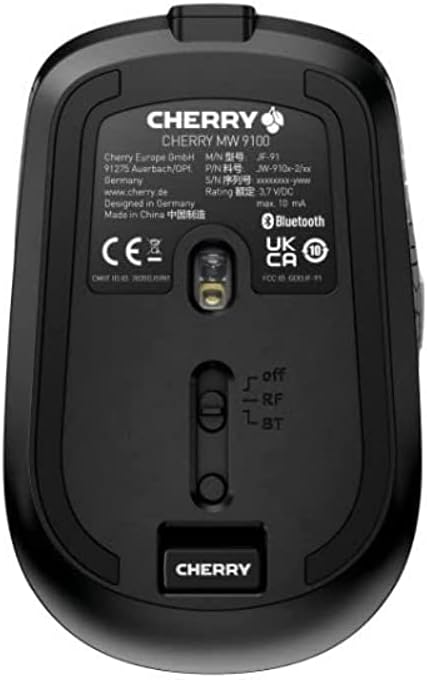
Şəkil 3.2: Underside of the Cherry MW 9100 mouse, highlighting the USB receiver storage and the connection mode switch.
3.2.2 Bluetooth bağlantısı
- On the underside of the mouse, slide the switch to the "BT" (Bluetooth) position.
- Press and hold the small pairing button located near the connection switch on the underside of the mouse until the LED indicator on the mouse starts blinking, indicating pairing mode.
- Kompüterinizdə və ya cihazınızda Bluetooth parametrlərini açın və yeni cihazlar axtarın.
- Select "Cherry MW 9100" from the list of available devices to complete the pairing process.
4. Əməliyyat Təlimatları
4.1 Əsas funksiyalar
The Cherry MW 9100 mouse features standard left and right click buttons, a scroll wheel (which also functions as a middle click button), and two side buttons for navigation (typically forward/back).
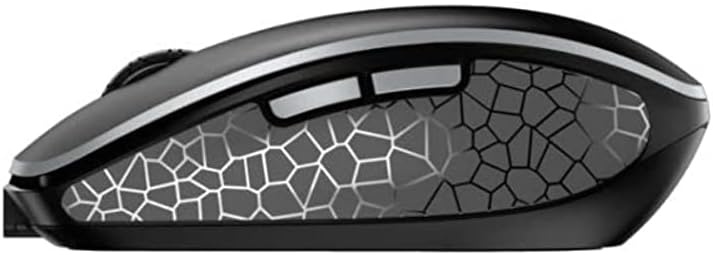
Şəkil 4.1: Yan view of the Cherry MW 9100 mouse, illustrating the ergonomic design and side buttons.
4.2 DPI Tənzimlənməsi
The mouse includes a DPI (Dots Per Inch) button, usually located near the scroll wheel, allowing you to adjust the cursor sensitivity. Press this button to cycle through different DPI settings to match your preference or task requirements.

Şəkil 4.2: A hand demonstrating the comfortable grip on the Cherry MW 9100 mouse during use.
5. Baxım
To ensure optimal performance and longevity of your Cherry MW 9100 mouse:
- Təmizləmə: Siçan səthini təmizləmək üçün yumşaq, quru bir parça istifadə edin. İnadkar çirk üçün bir az təmizləyin.amp cloth can be used, but ensure no moisture enters the device. Avoid harsh chemicals or abrasive materials.
- Yaddaş: When not in use, especially during travel, store the mouse in the provided protective pouch to prevent scratches and damage.
- Batareyaya qulluq: Avoid fully discharging the battery frequently. Recharge the mouse when the low battery indicator appears.
6. Giderme
| Problem | Mümkün Səbəb | Həll |
|---|---|---|
| Siçan cavab vermir | Low battery, incorrect connection mode, USB receiver not connected, Bluetooth not paired. |
|
| Intermittent connection (Bluetooth) | Interference, device driver issues, distance from device. |
|
| Kursor hərəkəti qeyri-sabit və ya yavaşdır | Dirty optical sensor, low battery, incorrect DPI setting. |
|
7. Spesifikasiyalar
| Xüsusiyyət | Detal |
|---|---|
| Brend | albalı |
| Model nömrəsi | JW-9100US-2 |
| Bağlantı texnologiyası | Bluetooth, 2.4 GHz USB Wireless |
| Hərəkat aşkarlanması | Optik |
| Xüsusi Xüsusiyyətlər | Lightweight, Portable, Rechargeable |
| Məhsul Ölçüləri | 4 x 3 x 2 düym |
| Maddə Çəkisi | 6.4 unsiya |
| Rəng | Qara |
8. Zəmanət və Dəstək
For warranty information and technical support, please refer to the official Cherry website or contact Cherry customer service directly. Keep your proof of purchase for warranty claims.
İstehsalçı: ALÇALI
Websayt: www.cherry.de


