Giriş
This manual provides detailed instructions for the setup, operation, maintenance, and troubleshooting of your Zoom H4essential 4-Track Recorder and Ritz Gear Shotgun Microphone Kit. This kit is designed to deliver professional-grade audio for filmmakers, podcasters, musicians, journalists, and content creators.

The complete Zoom H4essential 4-Track Recorder and Ritz Gear Shotgun Microphone Kit.
Qutuda nə var
- Zoom H4n Pro recorder
- Ritz Gear 10.8″ shotgun microphone
- Zərbə montajı
- Ön şüşə
- XLR kabel
- Molded carrying case
Quraşdırma
Zoom H4essential Recorder Setup
- Batareyaları quraşdırın: Open the battery compartment on the back of the H4essential. Insert two AA batteries, ensuring correct polarity. The device can record for approximately 9 hours on a fresh set of batteries.
- MicroSD kartı daxil edin: Locate the MicroSD card slot on the side of the recorder. Insert a MicroSDXC card (up to 32 GB max) until it clicks into place.
- Güc Aktivdir: Ekran işıqlanana qədər güc düyməsini basıb saxlayın.
- Mikrofonları birləşdirin: The H4essential features built-in X/Y stereo microphones. For external microphones, use the two locking XLR/TRS combo jacks at the bottom. Connect your XLR or TRS cables here.
- Connect Headphones/Line Out: Use the 3.5mm line out jack for monitoring audio with headphones or connecting to other audio devices.
- USB Bağlantısı: For livestreaming or connecting to a Digital Audio Workstation (DAW) on a Mac/PC, use the USB-C port.

Ön view of the Zoom H4essential 4-Track Recorder, showing the display and control buttons.

Yan view of the Zoom H4essential, highlighting the line in/out and volume controls.
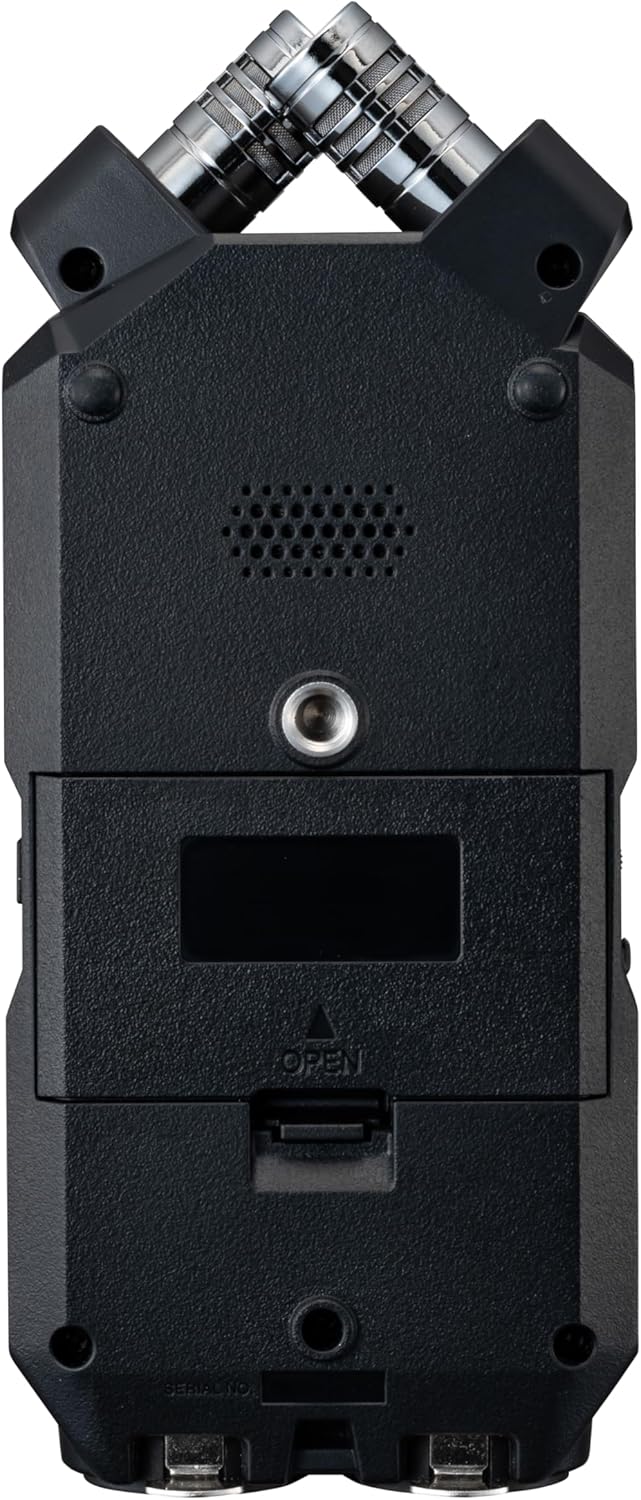
Geri view of the Zoom H4essential, showing the battery compartment and mounting screw.
Ritz Gear Shotgun Microphone Setup
- Batareyanı quraşdırın: Unscrew the base of the shotgun microphone. Insert one AA battery, observing the correct polarity. The microphone can operate for up to 26 hours on a single battery.
- Şok montajını əlavə edin: Secure the shotgun microphone into the provided shock mount. The shock mount helps to reduce handling noise.
- Connect to Recorder: Use the supplied XLR cable to connect the shotgun microphone to one of the XLR/TRS combo jacks on the Zoom H4essential.
- Ön şüşəni tətbiq edin: For outdoor recording or in windy conditions, place the foam or furry windscreen over the microphone to minimize wind noise.

The Ritz Gear Shotgun Microphone attached to its shock mount.

Close-up of the Ritz Gear Shotgun Microphone's battery compartment, showing AA battery insertion.

The shock mount for the Ritz Gear Shotgun Microphone allows for 180-degree smooth tilt adjustment.

Dimensions of the Ritz Gear Shotgun Microphone (10.8 inches long) and its foam windscreen (6.8 inches long).
Əməliyyat Təlimatları
Zoom H4essential Recorder Operation
- Naviqasiya: Use the directional buttons and the 'ENTER' button to navigate through the menus on the color LCD screen. The menu layout is designed for intuitive use.
- Qeyd rejimləri: Select your desired recording mode (Stereo, 4-Channel, or MTR multi-track) via the menu.
- S-ni tənzimləyinampdərəcəsi: In the 'Rec Settings' menu, you can adjust the sample rate up to 96 kHz for high-resolution audio capture.
- Pre-Record/Auto-Record: Enable these features in the recording settings to ensure you capture audio even before pressing record or automatically start recording when a sound threshold is met.
- Phantom Güc: The XLR/TRS inputs automatically detect and provide 24V/48V phantom power as needed for condenser microphones.
- Monitorinq: Connect headphones to the LINE OUT jack and adjust the volume slider on the side to monitor your recording in real-time.
- Qeydə Başla/Dayandır: Press the large red 'REC' button to start recording. Press it again to stop.

The Ritz Gear Shotgun Microphone positioned for recording in a studio environment.
Ritz Gear Shotgun Microphone Operation
- Qütb nümunəsi: The microphone features a super-cardioid, unidirectional polar pattern, designed to focus on the sound source directly in front of it and reject off-axis noise.
- Rejim keçidi: Use the switch on the microphone body to select between 'Tele' (telephoto/long-distance pickup), 'Normal' (standard pickup), or 'Off'.
Baxım
- Təmizləmə: Use a soft, dry cloth to clean the exterior of both the recorder and microphone. Do not use liquid cleaners or solvents.
- Yaddaş: Store the kit in its molded carrying case in a cool, dry place away from direct sunlight and extreme temperatures.
- Batareyaya qulluq: Remove batteries from both devices if they will not be used for an extended period to prevent leakage.
- Mikrofona qulluq: Always use the provided windscreens to protect the microphone capsule from dust, moisture, and wind.
Problemlərin aradan qaldırılması
- Güc yoxdur: Ensure batteries are correctly inserted and charged, or connect the H4essential via USB power.
- Səs yazısı yoxdur: Check microphone connections, ensure input levels are not too low, and verify that the correct recording mode is selected. Confirm that the SD card has sufficient free space.
- Təhrif edilmiş səs: Reduce input gain levels. The H4essential is designed to handle high SPLs (up to 140 dB) without clipping, but external microphones may have different tolerances.
- Həddindən artıq səs-küy: Ensure all cables are securely connected. For the shotgun microphone, check battery level and ensure windscreens are properly fitted in windy conditions. Avoid handling the recorder excessively during recording if not using a shock mount or external handling solution.
- Cihaz Kompüter tərəfindən Tanınmır: Ensure the USB cable is properly connected and the H4essential is in USB interface mode. Try a different USB port or cable.
Spesifikasiyalar
| Xüsusiyyət | Spesifikasiya |
|---|---|
| Brend | Zoom |
| Model Adı | H4n Pro |
| Mikrofon Forma Faktoru | Shotgun (Ritz Gear) |
| Kanalların sayı | 4 |
| Frequency Response (Recorder) | Up to 96 kHz (24-bit) |
| Frequency Response (Shotgun Mic) | 100 Hz–16 kHz |
| Polar Pattern (Shotgun Mic) | Super Cardioid, Unidirectional |
| Güc mənbəyi | Battery Powered (2x AA for H4essential, 1x AA for Shotgun Mic) |
| Bağlantı texnologiyası | USB, XLR/TRS |
| Uyğun Cihazlar | Camera, Personal Computer |
| Maddə Çəkisi | 5.84 funt (Kit) |
| Ölçülər (Paket) | 18.5 x 16.5 x 5 düym |
| Shotgun Mic Length | 10.8 düym |
Zəmanət və Dəstək
For warranty information and technical support, please refer to the documentation included in your product packaging or visit the official Zoom and Ritz Gear websaytlar. Zəmanət tələbləri üçün alış-veriş sənədinizi saxlayın.


