1. Giriş
This manual provides detailed instructions for the installation, operation, maintenance, and troubleshooting of your Biorunn Android 9 Inch Car Stereo. This unit is specifically designed for Benz Smart 453 Fortwo vehicles manufactured between 2015 and 2020, for models olmadan a factory navigation screen. Please read this manual thoroughly before installation and use to ensure proper functionality and safety.
2. Quraşdırma və Quraşdırma
2.1. Uyğunluğun yoxlanılması
This unit is compatible with Benz Smart 453 Fortwo models from 2015-2020 that etmə have a factory navigation screen. If your vehicle is equipped with a factory navigation screen, please ensure you have selected the correct variant (typically designated as 'B' models).
2.2. Paketin məzmunu
Paketinizdə bütün komponentlərin mövcud olduğunu yoxlayın:
- Biorunn 9 Inch Android Head Unit
- Elektrik kabeli kəməri
- RCA Kabel Dəsti
- GPS antenası
- USB Kabellər (x2)
- Mikrofon (MIC)
- Reversing Camera Input Cable (Camera not included)
- CANbus Decoder Box (may include multiple types; use the one compatible with your vehicle)

This image illustrates the physical dimensions of the 9-inch head unit and the various cables and accessories typically included in the package, such as the power cable, RCA cables, GPS antenna, USB cables, and microphone.
2.3. Quraşdırma addımları
- Hazırlanması: Disconnect the vehicle's battery before beginning installation. Remove the original car stereo and trim panels carefully.
- Naqil Bağlantıları: Connect the main power harness, RCA cables, GPS antenna, USB cables, and microphone to the corresponding ports on the new head unit. Ensure all connections are secure.
- CANbus Decoder: Connect the appropriate CANbus decoder box to the vehicle's wiring harness. If multiple CANbus boxes are provided, identify and use the one that fits your vehicle's system (e.g., 'SimpleSoft' or 'Hiworld').
- JBL Stereo System (Specific Note): If your Smart Fortwo is equipped with a JBL stereo system and you experience no audio after installation, locate the pink wire from the car's harness. This wire needs to be manually spliced into the 'AMP CONTD' wire coming from the new stereo's harness to activate the ampömürlük.
- Sükan idarəediciləri: Ensure the steering wheel control wires are correctly connected. In some cases, a specific part of the harness may need to be looped back into itself for the controls to function. Refer to the wiring diagram provided with the unit or contact support if issues persist.
- Test uyğunluğu: Before fully securing the unit, connect the battery and perform a brief functional test to ensure the unit powers on, audio works, and basic functions are operational.
- Təhlükəsiz Vahid: Carefully install the head unit into the dashboard opening and reattach all trim panels.
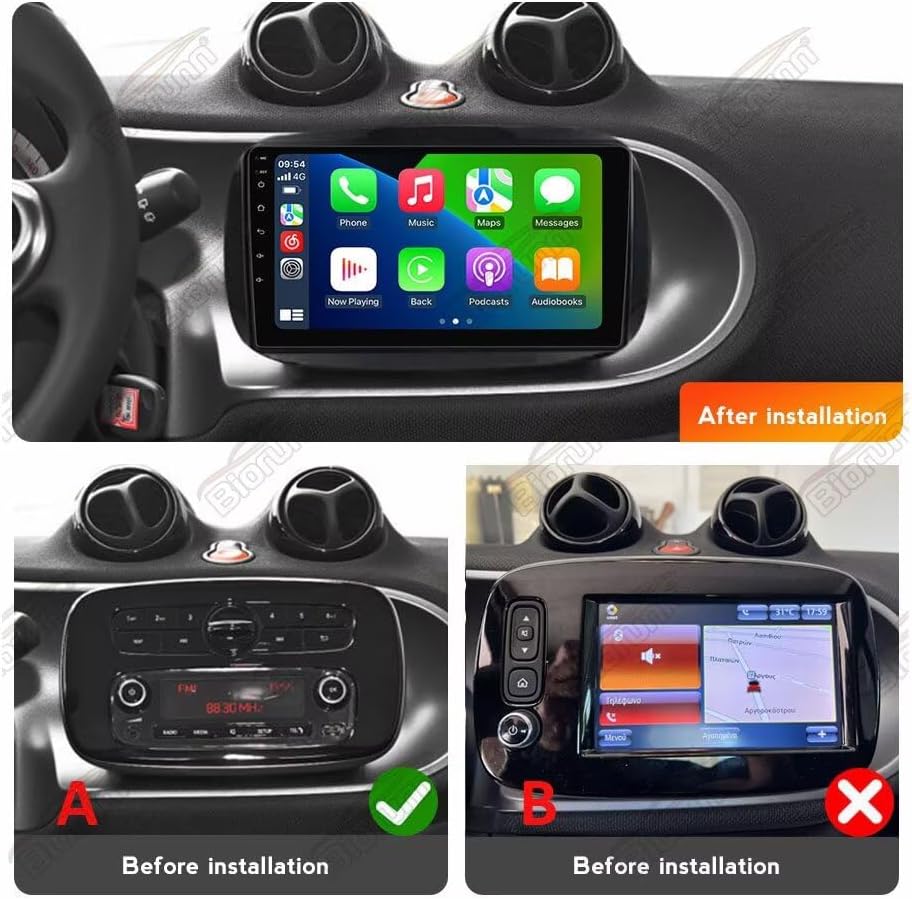
This image provides a visual guide, showing the original dashboard configurations (standard radio 'A' and factory navigation 'B') and the final appearance of the Biorunn Android stereo after successful installation.
3. Əməliyyat Təlimatları
3.1. Əsas əməliyyat
The Biorunn Android head unit features a 9-inch IPS touchscreen with a resolution of 1280x720 pixels. Navigate the interface by touching icons and swiping. The unit runs on an Android operating system, providing access to various applications and settings.
3.2. Wireless Car-Play and Android Auto
The unit supports both wireless and wired Car-Play (for iOS devices) and Android Auto (for Android devices), allowing seamless integration of your smartphone's features.

Qoşulmaq üçün:
- Enable Bluetooth on your smartphone and connect it to the head unit.
- On the head unit, open the application named "Car Link" (or similar).
- Wait for the connection to establish. You can also connect via a USB cable for a wired connection.
3.3. GPS Naviqasiyası
The unit includes a built-in global positioning system (GPS) with support for GPS, BDS, and GLONASS. It offers omni-directional map display and real-time traffic conditions. The system supports various navigation applications.
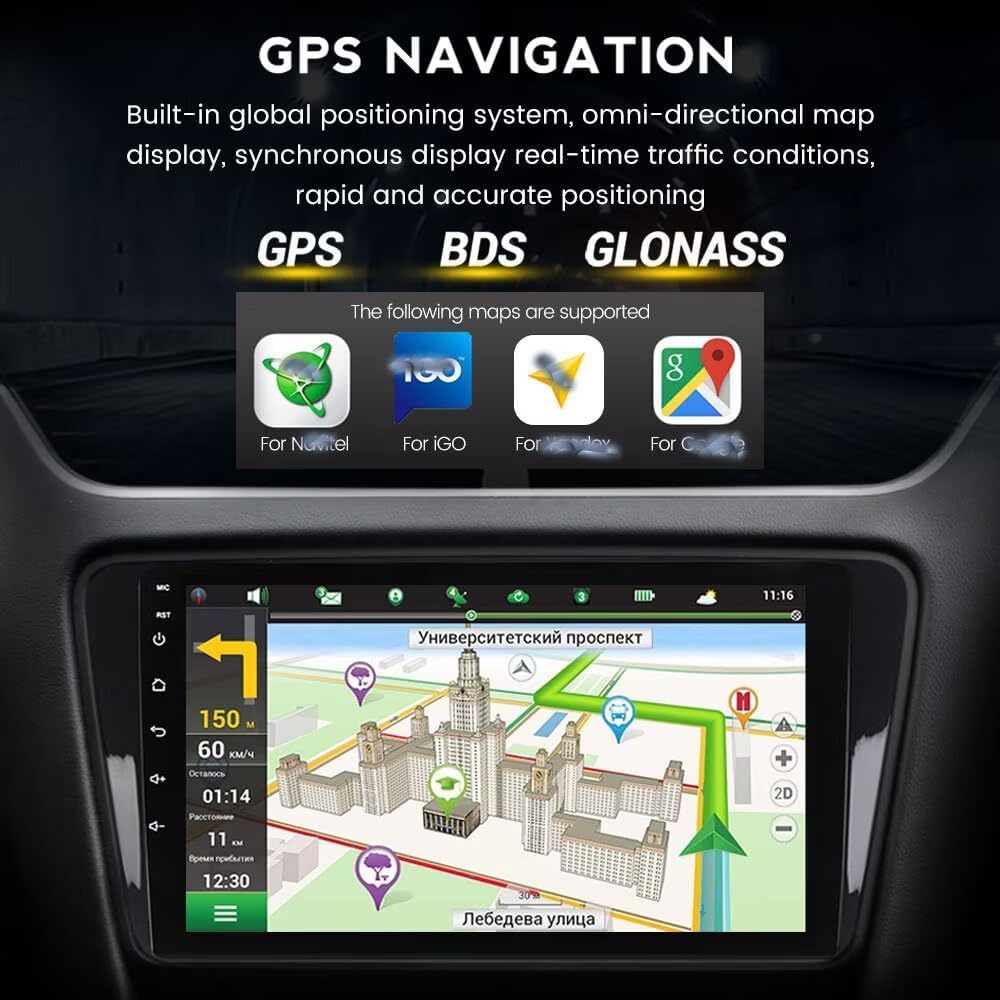
The image displays the navigation interface, highlighting supported map applications and real-time route information.
3.4. Bluetooth funksionallığı
Equipped with Bluetooth 5.0, the unit supports hands-free calling, phone book synchronization, and Bluetooth music streaming. This allows for safer communication and entertainment while driving.

This image illustrates the Bluetooth capabilities, including hands-free calling and contact management, emphasizing safe driving practices.
3.5. FM/AM RDS Radio
The built-in FM/AM RDS radio supports automatic and manual station searching. You can save your favorite stations for quick access.

The image displays the radio interface, showing frequency tuning and preset station management.
3.6. 5GHz WiFi Support
The unit supports 5GHz WiFi (802.11 b/g/n) for fast transmission, low latency, and wide coverage, ensuring a stable internet connection for online features and app downloads.

This image points out the 5GHz WiFi antenna and lists the advantages of its high-frequency support.
3.7. Əlavə Xüsusiyyətlər
- Ekranı bölün: Supports running two applications simultaneously on the screen.
- 4G LTE: Supports 4G LTE connectivity (requires a compatible USB dongle, not included).
- ADAS DVR: Supports Anti-collision warning driving recorder (DVR not included).
- OBD II: Supports OBD II diagnostic tools (OBD II not included).
- TPMS: Supports Tire Pressure Monitoring System (TPMS not included).
- Multimedia Oynatma: Supports various audio (MP3, WMA, AAC, RM, FALC) and video (MPEG-1/2/4, H264, H263, VC1, RV, RMVB, DivX, Sorenson SparK, Spark, VP8, AVS Stream) formats.
- Çoxdilli Dəstək: Includes English, German, French, Spanish, Italian, Portuguese, Russian, Dutch, Polish, Japanese, Simplified & Traditional Chinese, Arabic, etc.
4. Baxım
4.1. Ümumi Baxım
- Clean the screen with a soft, lint-free cloth. Avoid abrasive cleaners or solvents.
- Cihazı tozdan və nəmdən təmizləyin.
- Cihazı həddindən artıq temperaturlara məruz qoymaqdan çəkinin.
4.2. Soyutma sistemi
The head unit is equipped with a powerful cooling fan to manage heat generated during long-term operation or in high-temperature environments. This fan helps maintain stable performance and prolong the unit's lifespan.
This image highlights the integrated cooling fan on the rear of the unit, designed for thermal management.
5. Giderme
If you encounter issues, please refer to the following common solutions before contacting support.
| Problem | Mümkün səbəb/həlli |
|---|---|
| Güc yoxdur | Check all power cable connections. Ensure the vehicle's battery is connected and charged. Check relevant fuses. |
| No Sound (JBL System) | The pink wire from the car's harness may need to be spliced into the 'AMP CONTD' wire from the stereo's harness. |
| Sükan idarəetmələri işləmir | Verify CANbus decoder connection. Ensure the steering wheel control wires are correctly connected; some harnesses require a specific loop-back connection. |
| Unit Freezes or Malfunctions | Perform a factory reset through the system settings. Ensure all connections are snug. If the issue persists, contact support. |
| Wireless Car-Play/Android Auto Not Connecting | Ensure Bluetooth is enabled and paired. Confirm the 'Car Link' app is open on the head unit. Try connecting via USB cable. |
For persistent or complex issues, please refer to the support section.
6. Spesifikasiyalar
| Xüsusiyyət | Detal |
|---|---|
| Əməliyyat sistemi | Android |
| Əsas | 8 nüvəli |
| Ekran Ölçüsü | 9 düym |
| RAM | 8 GB |
| ROM | 128 GB |
| Qətnamə | 1280 x 720 (IPS Screen) |
| Bluetooth | Bluetooth 5.0 |
| DSP prosessoru | Daxili |
| Car-Play / Android Auto | Built-in (Wireless/Wired) |
| Ekranı bölün | Dəstəklənir |
| 4G LTE | Dəstəklənir |
| WiFi | 5GHz (802.11 b/g/n) |
| GPS | Built-in (GPS, BDS, GLONASS) |
| Radio | FM/AM RDS |
| Səs Çıxış Modu | Stereo |
| Montaj növü | Panel Mount or Dashboard Mount |
7. Zəmanət və Dəstək
7.1. Zəmanət Məlumatı
The Biorunn Android Car Stereo comes with a 1-year manufacturer's warranty, covering defects in materials and workmanship under normal use. Please retain your proof of purchase for warranty claims.
7.2. Müştəri dəstəyi
For technical assistance, installation queries, or troubleshooting beyond the scope of this manual, please contact Biorunn customer support. Support contact information is typically provided with your product packaging or can be found on the official Biorunn websayt və ya Amazon mağaza səhifəsi.
When contacting support, please have your product model number (A: No Factory Navi Screen 8-Core,8GB+128GB) and purchase details ready.
ziyarət edə bilərsiniz Biorunn Store on Amazon əlavə məlumat üçün.


