1. Giriş
This manual provides essential information for the proper installation, operation, and maintenance of your GreenTouch 13.3 Inch Industrial PCAP Touchscreen Monitor. Please read this manual thoroughly before using the product and retain it for future reference.
2. Təhlükəsizlik Məlumatı
- Ensure the monitor is placed on a stable surface or securely mounted to prevent accidental falls.
- Monitoru həddindən artıq temperatur, rütubət və ya birbaşa günəş işığına məruz qoymayın.
- Həddindən artıq istiləşmənin qarşısını almaq üçün ventilyasiya deliklərini bağlamaqdan çəkinin.
- Yalnız monitorla birlikdə verilən güc adapterindən istifadə edin.
- Disconnect the power cable from the outlet before cleaning or if the monitor will not be used for an extended period.
- Do not attempt to repair the monitor yourself. Refer all servicing to qualified personnel.
3. Məhsul bitdiview
The GreenTouch 13.3 Inch Industrial PCAP Touchscreen Monitor is designed for robust performance in various commercial and industrial environments, offering a responsive 10-point projected capacitive touch solution.
Əsas Xüsusiyyətlər
- TOUCH READY: Features (G+G) 10-point projected capacitive touch for optical clarity and touch durability.
- DAVAMLILIK: 3mm tempered cover glass provides front IK08 vandal-proof rating.
- Ətraf Mühitin Mühafizəsi: Sealed touch screen prevents dirt, dust, and liquid ingress, meeting front IP65 water-resistant requirements.
- VERSATILE INTERFACES: Equipped with HDMI, VGA, DVI, and Audio interfaces for diverse display applications.
- COMMERCIAL GRADE: Built for quality and reliability, designed for continuous operation.
- STABİLLİK: Undergoes rigorous reliability testing (over 20 tests) to deliver 50,000 MTBF (Mean Time Between Failures).
Dizayn və Davamlılıq

The monitor features front IP65 water resistance and IK08 anti-vandal protection, ensuring durability in demanding environments.

Industrial metal back shell with porous heat dissipation design ensures strong stability and effectively protects service life.
İnterfeyslər

Arxa view of the monitor displaying available input/output ports including Earphone, Audio In, VGA, DVI, HDMI, DC 12V In, OSD, and USB.

The monitor offers a variety of rich interfaces including HDMI, VGA, DVI, Audio In, and USB for broad compatibility.
Tətbiqlər
This industrial touchscreen monitor is suitable for a wide range of applications:
- Information Kiosks
- Game and Entertainment Systems
- Sənaye avtomatlaşdırılması
- Self-checking Services
- Point of Sale (POS) Systems

Examples of GreenTouch monitors used in diverse settings such as information kiosks, industrial control panels, and self-service stations.
This video illustrates the internal structure and various applications of the GreenTouch 2C series touchscreen monitor, showcasing its versatility in different industrial and commercial settings.
This video provides detailed insights into the GreenTouch Open Frame Touchscreen Monitor, highlighting its design, features, and potential uses in various environments.
This video offers a comprehensive overview of the GreenTouch Open Frame Touch Screen Monitor (2C series), demonstrating its functionality and robust build quality.
4. Paketin məzmunu
Zəhmət olmasa, bütün əşyaların mövcudluğundan və zədələnməməsindən əmin olmaq üçün paketin məzmununu yoxlayın:
- GreenTouch 13.3 Inch Industrial PCAP Touchscreen Monitor
- Güc adapteri
- Power Cord (US plug)
- VGA Kabel
- HDMI Kabel
- USB Cable (for touch functionality)
- RJ45 Cable (for OSD remote control)
- Montaj mötərizələri və vintlər
- OSD Remote Control
This video demonstrates the unboxing process of the GreenTouch 2C series Touchscreen Monitor, showing all included accessories and how they are packaged.
5. Quraşdırma
Montaj Seçimləri
The monitor supports both embedded and VESA mounting options.

The back of the monitor features standard VESA mounting holes (75mm x 75mm and 100mm x 100mm) for flexible installation.

This diagram illustrates both embedded installation using the side brackets and VESA installation with a compatible stand.
Monitorun qoşulması
- Enerji bağlantısı: Connect the power adapter to the DC 12V IN port on the monitor and then plug the power cord into a suitable electrical outlet.
- Video bağlantısı: Connect one end of the HDMI, VGA, or DVI cable to the corresponding port on the monitor and the other end to your computer or video source.
- Toxunma funksiyası: Connect the USB cable from the monitor's USB port to an available USB port on your computer. This enables the touch screen feature.
- Audio Bağlantı (İstəyə görə): If external speakers or headphones are desired, connect them to the AUDIO IN or EARPHONE jack.
- OSD Remote Control (Optional): Connect the RJ45 cable from the monitor's OSD port to the OSD remote control for external menu navigation.
6. Əməliyyat Təlimatları
Gücü yandırın/söndürün
- To power on the monitor, ensure all cables are connected and press the power button on the rear of the monitor or on the OSD remote control.
- Söndürmək üçün ekran sönənə qədər güc düyməsini basıb saxlayın.
Toxunma ekranı əməliyyatı
The monitor supports 10-point multi-touch. Ensure the USB cable is connected to your computer for touch functionality. No additional drivers are typically required for Windows operating systems.
- Klikləyin: Single touch for selection.
- Çək: Touch and slide your finger to move items or scroll.
- Pinch/Stretch: Use two fingers to zoom in or out.
OSD Menyu Naviqasiyası
The On-Screen Display (OSD) menu allows you to adjust various display settings. Access the OSD menu using the buttons on the rear of the monitor or the provided OSD remote control.
- Press the 'Menu' button to open the OSD menu.
- Seçimlər arasında getmək üçün ox düymələrindən istifadə edin.
- Press 'Enter' or 'OK' to select an option or confirm a setting.
- Press 'Exit' or 'Menu' again to close the OSD menu.
7. Baxım
- Ekranın təmizlənməsi: Ekranı yumşaq, tüysüz bir parça ilə yumşaq bir şəkildə silin. İnadkar izlər üçün dampParçanı yumşaq, aşındırıcı olmayan ekran təmizləyicisi ilə silin. Təmizləyicini birbaşa ekrana püskürtməyin.
- C-nin təmizlənməsiasing: Monitoru silmək üçün yumşaq, quru parça istifadə edin casing. Güclü yuyucu vasitələrdən və ya həlledicilərdən istifadə etməkdən çəkinin.
- Havalandırma: Ensure the ventilation holes are free from dust and debris to maintain proper airflow and prevent overheating.
- Kabel İdarəetmə: Keep cables tidy and untangled to prevent damage and ensure a safe setup.
8. Giderme
Monitorunuzla bağlı problemlərlə qarşılaşsanız, ümumi problemlər və həllər üçün aşağıdakı cədvələ baxın.
| Problem | Mümkün Səbəb | Həll |
|---|---|---|
| Ekranda şəkil yoxdur | Power cable disconnected; Video cable loose or incorrect input selected. | Check power and video cable connections. Ensure correct input source is selected via OSD menu. |
| Sensorlu ekran cavab vermir | USB cable disconnected; Driver issue. | Ensure USB cable is securely connected. Restart computer. Check device manager for touch screen drivers. |
| Şəkil pozulmuş və ya bulanıqdır | Yanlış qətnamə; Qüsurlu video kabel. | Adjust display resolution on your computer. Try a different video cable. |
| OSD menyusu görünmür | Buttons not functioning; OSD remote control issue. | Ensure buttons are pressed correctly. Check OSD remote control battery or connection. |
9. Spesifikasiyalar
Detailed technical specifications for the GreenTouch 13.3 Inch Industrial PCAP Touchscreen Monitor.
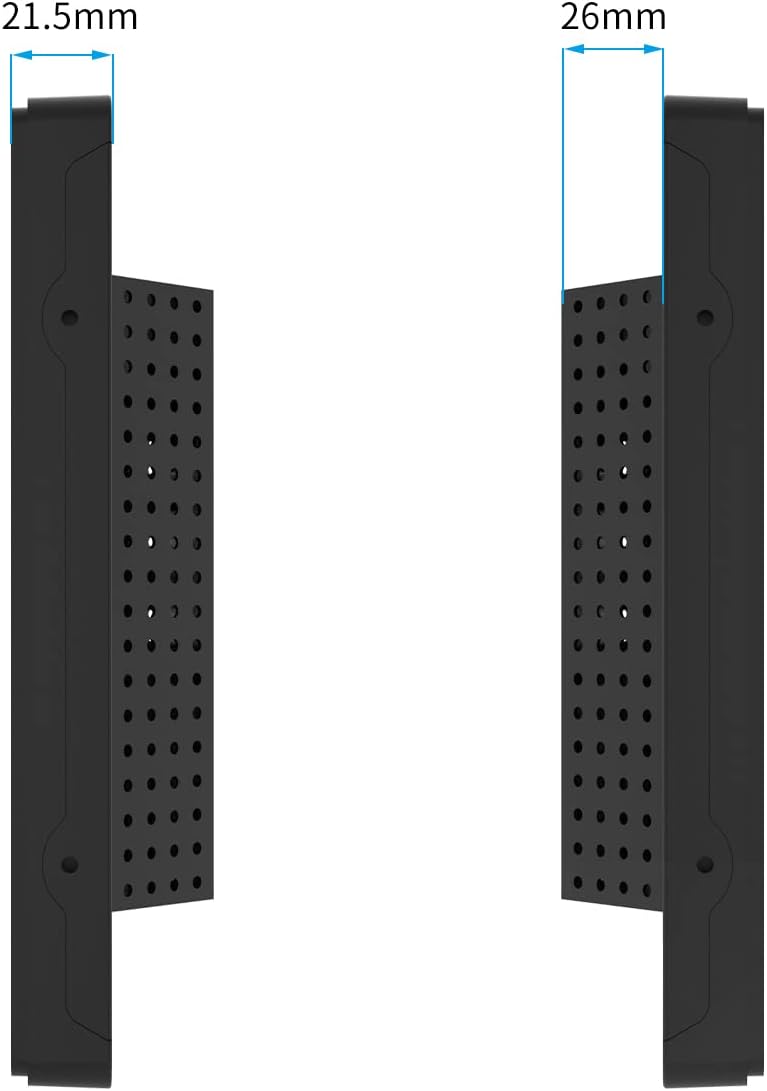
Yan view of the monitor illustrating its slim profile və ölçülər.

The monitor features an A+ Grade LCD Panel, ensuring high resolution, uniform brightness, high contrast, and rich color display.
| Xüsusiyyət | Təsvir |
|---|---|
| Məhsul Ölçüləri | 13.6 x 8.6 x 1.88 düym |
| Maddə Çəkisi | 6.6 funt sterlinq |
| İstehsalçı | GreenTouch |
| Element Model nömrəsi | GT-TM-1332C-CTW-HD |
| Daimi Ekran Görünüşü Ölçüsü | 13.3 düym |
| Aspekt nisbəti | 1.77:1 (16:9) |
| Cildtage | 12 Volt (DC) |
| Qətnamə | 1920 x 1080 (FHD 1080p) |
| Şəklin Parlaqlığı | 300cd/m² |
| Ekran Səthinin Təsviri | Parlaq |
| Toxunma Texnologiyası | Projected Capacitive (PCAP) 10-point touch |
| Ön Panel Mühafizəsi | IP65 Water-resistant, IK08 Vandal-proof |
10. Zəmanət və Dəstək
GreenTouch products are designed for reliability and performance. This monitor comes with a standard manufacturer's warranty. For specific warranty terms and conditions, please refer to the warranty card included in your package or visit the official GreenTouch websayt.
For technical support, troubleshooting assistance, or service inquiries, please contact GreenTouch customer service through the contact information provided on their official websayt və ya alış platformanız.


