Giriş
The TENVIS IP602W is a robust outdoor IP camera designed for reliable surveillance. It offers broad compatibility, supporting not only Windows OS but also Mac OS and other platforms accessible via an internet browser. Its design facilitates easy installation, allowing for wall mounting and wireless connectivity.
Equipped with a 1/4 CMOS image sensor and a 6mm lens, the IP602W delivers video at a maximum frame rate of 30 frames per second, with a resolution of up to 640 x 480 pixels. For low-light and nighttime environments, the camera features 30 infrared LEDs, providing high levels of invisible light for clear visibility. Mobile viewing is supported across multiple platforms via 3G networks, including iPhone, Android, Windows Mobile, and Java phones, enabling remote monitoring from any location with internet access.
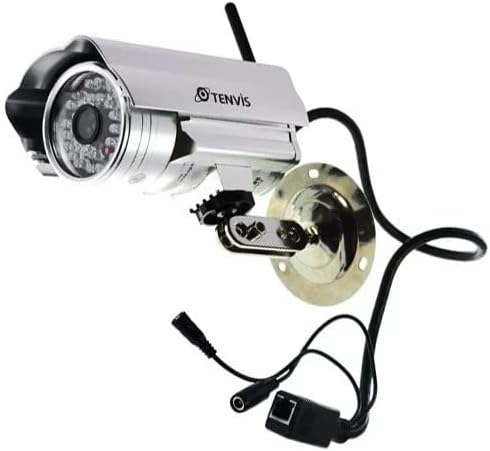
Image: The TENVIS IP602W Outdoor IP Camera, showcasing its durable build, integrated mounting bracket, and connectivity cables.
Qutuda nə var
Paketi açarkən, aşağıdakı bütün komponentlərin daxil olduğundan əmin olun:
- 1 x IP602W WiFi IP Camera
- 1 x Power Adaptor (AU Plug)
- 1 x WiFi antenna
- 1 x Quraşdırma Mötərizəsi
- 1 x CD (containing software/drivers)
- 1 x Screw Set for mounting
- 1 x İstifadəçi Təlimatı

Image: All components included in the TENVIS IP602W package, laid out for verification.
Məhsul Xüsusiyyətləri
The TENVIS IP602W camera is equipped with several key features to enhance its performance and usability:
- Night Version: Integrated infrared LEDs provide clear visibility in low-light and complete darkness.
- Simsiz Dəstək: Connects to your network via Wi-Fi for flexible placement.
- Metal and Waterproof Shell: Designed for outdoor use with a durable, weather-resistant casing.
- Hərəkət Təsbiti: Configurable motion detection alerts for security monitoring.
- Çarpaz Platforma Uyğunluğu: Dəstəkləyir viewing and control from various operating systems and browsers, including Windows, Mac OS, Firefox, Chrome, and Safari.
- Mobil View: Access live feeds and controls from mobile devices via 3G network, supporting iPhone, Android, Windows Mobile, and Java phones.

Image: Visual representation of the TENVIS IP602W camera, emphasizing its key features such as night vision and wireless capabilities.
Quraşdırma və Quraşdırma
Komponent İdentifikasiyası
Familiarize yourself with the camera's ports and components before installation:
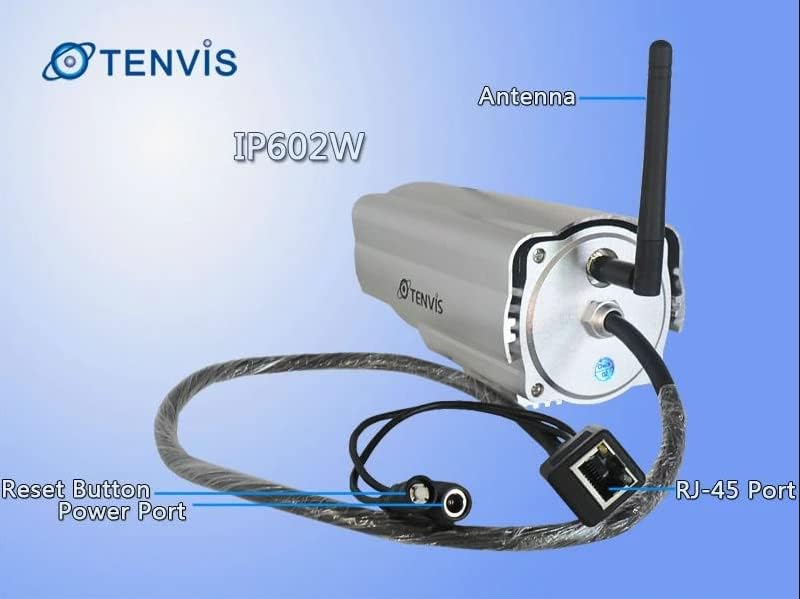
Şəkil: Ətraflı view of the TENVIS IP602W camera's rear, showing the antenna, RJ-45 Ethernet port, power input, and reset button.
- Antena: Simsiz şəbəkə bağlantısı üçün.
- RJ-45 Port: For wired Ethernet connection to your router.
- Güc Portu: Buraya daxil olan güc adapterini qoşun.
- Sıfırlama düyməsi: Zavod parametrlərini bərpa etmək üçün istifadə olunur.
Şəbəkə bağlantısı
The IP602W can connect to your network wirelessly or via an Ethernet cable. For initial setup, a wired connection is often recommended for stability.

Image: Network diagram showing how the IP602W camera connects to a router, allowing access from a LAN PC, Internet PC, and 3G phone.
- Connect the camera to your router using an Ethernet cable (if using wired setup).
- Enerji adapterini kameraya qoşun və onu elektrik rozetkasına qoşun.
- Allow the camera a few minutes to power on and initialize.
- Refer to the included CD or the TENVIS website for software installation and detailed network configuration instructions, especially for wireless setup.
Montaj
The camera comes with a mounting bracket for easy installation on a wall or other suitable surface. Ensure the mounting location provides a clear view and is within range of your Wi-Fi signal or Ethernet cable.
- Choose a suitable outdoor location for mounting.
- Qazma deliklərini qeyd etmək üçün montaj braketindən şablon kimi istifadə edin.
- Drill the necessary holes and insert wall anchors if required.
- Təqdim olunan vintlərdən istifadə edərək montaj braketini səthə bərkidin.
- Kameranı montaj mötərizəsinə bərkidin və onun bucağını optimal şəkildə tənzimləyin viewing.
Əməliyyat
Once the camera is set up and connected to your network, you can begin monitoring. The IP602W supports various viewing methods:
- PC/Mac Access: Use the provided software or a compatible web browser (Firefox, Chrome, Safari) to access the camera's live feed and settings from your computer.
- Mobile Device Access: Download the TENVIS mobile application (if available) or use a compatible mobile browser on your iPhone, Android, Windows Mobile, or Java phone to view the camera remotely via a 3G network connection.
- Video keyfiyyəti: The camera streams video at up to 640x480 resolution with a frame rate of 30fps, providing clear and smooth surveillance footage.
- Hərəkət aşkarlanması: Configure motion detection settings through the camera's interface to receive alerts when movement is detected in the monitored area.
Baxım
Regular maintenance helps ensure the longevity and optimal performance of your TENVIS IP602W camera:
- Təmizləmə: Kamera obyektivini və korpusunu vaxtaşırı yumşaq, damp parça. Aşındırıcı təmizləyicilərdən və ya həlledicilərdən çəkinin.
- Kabel yoxlaması: Check all cables (power, Ethernet) for any signs of wear, damage, or loose connections.
- Firmware Güncellemeleri: Check the TENVIS official webMövcud proqram təminatı yeniləmələri üçün vaxtaşırı sayta daxil olun. Proqram təminatını yeniləmək performansı və təhlükəsizliyi artıra bilər.
- Ekoloji yoxlamalar: Ensure the camera's mounting remains secure and that no obstructions are blocking its field of view.
Problemlərin aradan qaldırılması
If you encounter issues with your IP602W camera, try the following steps:
- Güc yoxdur: Güc adapterinin həm kameraya, həm də işləyən elektrik rozetkasına etibarlı şəkildə qoşulduğundan əmin olun.
- Şəbəkə bağlantısı yoxdur:
- For wired connection, check the Ethernet cable and router status.
- For wireless connection, ensure the Wi-Fi antenna is properly attached and the camera is within range of your router. Verify Wi-Fi settings in the camera's configuration.
- Cannot Access Camera: Verify the camera's IP address. Ensure your computer or mobile device is on the same network or has proper internet access for remote viewing. Check firewall settings on your computer.
- Video Keyfiyyəti: Ensure the lens is clean. Check network bandwidth and signal strength.
- Kameranın sıfırlanması: If issues persist, use the reset button (refer to Component Identification) to restore factory default settings. You will need to reconfigure the camera after a reset.
Spesifikasiyalar
| Xüsusiyyət | Detal |
|---|---|
| Model Adı | IP602W |
| Brend | TENVİS |
| Daxili / Xarici İstifadə | Çöldə |
| Bağlantı texnologiyası | Simsiz (Wi-Fi) |
| Nəzarətçi növü | Android (and other platforms) |
| Montaj növü | Divar montajı |
| Video çəkiliş həlli | 480p (640 x 480) |
| Çərçivə Tezliyi | 30 fps |
| Foto Sensor Texnologiyası | CMOS (1/4 inch) |
| Lens | 6 mm |
| Aşağı İşıq Texnologiyası | Night Color (Infrared LEDs) |
| Xəbərdarlıq növü | Yalnız Hərəkət |
| Məhsul Ölçüləri | 10 x 9.5 x 4 düym |
| GTIN | 06928446299816 |
Zəmanət və Dəstək
For warranty information, technical support, or further inquiries regarding your TENVIS IP602W camera, please refer to the official TENVIS website or contact their customer service directly. The included CD may also contain support contact details.
You can visit the official TENVIS store for more information: TENVIS Store on Amazon


