1. Giriş
Thank you for choosing the typecase Touch iPad Keyboard Case. This manual provides detailed instructions for setting up, operating, and maintaining your keyboard case to ensure optimal performance and longevity. Please read this manual thoroughly before use.
2. Uyğunluq
This keyboard case is designed for specific iPad models. Please verify your iPad model number to ensure compatibility.
- iPad 10th Generation (10.9-inch, 2022): A2696, A2757, A2777 modelləri
- iPad A16 (11th Generation, 2025): A3354, A3355, A3356 modelləri
To verify your iPad model:
- Metod 1: Check the back of your iPad for the model number (e.g., A2696).
- Metod 2: Go to iPad Settings > General > About > Model Number. Tap the model number to display the A-number.
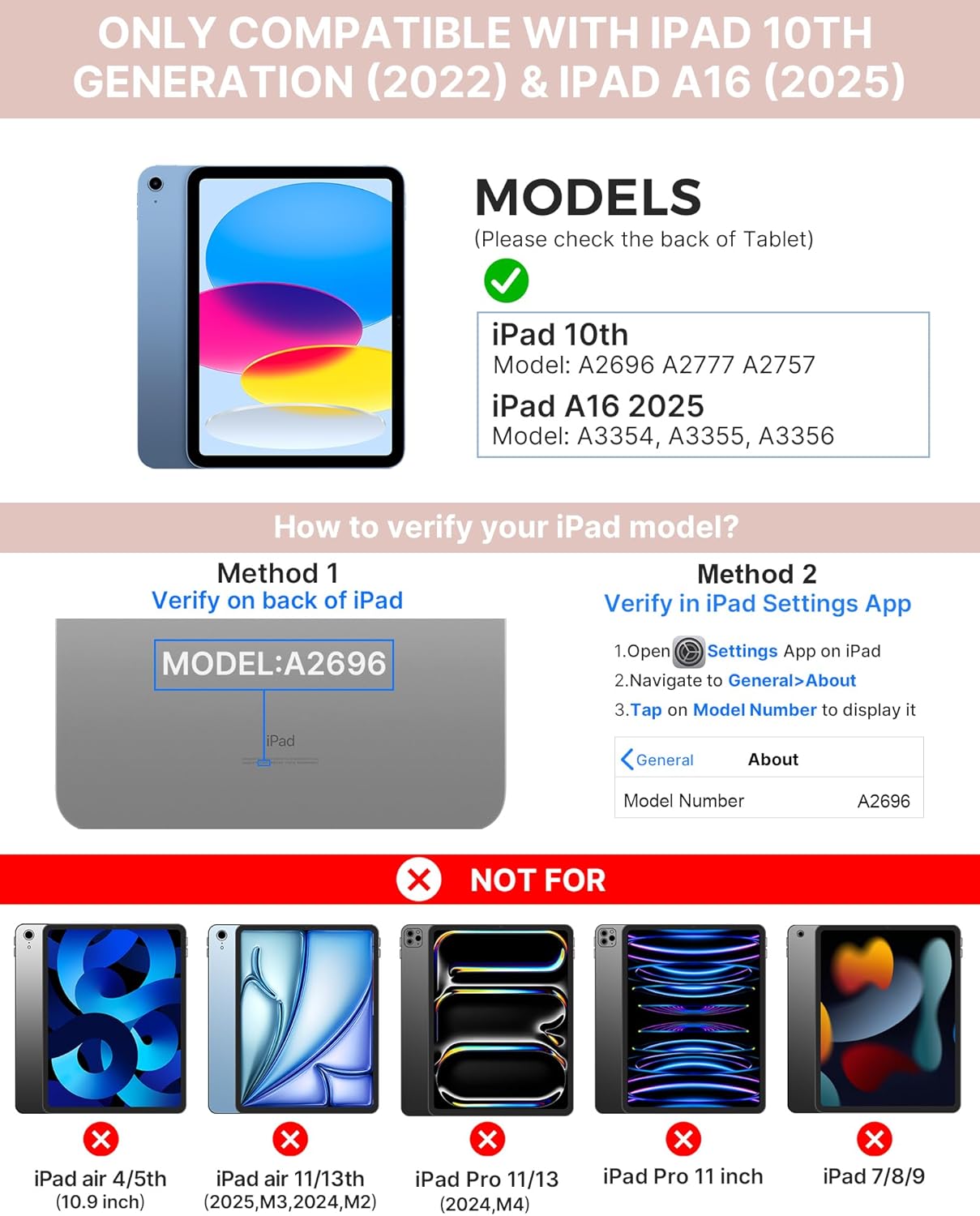
Image: Visual guide for identifying compatible iPad models and verifying the model number on the device or through settings.
3. Paketin məzmunu
Paketə daxildir:
- 1 x typecase Touch iPad Keyboard Case
- 1 x USB-C Şarj Kabeli
- 1 x İstifadəçi Təlimatı
4. Quraşdırma Təlimatları
4.1 Klaviaturanın doldurulması
Before initial use, fully charge the keyboard. Connect the provided USB-C charging cable to the keyboard's charging port and a power source. The charging indicator light will show the charging status.
- Gözləmə rejimi: 1 ilə qədər
- Daytime use (2 hours/day with backlight off): 3 aya qədər
- Nighttime use (2 hours/day with backlight on): 2 Həftəyə qədər

Image: Close-up of the keyboard's USB-C charging port and battery life specifications.
4.2 Pairing with iPad
- Klaviaturanın doldurulduğundan əmin olun.
- Turn on the keyboard by pressing the power button. The Bluetooth indicator light will flash.
- iPad-də, keçin Parametrlər > Bluetooth.
- Bluetooth-u yandırın. iPad-iniz mövcud cihazları axtaracaq.
- Select "typecase Keyboard" from the list of devices.
- Follow any on-screen prompts to complete the pairing process. The Bluetooth indicator light on the keyboard will turn solid when successfully paired.
5. Əməliyyat Təlimatları
5.1 iPad-inizi Quraşdırın
Gently insert your iPad into the case, ensuring all edges are securely seated. The case provides full protection for your device.
5.2 Klaviatura funksiyaları
The keyboard features a standard 78-key layout with a dedicated row of iPadOS shortcut keys for enhanced productivity.

Şəkil: Baş üstü view of the keyboard layout, highlighting the 78-key design and iPadOS shortcuts.
Arxa işıqlı açarlar
The keyboard features 11-color RGB LED backlighting with adjustable brightness levels. This allows for comfortable typing in various lighting conditions.
- düyməsini basın light bulb key to cycle through backlight colors.
- basın Fn + light bulb key arxa işıq parlaqlığını tənzimləmək üçün.
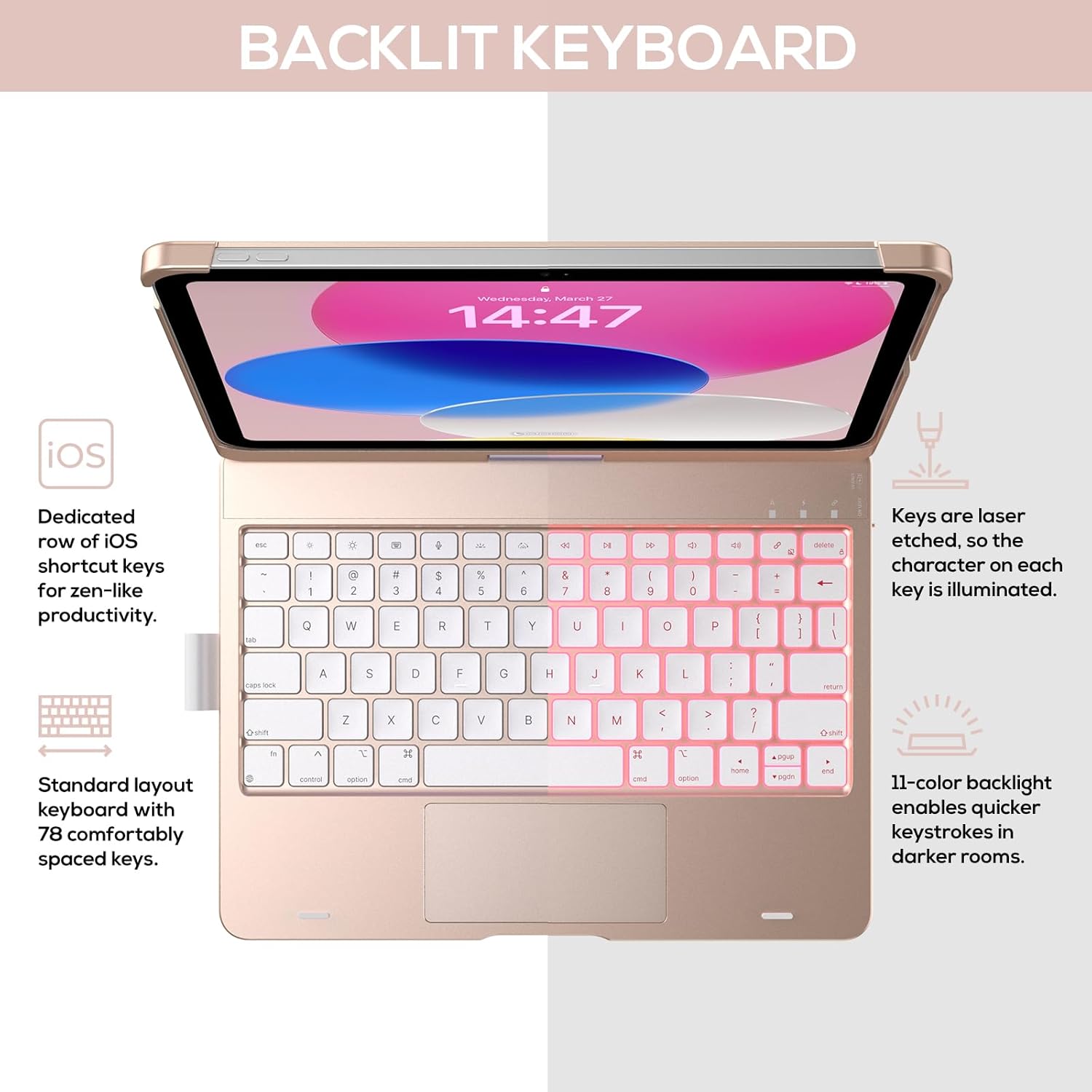
Image: The keyboard with illuminated keys, demonstrating the 11-color backlight and dedicated iOS shortcut keys.
5.3 Multi-Touch Trackpad
The integrated precision trackpad supports multi-gesture controls, enhancing productivity for tasks like document editing, web browsing, and presentation building.
- Tək barmaqla toxunma: Click/Select
- İki barmaq ilə sürüşdürün: Scroll up/down or left/right
- Böyütmək üçün sıxın: Böyütmək/kiçiltmək
- Three-finger swipe up: Proqram dəyişdiricisini açın
- Three-finger swipe down: Əsas ekrana qayıdın

Image: Diagram showing common multi-touch gestures for the trackpad, including managing files, web browsing, and app switching.
5.4 360° Rotatable Hinge and Use Modes
The patented 360° hinge allows for versatile use of your iPad in 7 unique modes, adapting to various tasks from typing to viewing.
- Noutbuk rejimi: Traditional laptop setup for typing.
- Dayanma rejimi: üçün idealdır viewməzmunu.
- Çadır rejimi: Stable for touch interaction or presentations.
- Planşet rejimi: Fold the keyboard behind the iPad for tablet use. Keys are protected in this mode.
- Corner Mode: Angled for comfortable drawing or writing.
- Paylaşma Rejimi: Rotate the screen to share content with others.
- Protect Mode: Close the case to fully protect the iPad.
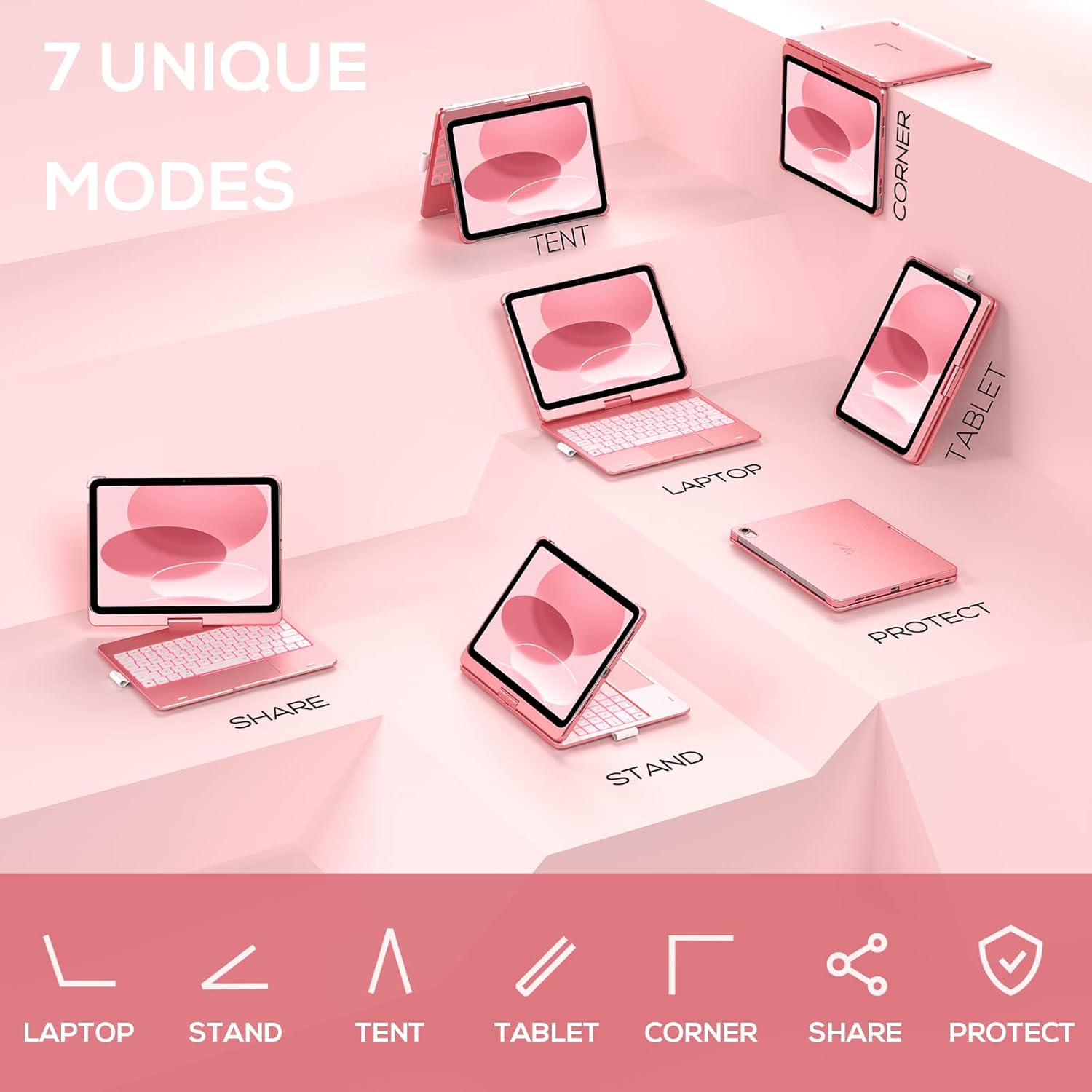
Image: A visual representation of the seven different configurations the keyboard case can be used in, including laptop, stand, and tablet modes.
5.5 Avtomatik Yuxu/Oyanma Funksiyası
The case features an auto sleep/wake function. Opening the case will wake your iPad, and closing it will put your iPad to sleep, helping to conserve battery life for both the iPad and the keyboard.

Image: A user's hand on the trackpad, illustrating the built-in trackpad and the auto sleep/wake feature that activates when the case is opened or closed.
5.6 Apple Pencil Holder
An integrated holder is provided for your Apple Pencil, ensuring it is securely stored and easily accessible.
6. Baxım
6.1 Təmizləmə
To clean the keyboard case, use a soft, damp cloth. Avoid using harsh chemicals or abrasive materials, as these may damage the surface. Ensure the charging port is dry before charging.
6.2 Saxlama
When not in use for extended periods, store the keyboard case in a cool, dry place. It is recommended to fully charge the keyboard before long-term storage to maintain battery health.
7. Giderme
7.1 Klaviatura Qoşulmur
- Klaviaturanın işə salındığından və doldurulduğundan əmin olun.
- Check that Bluetooth is enabled on your iPad.
- Forget the device in your iPad's Bluetooth settings and attempt to re-pair.
- Restart both your iPad and the keyboard.
7.2 Düymələr Cavab Vermir
- Klaviaturanın Bluetooth vasitəsilə düzgün qoşulduğundan əmin olun.
- Check the keyboard's battery level.
- Açarların ətrafındakı hər hansı bir zibili təmizləyin.
7.3 Trackpad Not Working
- Ensure the keyboard is connected.
- Check iPad settings for trackpad functionality (Settings > General > Trackpad).
- Klaviatura və iPad-i yenidən başladın.
7.4 Arxa işıq işləmir
- Klaviaturanın işə salındığından əmin olun.
- Press the backlight control keys (light bulb key, Fn + light bulb key) to activate or adjust.
- Check battery level; low battery may disable backlighting.
8. Spesifikasiyalar
| Model nömrəsi | KB201T-100 |
| Məhsul Ölçüləri | 11 x 8.6 x 1.5 düym (11"U x 8.6"W x 1.5"H) |
| Maddə Çəkisi | 1.43 funt sterlinq |
| Bağlantı texnologiyası | Bluetooth |
| Klaviatura Təsviri | Flexible, 78-key layout with iPadOS shortcuts |
| Xüsusi Xüsusiyyətlər | 360° Rotatable, 11-Color Backlit, Ergonomic, Lightweight, Multi-Touch Trackpad, Auto Sleep/Wake, Apple Pencil Holder |
| Klaviatura arxa işıqlandırması | RGB (11 rəng) |
| Batareya növü | 1 Litium Polimer batareya (daxildir) |
9. Zəmanət və Dəstək
typecase is committed to product quality and customer satisfaction. This product comes with the following support:
- Dəyişdirmə Xidməti: Within 1 year of purchase.
- Geri qaytarma siyasəti: Satın alındıqdan sonra 30 gün ərzində.
For any issues or inquiries, please contact typecase customer support for quick feedback and assistance.

Image: Information on typecase's after-sales service, including replacement, refund, and customer support.


