Giriş
This manual provides essential instructions for the safe and efficient operation of your Herneum FC Portable CD Player Boombox. Please read this manual thoroughly before using the device and retain it for future reference.
Məhsul Xüsusiyyətləri
- Portativ CD pleyer: Top-loading CD player with play/pause, skip, and repeat functions.
- FM Radiosu: Built-in FM radio with telescopic antenna for enhanced reception.
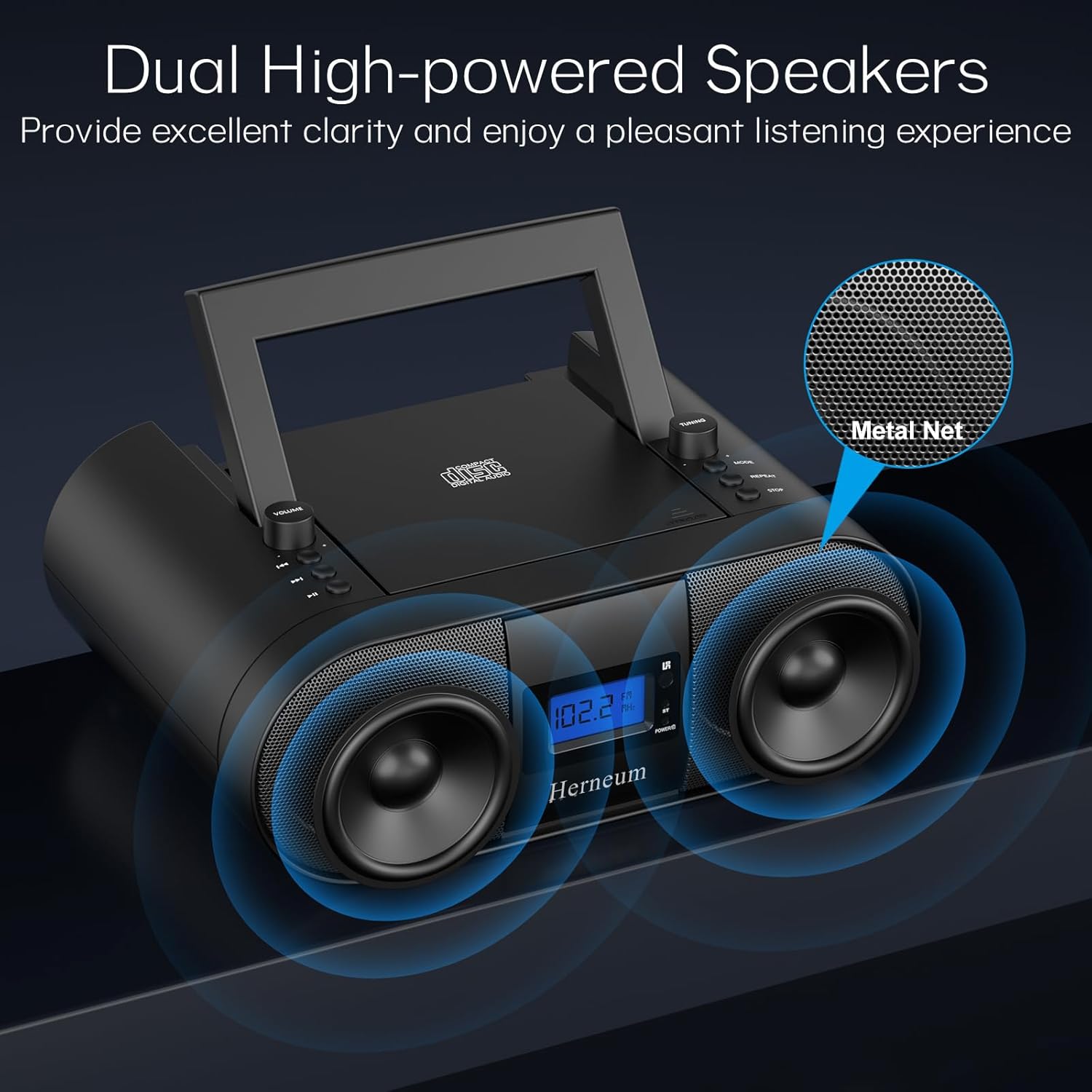
- Dual Stereo Sound System: High-performance speakers for clear audio.
- Yenidən doldurulan batareya: Integrated 2000mAh battery providing 4-5 hours of playback.
- Bluetooth bağlantısı: Uyğun cihazlardan simsiz audio axını.
- Birdən çox giriş: Supports USB and AUX-in for versatile audio sources.
- Qulaqlıq Çıxışı: Şəxsi dinləmək üçün.
- Uzaqdan İdarəetmə: Convenient operation from a distance, including sleep timer function.
Paketin məzmunu
Qutudan çıxarılarkən bütün əşyaların mövcud olduğundan əmin olun:
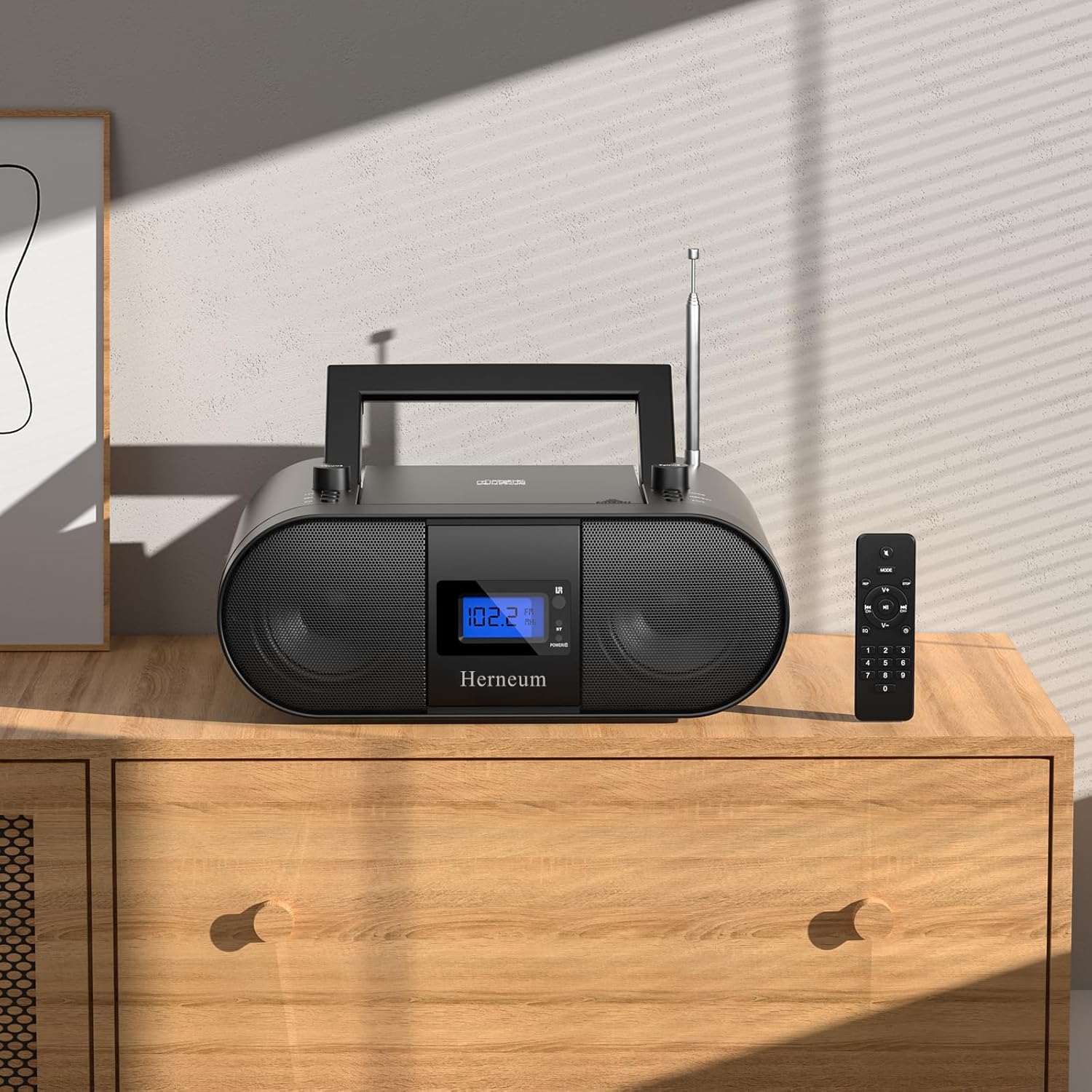
- Herneum FC Portable CD Player Boombox
- Uzaqdan İdarəetmə
- İstifadəçi təlimatı
- Elektrik kabeli
Təhlükəsizlik Məlumatı
- Cihazı yağışa və ya nəmə məruz qoymayın.
- Cihazı istilik mənbələrinin yaxınlığında və ya birbaşa günəş işığı altında yerləşdirməyin.
- Cihazı açmayın casing; xidməti ixtisaslı işçilərə həvalə edin.
- Uşaqların əli çatmayan yerdə saxlayın.
- Yalnız təchiz edilmiş güc adapterindən istifadə edin.
Quraşdırma
1. Cihazın enerji təchizatı
The Herneum FC can be powered by its internal rechargeable battery or by connecting it to an AC power outlet.
- AC Gücü: Connect the provided power cable to the "Power socket" (19) on the back of the unit and then to a wall outlet.
- Yenidən doldurulan batareya: The unit has a built-in 2000mAh rechargeable battery. It charges automatically when connected to AC power. A full charge provides approximately 4-5 hours of playback.
2. Anten Tənzimlənməsi
For optimal FM radio reception, extend the telescopic antenna fully and adjust its position.

Əməliyyat Təlimatları
1. Ümumi Nəzarətlər
The device features various controls on its top panel and a remote control for convenient operation.

- Güc açarı (18): Bölmənin arxa tərəfində yerləşir.
- Volume +/- (1): Audio çıxış səviyyəsini tənzimləyir.
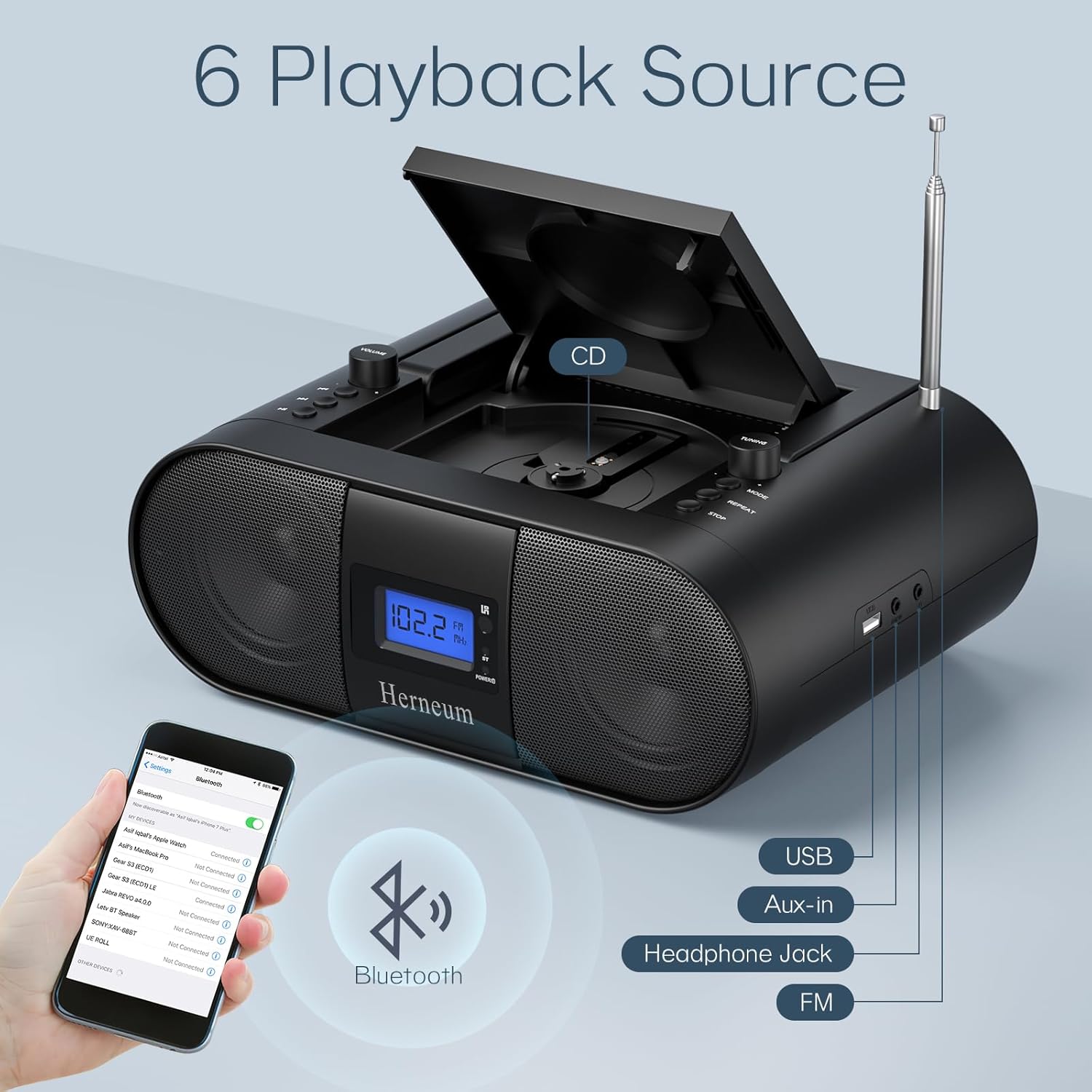
- Rejim (7): Switches between CD, FM, Bluetooth, USB, and AUX modes.
- Ekran (14): Shows current mode, track number, and FM frequency.
2. CD Oynatma
- Open the CD compartment (10) by gently lifting the lid.
- Etiket tərəfi yuxarı baxan bir CD qoyun.
- CD bölməsini bağlayın.
- düyməsini basın Rejim button (7) to select CD mode.
- basın Oynat/Pause (4) oxutmaya başlamaq üçün.
- istifadə edin Əvvəlki Track (2) və Növbəti Track (3) to navigate tracks.
- basın təkrarlayın (8) for single track or all track repeat.
- basın Dayan (9) to end playback.
3. FM Radio Əməliyyatı
- Teleskopik antenanı genişləndirin.
- düyməsini basın Rejim button (7) to select FM radio mode.
- istifadə edin Tuning +/- (6) to manually tune to a station.
- For automatic scanning, press and hold Tuning +/- (6).
4. Bluetooth bağlantısı
- düyməsini basın Rejim button (7) to select Bluetooth mode. The display will show "BT" and flash, indicating it's ready for pairing.
- On your mobile device, enable Bluetooth and search for "Herneum FC" (or similar device name).
- Select the device to pair. Once connected, the "BT" indicator will stop flashing.
- You can now stream audio from your device to the boombox.
5. USB Oynatma
- Insert a USB drive containing MP3/WMA files into the USB PORT (11).
- düyməsini basın Rejim button (7) to select USB mode.
- Playback will start automatically. Use track navigation buttons to select songs.
6. AUX giriş bağlantısı
- Connect an external audio device (e.g., smartphone, MP3 player) to the AUX-in jack (12) using a 3.5mm audio cable.
- düyməsini basın Rejim AUX rejimini seçmək üçün düyməni (7) basın.
- Xarici cihazınızdan oxutma və səs səviyyəsinə nəzarət edin.
7. Qulaqlıqdan istifadə
Plug headphones into the Headphone jack (13) for private listening. The speakers will automatically mute.
8. Uzaqdan idarəetmə
The included remote control allows for convenient operation of all functions from a distance. Insert 2 x AAA batteries (not included) into the remote.
- Səssiz/Səssiz: Temporarily silences or restores audio.
- İzləməyi keç: Navigates to the next or previous track.
- Change Radio: Adjusts FM frequency.
- Nəzarət həcmi: Increases or decreases volume.
- Stop Playing: Halts current playback.
- EQ rejimi: Adjusts sound equalization settings.
- Yuxu Taymeri: Set preferred running time (15, 30, 45, 60, or 90 minutes).

Baxım
- Təmizləmə: Cihazın xarici hissəsini təmizləmək üçün yumşaq, quru parça istifadə edin. Aşındırıcı təmizləyicilərdən və ya həlledicilərdən istifadə etməyin.
- CD Baxımı: CD-ləri kənarlarından tutun. Çirkli CD-ləri mərkəzdən kənara doğru silərək yumşaq, tüksüz bir parça ilə təmizləyin.
- Yaddaş: When not in use for extended periods, store the boombox in a cool, dry place.
Problemlərin aradan qaldırılması
| Problem | Mümkün Səbəb | Həll |
|---|---|---|
| Güc yoxdur | Power cable not connected; battery drained; power switch off. | Check power cable connection; charge battery; ensure power switch (18) is ON. |
| CD oxudulmur/keçirilmir | CD dirty or scratched; CD inserted incorrectly; CD compartment not closed. | Clean or replace CD; ensure CD is label-side up; close compartment firmly. |
| Zəif FM qəbulu | Antenna not extended/adjusted; weak signal. | Extend and adjust antenna; try moving the unit to a different location. |
| Bluetooth qoşalaşmır | Device not in pairing mode; Bluetooth disabled on external device. | Ensure boombox is in Bluetooth mode; enable Bluetooth on your device and search again. |
| Pult işləmir | Batteries drained or inserted incorrectly; obstruction between remote and unit. | Replace remote batteries; ensure correct polarity; remove obstructions. |
Spesifikasiyalar
- Model: FC
- Brend: Herneum
- Məhsul Ölçüləri: 12.6 x 8.66 x 5.9 düym
- Maddə çəkisi: 4.36 funt sterlinq
- Bağlantı texnologiyası: Bluetooth, CD, USB, AUX-in, FM Radio
- Rəng: Qara
- Dinamik növü: İkili spiker
- Batareya: Daxili 2000 mAh təkrar doldurulan batareya
- Playback Time (Battery): 4-5 saat
Zəmanət və Dəstək
The Herneum FC Portable CD Player Boombox comes with an 18-month warranty. For warranty claims, technical support, or any inquiries, please contact Herneum customer service.
Visit the official Herneum store for more information: Herneum Store


