Giriş
The Fanvil W611W is a robust wireless portable phone designed for enhanced communication mobility. Featuring a 2.4-inch color LCD, dual SIP lines, and support for Wi-Fi 6 (2.4GHz & 5GHz) and Bluetooth 5.0, it offers reliable and clear communication. Its IP67 rating ensures durability against water, dust, and drops, making it suitable for various environments.
Əsas Xüsusiyyətlər:
- 2.4" 240 x 320 color screen with intuitive user interface.
- High protection level of IP67, which is waterproof, dustproof, and drop-safe from 1.8-meter height.
- Supports dual-band Wi-Fi 802.11 a/b/g/n/ac/ax (Wi-Fi 6, 2.4GHz & 5GHz).
- Supports IEEE802.11k/v/r roaming for seamless connectivity.
- Supports WPA / WPA2-PSK and 802.1X EAP encryption to ensure communications security.
- 10 hours talk time and 200 hours standby time.
- Type-C USB and 3.5mm 4-pole jack for versatile connectivity.
- Comes with a charging base, belt clip, and power adapter.
Paketin məzmunu
- Fanvil W611W Wireless Portable Phone
- Doldurma bazası
- Kəmər klipi
- Güc adapteri
- Litium ion batareyası
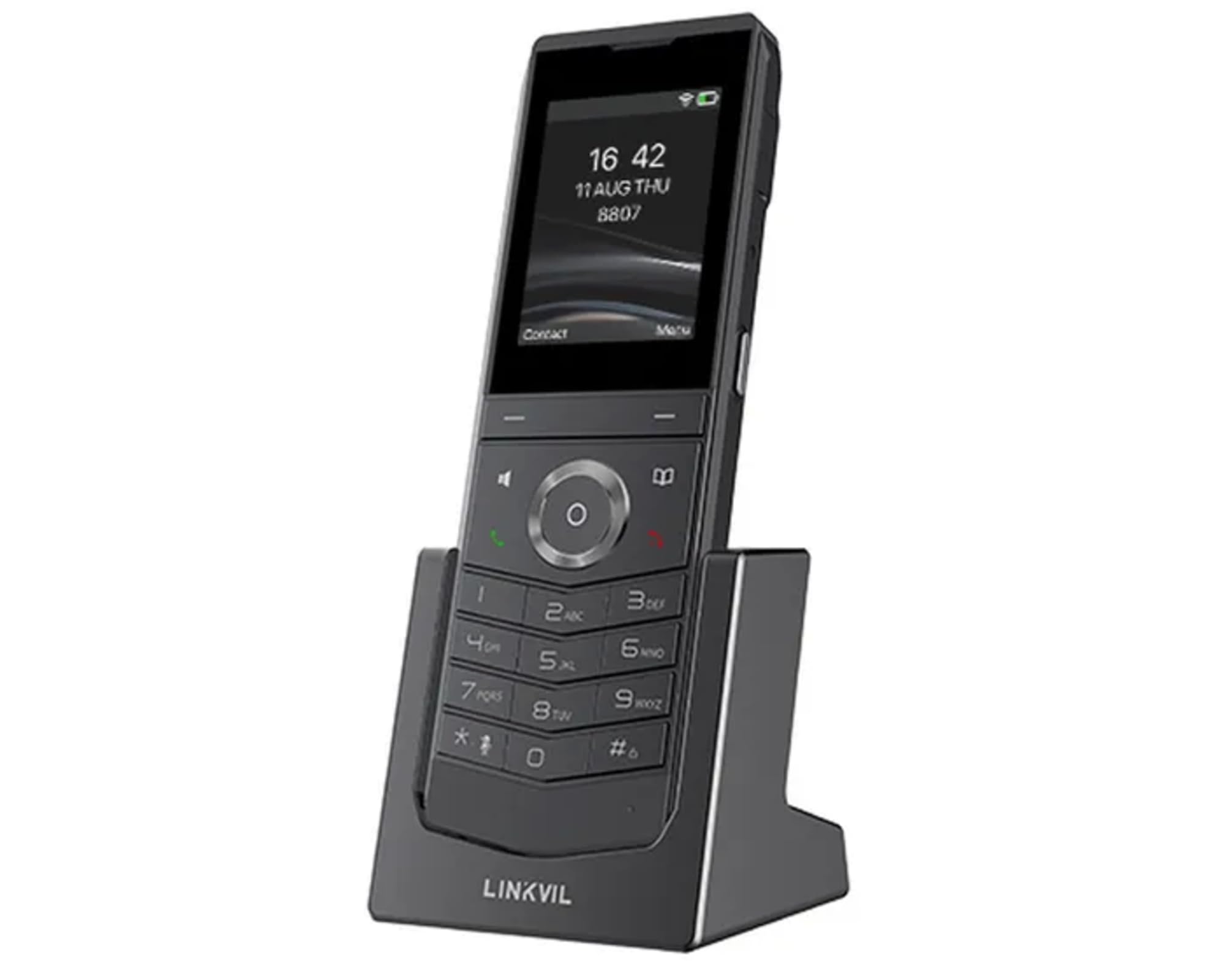
Image: Fanvil W611W Wireless Portable Phone, showcasing the handset and its charging base.
Quraşdırma Bələdçisi
- Batareyanı doldurun: Insert the Lithium Ion battery into the handset. Place the handset on the charging base and connect the power adapter to the charging base and a power outlet. Allow the phone to charge fully before first use (approximately 4 hours).
- Connect the Base Station: Connect the charging base to a power source using the provided power adapter.
- Şəbəkə bağlantısı: The W611W connects via Wi-Fi. Access the phone's menu to navigate to Wi-Fi settings. Select your desired Wi-Fi network and enter the password if prompted. The phone supports both 2.4GHz and 5GHz bands, including Wi-Fi 6.
- SIP Account Configuration: Access the phone's settings menu to configure your SIP accounts. You will need your SIP server address, user ID, password, and other relevant details provided by your VoIP service provider. The phone supports up to 2 SIP lines.
- Cütləşmə (lazım olduqda): If your handset is not pre-paired with a base station, follow the instructions in the phone's menu to initiate the pairing process.
Əməliyyat Təlimatları
Zənglərin edilməsi:
- Zəng: Klaviaturadan istifadə edərək telefon nömrəsini daxil edin və düyməni basın Zəng edin düymə (yaşıl telefon işarəsi).
- Kontaktlardan: -a keçin Əlaqələr menu, select the desired contact, and press the Zəng edin düyməsi.
- Yenidən yığma: düyməsini basın Yenidən zəng edin düyməsini basın view recent outgoing calls and select a number to redial.
Zənglərin qəbulu:
- Telefon zəng çaldıqda düyməsini basın Zəng edin cavab vermək üçün düymə.
- Zəngi rədd etmək üçün basın Zəngi bitir düyməsi (qırmızı telefon işarəsi).
During a Call:
- Səs səviyyəsini tənzimləyin: Use the volume buttons on the side of the handset.
- Dinamik: düyməsini basın Natiq button to activate/deactivate speakerphone mode.
- Səssiz: düyməsini basın Səssiz button to mute/unmute your microphone.
- Tutun: Use the menu options to place a call on hold.
- Transfer: Use the menu options to transfer a call to another extension or number.
Səsli mesaj:
- When you have new voicemail messages, an indicator will appear on the screen. Dial your voicemail access number (usually *97 or *98, consult your service provider) to retrieve messages.
Baxım
- Təmizləmə: Yumşaq istifadə edin, damp cloth to clean the phone's surface. Avoid harsh chemicals or abrasive cleaners.
- Batareyaya qulluq: To prolong battery life, avoid extreme temperatures. If the phone will not be used for an extended period, store it with a partial charge.
- Proqram təminatı yeniləmələri: Periodically check for firmware updates through the phone's settings menu or your service provider's instructions to ensure optimal performance and security.
Problemlərin aradan qaldırılması
- Yığma tonu yoxdur:
- Ensure the phone is charged and powered on.
- Verify Wi-Fi connection is active and stable.
- Check SIP account registration status in the phone's settings.
- Poor Call Quality/Range:
- Move closer to your Wi-Fi access point.
- Ensure there are no major obstructions (thick walls, metal objects) between the phone and the access point.
- Check for interference from other 2.4GHz or 5GHz devices.
- Batareya tez boşalır:
- Ensure the phone is charging correctly on the base.
- Reduce screen brightness or disable unnecessary features to conserve power.
- Batareya köhnədirsə, onu dəyişdirməyi düşünün.
- Handset Not Registering:
- Restart the phone and the Wi-Fi access point.
- Re-enter SIP account details carefully.
- Consult your service provider for specific registration steps.
Spesifikasiyalar
| Xüsusiyyət | Detal |
|---|---|
| Model Adı | W611W |
| Brend | Fanvil |
| Ekran Ölçüsü | 2.4 düym |
| Qətnamə | 240 x 320 |
| Bağlantı texnologiyası | Bluetooth, WiFi |
| Simsiz Şəbəkə Texnologiyası | Wi-Fi 802.11 a/b/g/n/ac/ax (Wi-Fi 6, 2.4GHz & 5GHz) |
| SIP Lines | 2 |
| Danışıq vaxtı | 10 saat |
| Gözləmə vaxtı | 200 saat |
| Batareya növü | Litium ion |
| Batareya Tutumu | 1900 milyonamp Saat |
| Qoruma səviyyəsi | IP67 (Waterproof, Dustproof, Drop-safe from 1.8m) |
| Məhsul Ölçüləri | 5.91 x 5.91 x 3.15 düym |
| Maddə Çəkisi | 15.8 unsiya |
Zəmanət və Dəstək
For warranty information and technical support, please refer to the official Fanvil website or contact your authorized Fanvil dealer. Keep your purchase receipt as proof of purchase for warranty claims.
Əlavə Resurslar
No relevant product videos from the seller were found for the Fanvil W611W in the provided data. Please refer to the official Fanvil website for any available video tutorials or additional support materials.


