1. Giriş
This manual provides comprehensive instructions for the setup, operation, and maintenance of your iDPRT 320E Thermal Label Printer. Please read this manual thoroughly before using the device to ensure proper functionality and to prevent damage. The iDPRT 320E is designed for efficient label printing in various environments, supporting multiple operating systems and connectivity options.
2. Qutuda nə var
Paketi açarkən bütün komponentlərin mövcud olduğunu yoxlayın:
- iDPRT 320E Thermal Label Printer
- Təlimat kitabçası
- USB məlumat kabeli
- Güc adapteri
- Sample Etiketlər
3. Məhsul bitdiview
The iDPRT 320E Thermal Label Printer is a compact device designed for high-speed, high-resolution label printing. It features a simple design with essential ports for connectivity and an intuitive LED indicator for operational status.
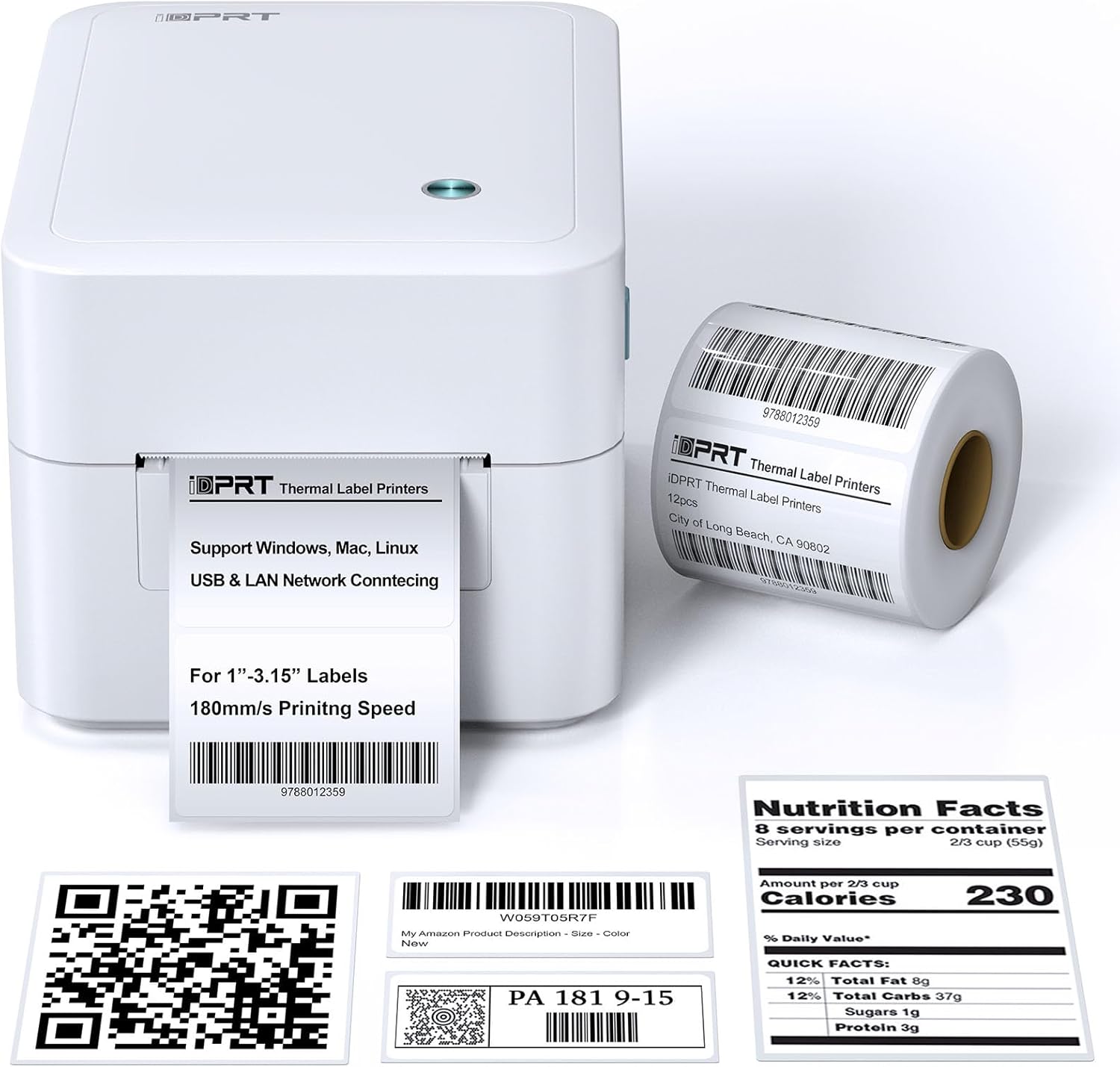
Şəkil 3.1: Ön view of the iDPRT 320E Thermal Label Printer with sample etiketlər.
Əsas komponentlər:
- Etiket Çıxış Yuvası: Çap olunmuş etiketlərin ortaya çıxdığı yer.
- Cover Release Latches: Used to open the printer cover for label loading.
- Güc Portu: Güc adapterinə qoşulur.
- USB Port: Kompüterə birbaşa qoşulmaq üçün.
- LAN Portu: Şəbəkə bağlantısı üçün.
- LED Göstərici: Printer statusunu göstərir.
4. Quraşdırma Təlimatları
4.1 Enerji Bağlantısı
- Güc adapterini printerin güc portuna qoşun.
- Elektrik adapterini uyğun elektrik rozetkasına qoşun.
4.2 Etiketlərin yüklənməsi
The printer supports thermal labels with widths between 1 and 3.15 inches.
- Gently press the cover release latches on both sides of the printer to open the top cover.
- Place the roll of thermal labels into the label compartment, ensuring the labels feed from the bottom of the roll and the printable side faces upwards.
- Adjust the label guides to fit the width of your labels snugly, without creasing onları.
- Pull a few labels past the print head and out through the label exit slot.
- Üst qapağı yerinə oturana qədər möhkəm bağlayın.

Figure 4.1: Correct method for loading thermal labels into the printer.
4.3 Sürücü və Proqram təminatının quraşdırılması
To use the printer with your computer, you must install the appropriate drivers and the Label Designer software.
- Visit the official iDPRT website to download the latest drivers for your operating system (Windows, Mac, or Linux).
- Download and install the free Label Designer software from the official website. This software is available for Windows and as an online editor for Mac users.
- Follow the on-screen instructions to complete the installation process for both the drivers and the software.

Figure 4.2: The iDPRT 320E printer supports multiple operating systems.
4.4 Qoşulma Seçimləri
The iDPRT 320E offers flexible connectivity:
- USB Bağlantısı: Connect the printer directly to your computer using the provided USB cable.
- LAN Network Connection: Connect the printer to your local area network using an Ethernet cable for shared access.
- Mobil Proqram: For direct printing from your smartphone, download the iDPRT mobile application.

Figure 4.3: USB and LAN network connectivity options.
5. Əməliyyat Təlimatları
5.1 Creating Labels with Label Designer Software
The Label Designer software allows you to create and customize various label types.
- Launch the Label Designer software on your computer.
- Select a template or start a new label design.
- Customize your labels with text, barcodes, QR codes, images, and various fonts. The software supports different label sizes and layouts.
- Ensure the label dimensions in the software match the physical labels loaded in the printer.

Figure 5.1: Designing labels using the Label Designer software.
5.2 Etiketlərin çapı
Once your label design is complete and labels are loaded:
- In the Label Designer software, click the 'Print' button.
- Select the iDPRT 320E printer from the list of available printers.
- Adjust print settings such as quantity and print speed if necessary. The printer supports speeds up to 180mm/s and a resolution of 203 DPI.
- Confirm the settings and initiate printing.

Figure 5.2: The printer delivers high-quality 203 DPI resolution for clear labels.
Figure 5.3: The printer is capable of high-speed printing up to 180mm/s.
5.3 LED Indicator Meanings
The LED indicator on the printer provides visual feedback on its status:
- Green (Solid On): The printer is currently printing.
- Red (Solid On): The printer cover is not properly closed, or there is a paper jam/error.
- Blue (Solid On): Printer işə hazırdır.
6. Baxım
6.1 Printerin təmizlənməsi
Mütəmadi təmizləmə çap keyfiyyətini qorumağa və printerin ömrünü uzatmağa kömək edir.
- Ensure the printer is powered off and unplugged before cleaning.
- Yumşaq, tüysüz parça istifadə edin dampened with isopropyl alcohol to gently wipe the print head. Avoid touching the print head with bare hands.
- Clean the exterior of the printer with a dry, soft cloth. Do not use abrasive cleaners or solvents.
- Etiket bölməsindən toz və ya etiket qalıqlarını təmizləyin.
7. Giderme
If you encounter issues with your iDPRT 320E printer, refer to the following common problems and solutions:
| Problem | Mümkün Səbəb | Həll |
|---|---|---|
| Printer açılmır | Elektrik kabeli qopdu; Elektrik rozetkası nasazdır | Elektrik bağlantılarını yoxlayın; fərqli bir rozetka sınayın. |
| Etiketlər çap edilmir | Labels loaded incorrectly; Printer cover open; No drivers installed; Incorrect printer selected | Reload labels correctly; Close cover firmly; Install drivers; Select iDPRT 320E in print dialog. |
| Poor print quality (faded, blurry) | Print head dirty; Low-quality labels; Incorrect print density settings | Clean the print head; Use recommended thermal labels; Adjust print density in software settings. |
| Cannot connect via USB/LAN | Cable faulty; Driver issue; Network configuration problem | Try a different cable; Reinstall drivers; Verify network settings (for LAN). |
| Cannot connect via mobile app | App not installed; Printer not discoverable; Network issue | Ensure app is installed and updated; Check printer's network connection; Restart printer and app. |
| Mac Bluetooth connectivity issues | Direct Bluetooth printing to Mac is not supported; Driver limitations | Connect via USB or LAN for Mac systems. Mobile app connectivity is available for smartphones. |
8. Spesifikasiyalar
Detailed technical specifications for the iDPRT 320E Thermal Label Printer:
| Xüsusiyyət | Spesifikasiya |
|---|---|
| Model Adı | 320E |
| Çap texnologiyası | Termal |
| Maksimum Çap Sürəti | 180 mm/s (Monochrome) |
| Maksimum Çap Çözünürlüğü | 203 DPI |
| Maksimum Media Ölçüsü | 1"-3.15" inches width |
| Bağlantı texnologiyası | USB, LAN |
| Uyğun Cihazlar | PC (Windows, Mac, Linux), Mobile (iOS/Android via App) |
| Nəzarət metodu | App, Software |
| Məhsul Ölçüləri | 8.11"D x 6.1"W x 5.28"H |
| Maddə Çəkisi | 3.78 funt sterlinq |
| Xüsusi Xüsusiyyətlər | Automatic Label Recognition, LAN Network Connectivity |
9. Zəmanət və Dəstək
9.1 Zəmanət Məlumatı
The iDPRT 320E Thermal Label Printer comes with a limited warranty. Please refer to the warranty card included in your product packaging or visit the official iDPRT webətraflı şərtlər və şərtlər üçün sayt.
9.2 Müştəri dəstəyi
For technical assistance, troubleshooting, or any inquiries regarding your iDPRT 320E printer, please contact our customer service team. You can reach us via the Amazon messaging system or through the contact information provided on the official iDPRT website. Our team is available to assist you with any pre-sales or after-sales support needs.


