1. Giriş
This manual provides comprehensive instructions for the Maxcom Fit FW55 Aurum Pro Smartwatch. It covers essential information regarding product setup, operation, maintenance, and troubleshooting to ensure optimal performance and user experience. Please read this manual carefully before using your device.
2. Paketin məzmunu
Zəhmət olmasa, aşağıda sadalanan bütün məhsulların məhsul qablaşdırmanızda olduğundan əmin olun:
- Maxcom Fit FW55 Aurum Pro Smartwatch
- Doldurma kabeli
- İstifadəçi Təlimatı (bu sənəd)
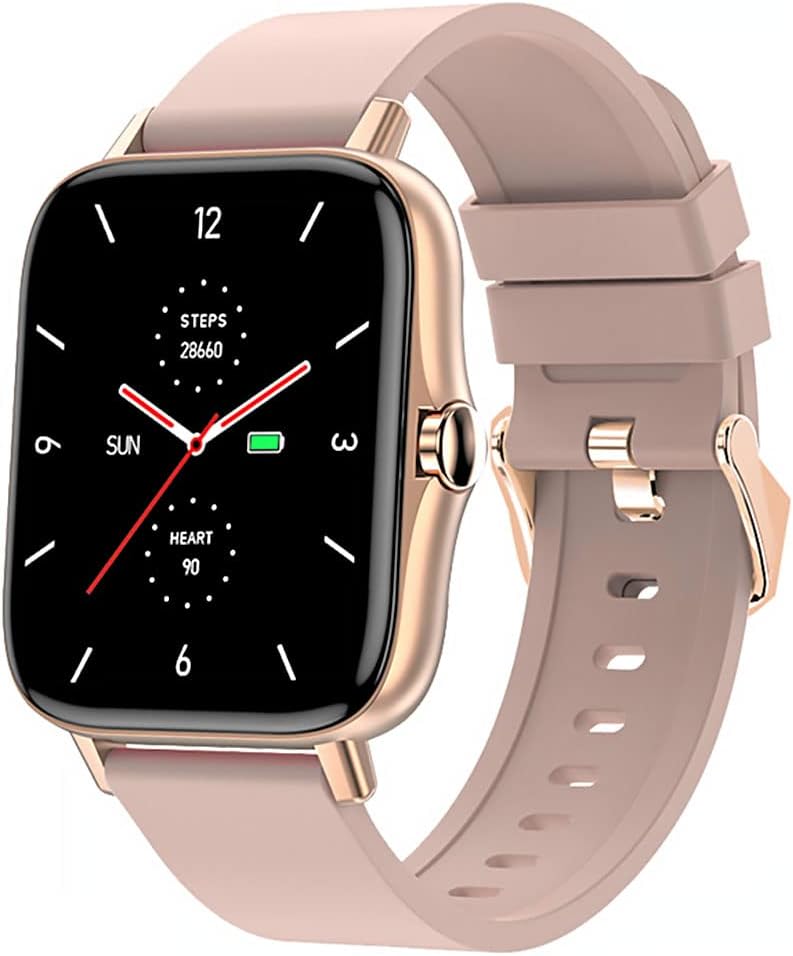
Image 1: Maxcom Fit FW55 Aurum Pro Smartwatch with a pink silicone band. The watch face displays steps, heart rate, and time.
3. Quraşdırma
3.1. Ağıllı saatın doldurulması
Before initial use, fully charge your Maxcom Fit FW55 Aurum Pro Smartwatch. Connect the provided charging cable to the charging port on the back of the smartwatch and plug the other end into a standard USB power adapter (not included) or a computer's USB port. The watch display will indicate charging status.
- Ensure the charging pins are clean and properly aligned with the watch's charging contacts.
- Tam doldurulması adətən təxminən 2 saat çəkir.
3.2. Smartfonunuzla Cütləşmə
To unlock the full functionality of your smartwatch, you need to pair it with your smartphone via Bluetooth.
- Proqramı yükləyin: axtarın the official Maxcom Fit application in your smartphone's app store (iOS App Store or Google Play Store) and install it.
- Bluetooth-u aktivləşdirin: Smartfonunuzda Bluetooth-un aktiv olduğundan əmin olun.
- Proqramı açın: Launch the Maxcom Fit application on your smartphone.
- Cihaz əlavə edin: Follow the in-app instructions to add a new device. Select "FW55 Aurum Pro" from the list of available devices.
- Qoşulmanı təsdiqləyin: A pairing request may appear on both your smartphone and the smartwatch. Confirm the pairing on both devices.
Once successfully paired, the smartwatch will synchronize data with your phone, and you can customize settings through the app.
4. Ağıllı saatın idarə edilməsi
4.1. Gücü yandırın/söndürün
- Güc Aktivdir: Press and hold the side button for a few seconds until the Maxcom logo appears.
- Söndürmək: From the watch face, swipe down to access quick settings, or navigate to the 'Settings' menu. Select 'Power Off' and confirm. Alternatively, press and hold the side button and select 'Power Off'.
4.2. Əsas Naviqasiya
- Toxunma Ekranı: The FW55 Aurum Pro features a 1.7-inch touch screen for intuitive interaction.
- Yuxarı/Aşağı sürüşdürün: Scroll through notifications, menus, or quick settings.
- Sola/Sağa sürüşdürün: Access different widgets or main functions (e.g., heart rate, activity data).
- Klikləyin: Element seçin və ya hərəkəti təsdiqləyin.
- Yan Düymə: Press to return to the watch face or wake the screen. A long press may access power options.
4.3. Əsas Xüsusiyyətlər
The Maxcom Fit FW55 Aurum Pro Smartwatch offers a range of features to support your daily activities and health monitoring:
- Fəaliyyət İzləmə: Atılan addımları, qət edilən məsafəni və yandırılan kaloriləri izləyir.
- Ürək dərəcəsi monitorinqi: Real vaxt rejimində ürək döyüntüsü məlumatları təqdim edir.
- Yuxu Monitorinqi: Yuxu rejimini və keyfiyyətini izləyir.
- Bildirişlər: Cütlənmiş smartfonunuzdan zənglər, mesajlar və tətbiq bildirişləri üçün bildirişlər alır.
- GPS: Integrated GPS for accurate outdoor activity tracking.
- Fərdiləşdirilə bilən Saat Üzləri: Personalize your watch face through the companion app.

Image 2: Maxcom Fit FW55 Aurum Pro Smartwatch featuring a gold metal mesh band. The watch face displays digital time, steps, and heart rate.
5. Baxım
Proper care and maintenance will extend the lifespan of your smartwatch.
- Təmizləmə: Regularly wipe the watch screen and body with a soft, dry, lint-free cloth. For stubborn dirt, slightly dampsu ilə parça. Sərt kimyəvi maddələrdən və ya aşındırıcı materiallardan istifadə etməyin.
- Kəmər Baxımı: Clean the watch strap according to its material. Silicone straps can be washed with mild soap and water. Metal straps may require specific cleaning agents.
- Ekstremal şərtlərdən qaçın: Do not expose the smartwatch to extreme temperatures, direct sunlight for prolonged periods, or corrosive liquids.
- Suya davamlılıq: While the watch may have some water resistance, it is not suitable for diving or high-pressure water activities. Refer to the product specifications for detailed water resistance ratings.
6. Giderme
If you encounter issues with your Maxcom Fit FW55 Aurum Pro Smartwatch, try the following solutions:
- Saat yandırılmır: Saatın tam doldurulduğundan əmin olun. Ən azı 30 dəqiqə şarj cihazına qoşun.
- Smartfonla qoşalana bilməz:
- Telefonunuzda və saatınızda Bluetooth-un aktiv olduğundan əmin olun.
- Saatın telefonunuzun Bluetooth diapazonunda olduğundan əmin olun.
- Həm telefonunuzu, həm də ağıllı saatı yenidən başladın.
- Cihazı tətbiq vasitəsilə ayırıb yenidən qoşmağa çalışın.
- Dəqiq olmayan məlumatlar (addımlar, ürək döyüntüsü):
- Saatın biləyinizə möhkəm taxıldığından, bilək sümüyünüzdən təxminən bir barmaq enində olduğundan əmin olun.
- Saatın arxasındakı sensoru təmizləyin.
- Yoldaş tətbiqini ən son versiyaya yeniləyin.
- Bildirişlər alınmadı:
- Check notification settings in the Maxcom Fit app.
- Telefonunuzun bildiriş icazələrinin tətbiqə verildiyinə əmin olun.
- Verify that the watch is successfully paired and connected to your phone.
If problems persist, consult the Maxcom support websayt və ya müştəri xidməti ilə əlaqə saxlayın.
7. Spesifikasiyalar
Below are the technical specifications for the Maxcom Fit FW55 Aurum Pro Smartwatch:
| Xüsusiyyət | Detal |
|---|---|
| Brend | Maxcom |
| Model nömrəsi | FW55 Aurum Pro |
| Ekran Ölçüsü | 1.7 düym |
| Bağlantı texnologiyası | Bluetooth |
| Simsiz rabitə standartı | Bluetooth |
| Uyğun Cihazlar | Smartfon |
| GPS | İnteqrasiya edilmiş GPS |
| Forma | Kvadrat |
| Hədəf Auditoriya | Adult Unisex |
| Daxil olan komponentlər | Şarj cihazı |

Şəkil 3: Ön view of the Maxcom Fit FW55 Aurum Pro Smartwatch with a pink silicone band, highlighting the square display.
8. Zəmanət və Dəstək
Zəmanət məlumatı və müştəri dəstəyi üçün, xahiş edirik, alış-verişinizə daxil olan sənədlərə baxın və ya rəsmi Maxcom saytına daxil olun. websayt. Zəmanət iddiaları üçün satınalma sübutunuzu saxlayın.
For technical assistance or further inquiries, please contact Maxcom customer service through their official channels.


