Giriş
This manual provides detailed instructions for the setup, operation, maintenance, and troubleshooting of your Makeid L1 Portable Wireless Sticker Label Maker Machine. Please read this manual thoroughly before using the device to ensure proper function and longevity.
Qutuda nə var
Bütün komponentlərin paketdə olduğunu yoxlayın:
- Makeid L1 Label Maker Machine
- 4-meter roll of label tape
- USB şarj kabeli
- İstifadəçi Təlimatı (bu sənəd)
Məhsul Bitdiview
Familiarize yourself with the key components of your Makeid L1 Label Maker.

Şəkil: Bitdiview of the Makeid L1 Label Maker, highlighting the power button, the lid for tape replacement, and the integrated cutter for crisp labels.
- Güc düyməsi: Yan tərəfdə yerləşir, cihazı yandırmaq/söndürmək üçün istifadə olunur.
- Qapaq: Opens to access the tape compartment for loading and replacing label rolls.
- Quraşdırılmış kəsici: Ensures clean and precise cuts of printed labels.
- Etiket Çıxış Yuvası: Çap olunmuş etiketlərin ortaya çıxdığı yer.
- Doldurma Portu: USB port for recharging the device.
Quraşdırma
1. Cihazın doldurulması
Before first use, ensure the label maker is fully charged. Connect the provided USB charging cable to the device's charging port and a compatible USB power source (e.g., computer USB port, USB wall adapter). The indicator light will show charging status (refer to device specific light indicators for full/charging status).
2. Loading Label Tape
The Makeid L1 supports various label tape widths (9mm, 12mm, 16mm) and types (continuous, die-cut, transparent, white, colored, pattern). Ensure the tape is correctly oriented.
- Open the lid of the label maker.
- Insert the label roll into the compartment, ensuring the tape feeds out from the bottom and through the output slot.
- Qapağı etibarlı şəkildə bağlayın.
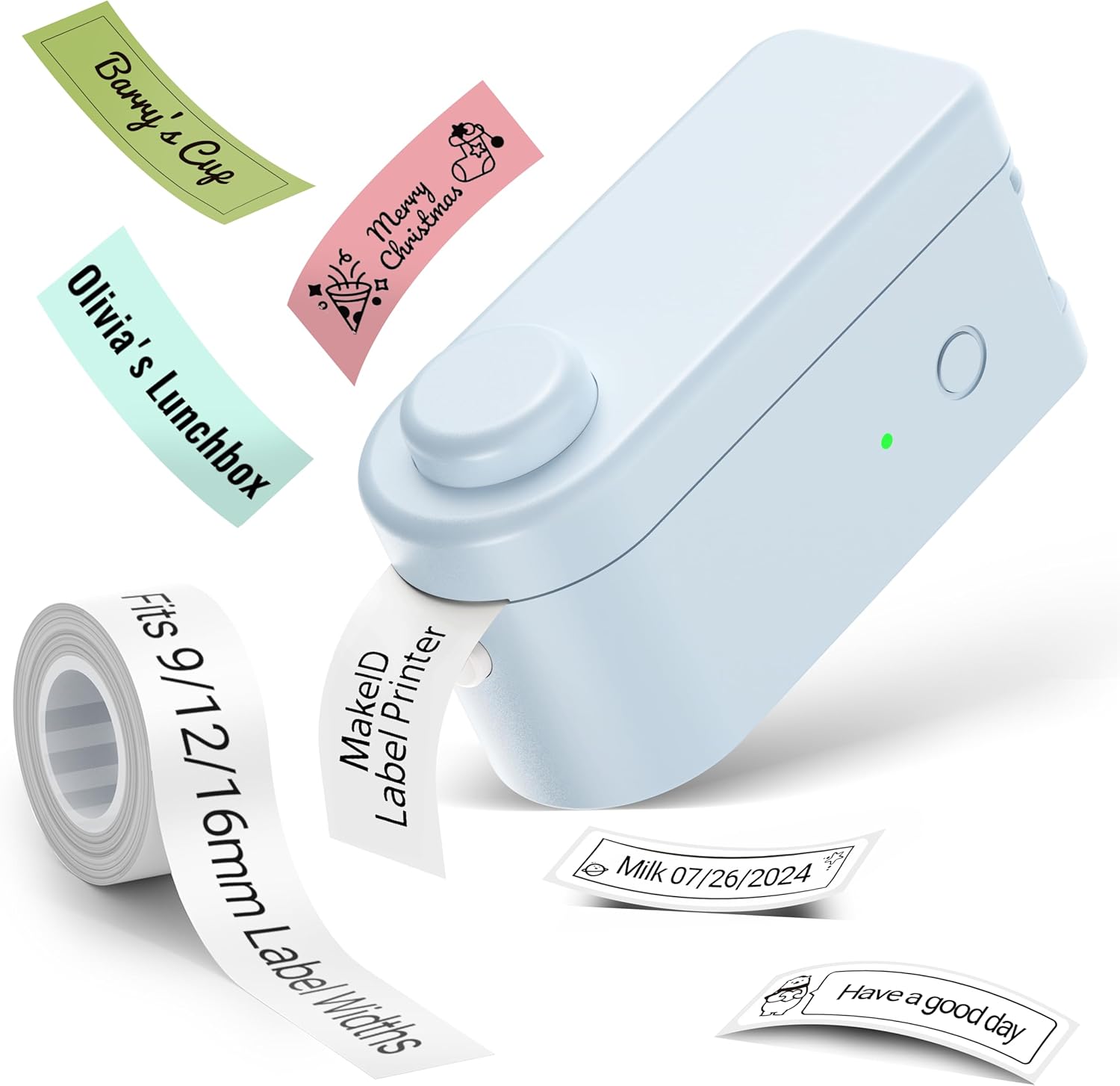
Şəkil: The Makeid L1 Label Maker demonstrating the label tape roll and examples of printed labels, including continuous and die-cut types.
3. Tətbiqin yüklənməsi və quraşdırılması
The Makeid L1 operates via a dedicated mobile application. axtarın "MakeID-Life" on your device's app store.

Şəkil: Screenshots showing the "Get it on Google Play" and "Download on the App Store" buttons, indicating where to find the MakeID-Life application.
4. Bluetooth Cütləşdirmə
The label maker connects to your smartphone via Bluetooth.
- Smartfonunuzda Bluetooth-un aktiv olduğundan əmin olun.
- Turn on the Makeid L1 Label Maker by pressing the power button. The indicator light will flash, indicating it's ready for pairing.
- Open the "MakeID-Life" app. The app will automatically search for nearby devices.
- Select "L1" from the list of available devices to connect. Once connected, the indicator light on the label maker will become solid.

Şəkil: A visual guide demonstrating the three steps for Bluetooth connection: turning on Bluetooth, selecting the L1 model within the app, and confirming the device connection.
Əməliyyat Təlimatları
1. Designing Your Label
The "MakeID-Life" app offers extensive customization options:
- Mətn daxil edin: Type your desired text.
- Şriftlər: Choose from 88 different font styles.
- Nişanlar və Simvollar: Access over 600 icons and various symbols.
- Şablonlar: Utilize over 400 pre-designed templates for various purposes (e.g., kitchen, office, school).
- Borders & Frames: Add decorative borders.
- Digər funksiyalar: Create barcodes, QR codes, tables, dates, and patterns.
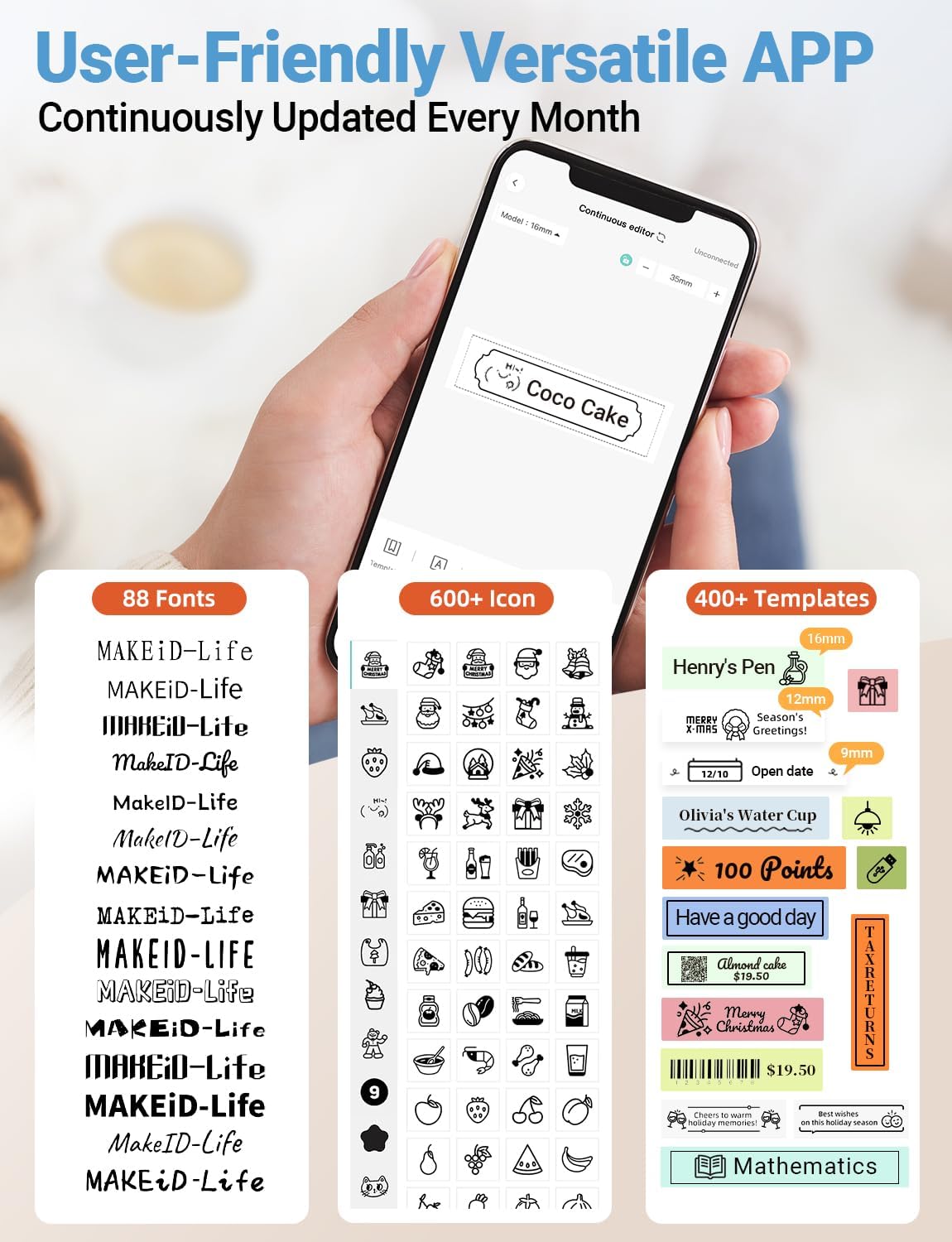
Şəkil: Ətraflı view of the MakeID-Life app interface, showcasing the wide selection of 88 fonts, over 600 icons, and more than 400 templates available for label customization.
2. Etiketlərin çapı
Once your design is complete in the app:
- Review your label design on the app screen.
- Tap the "Print" button within the app.
- The label will be thermally printed and emerge from the output slot.
3. Cutting Labels
The Makeid L1 features a built-in cutter for clean edges.
- After printing, gently pull the label forward slightly.
- Press the cutting button (refer to the Product Overview image for location) to cleanly cut the label.

Şəkil: Illustration of the Makeid L1's built-in cutter, demonstrating how it provides professional and safe cutting of labels, eliminating messy torn edges.
4. Types of Label Printing
The L1 supports two primary types of label printing:
- Continuous Labels: Ideal for custom lengths, allowing you to print text of any length and cut it precisely.
- Die-Cut Labels: Pre-sized labels with specific shapes, perfect for consistent labeling of items like jars or files.

Şəkil: Visual representation of continuous labels, which can be cut to any length, and die-cut labels, which are pre-shaped for specific applications.
Baxım
Çap başlığının təmizlənməsi
To ensure optimal print quality, periodically clean the thermal print head.
- Turn off the label maker and disconnect it from the power source.
- Open the lid and remove the label tape.
- Gently wipe the print head with a soft, lint-free cloth dampened with isopropyl alcohol. Do not use water or abrasive cleaners.
- Allow the print head to dry completely before reinserting the tape and closing the lid.
Saxlama
Store the label maker in a cool, dry place away from direct sunlight and extreme temperatures. Remove the label tape if storing for extended periods.
Problemlərin aradan qaldırılması
Ümumi problemlər və onların həlli yolları üçün aşağıdakı cədvələ baxın.
| Problem | Mümkün Səbəb | Həll |
|---|---|---|
| Cihaz açılmır. | Aşağı batareya. | Verilən USB kabeldən istifadə edərək cihazı doldurun. |
| Bluetooth vasitəsilə qoşulmaq mümkün deyil. | Bluetooth telefonda söndürülüb; cihaz cütləşmə rejimində deyil; proqram problemi. | Ensure Bluetooth is enabled on your phone. Turn the label maker off and on again to re-enter pairing mode. Restart the "MakeID-Life" app. |
| Zəif çap keyfiyyəti / Solğun çaplar. | Print head dirty; incorrect label tape; low battery. | Clean the print head. Ensure you are using Makeid compatible thermal label tape. Charge the device. |
| Label tape not feeding. | Tape incorrectly loaded; tape jammed. | Open the lid and re-insert the label tape correctly, ensuring it's not jammed. |
| Labels are not cutting cleanly. | Cutter blade dull or obstructed. | Ensure no debris is obstructing the cutter. If issues persist, contact customer support. |
Spesifikasiyalar
Detailed technical specifications for the Makeid L1 Label Maker Machine:
| Xüsusiyyət | Detal |
|---|---|
| Brend | Makeid |
| Model Adı | L1 |
| Bağlantı texnologiyası | Bluetooth |
| Çap texnologiyası | Termal |
| Printer Çıxışı | Monoxrom |
| Qətnamə | 203 x 203 DPI (also 300 x 300 DPI for other variants) |
| Maksimum Media Ölçüsü | 0.63 düym (16 mm) |
| Uyğun Cihazlar | Smartphones (Android & iOS) |
| Nəzarət metodu | Tətbiq |
| Avadanlıq interfeysi | USB |
| Güc mənbəyi | 1 litium-ion batareya (daxildir) |
| Məhsul Ölçüləri | 3.93"D x 1.6"W x 1.96"H (10x4.06x4.98 sm) |
| Maddə Çəkisi | 4.4 unsiya (126 qram) |
| Xüsusi Xüsusiyyətlər | Continuous & Pre-cut Label Tapes, Waterproof, Oil-proof, Friction Resistant, Light Resistant, No Fading, Rich Font Icon Pattern, Portable, Inkless, Wireless, Rechargeable, Creative Print Functions (Barcode, Text, Picture, QR 2D Code, Table, Date, Border, Icon, Shape, Pattern, Template) |
Zəmanət və Dəstək
The Makeid L1 Label Maker comes with a Ömürlük Zəmanət. For technical support, warranty claims, or further assistance, please contact Makeid customer service through the official Makeid websayt və ya məhsulun qablaşdırmasında göstərilən əlaqə məlumatı.
Əlavə qaynaqlar və tez-tez verilən suallar üçün buranı ziyarət edin Makeid Store on Amazon.
Təhlükəsizlik Məlumatı
- Cihazı özünüz sökməyin və ya təmir etməyə çalışmayın.
- Cihazı sudan və yüksək rütubətdən uzaq saxlayın.
- Use only original or certified compatible label tapes and charging cables.
- Uşaqların əli çatmayan yerdə saxlayın.
- Cihazı həddindən artıq temperatura və ya birbaşa günəş işığına məruz qoymayın.


