1. Giriş
This manual provides detailed instructions for the installation, operation, and maintenance of the Turing TP-MFD4A28 Smart Series 4MP IR Dome IP Camera. This camera features 4-megapixel resolution, TwilightVision technology for optimal low-light performance, Smart IR up to 30 meters (98 feet), and robust IP67 and IK10 ratings for outdoor and vandal-resistant use. It supports Power over Ethernet (PoE) and a 256GB MicroSD card for local storage.
Əsas xüsusiyyətlərə aşağıdakılar daxildir:
- Max. 4MP (2688x1520) resolution at 30/25fps
- 2.8mm sabit lens
- TwilightVision for optimal image clarity in low light
- Smart IR up to 30m (98ft) night vision
- IP67 weather resistance and IK10 vandal resistance
- Geniş Dinamik Aralıq (WDR)
- Power over Ethernet (PoE) dəstəyi
- Support for 256GB MicroSD card
- People and Vehicle Search capabilities when used with Turing Smart Series NVR and Turing Vision Cloud
2. Təhlükəsizlik Məlumatı
Please read these safety instructions carefully before using the product to prevent damage or injury.
- Enerji təchizatı: Use only the specified power adapter (12V DC) or a compliant Power over Ethernet (PoE) switch/injector. Incorrect voltage may damage the camera.
- Quraşdırma: Ensure the camera is securely mounted to prevent it from falling. Professional installation is recommended for outdoor or high-altitude mounting.
- Ətraf mühit: Do not expose the camera to extreme temperatures, humidity, or corrosive environments beyond its IP67 rating. Avoid direct sunlight for prolonged periods.
- Təmizləmə: Disconnect power before cleaning. Use a soft, dry cloth. Do not use strong detergents or solvents.
- Sökülmə: Kameranı sökməyə və ya dəyişdirməyə çalışmayın. Bu, zəmanəti ləğv edəcək və zərər verə bilər.
- Kabellər: Protect network and power cables from being walked on or pinched, especially at plugs and the point where they exit the camera.
3. Paketin məzmunu
Paketi açarkən bütün əşyaların mövcud olduğunu və yaxşı vəziyyətdə olduğunu yoxlayın:
- Turing TP-MFD4A28 IP Dome Camera
- Montaj vintləri və divar tıxacları
- Ethernet kabeli üçün suya davamlı konnektor
- Quick Start Guide / Instruction Manual (this document)
- Drill Template (may be included)
Note: A power adapter (12V DC) is not always included as the camera supports PoE. A PoE switch or injector is required for PoE power.
4. Məhsul bitdiview
The Turing TP-MFD4A28 is a compact dome-style IP camera designed for discreet surveillance. Its robust housing provides protection against weather and vandalism.
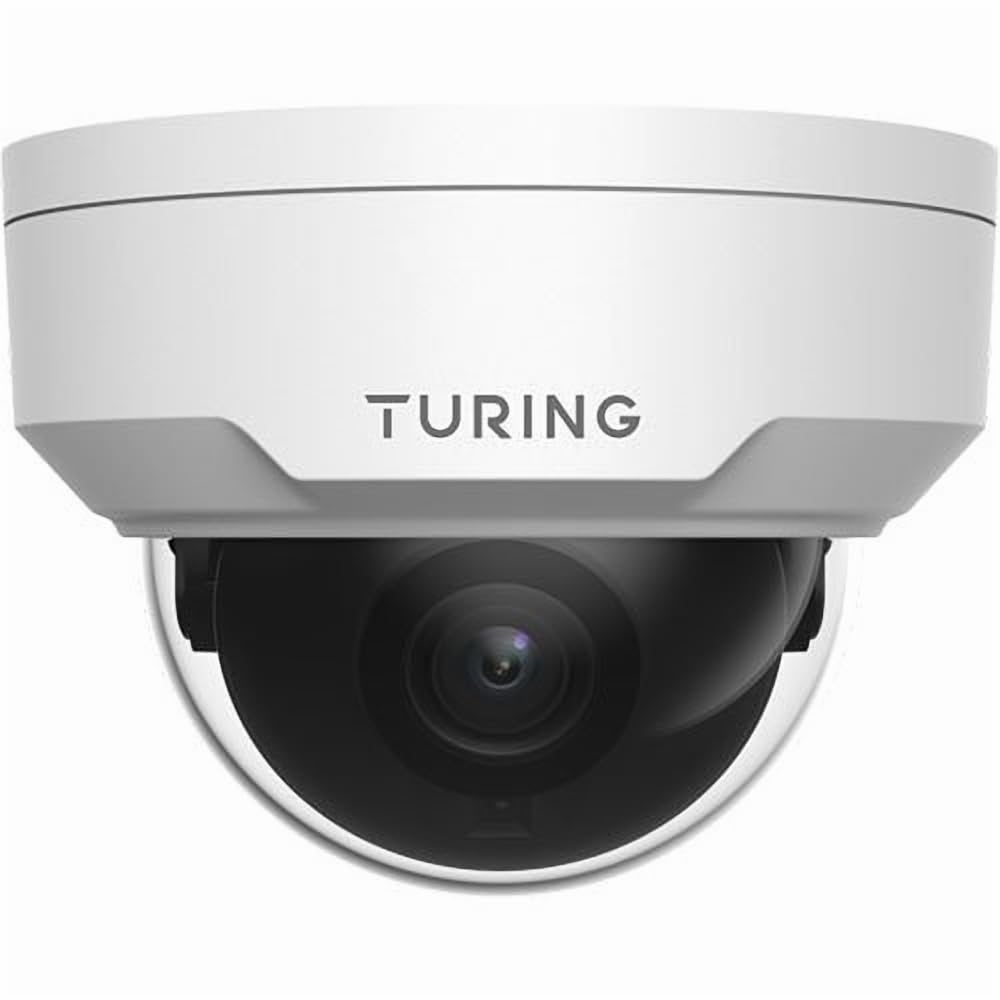
Şəkil 4.1: Ön view of the Turing TP-MFD4A28 4MP IR Dome IP Camera, showing its white dome design and lens.
Əsas komponentlər:
- Günbəz örtüyü: Protective cover for the lens and IR LEDs.
- Lens: 2.8mm fixed lens for a wide field of view.
- IR LEDləri: Infrared illuminators for night vision.
- MicroSD Kart Yuvası: Located internally, accessible by removing the dome cover.
- Sıfırlama düyməsi: Located internally, used for factory reset.
- Ethernet Portu (RJ45): Şəbəkə bağlantısı və Ethernet üzərindən güc (PoE) üçün.
- Güc Girişi (DC 12V): Optional power input if PoE is not used.
5. Quraşdırma
5.1 Physical Installation (Wall Mount)
- Məkan seçin: Select a suitable wall-mount location that provides the desired viewing angle and is within range of your network cable.
- Səthi hazırlayın: Use the provided drill template (if available) to mark the screw holes on the wall. Drill pilot holes.
- Mount the Camera Base: Secure the camera's mounting base to the wall using the provided screws and wall plugs.
- Marşrut kabelləri: Pass the Ethernet cable through the cable entry point on the mounting base.
5.2 Elektrik və Şəbəkə Bağlantısı
- Ethernet Bağlantısı: Connect an Ethernet cable from your PoE switch/injector or network router to the camera's RJ45 port. Use the waterproof connector for outdoor installations.
- Güc (İstəyə görə): PoE istifadə etmirsinizsə, 12V DC güc adapterini (daxil deyil) kameranın enerji girişinə qoşun.
- Gücü yoxlayın: The camera's indicator light (if present) should illuminate, indicating power.
5.3 MicroSD Kartının Quraşdırılması
The camera supports up to a 256GB MicroSD card for local storage.
- Gücü ayırın: MicroSD kartını quraşdırmadan və ya çıxarmadan əvvəl kameranın söndürüldüyünə əmin olun.
- Remove Dome Cover: Carefully twist or unclip the outer dome cover to access the internal components.
- MicroSD kartı daxil edin: Locate the MicroSD card slot and insert the card with the contacts facing down until it clicks into place.
- Replace Dome Cover: Securely reattach the dome cover, ensuring a watertight seal for IP67 protection.
- Kartı format edin: After powering on, format the MicroSD card via the camera's web interface or connected NVR for proper operation.
5.4 İlkin Konfiqurasiya
For initial setup and advanced configuration, access the camera via its web interface or connect it to a Turing Smart Series NVR or Turing Vision Cloud.
- IP ünvanını tapın: Use a network scanner tool or your NVR to discover the camera's IP address on your local network.
- Giriş Web İnterfeys: Açıq a web brauzerə daxil edin və kameranın IP ünvanını daxil edin. Standart etimadnamələrdən istifadə edərək daxil olun (standart istifadəçi adı/parol üçün Tez Başlanğıc Təlimatına baxın).
- Defolt parolu dəyişdirin: Təhlükəsizlik üçün ilk giriş zamanı standart parolu dərhal dəyişdirin.
- Şəbəkə Parametrləri: Configure network settings (e.g., static IP, DNS) if required by your network environment.
- Vaxt Parametrləri: Set the correct date and time for accurate recording timestamps.
6. işlək
6.1 Canlı View və Qeyd
Access the live video feed through your NVR, Turing Vision Cloud, or the camera's web interface. You can initiate manual recordings or configure scheduled/motion-triggered recordings.
- Qətnamə: The camera supports up to 4MP (2688x1520) resolution. Adjust settings as needed for bandwidth and storage.
- Çərçivə Tezliyi: Records at 30/25 frames per second for smooth video.
6.2 Night Vision (Smart IR)
The camera automatically switches to night vision mode in low-light conditions, utilizing its Smart IR LEDs to provide clear black-and-white video up to 30 meters (98 feet). TwilightVision technology enhances low-light performance before IR activation.
6.3 Geniş Dinamik Diapazon (WDR)
WDR technology helps balance areas of high contrast in the image, ensuring details are visible in both bright and dark regions simultaneously. This is particularly useful in scenes with strong backlighting.
6.4 Motion Detection and Analytics
Configure motion detection zones and sensitivity via the camera's web interface or NVR. When integrated with a Turing Smart Series NVR or Turing Vision Cloud, the camera supports advanced analytics like People and Vehicle Search.
- Xəbərdarlıq növü: Motion Only alerts are supported.
- Konfiqurasiya: Set up email notifications or NVR alarms for detected events.
7. Baxım
7.1 Kameranın təmizlənməsi
Regular cleaning helps maintain optimal image quality.
- Gently wipe the dome cover and lens with a soft, lint-free cloth.
- İnadkar kir üçün yüngül bir parça istifadə edin dampened with water. Avoid abrasive cleaners.
- Ensure no moisture enters the camera housing.
7.2 Mikroproqram yeniləmələri
Periodically check the Turing website or your NVR system for available firmware updates. Firmware updates can improve performance, add new features, and enhance security. Follow the provided instructions carefully when performing updates.
7.3 MicroSD Kart İdarəetməsi
If using a MicroSD card for recording, it is recommended to format it periodically (e.g., monthly) to maintain performance and prevent data corruption. Back up any important recordings before formatting.
8. Giderme
| Problem | Mümkün Səbəb | Həll |
|---|---|---|
| Enerji yoxdur / Kamera açılmır |
|
|
| Video Lenti yoxdur |
|
|
| Zəif Şəkil Keyfiyyəti |
|
|
| MicroSD Card Not Recording |
|
|
9. Spesifikasiyalar
| Model nömrəsi | TP-MFD4A28 |
| Effektiv Qətnamə | 4 MP (2688x1520) |
| Lens | 2.8mm Sabit Lens |
| Çərçivə Tezliyi | 30 fps |
| Gecə Görmə Aralığı | Up to 30m (98.43 Feet) with Smart IR |
| Aşağı İşıq Texnologiyası | TwilightVision |
| Beynəlxalq Qoruma Reytinqi | IP67 (Havaya davamlı) |
| Vandal Müqavimət | IK10 |
| Geniş Dinamik Aralıq (WDR) | Bəli |
| Güc mənbəyi | PoE (Ethernet üzərindən güc) və ya 12V DC |
| Bağlantı texnologiyası | Simli (Ethernet) |
| MicroSD Kart Dəstəyi | 256 GB-a qədər |
| Montaj növü | Divar montajı |
| Forma faktoru | Qübbə |
| Ölçülər (U x G x Y) | 4.3 x 4.3 x 3.2 düym |
| Maddə Çəkisi | 14.9 unsiya (0.93 funt) |
| Rəng | Ağ |
| Xəbərdarlıq növü | Yalnız Hərəkət |
| Foto Sensor Texnologiyası | CMOS |
10. Zəmanət və Dəstək
Turing products are covered by a manufacturer's warranty. Please refer to the official Turing webxüsusi zəmanət şərtləri və qaydaları üçün sayta və ya satınalma sənədlərinizə baxın.
For technical support, troubleshooting assistance, or warranty claims, please contact Turing customer service through their official websayt və ya satınalma ilə təmin edilən əlaqə məlumatı.
Onlayn Resurslar:
- Official Turing Websayt: www.turing.com
- Support Portal: (Check Turing website for specific support links)