1. Təhlükəsizlik Təlimatları
Please read all safety instructions carefully before operating the appliance. Failure to follow these instructions may result in electric shock, fire, or injury.
- Enerji təchizatının səslə uyğun olduğundan əmin oluntage reytinq etiketində göstərilmişdir.
- Cihazı zədələnmiş elektrik kabeli və ya fiş ilə işlətməyin.
- Keep the unit at least 50 cm away from walls or other objects to ensure proper ventilation.
- Hava girişinə və ya çıxışına əşyalar daxil etməyin.
- Cihazı vanna otağı və ya camaşırxana kimi nəm mühitlərdə istifadə etməyin.
- Təmizləmədən və ya hər hansı texniki xidmət göstərmədən əvvəl cihazı elektrik şəbəkəsindən ayırın.
- Bu cihaz fiziki, duyğu və ya əqli imkanları zəif olan və ya təcrübəsi və biliyi olmayan şəxslərin (uşaqlar da daxil olmaqla) istifadəsi üçün nəzərdə tutulmayıb, əgər onların təhlükəsizliyinə cavabdeh olan şəxs tərəfindən nəzarət və ya cihazın istifadəsi ilə bağlı təlimat verilməyibsə.
2. Paketin məzmunu
Verify that all items listed below are present in the packaging.
- Portativ Kondisioner
- Uzaqdan İdarəetmə
- Egzoz hortumu
- Window Sealing Kit (Adjustable window slider, exhaust hose adapter, window exhaust adapter)
- Hortumu boşaltın
- İstifadəçi təlimatı

Image: Included accessories for the Mistral MPAC1600R, showing the exhaust hose, window panel kit, and hose adapters.
3. Məhsul bitdiview
Ön View

Şəkil: Ön view of the Mistral MPAC1600R portable air conditioner, featuring its sleek black design and top control panel.
Yan View

Şəkil: Yan view of the Mistral MPAC1600R portable air conditioner, highlighting its compact profile and side vents.
Arxa View
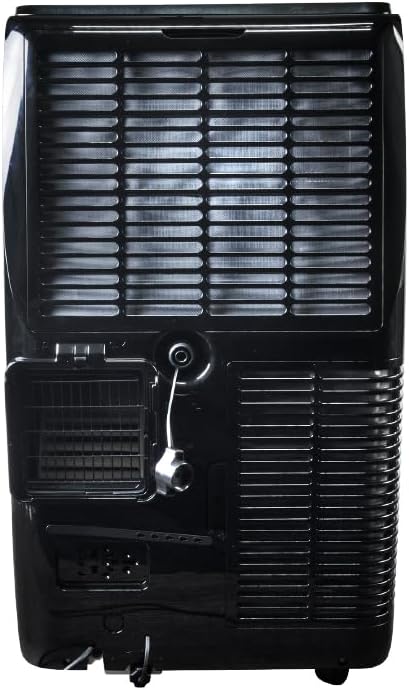
Şəkil: arxa view of the Mistral MPAC1600R portable air conditioner, detailing the exhaust port, drainage outlet, and power connection.
Ölçülər

Image: Diagram illustrating the dimensions of the Mistral MPAC1600R: 45 cm (width), 39.6 cm (depth), and 74.5 cm (height).
4. Quraşdırma və Quraşdırma
4.1 Qabın açılması
Carefully remove the air conditioner and all accessories from the packaging. Retain the packaging for future storage or transport.
4.2 Egzoz hortumunun quraşdırılması
- Screw the exhaust hose adapter onto one end of the exhaust hose.
- Pəncərə egzoz adapterini egzoz şlanqının digər ucuna qoşun.
- Insert the exhaust hose adapter into the exhaust outlet on the rear of the air conditioner unit.
4.3 Pəncərə dəstinin quraşdırılması
- Pəncərə sürüşmə dəstini pəncərə açılışınıza uyğunlaşdırın.
- Secure the window slider kit in the window frame.
- Insert the window exhaust adapter (attached to the exhaust hose) into the opening of the window slider kit.
- Hava sızmasının qarşısını almaq üçün pəncərənin dəstin ətrafında möhürləndiyinə əmin olun.
4.4 Yerləşdirmə ilə bağlı mülahizələr
- Bölməni düz, sabit bir səthə qoyun.
- Ensure there is at least 50 cm of clear space around the unit for proper airflow.
- Asan egzoz şlanqının quraşdırılması üçün bölməni pəncərənin yanında yerləşdirin.
- Cihazı birbaşa günəş işığı altında və ya istilik mənbələrinin yaxınlığında yerləşdirməyin.
5. Əməliyyat Təlimatları
5.1 İdarəetmə Paneli və Uzaqdan İdarəetmə
The unit can be operated via the control panel on top of the unit or the included remote control. The remote control offers full functionality.
- Güc düyməsi: Cihazı yandırır və ya söndürür.
- Rejim düyməsi: Cycles through Cool, Dry, and Fan modes.
- Fan sürəti düyməsi: Ventilyator sürətini tənzimləyir (Yüksək, Orta, Aşağı).
- Temperaturun yuxarı/aşağı düymələri: Adjusts the desired temperature (18 to 32 °C).
- Taymer düyməsi: 24 saatlıq AÇIQ/SÖNDÜRÜLMƏ taymerini təyin edir.
- Yuxu rejimi düyməsi: Activates or deactivates Sleep Mode.
- Smart Mode Button: Activates or deactivates Smart Mode.
- Turbo rejimi düyməsi: Activates or deactivates Turbo Mode.
- Uşaq kilidi düyməsi: Təsadüfi dəyişikliklərin qarşısını almaq üçün idarəetmə panelini kilidləyir.
5.2 İş rejimləri
- Sərin Rejim: Soyutma təmin edir. İstədiyiniz temperaturu və ventilyator sürətini təyin edin.
- Quru rejim: Dehumidifies the room. Fan speed is fixed to low.
- Fan rejimi: Soyutmadan hava dövranını təmin edir. İstədiyiniz ventilyator sürətini seçin.
- Smart Mode: Automatically selects the optimal operating mode (Cool, Dry, or Fan) based on the room temperature.
- Turbo rejimi: Operates at maximum cooling power and fan speed for rapid cooling.
- Yuxu rejimi: Gradually increases the set temperature by 1°C per hour for the first two hours, then maintains it, providing quieter operation for comfortable sleep.
5.3 Wi-Fi Connectivity and Smart Home Integration
The MPAC1600R features Wi-Fi connectivity, allowing control via a smartphone app and integration with smart home systems like Alexa and Google Home. Refer to the separate Wi-Fi setup guide for detailed instructions on connecting your device.
5.4 Uşaq kilidi funksiyası
To activate the Child Lock, press and hold the Child Lock button on the control panel or remote control for 3 seconds. This will disable all other buttons. To deactivate, repeat the process.
6. Baxım
Daimi texniki qulluq optimal performansı təmin edir və kondisionerinizin ömrünü uzadır.
6.1 Hava Filtrinin Təmizlənməsi
Hava filtri istifadədən və havanın keyfiyyətindən asılı olaraq iki həftədən bir və ya daha tez-tez təmizlənməlidir.
- Cihazı söndürün və elektrik şəbəkəsindən ayırın.
- Locate the air filter panel (usually on the rear or side).
- Filtri çıxarın.
- Clean the filter with a vacuum cleaner or wash it with warm, soapy water.
- Yenidən quraşdırmadan əvvəl yaxşıca yuyun və havada tamamilə qurumasına icazə verin.
6.2 Suyun boşaldılması
The unit collects condensation during operation. When the internal water tank is full, the unit will stop and display an error code. Drain the water as follows:
- Cihazı söndürün və elektrik şəbəkəsindən ayırın.
- Place a shallow pan or container under the drain port at the bottom rear of the unit.
- Drenaj tapasını çıxarın.
- Bütün suyun axmasına icazə verin.
- Drenaj tapasını etibarlı şəkildə dəyişdirin.
6.3 Saxlama
Cihazı uzun müddət saxlasanız:
- Drain all water completely.
- Hava filtrini təmizləyin.
- Daxili hissələri qurutmaq üçün cihazı bir neçə saat Ventilyator rejimində işlədin.
- Elektrik kabelini ayırın və səliqəli şəkildə sarın.
- Cihazı quru və sərin yerdə, tercihen orijinal qablaşdırmasında saxlayın.
7. Problemlərin aradan qaldırılması üçün təlimat
Müştəri dəstəyi ilə əlaqə saxlamazdan əvvəl ümumi problemlər və həll yolları üçün aşağıdakı cədvələ baxın.
| Problem | Mümkün Səbəb | Həll |
|---|---|---|
| Cihaz açılmır | Enerji təchizatı yoxdur Elektrik kabeli qoşulmayıb Internal water tank full | Elektrik çıxışını yoxlayın Elektrik kabelinin etibarlı şəkildə qoşulduğundan əmin olun Su çənini boşaltın |
| Soyutma yoxdur və ya qeyri-kafi soyutma | Hava filtri tıxanmışdır Egzoz hortumu düzgün quraşdırılmayıb Window not sealed Otaq çox böyük Temperatur ayarı çox yüksək | Hava filtrini təmizləyin Check exhaust hose connection and ensure it's not bent Seal window gaps Ensure unit is appropriate for room size Müəyyən edilmiş temperaturu aşağı salın |
| Vahid səs-küylüdür | Cihaz düz bir səthdə deyil Hava filtri tıxanmışdır Fanda maneə | Cihazı düz bir səthə qoyun Hava filtrini təmizləyin Hər hansı maneələri yoxlayın və aradan qaldırın |
| Su sızması | Boşaltma tapası boş Vahid əyilmiş Boşaltma hortumu bloklanıb | Drenaj tıxacının etibarlı olduğundan əmin olun Cihazı düz bir səthə qoyun Check and clear any blockages in the drain hose |
8. Texniki spesifikasiyalar
| Xüsusiyyət | Spesifikasiya |
|---|---|
| Model | MPAC1600R |
| Soyutma Tutumu | 16,000 BTU |
| Cildtage | 220 volt |
| Wattage | 1560 vatt |
| Səs-küy Səviyyəsi | 51 desibel |
| Soyutma Temperaturu Aralığı | 18 ilə 32 °C arasında |
| Rejimlər | Cool, Dry, Fan, Smart, Turbo, Sleep |
| Fan Sürətləri | Yüksək, Orta, Aşağı |
| Taymer | 24 saat |
| Xüsusi Xüsusiyyətlər | UV Sterilisation, Wi-Fi (Alexa & Google Home compatible), Child Lock |
| Məhsulun Ölçüləri (U x G x Y) | 45 x 39.6 x 74.5 sm |
| Çəki | 33.3 kq |
| Forma faktoru | Portativ |
9. Zəmanət və Müştəri Dəstəyi
This Mistral Portable Air Conditioner is covered by a manufacturer's warranty. Please refer to the warranty card included in your package for specific terms and conditions, including the warranty period and coverage details.
For technical assistance, troubleshooting beyond this guide, or warranty claims, please contact Mistral customer support. Contact information can typically be found on the manufacturer's official websaytda və ya alış qəbzinizdə.
When contacting support, please have your model number (MPAC1600R) and proof of purchase readily available.


