Giriş
This manual provides detailed instructions for the setup, operation, and maintenance of your ATTACK SHARK M71 75% TKL Wireless Mechanical Keyboard. Please read this guide thoroughly to ensure proper use and to maximize your keyboard's performance and lifespan.

Image: The ATTACK SHARK M71 keyboard showcasing its 68% layout and key features like aluminum alloy body, three-mode connection, and RGB backlight.
Paketin məzmunu
Bütün əşyaların paketdə olduğunu yoxlayın:
- ATTACK SHARK M71 Wireless Mechanical Keyboard
- Type-C Kabel
- 2.4G Simsiz Qəbuledici
- Keycap Puller / Switch Puller (Two-in-one tool)
- Complimentary 61 additional PBT OEM keycaps (different color layout)
- İstifadəçi təlimatı

Image: A visual representation of the items included in the ATTACK SHARK M71 keyboard package, including the keyboard, cables, and extra keycaps.
Video: Unboxing the Blueberry version of the M71 keyboard, showing the package contents and a demonstration of its typing sound.
Məhsul Bitdiview
The ATTACK SHARK M71 is a 75% TKL wireless mechanical keyboard featuring a full aluminum CNC chassis, multi-mode connectivity, hot-swappable switches, and RGB lighting. Its compact design and robust construction are engineered for both gaming and productivity.
Əsas Xüsusiyyətlər:
- Full Aluminum CNC Body: Constructed from international standard 6063 aluminum alloy for durability and a premium feel.
- Üç Rejimli Bağlantı: Supports Bluetooth 5.0/3.0, 2.4G wireless, and wired USB-C connections.
- İsti dəyişdirilə bilən açarlar: Compatible with 3/5-pin switches, allowing for easy customization without soldering.
- Conta montaj strukturu: Incorporates anti-static IPEX switch pads, PORON sound-absorbing cotton, and PET acoustic switch pads to enhance typing feel and reduce noise.
- RGB LED İşıqlandırma: Features customizable RGB backlighting and a side LED light strip.
- 4600mAh Batareya: Geniş simsiz istifadəni təmin edir.
- PBT OEM Keycaps: Durable keycaps with GMK-like characters.
Komponentlər:
Familiarize yourself with the main components of your keyboard:
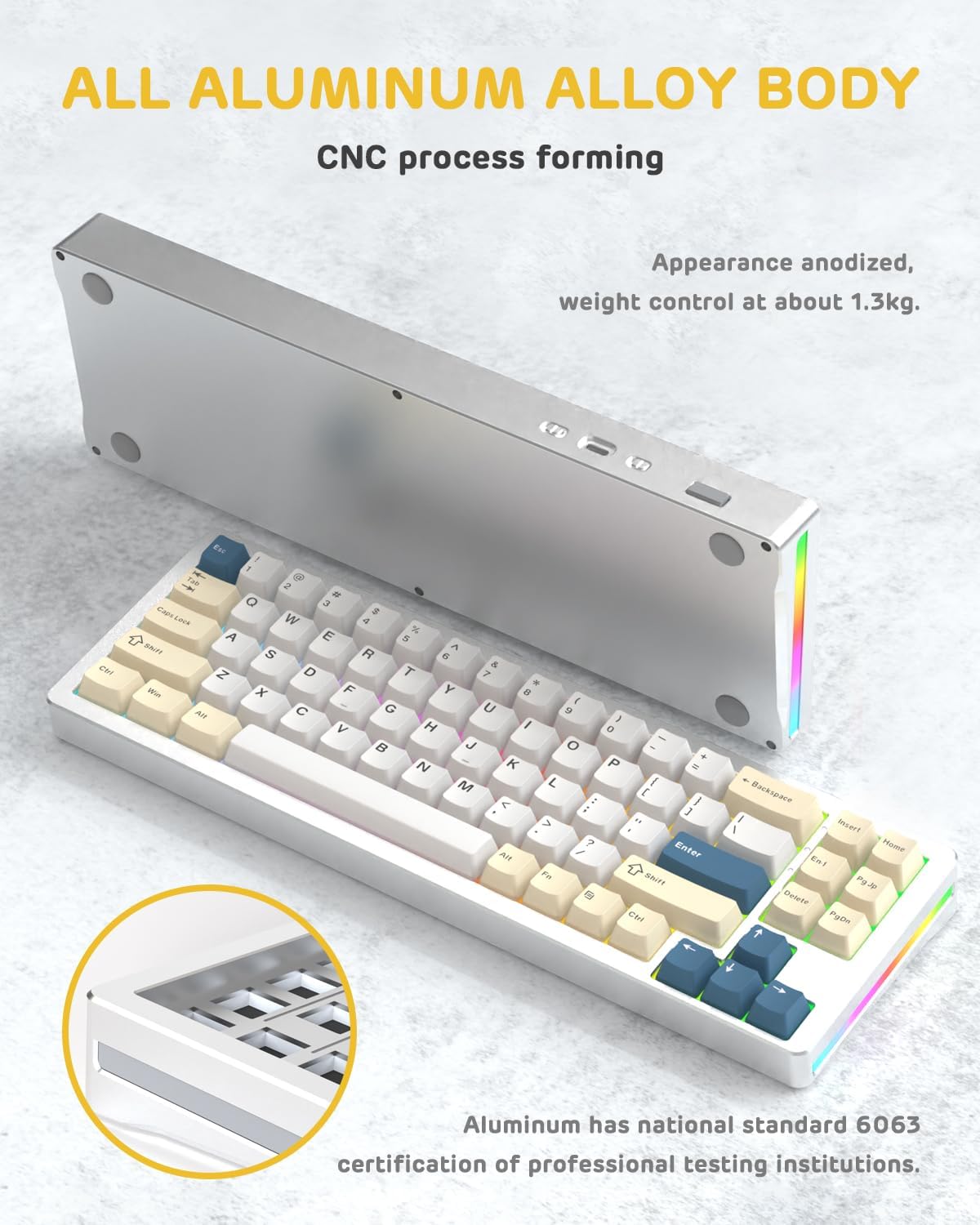
Şəkil: bir tərəf view of the M71 keyboard highlighting its full aluminum alloy body and CNC process forming.

Şəkil: partladı view illustrating the multi-layered gasket mount structure, including the PBT keycaps, aluminum alloy upper cover, customized switch body, PC positioning board, PORON filled cotton, anti-static IPEX switch underpad, PET singing pad, PCB board, PORON shaft seat cushion, PET sound backing pad, wing light strip, and aluminum alloy base.
Quraşdırma
1. Connectivity Modes:
The M71 keyboard supports three connection modes: Bluetooth, 2.4G wireless, and wired USB-C.
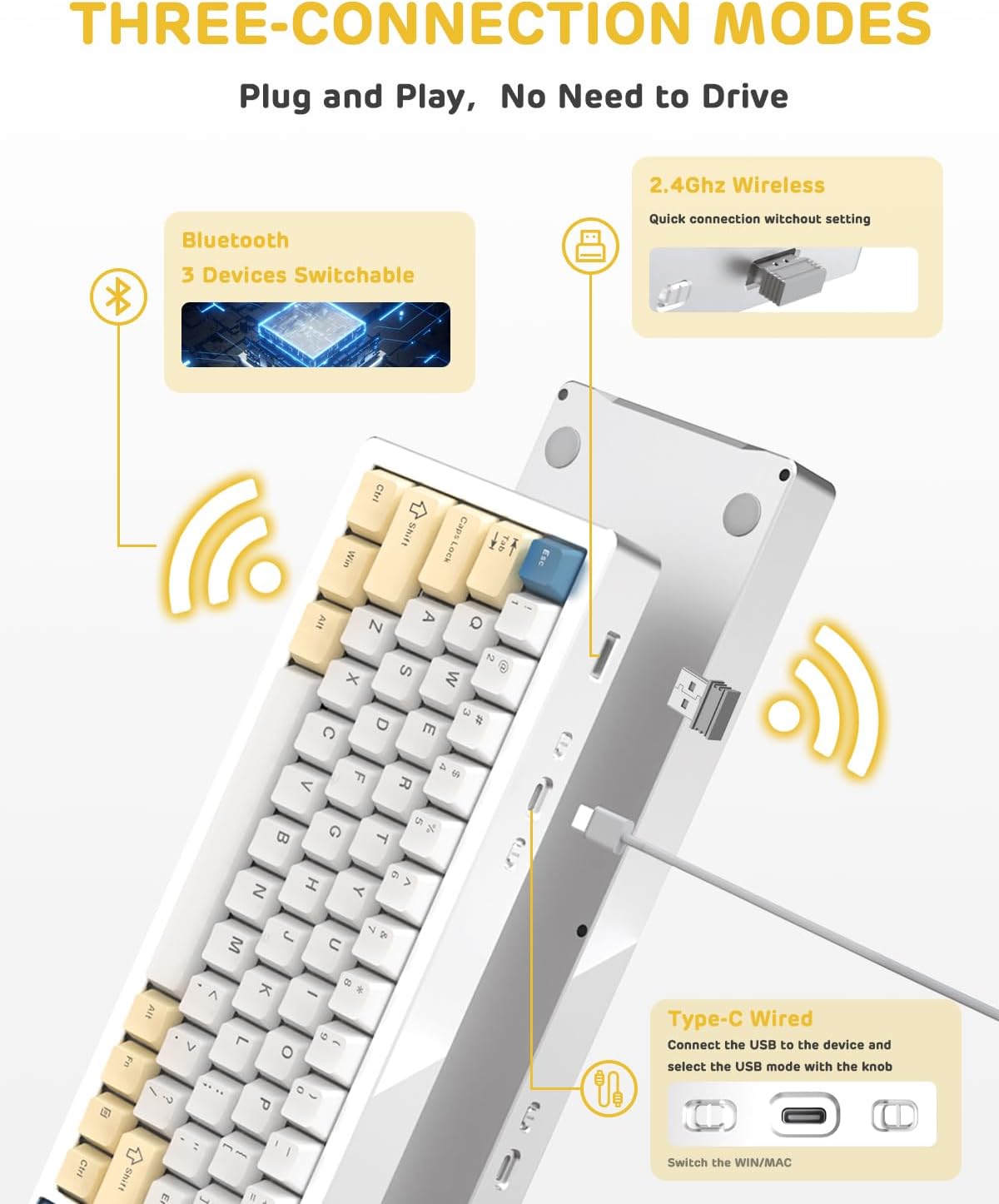
Image: A visual guide to the three connectivity options: Bluetooth for up to 3 devices, 2.4GHz wireless with a receiver, and wired Type-C connection.
Simli Bağlantı:
- Connect the provided Type-C cable to the keyboard's USB-C port and to your computer's USB port.
- Ensure the mode switch on the keyboard is set to the wired (USB-C) position.
- Klaviatura sisteminiz tərəfindən avtomatik olaraq tanınacaq.
2.4G Simsiz Bağlantı:
- Locate the 2.4G wireless receiver (dongle) in the package.
- 2.4G qəbuledicisini kompüterinizdə mövcud USB portuna qoşun.
- Set the mode switch on the keyboard to the 2.4G wireless position.
- Klaviatura avtomatik qoşulmalıdır.
Bluetooth bağlantısı:
- Klaviaturadakı rejim açarını Bluetooth vəziyyətinə qoyun.
- Kompüterinizdə və ya cihazınızda Bluetooth parametrlərini açın və yeni cihazlar axtarın.
- The keyboard should appear as "ATTACK SHARK M71" or similar. Select it to pair.
- The keyboard can connect to up to 3 Bluetooth devices. Use Fn + 1/2/3 qoşalaşdırılmış cihazlar arasında keçid etmək.
2. Battery Charging and Status:
The M71 keyboard is equipped with a 4600mAh battery. To charge, connect the keyboard via the USB-C cable to a power source (e.g., computer USB port, USB wall adapter).

Image: A diagram showing how to check the battery level using Fn+ALT(R) and the visual indicators on the keyboard's side LED strip.
- To check the battery level in wireless mode, press Fn + ALT (Right). The side LED strip will indicate the charge level.
- Battery life is approximately 1-2 weeks with lighting enabled and up to 4 weeks with lighting disabled.
Əməliyyat Təlimatları
1. Multimedia Keys:
The keyboard features 12 multimedia keys accessible via the Fn düymə birləşmələri:
- Fn + F1-F12: Access various multimedia functions (e.g., volume control, play/pause, calculator, email).
- Fn + 1/2: Control screen brightness.
2. RGB İşıqlandırma Nəzarəti:
Customize the keyboard's RGB backlight and side LED strip:

Image: The M71 keyboard displaying its RGB backlight and side LED strip, along with a close-up of the PBT keycaps.
- Fn + Ctrl (Right): Switch between different side LED light strip modes.
- Fn + Tab: Toggle white light mode.
- Refer to the full user manual for additional lighting effect controls and customization options via the programmable software.
3. Proqramlaşdırıla bilən proqram təminatı:
The keyboard supports a dedicated driver program for advanced customization. You can download the software from the official ATTACK SHARK website to personalize lighting effects, key assignments, and macros. The keyboard is compatible with Windows 2000/XP/Vista/7/8/10/11, Android, and iOS.
Baxım
1. Təmizləmə:
- Klaviatura səthini silmək üçün yumşaq, quru parça istifadə edin.
- For deeper cleaning, remove keycaps using the provided keycap puller and use compressed air to clear debris from between switches.
- Sərt kimyəvi maddələrdən və ya aşındırıcı materiallardan istifadə etməyin.
2. Hot-Swapping Switches:
The M71 keyboard features hot-swappable sockets, allowing you to change switches without soldering.

Şəkil: Yaxın plan view of the hot-swappable White Jade linear switches on the M71 keyboard, demonstrating how they can be easily removed and replaced.
- Klaviaturanı söndürün və ya cihazınızdan ayırın.
- Use the switch puller tool to carefully grip the switch and pull it straight up.
- Align the pins of the new switch with the holes on the PCB and press down gently until it clicks into place. Ensure pins are not bent.
- The PCB supports both 3-pin and 5-pin switches.
Video: A demonstration of the disassembly process for the M71 keyboard, showing how to remove keycaps and switches, revealing the gasket mount structure.
Problemlərin aradan qaldırılması
| Məsələ | Mümkün Həll |
|---|---|
| Simsiz rejimdə klaviatura cavab vermir. |
|
| Açarlar qeydiyyatdan keçmir və ya ikiqat yazılmır. |
|
| RGB işıqlandırma işləmir və ya səhvdir. |
|
| Bluetooth cütləşdirmə problemləri. |
|
Spesifikasiyalar
| Xüsusiyyət | Detal |
|---|---|
| Model | M71 |
| Layout | 75% TKL (71 keys) |
| Bağlantı | Bluetooth 5.0/3.0, 2.4G Wireless, USB-C Wired |
| Keçidlər | Hot-swappable (3/5-pin compatible), Pre-lubed Linear White Jade Switch |
| Düymələr | PBT OEM Açar Qapaqları |
| Montaj tərzi | Conta montajı |
| Şassi materialı | Full Aluminum CNC (6063 alloy) |
| Batareya Tutumu | 4600 mAh |
| İşıqlandırma | RGB Backlight, RGB LED Side Light Strip |
| Uyğunluq | Windows 2000/XP/Vista/7/8/10/11, Android, iOS, Mac |
| Məhsul Ölçüləri | 13.78"U x 4.53"W x 1.22"H |
| Maddə Çəkisi | 2.86 funt sterlinq |
Zəmanət və Dəstək
For warranty information and technical support, please refer to the official ATTACK SHARK websaytına daxil olun və ya birbaşa müştəri xidmətləri ilə əlaqə saxlayın. Satınalma qəbzinizi hər hansı zəmanət iddiaları üçün satınalmanın sübutu kimi saxlayın.
İstehsalçı: HÜCUM SHARK
Satıcı: Ajazz US
İlk mövcud tarix: 4 avqust 2023-cü il