1. Giriş
Thank you for choosing the Cherry KW 7100 Mini Multi-Device Compact Keyboard. This manual provides essential information for setting up, operating, and maintaining your new keyboard. Designed for versatility and portability, this keyboard offers seamless connectivity across multiple devices.
2. Qutuda nə var
- Cherry KW 7100 Mini Multi-Device Compact Keyboard
- USB-C to USB-A Charging/Connection Cable
- 2x AAA batareyalar
- 2.4 GHz Wireless Nano Receiver (stored magnetically in the keyboard)
- Daşıma çantası
- Təlimat kitabçası

Şəkil 1: Yuxarıdan aşağıya view of the Cherry KW 7100 Mini Keyboard.
3. Quraşdırma
3.1. Batareyanın quraşdırılması
- Batareya bölməsini klaviaturanın alt tərəfində tapın.
- Batareya yuvasının qapağını sürüşdürərək açın.
- Düzgün polariteyi (+/-) təmin edərək iki AAA batareyasını daxil edin.
- Batareya bölməsinin qapağını etibarlı şəkildə bağlayın.
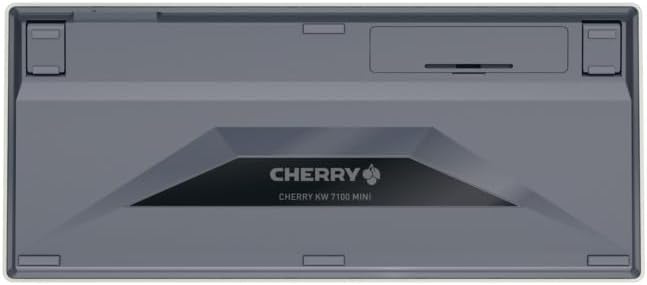
Figure 2: Underside of the keyboard with the battery compartment.
3.2. Klaviaturanın qoşulması
The Cherry KW 7100 Mini supports three connection methods: Bluetooth, 2.4 GHz Wireless, and Wired USB-C.
3.2.1. Bluetooth bağlantısı (3 cihaza qədər)
- Yan tərəfdə yerləşən güc açarından istifadə edərək klaviaturanı yandırın.
- Press and hold one of the Bluetooth channel keys (F1, F2, or F3) for 3-5 seconds until the corresponding LED indicator blinks rapidly. This indicates pairing mode.
- On your device (laptop, smartphone, tablet), navigate to Bluetooth settings and search for available devices.
- Select "Cherry KW 7100" from the list to pair. The LED will stop blinking and remain solid for a few seconds upon successful connection.
- Repeat for up to two additional devices using the other Bluetooth channel keys (F1, F2, or F3).
3.2.2. 2.4 GHz Simsiz Bağlantı
- Locate the 2.4 GHz wireless nano receiver, typically stored magnetically in a slot on the underside of the keyboard.
- Insert the nano receiver into an available USB-A port on your computer.
- Turn on the keyboard using the power switch. The keyboard should automatically connect to the receiver.
3.2.3. Simli USB-C Bağlantısı
- Connect one end of the provided USB-C cable to the USB-C port on the keyboard.
- Connect the other end of the USB-C cable to an available USB-A port on your computer.
- The keyboard will function as a wired keyboard.
Video 1: Demonstrating the setup and typing experience of the Cherry KW 7100 Mini Keyboard.
4. Klaviaturanın işlədilməsi
4.1. Qoşulmuş Cihazlar arasında keçid
To switch between paired Bluetooth devices, simply press the corresponding Bluetooth channel key (F1, F2, or F3) that your device is paired to. The keyboard will automatically connect to the selected device.
4.2. Function Keys (FN)
The keyboard features a dedicated FN key, typically located near the right Shift key. This key, in combination with other keys, activates secondary functions such as media controls, screen brightness, and other system commands. Refer to the keycap legends for specific FN key combinations.
4.3. LED göstəriciləri
LED indicators on the keyboard provide information about its status:
- Bluetooth Channel LEDs (F1, F2, F3): Indicate the currently active Bluetooth connection or pairing mode.
- Caps Lock LED: Caps Lock aktiv olduqda yanır.
- Batareya Vəziyyəti LED: Aşağı batareya səviyyəsini göstərir.
4.4. Ayarlanabilir Ayaqlar
The keyboard is equipped with stable, fold-out feet on the underside. These allow you to adjust the typing angle for improved ergonomics and comfort.
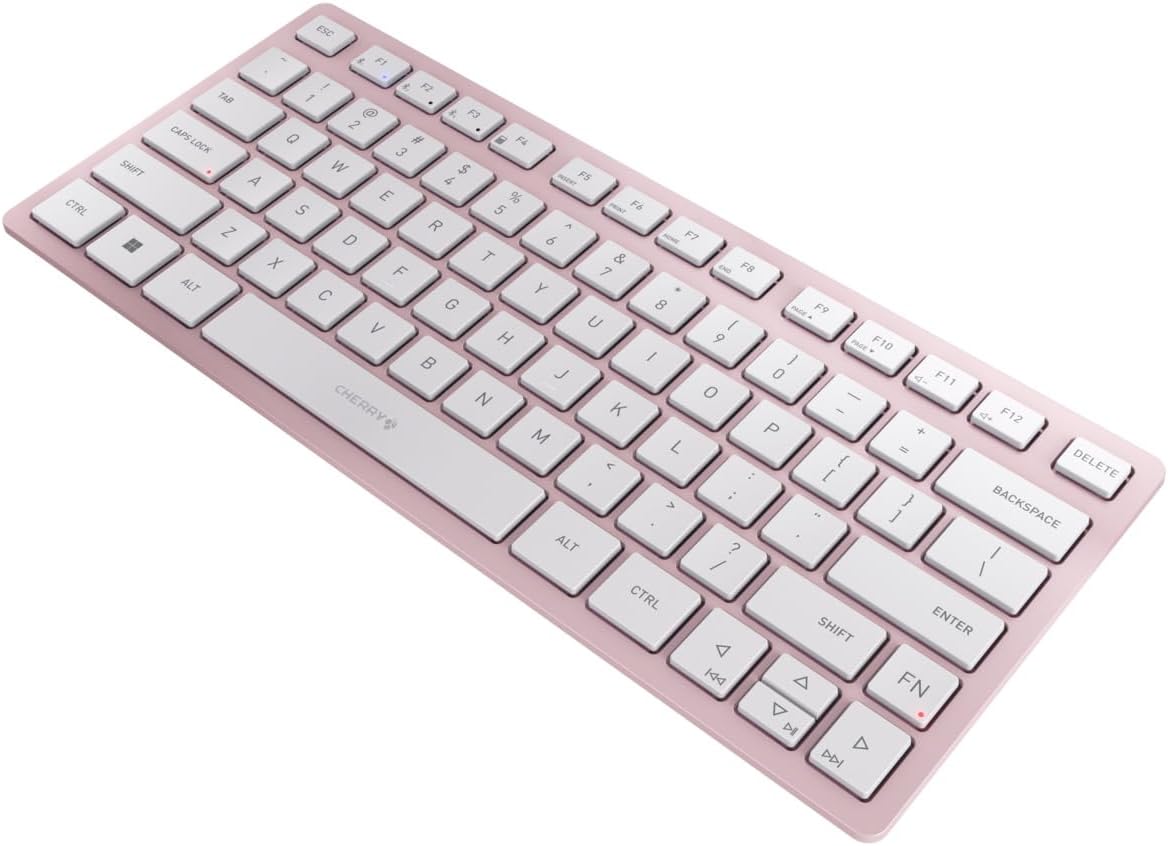
Şəkil 3: Bucaqlı view of the keyboard, highlighting its slim profile.

Şəkil 4: Yan view showing the adjustable feet extended for an ergonomic typing angle.
5. Baxım
5.1. Təmizləmə
To clean your keyboard, gently wipe the keycaps and surface with a soft, lint-free cloth. For stubborn dirt, slightly dampen the cloth with water or a mild, non-abrasive cleaning solution. Avoid excessive moisture and do not spray cleaners directly onto the keyboard.
5.2. Saxlama
When not in use, especially during travel, store the keyboard in its included carrying case to protect it from dust, scratches, and minor impacts.

Figure 5: The keyboard stored in its protective carrying case.
6. Giderme
6.1. Klaviatura Qoşulmur
- Klaviaturanın işə salındığından əmin olun.
- Batareyaları yoxlayın və lazım olduqda dəyişdirin.
- For Bluetooth, ensure the correct channel (F1, F2, or F3) is selected and the keyboard is in pairing mode (blinking LED).
- For 2.4 GHz wireless, ensure the nano receiver is securely plugged into a USB-A port.
- Simsiz problemləri istisna etmək üçün USB-C kabeli vasitəsilə qoşulmağa çalışın.
- Cihazınızı yenidən başladın və yenidən cütləşdirməyə cəhd edin.
6.2. Açarlar Cavab Vermir
- Check the connection as described above.
- Açarların altında heç bir zibil qalmadığından əmin olun.
- If using a wired connection, try a different USB port or cable.
6.3. Qısa Batareya Ömrü
- Ensure you are using fresh, high-quality AAA batteries.
- Turn off the keyboard when not in use to conserve battery power.
7. Spesifikasiyalar
| Xüsusiyyət | Spesifikasiya |
|---|---|
| Model Adı | KVt 7100 |
| Element Model nömrəsi | JK-7100US-19 |
| Brend | albalı |
| Bağlantı texnologiyası | Bluetooth 5.1 (3 channels), 2.4 GHz Wireless, USB-C Wired |
| Uyğun Cihazlar | Noutbuk, Smartfon, Planşet |
| Klaviatura Təsviri | Compact, Multi-Device |
| Əsas Mexanizm | CHERRY SX Scissor Mechanism |
| Güc mənbəyi | 2x AAA batareyalar |
| Şifrələmə | AES-128 |
| Məhsul Ölçüləri | 11.6 x 5.1 x 0.6 düym |
| Maddə Çəkisi | 1.4 funt sterlinq |
| Material | Metal, Plastik |
| Rəng | Albalı Çiçəyi |
8. Zəmanət və Dəstək
This product is covered by Cherry's standard manufacturer warranty. For detailed warranty information, technical support, or service inquiries, please visit the official Cherry websaytına daxil olun və ya birbaşa müştəri dəstəyi ilə əlaqə saxlayın.
İstehsalçı: albalı
Websayt: www.cherry.de