1. Giriş
Aldığınız üçün təşəkkür edirikasing the Zenwire A10 Mini Portable Projector. This device is designed to provide a versatile and convenient projection experience, allowing you to display content from various sources, including smartphones, tablets, and computers. Please read this manual carefully before using the projector to ensure proper operation and to maximize its lifespan.
2. Əhəmiyyətli Təhlükəsizlik Təlimatları
- l olduqda proyektorun obyektivinə birbaşa baxmayınamp aktivdir.
- Proyektorun həddindən artıq istiləşməsinin qarşısını almaq üçün onun ətrafında düzgün havalandırma təmin edin. Havalandırma dəliklərini bağlamayın.
- Yalnız proyektorla birlikdə verilən enerji adapterindən istifadə edin.
- Proyektoru sudan, nəmdən və tezalışan materiallardan uzaq tutun.
- Do not attempt to disassemble or repair the projector yourself. Contact qualified service personnel for assistance.
- Proyektoru sabit, düz bir səthə qoyun.
- İldırım fırtınaları zamanı və ya uzun müddət istifadə edilmədikdə proyektoru elektrik şəbəkəsindən ayırın.
3. Paketin məzmunu
Lütfən, qutudan çıxararkən paketin məzmununu yoxlayın. Hər hansı əşyalar əskik və ya zədələnmişsə, satıcınızla əlaqə saxlayın.
- Zenwire A10 Mini Portable Projector
- Uzaqdan İdarəetmə
- Güc adapteri
- İstifadəçi təlimatı
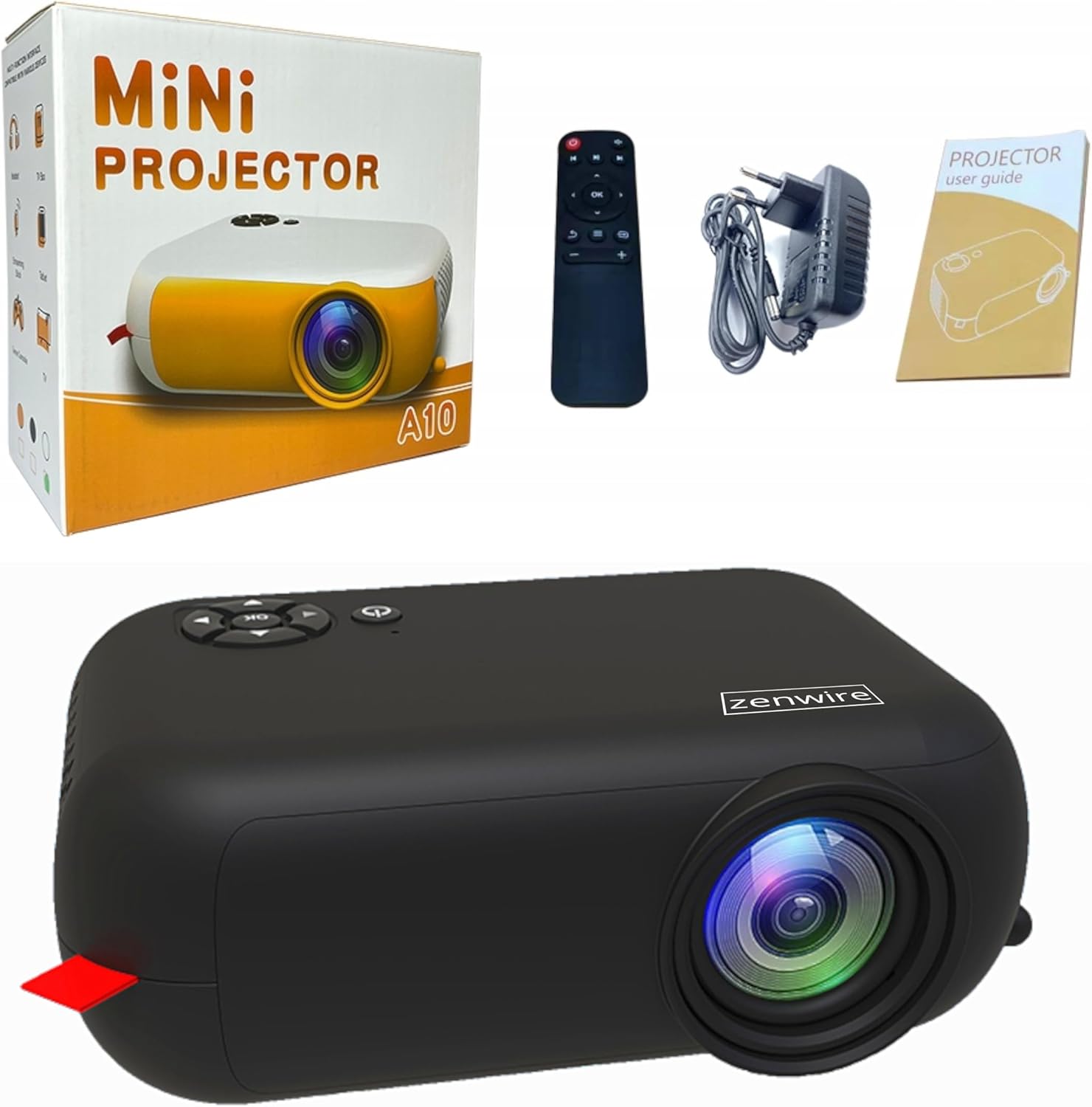
Image: Contents of the Zenwire A10 Mini Projector package, including the projector, remote control, power adapter, and user manual.
4. Məhsul bitdiview
4.1 Projector Dimensions and Design
The Zenwire A10 is designed for portability, featuring a compact and lightweight form factor. Its dimensions are approximately 14cm x 10cm x 5.5cm, making it easy to carry and set up in various locations.

Image: The Zenwire A10 Mini Projector held in a hand, illustrating its compact size and portability.
4.2 Portlar və İdarəetmələr
The projector features a range of input and output ports for versatile connectivity, along with intuitive controls.

Image: Rear panel of the Zenwire A10 Mini Projector, showing the 5V-IN DC power input, IR receiver, USB port, 3.5mm audio jack, HDMI port, and SD card slot.
- 5V-IN DC: Proyektor üçün enerji girişi.
- IR: Pult üçün infraqırmızı qəbuledici.
- USB: Media oxutma üçün USB yaddaş cihazlarını birləşdirin.
- Qulaqlıq girişi (3.5 mm): Xarici dinamikləri və ya qulaqlıqları qoşun.
- HDMI: Connect devices such as laptops, gaming consoles, or streaming sticks.
- SD: Insert Micro SD cards for media playback.
- Fokus Çarxı: Adjust image sharpness (located on the side).
- İdarəetmə Paneli: Buttons on top for navigation and selection.
5. Quraşdırma
5.1 Enerji Bağlantısı
- Təchiz edilmiş güc adapterini şəbəkəyə qoşun 5V-IN DC proyektordakı port.
- Elektrik adapterini rozetkaya qoşun.
- Yandırmaq üçün proyektorun və ya pultdakı güc düyməsini basın.
5.2 Placement and Focus Adjustment
- Place the projector on a stable surface or mount it according to your preference. Ensure the projector lens is facing the projection surface (wall or screen).
- Adjust the distance between the projector and the screen to achieve your desired image size. The projector supports screen sizes up to 100 inches.
- Rotate the focus wheel (typically located near the lens) until the projected image appears clear and sharp.

Image: Diagram illustrating the Zenwire A10 Mini Projector's capability to project various screen sizes, from 13 inches up to 100 inches, depending on the projection distance.
6. Proyektorun işlədilməsi
6.1 Wireless Connection (Miracast & Airplay)
The Zenwire A10 supports wireless screen mirroring via 2.4/5GHz WiFi, compatible with Android (Miracast) and iOS (Airplay) devices.
- Proyektorunuzun və mobil cihazınızın eyni Wi-Fi şəbəkəsinə qoşulduğundan əmin olun.
- On the projector's main menu, select the 'Screen Mirroring' or 'Wireless Display' option.
- Android üçün: On your Android phone/tablet, enable 'Wireless Display', 'Screen Mirroring', 'Smart View', or similar function (names may vary by device). Select the projector from the list of available devices.
- iOS üçün: On your iPhone/iPad, open Control Center and tap 'Screen Mirroring'. Select the projector from the list of available devices.
- The content from your mobile device should now be mirrored on the projector screen.
6.2 Simli Bağlantılar
The projector offers multiple wired input options for various devices.

Image: The Zenwire A10 Mini Projector connected to various devices such as smartphones, tablets, laptops, desktop computers, gaming consoles, and media players, highlighting its versatile connectivity.
- HDMI: Connect a laptop, PC, gaming console (e.g., Xbox, PlayStation), or streaming device (e.g., Amazon Fire TV Stick, Google Chromecast) using an HDMI cable. Select the HDMI input source on the projector.
- USB: Insert a USB flash drive or external hard drive into the USB port. The projector's media player will allow you to browse and play supported video, audio, and image files.
- Mikro SD: Insert a Micro SD card into the SD card slot. Similar to USB, you can access media files through the projector's interface.
- Audio Out (3.5mm Jack): Connect external speakers or headphones to enhance the audio experience.
6.3 Menyu Naviqasiyası
Use the remote control or the buttons on the projector to navigate through the on-screen menu. Select input sources, adjust picture settings (brightness, contrast, color), sound settings, and other system preferences.
7. Baxım
- Lensin təmizlənməsi: Proyektor linzasını yumşaq bir şəkildə silmək üçün optik linzalar üçün xüsusi hazırlanmış yumşaq, tüksüz bir parça istifadə edin. Aşındırıcı təmizləyicilərdən və ya həddindən artıq gücdən istifadə etməkdən çəkinin.
- Toz Təmizləmə: Regularly clean the projector's exterior with a soft, dry cloth. Use a small brush or compressed air to clear dust from the ventilation openings to ensure proper airflow.
- Yaddaş: When not in use, store the projector in a cool, dry place, away from direct sunlight and extreme temperatures. Use the original packaging or a protective case to prevent dust accumulation and damage.
8. Giderme
If you encounter issues with your Zenwire A10 projector, refer to the following common problems and solutions:
| Problem | Mümkün Səbəb | Həll |
|---|---|---|
| Ekranda şəkil yoxdur | Power not connected; Incorrect input source; Device not connected properly. | Check power cable; Select correct input source (HDMI, USB, etc.); Reconnect source device. |
| Şəkil bulanıqdır | Fokus tənzimlənməyib; Proyektor ekrana çox yaxın/uzaqdır. | Adjust the focus wheel; Adjust projection distance. |
| Səs yoxdur | Volume too low; Muted; External audio device not connected/selected. | Increase volume; Unmute; Check external speaker connection or select internal speaker. |
| Simsiz əlaqə problemləri | Not on same Wi-Fi network; Device not compatible; Interference. | Ensure both devices are on the same Wi-Fi; Verify device compatibility; Try moving closer to Wi-Fi router. |
9. Spesifikasiyalar
| Xüsusiyyət | Detal |
|---|---|
| Brend | Zenwire |
| Model nömrəsi | A10 |
| Məhsul növü | Compact and Portable Projector |
| Doğma Qətnamə | 480 x 360p |
| Maksimum Ekran Çözünürlüğü | 1920 x 1080 (Full HD) |
| Parlaqlıq | 1800lm / 60 ANSI |
| Kontrast nisbəti | 2000:1 |
| Ekran növü | LED |
| Bağlantı texnologiyası | Wi-Fi (2.4/5GHz), HDMI, USB, Micro SD, 3.5mm Audio Jack |
| Simsiz Xüsusiyyətlər | Miracast, Airplay |
| Uyğun Cihazlar | Smartphones (Android, iOS), Tablets, Laptops, PCs, Gaming Consoles |
| Tövsiyə olunan istifadələr | Ev Kino |
| Ölçülər (təxminən) | 14sm x 10sm x 5.5sm |
10. Zəmanət və Dəstək
The Zenwire A10 Mini Portable Projector comes with a standard manufacturer's warranty. For specific warranty terms and conditions, please refer to the documentation provided at the time of purchase or contact your retailer. For technical support or service inquiries, please reach out to Zenwire customer service through their official websayt və ya məhsulunuzla birlikdə verilən əlaqə məlumatları.


