1. Giriş
Aldığınız üçün təşəkkür edirikasing the Sharp Plasmacluster Humidifying Air Purifier, Model KC-35T7. This manual provides essential information for the safe and efficient operation, maintenance, and troubleshooting of your new appliance. Please read this manual thoroughly before use and keep it for future reference.
This advanced air purifier is designed to improve your indoor air quality by reducing harmful gases such as formaldehyde and other Volatile Organic Compounds (VOCs). It features a powerful purification function, integrated humidification, and a convenient display for humidity and temperature.
2. Təhlükəsizlik Məlumatı
Təhlükəsiz işləməyi təmin etmək və məhsula zərər verməmək, yaxud özünüzə və başqalarına xəsarət yetirməmək üçün aşağıdakı təhlükəsizlik tədbirlərinə əməl edin:
- Always use the appliance with the correct voltage as specified on the rating label.
- Hava giriş və çıxış dəliklərini bağlamayın.
- Do not insert fingers or objects into any openings.
- Unplug the appliance before cleaning, performing maintenance, or when not in use for extended periods.
- Do not operate the appliance near flammable gases or combustible materials.
- Keep the appliance away from water and moisture. Do not immerse the unit in water.
- Ensure the water tank is properly installed before operating the humidification function. Use only clean tap water in the water tank.
- Bu cihaz fiziki, duyğu və ya əqli imkanları zəif olan və ya təcrübəsi və biliyi olmayan şəxslərin (uşaqlar da daxil olmaqla) istifadəsi üçün nəzərdə tutulmayıb, əgər onların təhlükəsizliyinə cavabdeh olan şəxs tərəfindən nəzarət və ya cihazın istifadəsi ilə bağlı təlimat verilməyibsə.
3. Hissələrin İdentifikasiyası
Familiarize yourself with the main components of your Sharp Plasmacluster Humidifying Air Purifier:

Şəkil 3.1: Ön View of the Air Purifier. This image displays the main body of the Sharp KC-35T7 air purifier, highlighting the control panel at the top, the air intake grille, and the Plasmacluster logo. The unit is white with black accents on the sides.
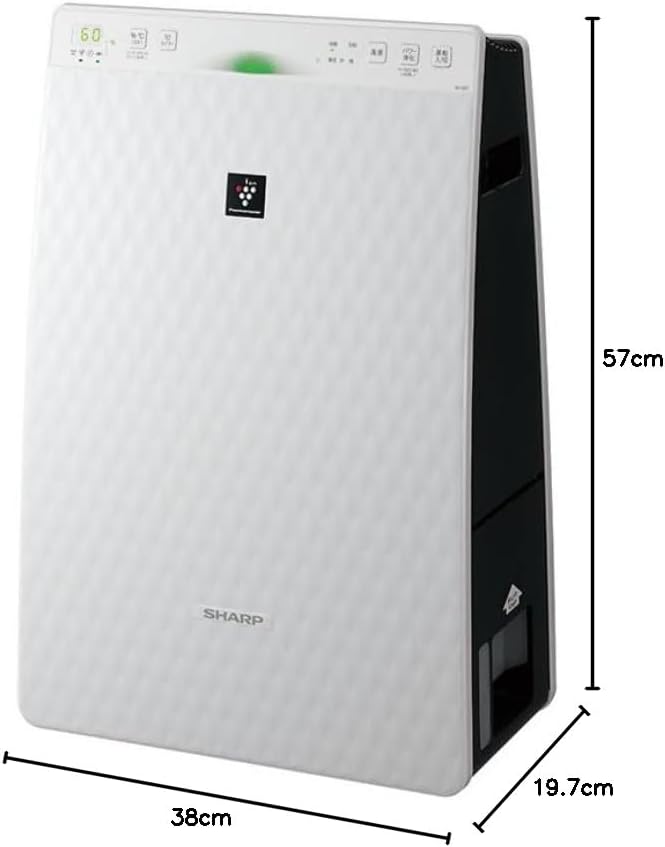
Figure 3.2: Air Purifier with Dimensions. Bu şəkil perspektiv təqdim edir view of the Sharp KC-35T7, illustrating its approximate dimensions: 38 cm (width), 19.7 cm (depth), and 57 cm (height). These measurements are crucial for proper placement and space planning.
Əsas komponentlər:
- İdarəetmə Paneli: Located on the top, with buttons for power, mode selection, fan speed, and display.
- Hava qəbulu: Located on the front and sides, where air is drawn into the unit.
- Hava çıxışı: Located at the top, where purified and humidified air is released.
- Su çəni: Removable tank for humidification, typically located on the side or back.
- Filtrlər: Internal filters (e.g., HEPA, deodorizing) for air purification.
4. Quraşdırma
Follow these steps for the initial setup of your air purifier:
- Qablaşdırma: Carefully remove the air purifier from its packaging. Retain the packaging materials for future transport or storage.
- Filtr quraşdırılması: Open the rear panel of the unit. Remove all protective plastic bags from the filters (e.g., HEPA filter, deodorizing filter) and install them according to the markings inside the unit. Ensure they are securely in place. Close the rear panel.
- Fill Water Tank (for Humidification): Remove the water tank from the unit. Open the water tank cap and fill it with clean tap water up to the maximum fill line. Close the cap securely and reinsert the water tank into the unit until it clicks into place.
- Yerləşdirmə: Place the air purifier on a flat, stable surface, ensuring there is adequate space (at least 20 cm) around the air intake and outlet for optimal airflow. Avoid placing it directly against a wall or near heat sources.
- Enerji bağlantısı: Elektrik kabelini uyğun elektrik rozetkasına qoşun.
5. Əməliyyat Təlimatları
Learn how to operate your Sharp Plasmacluster Humidifying Air Purifier:
Yandırma/Söndürmə:
- düyməsini basın Güc cihazı yandırmaq və ya söndürmək üçün idarəetmə panelindəki düyməni basın.
Rejim seçimi:
The unit typically offers several operating modes:
- Avtomatik Rejim: The unit automatically adjusts fan speed and humidification based on detected air quality and humidity levels.
- Hava Təmizləmə Rejimi: Operates solely as an air purifier.
- Humidification Mode: Operates with humidification function active.
- Plasmacluster Spot Mode: Concentrates Plasmacluster ions for targeted deodorization or purification.
düyməsini basın Rejim button repeatedly to cycle through available modes.
Fan sürətinin tənzimlənməsi:
Adjust the fan speed to your preference:
- düyməsini basın Fan sürəti button to select between Low, Medium, High, or Silent settings.
Humidity/Temperature Display:
The display shows current room humidity and temperature. This information helps you monitor your indoor environment and adjust settings as needed.
6. Baxım
Regular maintenance ensures optimal performance and extends the lifespan of your air purifier. Always unplug the unit before cleaning.
Filtrin Təmizlənməsi və Dəyişdirilməsi:
- Əvvəlcədən filtr: Clean the pre-filter (mesh filter) regularly, approximately once a month, or more often if used in a dusty environment. Use a vacuum cleaner to remove dust or wash it with water and mild detergent. Ensure it is completely dry before reinstallation.
- HEPA Filtri: The HEPA filter cannot be washed. Replace it approximately every 2-5 years, depending on usage and air quality. Refer to the indicator light on the control panel for replacement timing.
- Dezodorasiya filtri: The deodorizing filter also cannot be washed. Replace it at the same interval as the HEPA filter.
Water Tank and Humidifying Filter Cleaning:
- Su çəni: Clean the water tank weekly to prevent mold and bacteria growth. Rinse with clean water and use a soft brush or cloth to remove any residue.
- Humidifying Filter/Tray: Clean the humidifying filter and tray monthly. Remove any mineral deposits or slime using a soft brush and a mild descaling solution (e.g., citric acid solution) if necessary. Rinse thoroughly with clean water and ensure all parts are dry before reassembly.
Xarici Təmizlik:
- Wipe the exterior of the unit with a soft, dry cloth. For stubborn stains, use a damp cloth with a mild detergent, then wipe dry. Do not use abrasive cleaners or solvents.
7. Giderme
Hava təmizləyicinizlə bağlı problemlərlə qarşılaşsanız, aşağıdakı ümumi problemlərə və həllərə baxın:
| Problem | Mümkün Səbəb | Həll |
|---|---|---|
| Cihaz işə düşmür. | Power cord not securely plugged in. No power from outlet. | Elektrik kabeli bağlantısını yoxlayın. Rozeti başqa bir cihazla yoxlayın. |
| Nəmləndirmə yoxdur. | Water tank empty. Water tank not properly installed. Humidifying filter dirty. | Refill water tank. Reinstall water tank correctly. Clean humidifying filter. |
| Qeyri -adi səs -küy. | Filters not properly installed. Foreign object in unit. | Check filter installation. Unplug and inspect for foreign objects. |
| Zəif hava təmizlənməsi. | Filters are dirty or clogged. Unit placed in an obstructed area. | Clean or replace filters. Ensure proper clearance around the unit. |
| Odor coming from unit. | Deodorizing filter saturated. Water tank/humidifying filter dirty. | Replace deodorizing filter. Clean water tank and humidifying filter. |
Bu həll yollarına cəhd etdikdən sonra problem davam edərsə, müştəri dəstəyi ilə əlaqə saxlayın.
8. Spesifikasiyalar
Detailed technical specifications for the Sharp Plasmacluster Humidifying Air Purifier KC-35T7:
| Xüsusiyyət | Spesifikasiya |
|---|---|
| Brend | Kəskin |
| Model nömrəsi | KC-35T7 |
| Rəng | Ağ |
| Məhsulun Ölçüləri (D x G x Y) | 19.7 sm x 38 sm x 57 sm |
| Paket Ölçüləri (U x G x Y) | 63 sm x 43 sm x 26 sm |
| Paket Çəki | 7.88 kq |
| Digər funksiyalar | Humidification function, Plasmacluster technology, Humidity/Temperature display |
| Batareyalar Tələb olunur | yox |
9. Zəmanət və Dəstək
Your Sharp Plasmacluster Humidifying Air Purifier is covered by a manufacturer's warranty. Please refer to the warranty card included in your product packaging for specific terms and conditions, including the warranty period and coverage details.
For technical assistance, service, or to inquire about replacement parts and filters, please contact Sharp customer support. Contact information can typically be found on the manufacturer's official websaytda və ya alış qəbzinizdə.
When contacting support, please have your product model number (KC-35T7) and serial number (if applicable) ready.


