1. Giriş
This manual provides detailed instructions for the safe and efficient use of your Blitzwolf BW-CML5 Monitor Light Bar. Please read this manual thoroughly before operating the device and retain it for future reference.
2. Paketin məzmunu
Please check the package contents upon opening to ensure all items are present and undamaged. If any items are missing or damaged, please contact customer support.
- Blitzwolf BW-CML5 Monitor Light Bar
- Simsiz Uzaqdan İdarəetmə
- USB Güc Kabeli
- İstifadəçi Təlimatı (bu sənəd)
3. Təhlükəsizlik Təlimatları
Təhlükəsiz işləməyi təmin etmək və zərərin qarşısını almaq üçün aşağıdakı təhlükəsizlik tədbirlərinə əməl edin:
- Cihazı suya və ya həddindən artıq nəmə məruz qoymayın.
- Cihazı istilik mənbələrinin yaxınlığında və ya birbaşa günəş işığı altında yerləşdirməyin.
- Cihazı özünüz sökməyə və ya təmir etməyə çalışmayın. Bütün xidmətlər üçün ixtisaslı işçilərə müraciət edin.
- Use only the provided USB power cable or a certified equivalent.
- Uşaqların əli çatmayan yerdə saxlayın.
- Ensure the light bar is securely attached to the monitor to prevent accidental falls.
4. Quraşdırma və Quraşdırma
Follow these steps to set up your monitor light bar:
- İşıq çubuğunu əlavə edin: Gently place the light bar on top of your monitor. The adjustable clip mechanism should securely grip the top edge of the monitor. Ensure the light source faces downwards towards your desk.
- Güc bağlayın: Connect the USB power cable to the light bar's power input port. Plug the other end of the USB cable into a USB port on your computer or a compatible USB power adapter (5V/1A recommended).
- Uzaqdan idarəetməni yerləşdirin: Place the wireless remote control on your desk within easy reach. The remote operates wirelessly and does not require direct line of sight to the light bar.
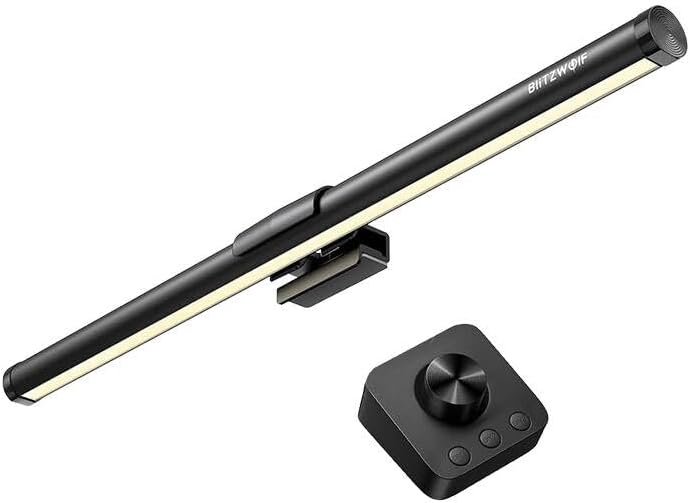
Şəkil 1: The Blitzwolf BW-CML5 Monitor Light Bar attached to a monitor, with its wireless remote control placed on a desk. This image illustrates the typical setup of the product.
5. Əməliyyat Təlimatları
The Blitzwolf BW-CML5 is controlled via its wireless remote. Familiarize yourself with the remote's functions:
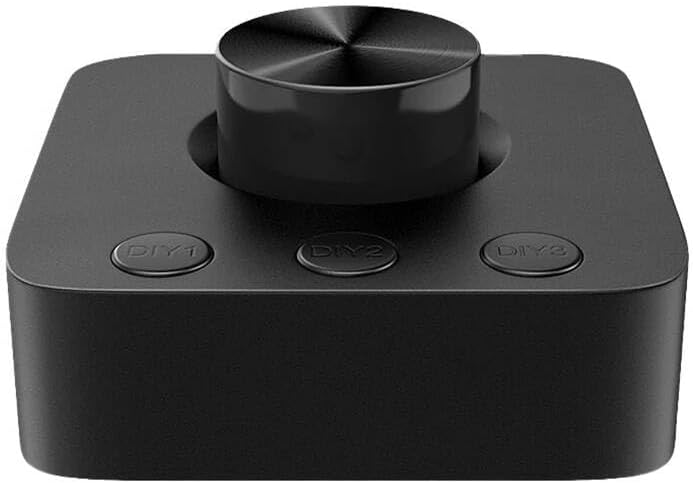
Şəkil 2: Yaxın plan view of the wireless remote control for the Blitzwolf BW-CML5 Monitor Light Bar, showing the central rotary knob and three "DIY" preset buttons.
- Yandırma/Söndürmə: Press the central rotary knob once to turn the light bar on or off.
- Parlaqlığı tənzimləyin: Rotate the central knob clockwise to increase brightness and counter-clockwise to decrease brightness.
- Rəng Temperaturunu Tənzimləyin: Press and hold the central knob for approximately 2 seconds. While holding, rotate the knob to cycle through different color temperature settings (e.g., warm white, neutral white, cool white). Release the knob to set the desired temperature.
- DIY Preset Buttons (DIY1, DIY2, DIY3): These buttons allow you to save and recall your preferred brightness and color temperature settings.
- Əvvəlcədən ayarı saxlamaq üçün: Adjust the light bar to your desired brightness and color temperature. Then, press and hold one of the DIY buttons (DIY1, DIY2, or DIY3) for approximately 3 seconds until the light blinks, indicating the setting has been saved.
- Əvvəlcədən təyinatı geri çağırmaq üçün: Simply press the corresponding DIY button (DIY1, DIY2, or DIY3) once to activate the saved setting.
6. Baxım
Proper maintenance ensures the longevity of your device:
- Təmizləmə: Disconnect the power before cleaning. Use a soft, dry cloth to wipe the light bar and remote control. Do not use abrasive cleaners or solvents.
- Yaddaş: Uzun müddət istifadə edilmədikdə, cihazı sərin, quru yerdə, birbaşa günəş işığından və həddindən artıq temperaturdan uzaq saxlayın.
7. Giderme
If you encounter issues with your Blitzwolf BW-CML5, please refer to the following common problems and solutions:
| Problem | Mümkün Səbəb | Həll |
|---|---|---|
| İşıq paneli yanmır. | No power, loose connection, remote battery low. | Check USB power cable connection. Ensure USB power source is active. Replace remote control batteries if applicable (check remote manual for battery type). |
| Uzaqdan idarəetmə cavab vermir. | Remote battery low, interference, not paired. | Replace remote control batteries. Move remote closer to the light bar. If issues persist, refer to the remote's specific pairing instructions (if any, usually automatic for these devices). |
| İşıq gözlənilmədən yanıb-sönür və ya zəifləyir. | Insufficient power supply, faulty cable. | Ensure the USB power source provides sufficient power (5V/1A recommended). Try a different USB port or power adapter. Replace the USB cable if necessary. |
If the problem persists after trying these solutions, please contact Blitzwolf customer support for further assistance.
8. Spesifikasiyalar
| Model | BW-CML5 |
| Brend | BlitzWolf |
| Məhsulun Ölçüləri (U x G x Y) | 10 x 5 x 1.27 sm |
| Məhsul Çəkisi | 100 q |
| Giriş həcmitage | 5V (USB vasitəsilə) |
| Rəng | Qara |
9. Zəmanət və Dəstək
Blitzwolf products are designed and manufactured to the highest quality standards. For information regarding warranty coverage, technical support, or service inquiries, please refer to the warranty card included with your product or visit the official Blitzwolf website. Please have your model number (BW-CML5) and purchase information ready when contacting support.
For further assistance, you may contact Blitzwolf customer service through their official channels.