Giriş
This manual provides essential information for setting up, operating, maintaining, and troubleshooting your Tecno CAMON 30 5G smartphone. Please read this manual carefully to ensure proper use and to maximize the device's capabilities.
1. Quraşdırma
1.1 Qutunun açılması və ilkin yoxlama
Upon opening the package, verify that all components are present and undamaged. The standard package contents include:
- Tecno CAMON 30 5G Smartphone
- 70W Flash Charger
- USB kabel
- SİM Tablasının Ejektoru
- Qoruyucu korpus (bölgəyə görə dəyişə bilər)
- Tez Başlanğıc Bələdçisi
- Zəmanət kartı

Figure 1.1: Tecno CAMON 30 5G smartphone, showcasinön displeyi və arxa kamera modulu.
1.2 SİM kartın daxil edilməsi
To ensure network connectivity, insert your Nano-SIM card(s) into the device. The Tecno CAMON 30 5G supports dual SIM functionality.
- Cihazın yan tərəfində SİM kart tepsisini tapın.
- Verilən SIM qabı çıxarıcı alətini qabın yanındakı kiçik dəliyə yerləşdirin və qab çıxana qədər yavaşca basın.
- SİM qabını ehtiyatla çıxarın.
- Place your Nano-SIM card(s) into the designated slots on the tray, ensuring the gold contacts face downwards and the cut corner aligns correctly.
- SIM kart yuvasını yerinə oturana qədər cihazın içinə yavaşca itələyin.

Figure 1.2: The SIM tray ejector tool, used for accessing the SIM card slot.
1.3 Cihazın doldurulması
Before first use, it is recommended to fully charge your device. The Tecno CAMON 30 5G supports 70W Flash Charging.
- Connect the USB cable to the 70W Flash Charger.
- Şarj cihazını elektrik rozetkasına qoşun.
- USB kabelinin digər ucunu telefonunuzun altındakı USB-C portuna qoşun.
- The charging indicator will appear on the screen. A full charge from 0-50% can be achieved in approximately 19 minutes.

Figure 1.3: The bottom of the Tecno CAMON 30 5G, featuring the USB-C port for charging and data transfer.
1.4 Yandırma və İlkin Quraşdırma
Press and hold the Power button (located on the right side of the device) until the Tecno logo appears. Follow the on-screen instructions to complete the initial setup, which includes selecting your language, connecting to Wi-Fi, and setting up your Google account.
2. Cihazın işlədilməsi
2.1 Əsas naviqasiya
The Tecno CAMON 30 5G operates on Android 14 with HiOS. Navigation is primarily touch-based:
- Klikləyin: Bir element seçin və ya proqram açın.
- Çalmak: Ekranlarda, siyahılarda və ya məzmunda sürüşdürün.
- Böyütmək üçün çimdik: Ekrandakı məzmunu böyüdün və ya kiçildin.
- Uzun basın: Kontekst menyularına daxil olun və ya nişanları köçürün.
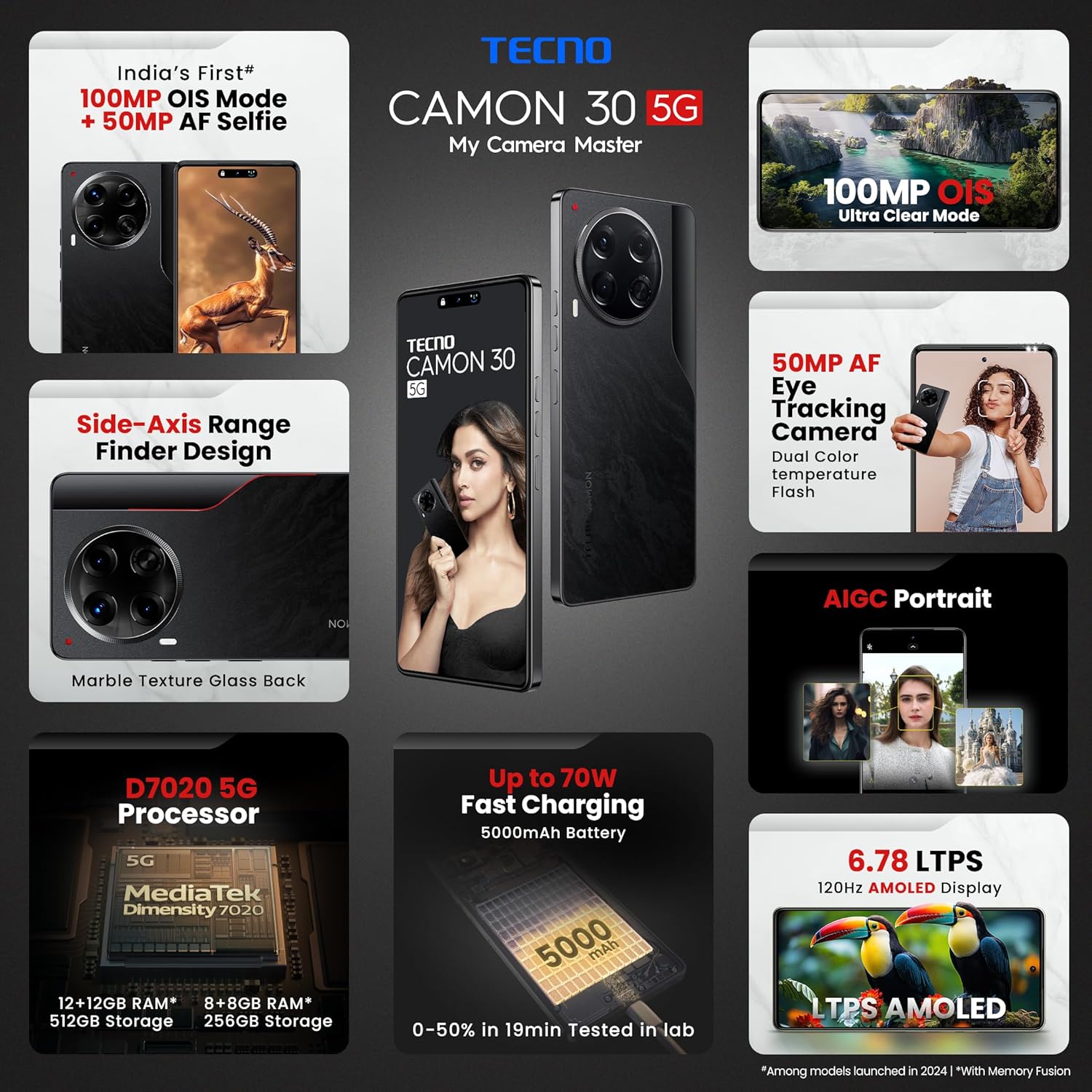
Figure 2.1: The Tecno CAMON 30 5G's vibrant LTPS AMOLED display.
2.2 Ekran Xüsusiyyətləri
The device features a 6.78-inch FHD+ LTPS AMOLED Dot-in display with a resolution of 1080 x 2436 pixels. Key display features include:
- 1300 nits Peak Brightness: Ensures clear visibility even in bright outdoor conditions.
- 120Hz Adaptiv Təzələmə Sürəti: Automatically adjusts between 120Hz, 90Hz, and 60Hz for smooth scrolling and power efficiency.
- 2160Hz High-Frequency PWM Dimming: Reduces screen flicker for improved eye comfort.
- TÜV Rheinland Low Blue Light Emission Certified: Protects your eyes from harmful blue light.
- Wet Hand Touch Technology: Allows for smooth navigation even with wet hands.
2.3 Kamera Sistemi
The Tecno CAMON 30 5G is equipped with an advanced camera system for high-quality photography and videography.
- Arxa Kamera: 100MP OIS (Optical Image Stabilization) main sensor with a 2MP Depth Sensor. Features include Ultra Steady videos (OIS + EIS), 10X Zoom, Twinkle Portrait Filter, Super Night Photography Mode, Sky Shop, and Slow Motion Videos.
- Ön kamera: 50MP Auto Focus Selfie camera with Dual Color Temperature Front Flash. Supports DSLR-level portrait system and Video HDR.
- AIGC Portrait (OTA): AI Generative Content for enhanced portrait photography.

Figure 2.2: The distinctive rear camera module of the Tecno CAMON 30 5G.
2.4 Performans və Saxlama
Powered by the MediaTek Dimensity 7020 chipset with a 6nm processor, the device offers robust performance for gaming and multitasking.
- Prosessor: MediaTek Dimensity 7020 (6nm) for Ultra 5G Performance.
- RAM: Up to 24GB* (12GB physical + 12GB Memory Fusion) LPDDR4x RAM.
- Daxili yaddaş: 512GB UFS 3.1 Storage.
2.5 Audio and Smart Features
- Dolby Atmos: Provides immersive audio experience.
- Ella with ChatGPT: Integrated AI assistant for various tasks.
- AI Eraser (OTA): Allows for intelligent object removal from photos.
- İnfraqırmızı Uzaqdan İdarəetmə: Supports control of up to 15 types of home appliances.
- Dynamic Pet AOD: Customizable Always-On Display with dynamic pet animations.
3. Baxım
3.1 Cihazınızın təmizlənməsi
To maintain the appearance and functionality of your device:
- Ekranı və bədəni silmək üçün yumşaq, tüysüz parçadan istifadə edin.
- Sərt kimyəvi maddələrdən, aşındırıcı təmizləyicilərdən və ya sıxılmış havadan istifadə etməyin.
- Limanları toz və zibildən təmiz saxlayın.
3.2 Proqram Yeniləmələri
Optimal performansı, təhlükəsizliyi və yeni funksiyalara çıxışı təmin etmək üçün proqram yeniləmələrini mütəmadi olaraq yoxlayın və quraşdırın. gedin Parametrlər > Sistem > Sistem yeniləməsi yeniləmələri yoxlamaq üçün.
3.3 Batareya Baxımı
Cihaz 5000 mAh batareya ilə təchiz edilmişdir. Batareyanın ömrünü uzatmaq üçün:
- Həddindən artıq temperaturdan çəkinin.
- Use only the official Tecno charger and cable.
- Tez-tez batareyanı tamamilə boşaltmaqdan çəkinin.
3.4 Saxlamanın idarə edilməsi
Regularly manage your device's storage to ensure smooth operation. Delete unnecessary files, clear app caches, and uninstall unused applications. You can check storage usage in Parametrlər > Yaddaş.
4. Giderme
This section addresses common issues you might encounter with your Tecno CAMON 30 5G.
4.1 Cihaz Açılmır
- Batareyanın doldurulduğundan əmin olun. Şarj cihazını qoşun və yandırmağa cəhd etməzdən əvvəl bir neçə dəqiqə gözləyin.
- Yenidən başlamağa məcbur etmək üçün Güc düyməsini ən azı 10-15 saniyə basıb saxlayın.
4.2 Doldurma Problemləri
- Şarj cihazının və USB kabelinin həm telefona, həm də elektrik rozetkasına etibarlı şəkildə qoşulduğunu yoxlayın.
- Fərqli elektrik rozetkasından istifadə etməyə çalışın.
- Şarj portunu hər hansı zibil və ya zədə üçün yoxlayın.
4.3 Şəbəkəyə qoşulma problemləri
- Check if Airplane Mode is enabled (swipe down from the top of the screen to access Quick Settings).
- SİM kartınızın düzgün daxil olduğundan əmin olun.
- Cihazı yenidən başladın.
- gedin Parametrlər > Şəbəkə və internet > Mobil şəbəkə və mobil məlumatların aktiv olduğundan əmin olun.
4.4 Tətbiqlərin sıradan çıxması və ya donması
- Problemli tətbiqi bağlayın və yenidən açın.
- Proqramın önbelleğini silin (Parametrlər > Proqramlar > [Tətbiq Adı] > Yaddaş və keş > Keşi təmizləyin).
- Proqramın ən son versiyasına yeniləndiyinə əmin olun.
- Problem davam edərsə, proqramı silib yenidən quraşdırmağı düşünün.
4.5 Zavod parametrlərinə sıfırlama
Davamlı proqram təminatı problemləri ilə qarşılaşırsınızsa, zavod parametrlərinə yenidən qurmaq onları həll edə bilər. Xəbərdarlıq: Bu, telefonunuzdakı bütün məlumatları siləcək. Davam etməzdən əvvəl vacib məlumatların ehtiyat nüsxəsini çıxarın.
- gedin Parametrlər > Sistem > Seçimləri sıfırlayın.
- seçin Bütün məlumatları silin (zavod parametrlərinə sıfırlama).
- Qərarınızı təsdiqləyin və tələb olunduqda PIN/naxış/şifrənizi daxil edin.
5. Spesifikasiyalar
Below are the detailed technical specifications for the Tecno CAMON 30 5G (Model: CL7 512+12).
| Xüsusiyyət | Spesifikasiya |
|---|---|
| Əməliyyat sistemi | Android 14 (HiOS) |
| Prosessor | MediaTek Dimensity 7020 (6nm) |
| RAM | 12GB (expandable up to 24GB with Memory Fusion) |
| Daxili yaddaş | 512 GB UFS 3.1 |
| Ekran | 6.78" FHD+ LTPS AMOLED Dot-in Display, 1080 x 2436 resolution, 120Hz Adaptive Refresh Rate, 1300 nits Peak Brightness, 2160Hz PWM Dimming |
| Arxa Kamera | 100MP OIS Main Camera + 2MP Depth Sensor |
| Ön kamera | 50MP Auto Focus Selfie Camera |
| Batareya | 5000 mAh |
| Doldurulur | 70W Flash Charging, 10W Reverse Charging |
| Ölçülər | 16.54 x 0.76 x 0.78 sm |
| Çəki | 199 q |
| Bağlantı | 5G, Wi-Fi, Bluetooth, USB Type-C |
| Sensorlar | In-display Fingerprint Sensor, Accelerometer, Gyroscope, Proximity, Compass |
| Qutuda nə var | SIM Tray Ejector (other accessories like charger and cable are typically included but not explicitly listed in 'Whats in the box' field) |
6. Zəmanət və Dəstək
6.1 Zəmanət Məlumatı
Your Tecno CAMON 30 5G comes with a limited manufacturer's warranty. Please refer to the warranty card included in your product package for specific terms, conditions, and duration of coverage. Keep your proof of purchase for warranty claims.
6.2 Müştəri dəstəyi
For technical assistance, service, or any inquiries regarding your device, please contact Tecno customer support:
- Ödənişsiz Nömrə: 18004190525
- E-poçt: Service.india@carlcare.com
- İstehsalçı: G mobiles, Ismartu India Private Limited, D-197 and 198, Sector 63, Noida, Gautam Buddha Nagar, Uttar Pradesh 201301, India.
Tecno provides a robust after-sales service network with over 1300 service centers across more than 1000 towns in India.


