1. Giriş
The Mastech MS8250D is a high-performance digital multimeter designed for accurate measurement of AC/DC voltage, AC/DC current, resistance, capacitance, frequency, and temperature. It features a 6600-count display, auto/manual ranging, True RMS, Non-Contact Voltage (NCV) detection, diode and continuity testing, and a USB interface for PC connectivity. This manual provides detailed instructions for safe and effective use of the device.
Əsas Xüsusiyyətlər:
- 6600-count digital display
- Automatic and Manual Ranging
- Həqiqi RMS ölçüsü
- Əlaqəsiz Voltage (NCV) aşkarlanması
- Diode and Continuity Tester (buzzer < 50Ω)
- MAX/MIN value recording
- Məlumat saxlama funksiyası
- Ekranın arxa işığı
- Avtomatik söndürmə
- Nisbi ölçmə rejimi
- Aşağı Batareya Göstərişi
- USB Interface for Windows OS
2. Təhlükəsizlik Məlumatı
XƏBƏRDARLIQ: To avoid electric shock or personal injury, and to avoid damage to the meter or to the equipment under test, read all safety information carefully before using the meter. This device complies with CE, RoHS, and UL safety standards.
- Always ensure the test leads are in good condition and properly connected.
- Qiymətləndirilmiş həcmdən artıq tətbiq etməyintage, sayğacda qeyd olunduğu kimi, terminallar arasında və ya hər hansı bir terminal ilə torpaqlama arasında.
- Vol ilə işləyərkən ehtiyatlı oluntag30V AC RMS, 42V pik və ya 60V DC-dən yuxarı. Bu cildtagşok təhlükəsi yaradır.
- Before measuring current, ensure the circuit is de-energized and the meter is connected in series.
- Funksiyaları və ya diapazonları dəyişdirməzdən əvvəl həmişə sınaq naqillərini dövrədən ayırın.
- Sayğac zədələnmiş və ya qutusu açıq görünürsə, istifadə etməyin.
- Dəqiq oxunuşları təmin etmək üçün aşağı batareya göstəricisi görünən kimi batareyanı dəyişdirin.
- Adhere to the specified measurement categories (CAT III 1000V / CAT IV 600V) for safe operation.
3. Məhsul bitdiview
Familiarize yourself with the components of your Mastech MS8250D Digital Multimeter.

Şəkil 3.1: Ön view of the Mastech MS8250D Digital Multimeter, showing the display, function dial, and input jacks. The display shows "1.987 V", indicating a voltage measurement. The function dial is set to T-RMS. Input jacks are labeled for µA mA, A, VΩHz%, and COM.
Əsas komponentlər:
- LCD displey: Ölçmə göstəricilərini, vahidləri və funksiya göstəricilərini göstərir.
- Funksiya yığımı: Used to select the desired measurement function (e.g., Voltage, Current, Resistance, Diode, Continuity, Temperature).
- Funksiya Düymələri:
- SAXLAYIN: Cari ekran oxumasını dondurur.
- RANGE: Switches between auto and manual ranging.
- REL: Nisbi ölçmə rejimini aktivləşdirir.
- MAKSİMUM/MİN: Maksimum və minimum dəyərləri qeyd edir.
- FUNC: Selects sub-functions within a dial position (e.g., AC/DC, Diode/Continuity).
- T-RMS: (Indicated on dial) True RMS measurement.
- NCV: Əlaqəsiz Voltage aşkarlanması.
- Arxa işıqlandırma düyməsi: Activates display backlight.
- Giriş yuvaları:
- COM: Common terminal for all measurements (negative lead).
- VΩHz%: Cild üçün giriştage, resistance, frequency, capacitance, and diode/continuity measurements (positive lead).
- µA mA: Input for microampere and milliampere current measurements (positive lead). Fused for protection.
- A: üçün daxil edin ampere current measurements (positive lead). Fused for protection.
Daxil olan komponentlər:
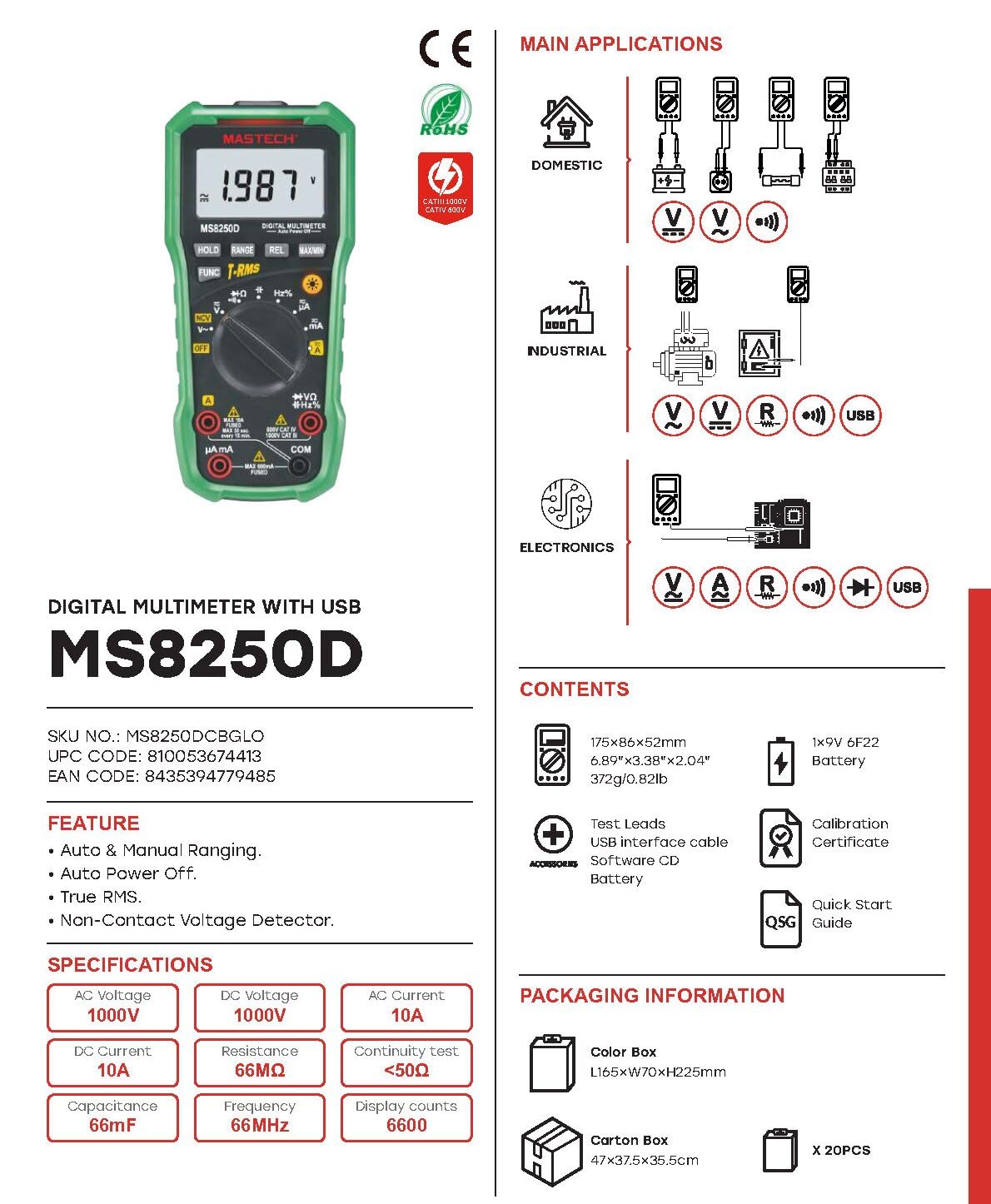
Şəkil 3.2: Diagram showing the Mastech MS8250D Multimeter and its included accessories. The image also illustrates typical applications in domestic, industrial, and electronics settings.
- Mastech MS8250D Digital Multimeter
- Test kabelləri (Qırmızı və Qara)
- 1x 9V 6F22 Battery (pre-installed or included separately)
- USB interfeys kabeli
- Software CD (for Windows OS)
- Kalibrləmə Sertifikatı
- Tez Başlanğıc Bələdçisi
4. Quraşdırma
4.1 Batareyanın quraşdırılması
The MS8250D requires one 9V 6F22 battery for operation. Two LR44 batteries are also mentioned in specifications, likely for a different internal component or an error in data. For the main power, use the 9V battery.
- Multimetrin söndürüldüyünə əmin olun.
- Sayğacın arxasındakı batareya bölməsinin qapağını tapın.
- Qapağı bərkidən vint(lər)i boşaltmaq üçün tornavida istifadə edin.
- Qapağı çıxarın.
- Connect the 9V battery to the battery clips, observing correct polarity (+ and -).
- Batareyanı bölməyə yerləşdirin.
- Batareya bölməsinin qapağını dəyişdirin və vint(lər) ilə bərkidin.
Qeyd: The meter also uses 2 LR44 batteries, which are typically included and pre-installed for specific functions like the backlight or non-contact voltage detection. Refer to the quick-start guide for specific details on these smaller batteries if replacement is needed.
4.2 Test aparatlarının birləşdirilməsi
Always connect the black test lead to the COM jack. Connect the red test lead to the appropriate input jack based on the measurement type:
- Cild üçüntage, Resistance, Capacitance, Frequency, Diode, and Continuity measurements: Connect the red lead to the VΩHz% jak.
- For Current measurements (µA or mA): Connect the red lead to the mA mA jak.
- For High Current measurements (A): Connect the red lead to the A jak.
Ensure the test leads are fully inserted into the jacks.
5. Əməliyyat Təlimatları
5.1 Yandırma/Söndürmə
To turn the meter ON, rotate the function dial from the "OFF" position to any desired measurement function. To turn the meter OFF, rotate the function dial back to the "OFF" position.
The meter features an Avtomatik söndürmə function to conserve battery life. It will automatically power off after a period of inactivity. To disable or re-enable this feature, refer to the quick-start guide or the full user manual provided on the software CD.
5.2 Auto Ranging and Manual Ranging
The MS8250D defaults to Avtomatik dəyişmə, which automatically selects the best measurement range. Press the RANGE keçmək üçün düymə Manual Ranging. In manual ranging, each press of the RANGE button cycles through available ranges. To return to auto ranging, press and hold the RANGE düyməsi.
5.3 AC/DC-nin ölçülməsi Voltage (V)
- Funksiya diaqramını seçin V~ (AC Voltage) və ya V- (DC Cildtage) mövqe.
- Qara test ucunu COM jack and the red test lead to the VΩHz% jak.
- Ölçüləcək dövrə və ya komponent üzrə sınaq zondlarını birləşdirin.
- Cild oxuyuntage value on the display. The meter will automatically detect AC or DC if the dial is set to the combined V position, or you can use the FUNC button to toggle between AC and DC if available on your model.
5.4 Measuring AC/DC Current (A, mA, µA)
XƏBƏRDARLIQ: Heç vaxt sayğacı bir voltmetrə paralel olaraq qoşmayıntagCərəyanı ölçərkən e mənbəyi. Bu, qoruyucunu yandıra və ya sayğaca zərər verə bilər.
- Dövrəyə gələn enerjini söndürün.
- Funksiya diaqramını seçin A~ (AC Current), A- (DC Current), mA~, mA-, µA~, və ya µA- mövqe.
- Qara test ucunu COM jak.
- Qırmızı test ucunu A jack for high current, or mA mA jack for low current.
- Open the circuit where the current is to be measured and connect the meter in series with the load.
- Dövrə güc tətbiq edin.
- Read the current value on the display. Use the FUNC Lazım gələrsə, AC və DC arasında keçid etmək üçün düyməni basın.
5.5 Müqavimətin Ölçülməsi (Ω)
- Funksiya diaqramını seçin Ω mövqe.
- Qara test ucunu COM jack and the red test lead to the VΩHz% jak.
- Test edilən dövrənin və ya komponentin enerjisiz olduğundan əmin olun.
- Test zondlarını komponent üzərində birləşdirin.
- Ekrandakı müqavimət dəyərini oxuyun.
5.6 Diod Testi və Davamlılıq Testi
- Funksiya diaqramını seçin Diod / Davamlılıq position (often shared with resistance or capacitance).
- Qara test ucunu COM jack and the red test lead to the VΩHz% jak.
- istifadə edin FUNC button to select between Diode Test and Continuity Test.
- For Diode Test: Qırmızı zond anoda, qara zond isə diodun katoduna birləşdirilir. Ekran irəli səsi göstərəcəktage drop (typically 0.5V to 0.8V for silicon diodes). Reversing the probes should show "OL" (Open Loop).
- Davamlılıq Testi üçün: Connect the probes across the circuit or component. If resistance is less than approximately 50Ω, the buzzer will sound, indicating continuity.
5.7 Measuring Capacitance (F)
- Funksiya diaqramını seçin Tutum position (often shared with resistance or diode).
- Qara test ucunu COM jack and the red test lead to the VΩHz% jak.
- Ensure the capacitor is fully discharged before testing to avoid damage to the meter.
- Test zondlarını kondansatör terminallarına qoşun.
- Ekrandakı kapasitans dəyərini oxuyun.
5.8 Measuring Frequency (Hz) and Duty Cycle (%)
- Funksiya diaqramını seçin Hz% position (often shared with voltagvə).
- Qara test ucunu COM jack and the red test lead to the VΩHz% jak.
- Test zondlarını siqnal mənbəyinə qoşun.
- The display will show the frequency. Press the FUNC button to toggle to Duty Cycle measurement if available.
5.9 Kontaktsız Cildtage (NCV) aşkarlanması
- Funksiya diaqramını seçin NCV mövqe.
- Hold the meter with the NCV sensor (usually at the top of the meter) near a live AC voltage mənbə.
- Sayğac AC həcminin mövcudluğunu göstərəcəktage through an audible beep and/or visual indicator (e.g., LED).
5.10 USB Interface (Windows OS)
The MS8250D includes a USB interface for connecting to a computer running Windows OS. This allows for data logging and real-time monitoring of measurements. Install the provided software from the CD and follow the on-screen instructions for driver installation and software usage.
6. Baxım
6.1 Təmizləmə
Sayğacın qutusunu reklamla silinamp parça və yumşaq yuyucu vasitə. Aşındırıcı maddələr və ya həlledicilərdən istifadə etməyin. İstifadədən əvvəl sayğacın tamamilə quruduğundan əmin olun.
6.2 Batareyanın dəyişdirilməsi
When the low battery indicator appears on the display, replace the 9V battery immediately to ensure accurate readings. Follow the steps in Section 4.1 Battery Installation.
6.3 Sigortanın dəyişdirilməsi
If the meter fails to measure current, the fuse may be blown. Fuses are located inside the meter. To replace a fuse:
- Ensure the meter is turned OFF and all test leads are disconnected.
- Open the battery compartment cover (and potentially the main case, depending on design).
- Köhnə sigortanı diqqətlə çıxarın.
- Replace with a fuse of the exact same type and rating (e.g., F600mA/250V for mA/µA range, F10A/250V for A range). Refer to the meter's internal markings or the full manual for specific fuse ratings.
- Bütün vintlərin bərkidildiyindən əmin olaraq sayğacı yenidən yığın.
XƏBƏRDARLIQ: Never use a fuse with a different rating or bypass the fuse. This can damage the meter and pose a serious safety hazard.
7. Giderme
| Problem | Mümkün Səbəb | Həll |
|---|---|---|
| Sayğac işə düşmür. | Ölü batareya. | 9V batareyanı dəyişdirin. |
| "OL" (Həddindən artıq yükləmə) göstərilir. | Ölçmə seçilmiş diapazonu və ya sayğacın maksimum tutumunu aşır. | Switch to a higher range (if in manual ranging) or ensure the measurement is within the meter's limits. |
| No current reading. | Blown fuse; incorrect lead connection; open circuit. | Check and replace fuse if necessary. Ensure leads are connected correctly (in series). Verify circuit continuity. |
| Qeyri-dəqiq oxunuşlar. | Low battery; poor lead contact; external interference. | Replace battery. Ensure leads are firmly connected. Move away from strong electromagnetic fields. |
| Display shows "USB" but no PC connection. | Drivers not installed; incorrect software settings. | Install drivers from the provided CD. Refer to software manual for connection instructions. |
8. Spesifikasiyalar
The following table details the technical specifications of the Mastech MS8250D Digital Multimeter.

Şəkil 8.1: Detailed specifications table for the Mastech MS8250D, outlining ranges, resolutions, and accuracies for various measurement functions.
| Funksiya | Aralığı | Qətnamə | Dəqiqlik |
|---|---|---|---|
| DC Cildtage | |||
| 660mV | 0.1mV | ±(0.8%+3) | |
| 6.6V/66V/660V/1000V | 1mV/10mV/0.1V/1V | ±(0.5%+5) | |
| AC Cildtage (True RMS) | |||
| 660mV | 0.1mV | ±(1.5%+5) | |
| 6.6V/66V | 1mV/10mV | ±(1.2%+5) | |
| 660V/1000V | 0.1V/1V | ±(1.0%+3) | |
| DC cərəyanı | |||
| 660µA/6600µA/66mA/660mA | 0.1µA/1µA/10µA/0.1mA | ±(1.0%+5) | |
| 10A | 10mA | ±(2.0%+5) | |
| AC cərəyanı (True RMS) | |||
| 660µA/6600µA/66mA/660mA | 0.1µA/1µA/0.01mA/0.1mA | ±(1.5%+5) | |
| 10A | 10mA | ±(3.0%+5) | |
| Müqavimət | |||
| 660Ω / 6.6kΩ / 66kΩ / 660kΩ / 6.6MΩ | 0.1Ω / 1Ω / 10Ω / 100Ω / 1kΩ | ±(0.8%+5) | |
| 66MΩ | 10kΩ | ±(1.5%+5) | |
| Tutum | |||
| 6.6nF/66nF/660nF/6.6µF/66µF | 1pF/10pF/0.1nF/1nF/10nF | ±(4.0%+5) | |
| 600μF | 1μF | ±(3.0%+5) | |
| 6.6mF/66mF | 1µF/10µF | ±(4.0%+5) | |
| Tezlik | |||
| 66Hz/660Hz/6.6kHz/66kHz | 0.01Hz / 0.1Hz / 1Hz / 10Hz | ±(1.5%+5) | |
| 660kHz/6.6MHz/66MHz | 0.1kHz/1kHz/10kHz | ±(1.5%+5) | |
| Vəzifə dövrü | |||
| 0.1%~99.9% | 0.1% | ±(2.0%+5) | |
Ümumi Spesifikasiyalar:
- Ekran: 6600 sayı
- Güc mənbəyi: 1x 9V 6F22 Battery (main power), 2x LR44 batteries (auxiliary, e.g., backlight)
- Avtomatik söndürmə: Bəli
- Əsl RMS: Bəli
- Əlaqəsiz Voltage (NCV) Detektoru: Bəli
- Diode Open Voltage: 3.2V
- Davamlılıq siqnalı: < 50Ω
- MAKSİMUM/MİN: Bəli
- Məlumat saxlama: Bəli
- Low Battery Display: Bəli
- Ekranın arxa işığı: Bəli
- USB interfeysi: Yes (Windows OS)
- Təhlükəsizlik reytinqi: CAT III 1000V / CAT IV 600V
- Ölçmə Dəqiqliyi: 0.4% (general, specific accuracies per function in table)
- Əməliyyat Voltage (dəq): 3.2 volt
- Üst temperatur dərəcəsi: 50 dərəcə Selsi
- Ölçülər (U x G x Y): 20 x 15 x 25 sm
- Maddə çəkisi: 1 kq
- Material: Akrilonitril Butadien Stirol (ABS)
- Rəng: Mavi
- İstehsalçı: MASTECH
- Mənşə ölkəsi: Tayvan
- Sertifikatlar: CE, RoHS, UL
9. Zəmanət və Dəstək
Mastech products are designed for reliability and durability. For specific warranty information, please refer to the warranty card included with your product or contact Mastech customer support directly. Typically, Mastech offers a limited warranty against defects in materials and workmanship.
For technical support, troubleshooting assistance, or warranty claims, please contact your authorized Mastech dealer or visit the official Mastech webəlaqə məlumatı üçün sayt.
AB Ehtiyat hissələrinin mövcudluğu müddəti: 1 il


