1. Giriş
This manual provides detailed instructions for setting up, operating, and maintaining your Womier SK80 PRO 75% Wireless Mechanical Keyboard. Please read this guide thoroughly to ensure proper usage and to maximize your keyboard's features.

Image 1.1: Womier SK80 PRO keyboard, wrist rest, and mouse pad setup.
2. Paketin məzmunu
Bütün əşyaların paketinizdə olduğunu yoxlayın:
- Womier SK80 PRO 75% Wireless Mechanical Keyboard
- Matching Wrist Rest
- Matching Mouse Pad
- USB-C kabeli
- 2.4G USB Receiver (stored magnetically in the keyboard)
- Düymə qapağı çəkicisi
- Çəkici
- İstifadəçi Təlimatı (bu sənəd)
3. Quraşdırma
3.1 Fiziki Quraşdırma
- Klaviaturanı sabit bir səthə qoyun.
- Position the wrist rest in front of the keyboard for ergonomic support.
- Place the mouse pad next to your keyboard.
- Adjust the keyboard's feet for your preferred typing angle.

Image 3.1: Ergonomic design and dimensions of the keyboard and wrist rest.
3.2 Qoşulma Rejimləri
The Womier SK80 PRO supports three connection modes: 2.4G Wireless, Bluetooth, and USB-C Wired.
- 2.4G Simsiz rejimi:
- Locate the 2.4G USB receiver stored magnetically on the underside of the keyboard.
- Qəbuledicini kompüterinizdə mövcud olan USB portuna qoşun.
- Switch the mode selector on the keyboard's underside to '2.4G'.
- Klaviatura avtomatik qoşulmalıdır.
- Bluetooth rejimi:
- Switch the mode selector on the keyboard's underside to 'BT'.
- Cihazınızda (kompüter, planşet, telefon) Bluetooth-u aktivləşdirin və yeni cihazları axtarın.
- Select 'Womier SK80 PRO' from the list of available devices to pair.
- The keyboard can connect to up to 3 Bluetooth devices. Use Fn + Q/W/E to switch between paired devices.
- USB-C simli rejimi:
- Təqdim olunan USB-C kabelini klaviaturanın USB-C portuna qoşun.
- Kabelin digər ucunu kompüterinizdə mövcud USB portuna qoşun.
- Switch the mode selector on the keyboard's underside to 'USB'.
- The keyboard will function as a wired device and charge simultaneously.

Image 3.2: The keyboard supports three versatile connection modes.
3.3 Driver/Software Installation
For advanced customization, including key remapping, macro settings, RGB lighting effects, and custom GIF images on the multimedia screen, download the official Womier SK80 PRO software from the Womier website. The software is compatible with Windows systems.
Video 3.3: Demonstration of the Womier SK80 PRO programming software.
4. Əməliyyat Təlimatları
4.1 Əsas Klaviatura Funksiyaları
The keyboard features a 75% layout with standard keys. Refer to the keycap legends for primary and secondary functions. Use the Fn key in combination with other keys to access secondary functions (e.g., media controls, F-keys).
4.2 Multimedia Screen Functions
The built-in color multimedia smart display screen can show various information and custom content:
- Ekran məlumatı: Time, connection status, and battery level.
- Custom GIF Images: Upload custom GIF images via the software for a personalized display.

Image 4.1: Multimedia screen displaying various functions and custom GIFs.
Video 4.2: Demonstration of the multimedia display features.
4.3 RGB İşıqlandırmanın Fərdiləşdirməsi
The keyboard features 16.8 million RGB backlight colors with south-facing LEDs for enhanced illumination. Customize lighting effects, brightness, and speed using the dedicated software or onboard controls (refer to the keyboard's quick guide for specific key combinations).

Image 4.3: RGB customization options via software.
4.4 İsti dəyişdirilə bilən açarlar
The PCB supports 3-pin/5-pin hot-swappable switches, allowing you to easily replace the pre-lubed linear cream switches with other compatible mechanical switches without soldering.
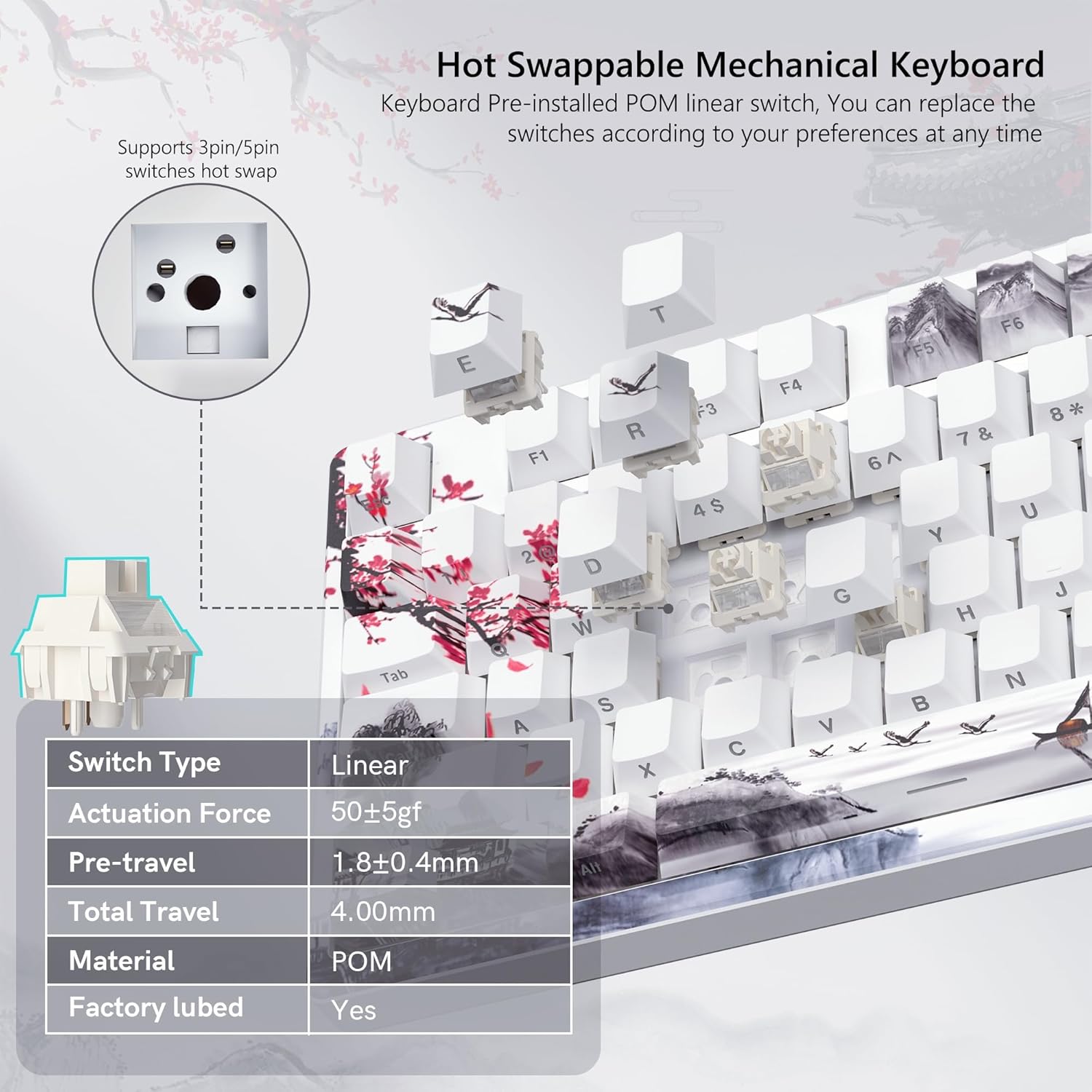
Image 4.4: Hot-swappable switch mechanism.
Video 4.5: Demonstration of hot-swappable switches and connectivity modes.
4.5 Key Remapping and Macro Settings
Utilize the Womier SK80 PRO software to redefine key functions and set up custom macros, enhancing your productivity and gaming experience.
5. Baxım
5.1 Təmizləmə
- Təmizləməzdən əvvəl klaviaturanı cihazınızdan ayırın.
- Hərtərəfli təmizləmə üçün açar qapağını diqqətlə çıxarmaq üçün açar qapağı çəkəndən istifadə edin.
- Klaviatura səthini yumşaq, d ilə silinamp parça. Həddindən artıq nəmdən çəkinin.
- Düymələr arasındakı toz və zibilləri təmizləmək üçün sıxılmış hava istifadə edin.
5.2 Batareya Baxımı
The keyboard is equipped with a 4000mAh battery. To prolong battery life:
- İlk istifadə etməzdən əvvəl klaviaturanı tam doldurun.
- Tez-tez batareyanı tamamilə boşaltmaqdan çəkinin.
- Uzun müddət istifadə edilmədikdə klaviaturanı sərin, quru yerdə saxlayın.
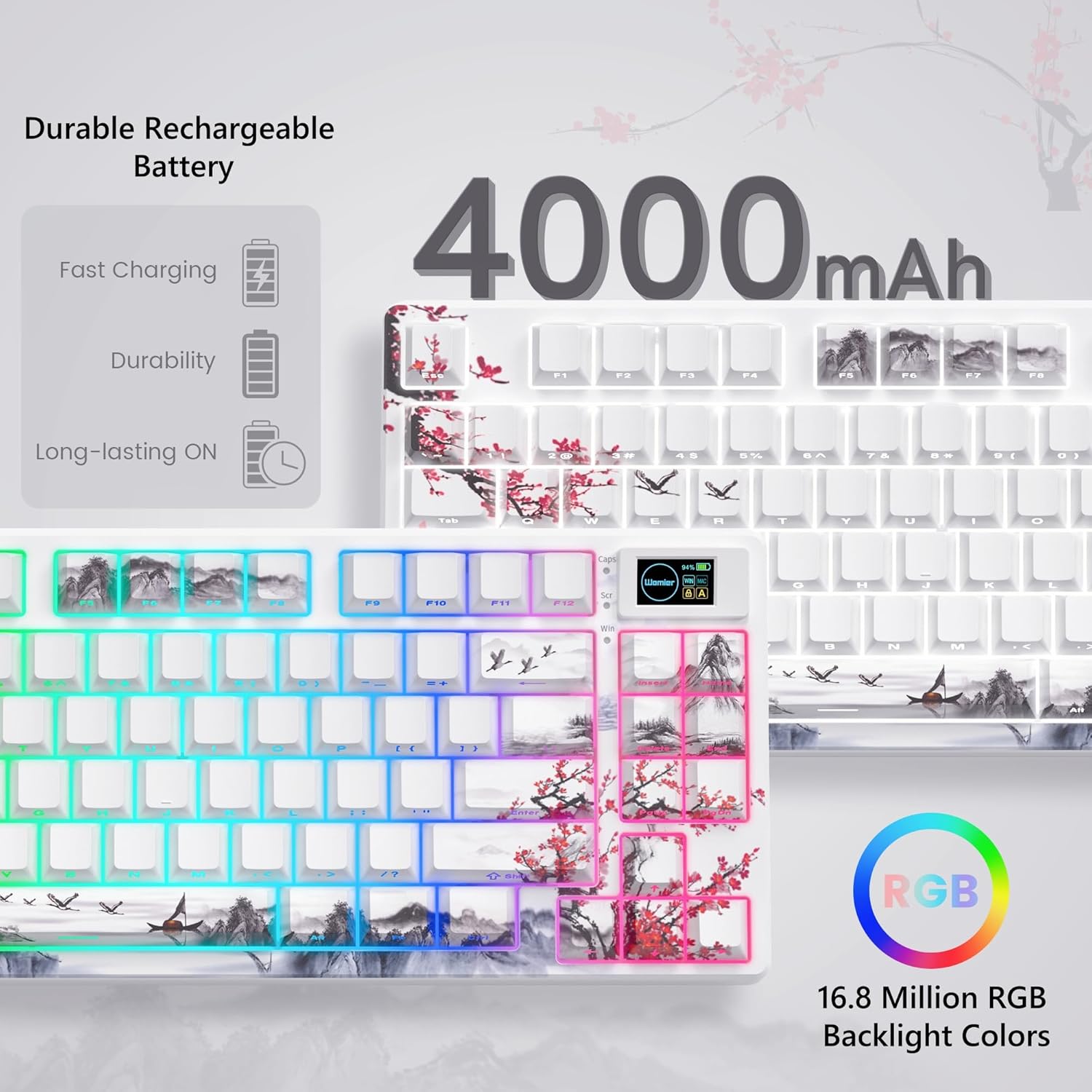
Image 5.1: Battery and RGB features.
5.3 Açarın dəyişdirilməsi
Açarları dəyişdirmək üçün:
- İstədiyiniz düymə qapağını çıxarmaq üçün təqdim olunan düymə qapağı çəkəndən istifadə edin.
- Use the switch puller to gently grasp and pull the switch upwards until it detaches from the PCB.
- Yeni açarın sancaqlarını PCB-dəki deliklərlə hizalayın.
- Press the new switch firmly until it clicks into place. Ensure pins are not bent.
- Klaviatura qapağını yenidən taxın.
6. Giderme
- Klaviatura cavab vermir:
- Check the connection mode switch (2.4G, BT, USB) on the underside of the keyboard.
- Ensure the USB-C cable or 2.4G receiver is securely connected.
- For Bluetooth, ensure the keyboard is paired and selected on your device.
- Batareyanın səviyyəsini yoxlayın; az olduqda doldurun.
- RGB lighting not working/customizing:
- Klaviaturanın işə salındığından əmin olun.
- Install and use the Womier SK80 PRO software for full customization.
- Refer to the quick guide for onboard RGB control shortcuts.
- Multimedia screen not displaying correctly:
- Ensure the keyboard is connected and powered.
- Use the Womier SK80 PRO software to upload or reset custom GIFs.
- Qeydiyyatdan keçməyən və ya iki dəfə yazılan açarlar:
- This may indicate a faulty switch. Use the switch puller to replace the affected switch.
- Keçidin PCB-yə tam oturduğundan əmin olun.
7. Spesifikasiyalar
| Xüsusiyyət | Detal |
|---|---|
| Model nömrəsi | JM-AZ-129 |
| Layout | 75% |
| Bağlantı | 2.4G Wireless, Bluetooth, USB-C Wired |
| Uyğun Cihazlar | PC (Windows, Mac, Android, iOS) |
| Keçidlər | Womier Customized Pre-lubed Linear Cream Switches (Hot-swappable 3-pin/5-pin) |
| Düymələr | Theme Art Keycaps (Shine-through) |
| Arxa işıqlandırma | 16.8 Million RGB (South-facing LED) |
| Batareya Tutumu | 4000mAh Lityum Polimer |
| Xüsusi Xüsusiyyətlər | Color Multimedia Smart Display Screen, Gasket Mount Design, EVA Positioning Plate, Bottom Filling |
| Məhsul Ölçüləri | 13.39 x 6.69 x 1.38 düym |
| Maddə Çəkisi | 2.97 funt sterlinq |
8. Zəmanət və Dəstək
Womier products are designed for reliability and performance. For warranty information, technical support, or service inquiries, please visit the official Womier website or contact customer support directly. Keep your purchase receipt for warranty claims.


