1. Giriş
Thank you for choosing the ErGear EGESD8 Electric Standing Desk. This manual provides essential information for the safe and efficient assembly, operation, and maintenance of your new desk. Please read these instructions carefully before use and retain them for future reference. This electric standing desk is designed to offer ergonomic flexibility, allowing you to easily switch between sitting and standing positions, promoting a healthier work environment.

The ErGear Electric Standing Desk, showcasing its sleek design and spacious desktop in a contemporary workspace.
2. Təhlükəsizlik Təlimatları
Təhlükəsiz işləməyi təmin etmək və zərərin qarşısını almaq üçün aşağıdakılara əməl edin:
- Masanı işə salmadan əvvəl bütün əlaqələrin etibarlı olduğundan əmin olun.
- İş zamanı uşaqları və ev heyvanlarını masadan uzaq tutun.
- Do not place hands or other body parts near moving parts to avoid injury.
- Masanı həddindən artıq yükləməyin. Maksimum çəki tutumu 80 kq.
- Mayeləri birbaşa idarəetmə panelinə və ya elektrik komponentlərinin yaxınlığına qoymaqdan çəkinin.
- If the desk makes unusual noises or movements, discontinue use and consult the troubleshooting section or contact support.
- Yalnız təqdim olunan enerji adapterindən və kabellərindən istifadə edin.

This image highlights the robust construction of the ErGear Electric Standing Desk, capable of supporting up to 80 kg, ensuring stability even under significant load.
3. Paketin məzmunu
Zəhmət olmasa, bütün komponentlərin mövcud olduğunu və zədələnmədiyini yoxlayın:
- Desktop Panels (assembled)
- Masa Ayaqları (2)
- Ayaq yastıqları (2)
- Yan Mötərizələr (2)
- Crossbar
- Transmissiya çubuğu
- İdarəetmə Paneli
- Enerji Adapteri və Kabel
- Cable Grommets (2)
- Headphone Hooks (2)
- Yığım Avadanlığı (vintlər, Allen açarı)
- İstifadəçi təlimatı
4. Montaj Təlimatları
Follow these steps to assemble your ErGear Electric Standing Desk. It is recommended to have two people for assembly.
Official assembly video for the ErGear Electric Standing Desk, demonstrating step-by-step installation.
Addım 1: Çərçivəni yığın
- Attach the side brackets to the desk legs using the provided screws and Allen wrench.
- Secure the foot pads to the bottom of each leg.
- Connect the two leg assemblies with the crossbar, ensuring all screws are tightened.
Step 2: Fix the Transmission Rod
- Insert the transmission rod into the designated openings on both desk legs.
- Ensure the rod is properly seated and secured with the retaining clips or screws.
Step 3: Assemble the Desktop Panel
- Lay the desktop panels face down on a soft, clean surface.
- Align the panels and secure them together using the provided connectors and screws.
Step 4: Attach the Frame to the Desktop
- Carefully place the assembled desk frame onto the underside of the desktop.
- Align the pre-drilled holes and secure the frame to the desktop using the appropriate screws.
- Attach the control panel to the underside of the desktop in a convenient location using the provided screws.
- Install the headphone hooks to the underside of the desktop as desired.
Addım 5: Kabelləri birləşdirin
- Connect the motor cables from the legs to the control box.
- Connect the control panel cable to the control box.
- Güc adapterini idarəetmə qutusuna və sonra elektrik rozetkasına qoşun.
Step 6: Fix the Cable Grommets
- Insert the cable grommets into the pre-cut holes on the desktop to manage cables.
5. Əməliyyat Təlimatları
Your ErGear Electric Standing Desk features an intuitive control panel for easy height adjustment.
Qısa video şouasing key features of the ErGear Electric Standing Desk, including height adjustment and stability.
İdarəetmə Paneli bitdiview

The desk's intelligent control panel features an LED display showing current height in centimeters, along with up/down arrows and four memory preset buttons for quick adjustments.
- Up/Down Arrows (▲ / ▼): Press and hold to adjust the desk height manually.
- LED displey: Shows the current height of the desk in centimeters.
- Memory Presets (1, 2, 3, 4): Store and recall preferred height settings.
Hündürlüyün tənzimlənməsi
The desk can be adjusted between 72 sm və 118 sm.
- Əllə tənzimləmə: Press and hold the up (▲) or down (▼) arrow button until the desk reaches your desired height.
- Using Memory Presets: Press the corresponding memory button (1, 2, 3, or 4) to automatically move the desk to the saved height.
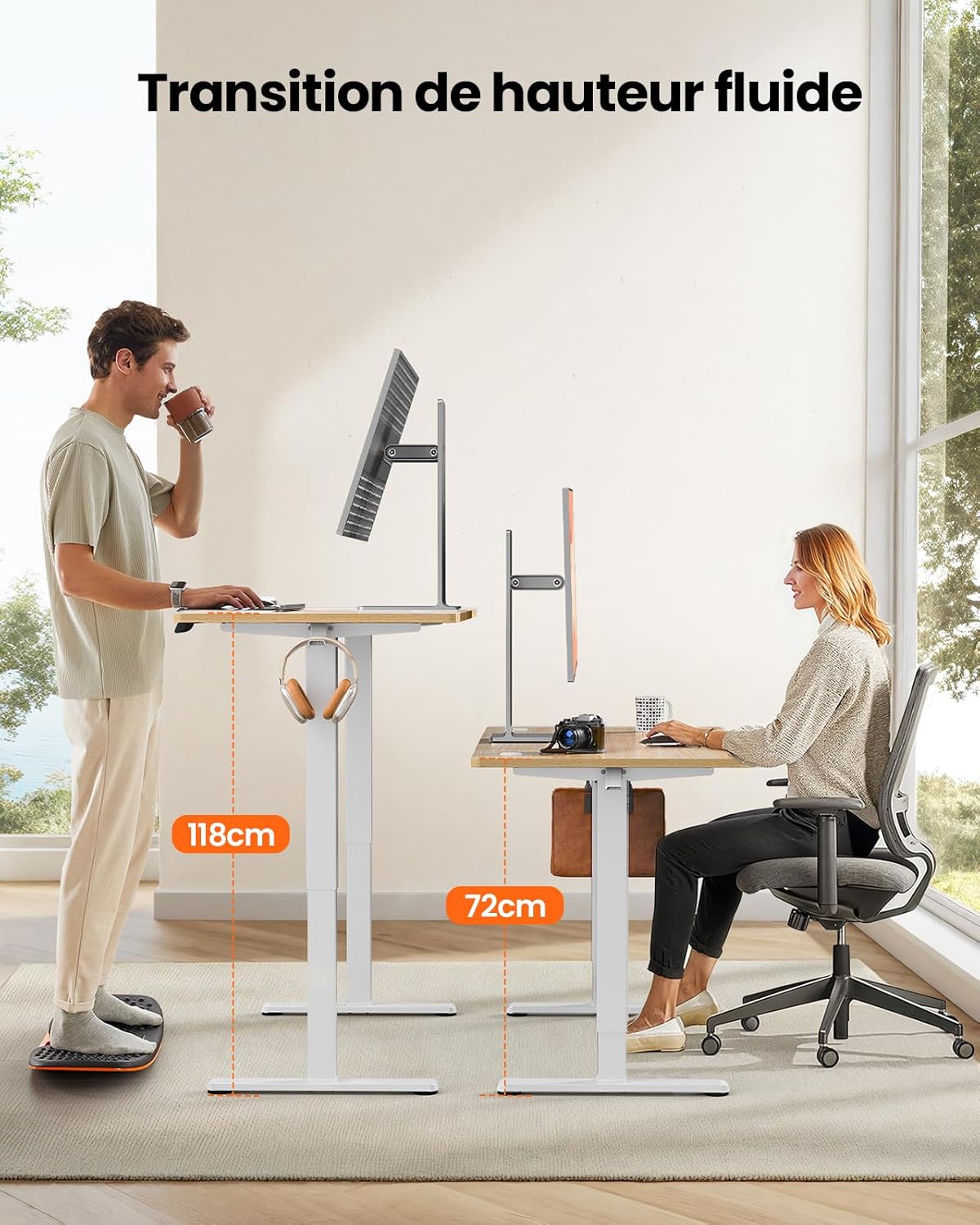
This image demonstrates the adjustable height range of the ErGear Electric Standing Desk, showing a user sitting at 72cm and standing at 118cm, emphasizing ergonomic flexibility.
Setting Memory Presets
- Yuxarı/aşağı oxlardan istifadə edərək masanı istədiyiniz hündürlüyə uyğunlaşdırın.
- Press the 'M' button (if available, or a 'Set' button) followed by the desired memory button (1, 2, 3, or 4). The display will typically flash or beep to confirm the setting is saved.
Səssiz Əməliyyat
The desk operates with a quiet motor, producing a noise level of ≤ 55 dB, ensuring a peaceful work environment.

Illustrates the ultra-quiet operation of the ErGear Electric Standing Desk, with a noise level of 55dB, ensuring a peaceful and undisturbed work environment.
6. Baxım
Masaüstünüzün müntəzəm baxımı onun ömrünü uzadır:
- Təmizləmə: Wipe the desk surface and legs with a soft, damp parça. Sərt kimyəvi maddələrdən və ya aşındırıcı təmizləyicilərdən çəkinin.
- Kabel İdarəetmə: Periodically check that all cables are neatly organized and not pinched or tangled. Utilize the integrated cable grommets and hooks.
- Screw Tightness: Occasionally check and tighten any loose screws on the frame or desktop connections.
- Yoxlama: Inspect the desk for any signs of wear or damage. If any issues are found, contact customer support.

Detal view of the desk's integrated cable grommets and convenient hooks, designed to help maintain a tidy and organized workspace by managing cables and accessories.
7. Giderme
Masanızla bağlı hər hansı bir problemlə qarşılaşsanız, aşağıdakı ümumi problemlərə və həllərə baxın:
| Problem | Mümkün Səbəb | Həll |
|---|---|---|
| Masa hərəkət etmir. | Power cable disconnected, motor cable loose, overload. | Check all power and motor connections. Reduce weight on the desk. |
| Masa qeyri-bərabər hərəkət edir. | Uneven load, loose screws, obstruction. | Distribute weight evenly. Check and tighten all assembly screws. Ensure no obstructions. |
| Tənzimləmə zamanı masa dayanır. | Overload protection activated, obstruction. | Remove some weight. Check for obstructions. Wait a few minutes before trying again. |
| Control panel not responding. | Control panel cable loose, power issue. | Check control panel cable connection. Verify power supply. |
Bu həlləri sınadıqdan sonra problem davam edərsə, zəhmət olmasa ErGear müştəri dəstəyi ilə əlaqə saxlayın.
8. Spesifikasiyalar
| Xüsusiyyət | Detal |
|---|---|
| Brend | ErGear |
| Model nömrəsi | EGESD8 |
| Rəng | Beige and Natural |
| Desktop Dimensions (L x W) | 120 sm x 60 sm |
| Hündürlük Tənzimləmə Aralığı | 72 sm - 118 sm |
| Material | Wood (Desktop), Metal (Base) |
| Çəki tutumu | 80 kq |
| Motor Səs-küy Səviyyəsi | ≤ 55 dB |
| Xüsusi Xüsusiyyətlər | Ergonomic, Electric, 4 Memory Presets, Cable Grommets, Headphone Hooks |
| Məhsul Çəkisi | 19.05 kq |

A clear diagram illustrating the overall dimensions of the ErGear Electric Standing Desk, including its 120cm x 60cm desktop and adjustable height range of 72cm to 118cm.
9. Zəmanət və Dəstək
ErGear products are designed for durability and performance. This product comes with a standard manufacturer's warranty. For specific warranty details, please refer to the warranty card included in your package or visit the official ErGear websayt.
If you have any questions, require technical assistance, or need to report a missing or damaged part, please contact ErGear customer support through the retailer where you purchased the product or via the contact information provided on the official ErGear websayt.
Please have your model number (EGESD8) and purchase information ready when contacting support.


