1. Giriş
This manual provides essential information for the safe and efficient operation of your VISION VP-621 4K Ultra HD Multimedia Projector. Please read this manual thoroughly before using the projector and retain it for future reference.
The VISION VP-621 is a versatile smart projector featuring 4K Ultra HD support, 11000 lumens brightness, 5G WiFi, Bluetooth 5.0, Auto Focus, Wireless Miracast, and an integrated Android 9.0 operating system. It is designed for various applications including home entertainment, business presentations, and educational purposes.
2. Təhlükəsizlik Məlumatı
- Havalandırma dəliklərini bağlamayın. Həddindən artıq istiləşmənin qarşısını almaq üçün proyektorun ətrafında kifayət qədər hava axını təmin edin.
- l olduqda proyektorun obyektivinə birbaşa baxmayınamp aktivdir. Parlaq işıq gözə zərər verə bilər.
- Proyektorun yıxılmasının qarşısını almaq üçün onu sabit, düz bir səthə qoyun.
- Proyektoru sudan, nəmdən və həddindən artıq temperaturdan uzaq tutun.
- Yalnız proyektorla birlikdə verilən enerji adapterindən istifadə edin.
- Proyektoru özünüz açmağa və ya təmir etməyə çalışmayın. Bütün xidmət işlərini ixtisaslı mütəxəssislərə həvalə edin.
- İldırım fırtınaları zamanı və ya uzun müddət istifadə edilmədikdə proyektoru elektrik şəbəkəsindən ayırın.
3. Paketin məzmunu
Aşağıda sadalanan bütün elementlərin paketinizə daxil olduğunu yoxlayın:
- VISION VP-621 Projector
- Elektrik kabeli
- Adapter
- Uzaqdan İdarəetmə
- AV Cable
- Proyektor Lens Qapağı
4. Məhsul bitdiview
Familiarize yourself with the main components and interfaces of your VISION VP-621 projector.

Şəkil: Ön və yan view of the VISION VP-621 projector, showcasing onun kompakt dizaynı və obyektiv.
4.1 Front and Top Panel
- Proyeksiya linzaları: Şəkli yayımlayır.
- İnfraqırmızı qəbuledici: Uzaqdan idarəetmə siqnalları üçün.
- Nəzarət Düymələri: Power, Navigation (OK, Up, Down, Left, Right), Back.
- Havalandırma barmaqlıqları: For cooling the internal components.

Şəkil: Üst view of the projector highlighting the integrated control buttons for power and navigation.
4.2 Rear Panel and Connectivity Ports
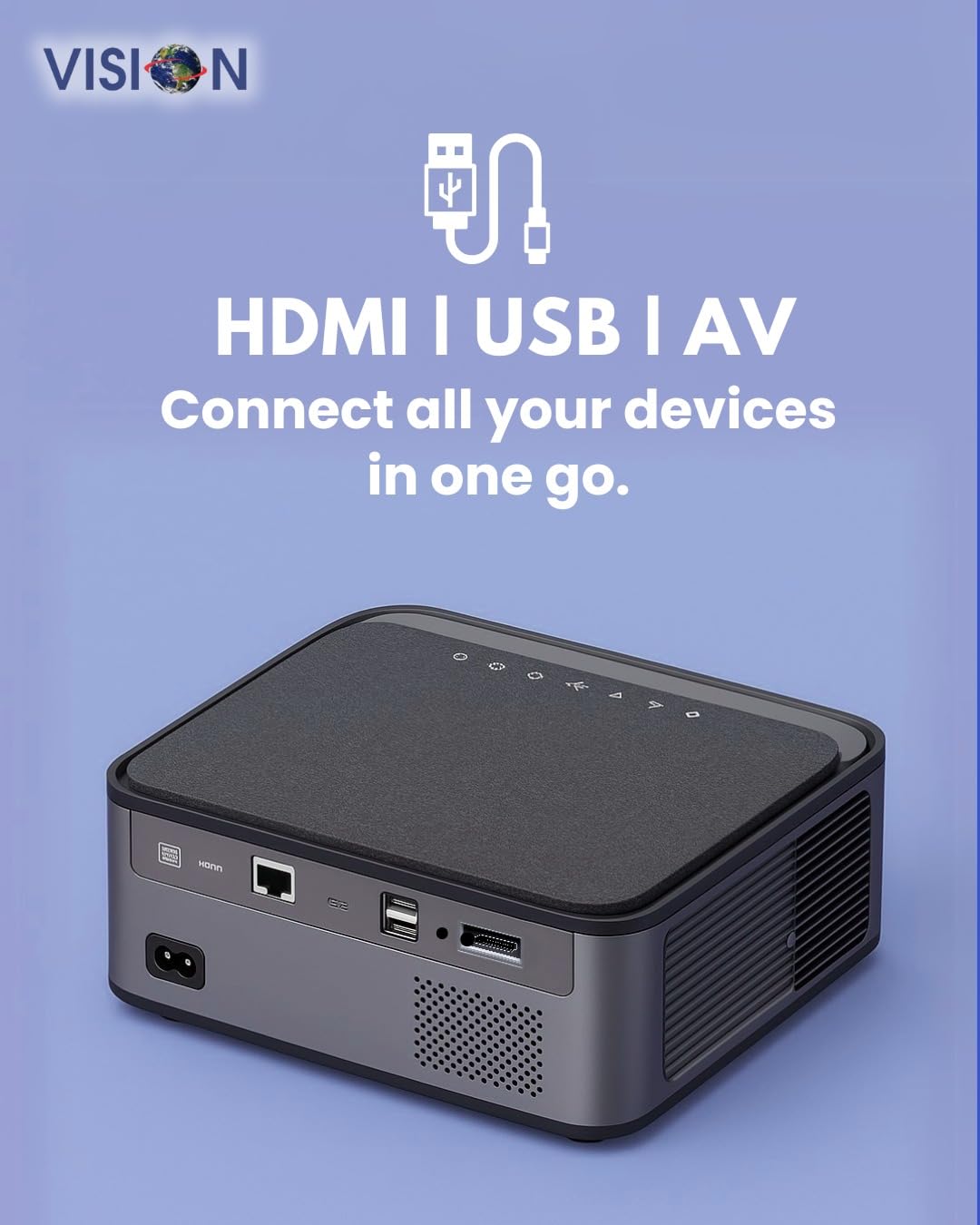
Şəkil: arxa view of the projector displaying the various input and output ports, including HDMI, USB, and AV.
- Güc Girişi: Güc adapterini buraya qoşun.
- HDMI portu: Connect to HDMI-enabled devices (laptops, gaming consoles, streaming sticks).
- USB Portları (x2): Connect USB drives for media playback or external devices.
- AV Girişi: Connect to older devices using the provided AV cable.
- Audio Çıxış (3.5 mm): Xarici dinamikləri və ya qulaqlıqları qoşun.
- LAN Portu: For wired internet connection (if available).
5. Quraşdırma
5.1 Proyektorun Yerləşdirilməsi
Choose a flat, stable surface for the projector. Ensure there are no obstructions in front of the lens and that the ventilation grilles are clear.

Image: A projector positioned on a desk, illustrating a typical setup environment.
5.2 Enerji Bağlantısı
- Güc adapterini proyektorun güc giriş portuna qoşun.
- Elektrik kabelini divar rozetkasına qoşun.
- Proyektordakı güc göstəricisi işığı yanacaq.
5.3 İlkin işə salınma
- Yandırmaq üçün proyektorun və ya pultdakı güc düyməsini basın.
- The projector will boot up and display the Android 9.0 home screen.
5.4 Fokus və Keystone Tənzimləməsi
The VISION VP-621 features automatic focus and 4D keystone correction for a clear and properly aligned image.

Image: Illustrates the projector's automatic focus and keystone correction capabilities, ensuring a sharp and aligned picture.
- Avto Fokus: The projector will automatically adjust the focus for a sharp image upon startup or movement.
- 4D əsas daşının korreksiyası: The projector automatically corrects image distortion when placed at an angle. Manual adjustments may be available in the settings menu if needed.
6. Əməliyyat Təlimatları
6.1 Android 9.0 Smart OS
The integrated Android 9.0 system allows direct access to streaming services and apps.
- Naviqasiya: Use the remote control's directional buttons and "OK" button to navigate the interface.
- Tətbiqin quraşdırılması: Access the Google Play Store to download and install applications like YouTube, Netflix, and Prime Video.
- Şəbəkə bağlantısı: Go to Settings > Network to connect to a 5G WiFi network or a wired LAN connection.
6.2 Xarici Cihazların Birləşdirilməsi
HDMI bağlantısı
- Connect an HDMI cable from your device (laptop, gaming console, Fire TV Stick) to the HDMI port on the projector.
- On the projector's home screen, select the HDMI input source.
USB Bağlantısı
- Insert a USB drive into one of the USB ports on the projector.
- The projector will typically prompt you to open the media player or file browser. If not, navigate to the file manager app on the Android home screen.
AV bağlantısı
- Connect the provided AV cable to the AV input port on the projector and to your external device.
- Select the AV input source on the projector.
Bluetooth 5.0 Audio Output
- Go to Settings > Bluetooth on the projector.
- Bluetooth-u aktivləşdirin və mövcud cihazları axtarın.
- Select your Bluetooth speaker or headphones from the list to pair and connect.
Wireless Miracast (Screen Mirroring)
Miracast allows you to wirelessly mirror the screen of your compatible smartphone, tablet, or laptop.
- On the projector's home screen, select the "Miracast" or "Screen Mirroring" application.
- On your mobile device, enable screen mirroring (often found in quick settings or display settings, named "Cast," "Smart View," "Wireless Display," etc.).
- Select the projector from the list of available devices to establish the connection.
7. Baxım
7.1 Proyektorun təmizlənməsi
- Lens: Xüsusi olaraq optik linzalar üçün hazırlanmış yumşaq, tüksüz parça istifadə edin. Aşındırıcı təmizləyicilərdən istifadə etməyin.
- Casing: Proyektoru silin casing with a soft, dry cloth. For stubborn dirt, slightly dampparçanı su ilə isladın və sonra qurulayın.
- Havalandırma: Regularly check and clean the ventilation grilles to ensure proper airflow and prevent dust buildup. Use a soft brush or compressed air.
7.2 Lamp Həyat
The VISION VP-621 utilizes advanced LED technology, providing an estimated lamp life of up to 50,000 hours. This significantly reduces the need for lamp ənənəvi proyektorlarla müqayisədə əvəzedici.
8. Giderme
| Problem | Mümkün Səbəb | Həll |
|---|---|---|
| Heç bir şəkil göstərilməyib |
|
|
| Bulanıq şəkil |
|
|
| Səs yoxdur |
|
|
| Wi-Fi-a qoşulmaq mümkün deyil |
|
|
9. Spesifikasiyalar
| Brend | GÖRÜŞ |
| Model Adı | VP-621 AN |
| Ekran Texnologiyası | LCD |
| Ekran növü | LED |
| Parlaqlıq | 11000 lümen |
| Təsvirin kontrast nisbəti | 18000:1 Pixels |
| Doğma Qətnamə | 1920 x 1280 (Full HD) |
| Dəstəklənən Qətnamə | Up to 4K Ultra HD |
| Aspekt nisbəti | 16:9, 4:3 |
| Əməliyyat sistemi | Android 9.0 |
| Bağlantı texnologiyası | Bluetooth 5.0, HDMI, USB, Wi-Fi (5G) |
| Avadanlıq interfeysi | Bluetooth 5, HDMI, USB 3.0 |
| Xüsusi Xüsusiyyətlər | Built-In 3D, Built-In Cooling System, Built-In Speaker, Electric Focus, Wi-Fi Ready, Auto Focus, 4D Keystone Correction, Wireless Miracast |
| Məhsul Ölçüləri | 30 x 18 x 7 sm |
| Maddə Çəkisi | 8 kq |
| Lamp Həyat | 50,000 saata qədər |

Image: Illustrates the projector's Full HD (1920x1080) resolution capability for crisp visuals.

Image: Highlights the projector's 11000 lumens brightness, ensuring clear visuals in various lighting conditions.
10. Zəmanət və Dəstək
Zəmanət məlumatı və texniki dəstək üçün istehsalçı ilə əlaqə saxlayın:
- İstehsalçı: Scorpio Infosolutions
- Məkan: Delhi, India
- Telefon: +91-7982647130
- Websayt: visionsheen.in
Please have your product model (VP-621) and purchase details ready when contacting support.


