1. Giriş
The BOYA BY-V10 is a compact and lightweight wireless lavalier microphone system designed for use with USB-C compatible devices, including Android smartphones, iPhone 15/16, iPads, and laptops. It offers high-quality audio recording with features like one-click noise cancellation and stable wireless transmission, making it suitable for various content creation scenarios.

Image: The BOYA BY-V10 USB-C Wireless Lavalier Microphone system, showing the transmitter and receiver.
Video: Bitdiview of the BOYA BY-V10 Wireless Microphone, highlighting its ease of use for recording.
2. Qutuda nə var
Paketinizdə bütün komponentlərin mövcud olduğunu yoxlayın:
- 1 x Transmitter (TX)
- 1 x Receiver (RXU) with USB-C connector
- 1 x USB-A-USB-C Şarj Kabeli
- 1 x Köpük Ön Cam
- 1 x Daşıma Çantası
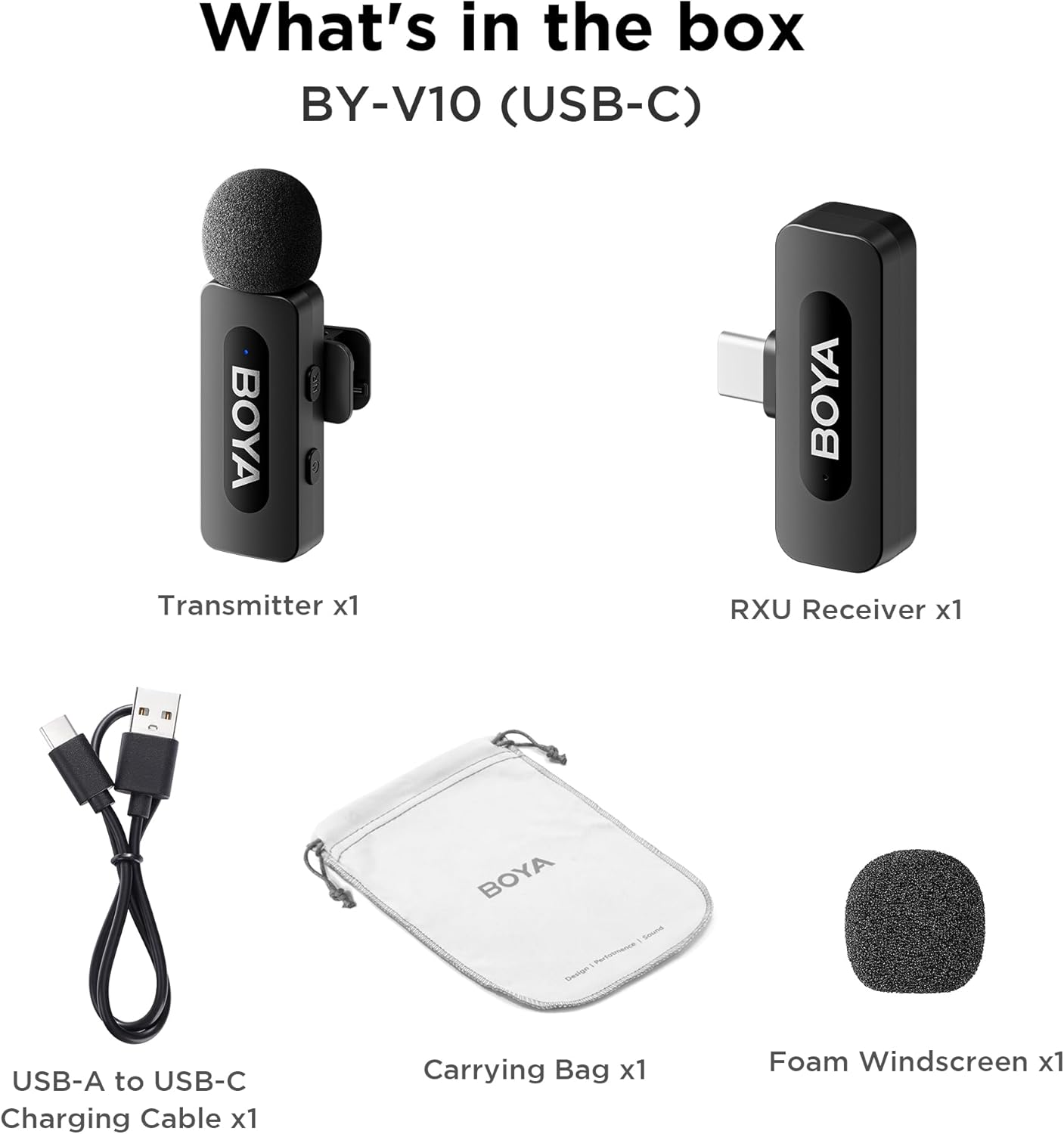
Image: The complete packing list for the BY-V10, showing all included accessories.
Video: An unboxing video demonstrating the contents of the BOYA BY-V Wireless Lavalier Microphone package.
3. Quraşdırma Bələdçisi
3.1 İlkin Doldurma
Before first use, ensure the transmitter is fully charged using the provided USB-A to USB-C charging cable. The receiver does not require charging as it draws power directly from your connected device.

Image: Battery life and charging details for the BY-V10 transmitter.
3.2 Cihazınıza Qoşulur
- Press and hold the power button on the Transmitter (TX) for 2 seconds to turn it on. The indicator light will blink.
- Plug the Receiver (RXU) directly into the USB-C port of your smartphone, iPad, or laptop.
- The Transmitter and Receiver will automatically pair within 10 seconds. The indicator light on both units will turn solid blue once successfully paired.
- Android istifadəçiləri üçün qeyd: Enable the "OTG" function in your device's settings before connecting the USB Type-C microphone.

Image: Visual instructions for the plug-and-play setup process.
3.3 Cihaz Uyğunluğu
The BY-V10 is compatible with devices featuring a USB-C port, including:
- Android smartfonları
- iPhone 15/16 modelləri
- iPads with USB-C
- Laptops with USB-C
Please ensure your device supports external USB-C audio input.

Image: Visual representation of compatible devices for the BY-V10 microphone.
4. Əməliyyat Təlimatları
4.1 Wearing the Microphone
The transmitter features a 360° rotatable clip for easy attachment to your clothing. For optimal sound capture, clip the microphone approximately 6-8 inches from your mouth.

Image: The compact size and clip-on design of the BY-V10 transmitter.
4.2 One-Click Noise Cancellation
To activate or deactivate the noise reduction mode, press the 'NR' button on the side of the transmitter. The indicator light will change to static green when noise reduction is enabled, and blink blue slowly when muted.

Image: Visual comparison of audio with and without noise cancellation enabled.

Image: Detailed explanation of the noise cancellation button and indicator lights.
4.3 Səssiz funksiyası
To mute the microphone, briefly press the power button on the transmitter. The indicator light will blink blue slowly. Press again to unmute.
4.4 Transmission Range
The BY-V10 offers a stable audio signal transmission range of up to 100 meters (328 feet) in open environments without obstacles or interference.

Image: Demonstration of the microphone's long-distance transmission capability.

Image: Further illustration of the extended transmission range.
4.5 Yazarkən doldurulması
The receiver allows you to charge your phone or connected device while recording, ensuring uninterrupted long sessions for streaming or course recording.

Image: The receiver connected to a smartphone, illustrating the ability to charge the phone during recording.

Image: Another visual of the 'Support Using While Charging' feature.
5. Baxım
To ensure the longevity and optimal performance of your BOYA BY-V10 microphone, follow these maintenance guidelines:
- Təmizləmə: Use a soft, dry cloth to clean the microphone and receiver. Avoid using liquids or abrasive cleaners.
- Yaddaş: Store the microphone system in its carrying bag when not in use to protect it from dust, moisture, and physical damage.
- Batareyaya qulluq: Fully charge the transmitter before long periods of storage to maintain battery health.
- Diqqətlə idarə edin: Avoid dropping the devices or exposing them to extreme temperatures.
6. Giderme
If you encounter problems when using the unit, please refer to the following checklist. If the problem cannot be solved, please contact the seller for after-sales service.
- Cihaz qoşula bilmir: Ötürücü(lər)i bir qəbuledici ilə qoşduğunuzdan əmin olun. Birdən çox qəbuledici ilə qoşulursa, hansı qəbuledicinin ötürücü(lər)lə qoşulacağı müəyyən edilə bilməz.
- Cihazdan səs çıxmır və ya xarici cihaza qoşulduqda səs çıxmır:
- Qəbuledicidəki konnektorun cihazınıza yaxşı qoşulduğundan əmin olun.
- Ötürücü(lər)in səssiz olmadığından əmin olun. Əgər onun göstəricisi yavaş-yavaş mavi yanıb-sönürsə, ötürücü(lər)in səsini açmaq üçün istifadəçilər güc düyməsini bir dəfə basmalıdırlar.
- Cihazın işləmə diapazonu məhduddur və səs tez-tez fasilələrlə eşidilir: Ötürücü(lər) və qəbuledici arasında heç bir maneə olmadığından əmin olun. Əgər fasiləli səs hələ də tez-tez eşidilirsə, satış sonrası xidmət üçün bizimlə əlaqə saxlayın.
- Cihaz avtomatik olaraq sönür: Qoşulmadıqda, ötürücü(lər) 10 dəqiqədən sonra avtomatik olaraq sönəcək.
- Cihaz işə salınmır: Cihazın işə salınması üçün kifayət qədər batareyanın olduğundan əmin olun. Dövrəni aktivləşdirmək üçün şarj kabelini qoşmağa çalışın.
- Şarj qutusu cihazı doldura bilmir:
- Şarj qutusunun batareyasının boşalmadığından əmin olun. Qutunu doldurmağa çalışın.
- Cihazın şarj kontaktlarını və şarj qutusunun şarj sancaqlarını təmiz bir parça ilə silin və tozun onları örtmədiyinə əmin olun.
- Şarj kontaktları tam birləşənə qədər şarj qutusuna yerləşdirilmiş cihazı aşağı itələməyə çalışın. Bundan sonra, cihaz hələ də şarj olunmazsa, maqnit qüvvəsi köhnələ bilər. Satış sonrası xidmət üçün bizimlə əlaqə saxlayın.

Image: A troubleshooting guide with solutions for common operational problems.
7. Spesifikasiyalar
| Xüsusiyyət | Detal |
|---|---|
| Brend | BOYA |
| Model Adı | BY-V10(USB-C) |
| Mikrofon Forma Faktoru | Lavalier |
| Bağlantı texnologiyası | USB |
| Bağlayıcı növü | USB Type-C |
| Qütb nümunəsi | Çox yönlü |
| Audio Həssaslıq | 42 desibel |
| Siqnal-to-küy nisbəti | 80 dB |
| Maddə Çəkisi | 1.76 unsiya (0.05 Kiloqram) |
| Məhsul Ölçüləri | 3.27 x 4.45 x 1.38 düym |
| Güc mənbəyi | Batareya ilə işləyən (ötürücü) |
| Batareya Ömrü (Ötürücü) | 9 saata qədər |
| Doldurma Müddəti (Ötürücü) | təqribən. 2 saat |
| Xüsusi Xüsusiyyət | Mute Function, One-Click Noise Cancellation |
| Uyğun Cihazlar | Noutbuk, Smartfon (USB-C) |
8. Zəmanət və Dəstək
For warranty information, technical support, or any inquiries regarding your BOYA BY-V10 microphone, please refer to the official BOYA website or contact the seller directly through your purchase platform. Keep your proof of purchase for warranty claims.


