1. Giriş
Thank you for choosing the GenMachine Mini PC AMD Ryzen 3 4300U. This compact and high-performance mini computer is designed for both home and office use, offering efficient multitasking, 4K visuals, and advanced connectivity. This manual provides essential information for setting up, operating, and maintaining your device.
2. Qutuda nə var
Bütün əşyaların paketinizdə olduğunu yoxlayın:
- GenMachine Mini PC (R3 4300U 8G 256G)
- İstifadəçi təlimatı
- Güc adapteri
- HDMI Kabel
- Mounting Bracket (for VESA mounting)

3. Məhsul bitdiview (Təchizat)
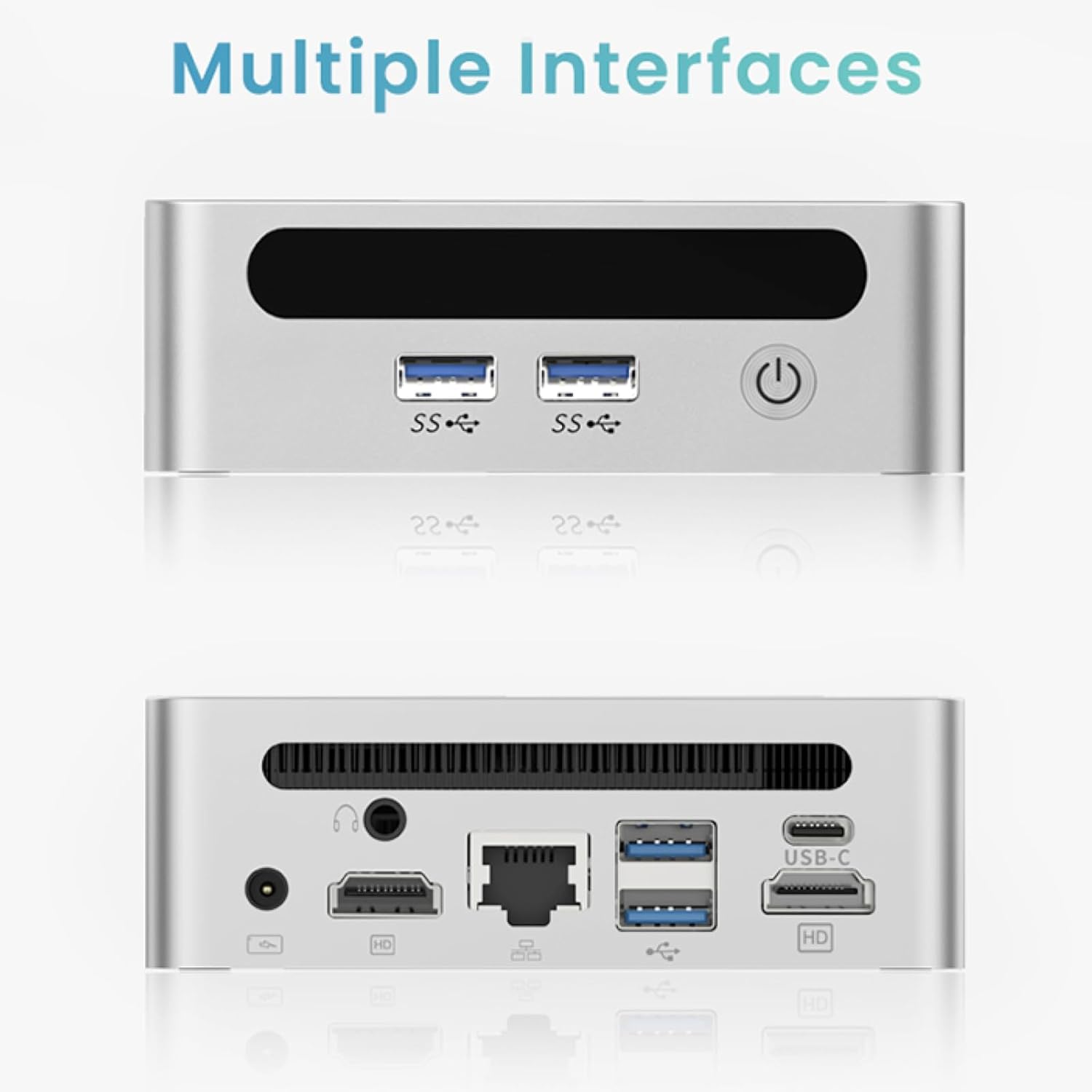
The GenMachine Mini PC features a compact design with various ports for connectivity and expansion.
Ön Panel
- Güc düyməsi: Cihazı yandırmaq/söndürmək üçün.
- USB 3.0 Portları (x2): For high-speed data transfer and peripheral connections.
- USB 2.0 Portu (x1): For standard peripheral connections.
Arxa Panel
- DC Güc Girişi: Təqdim olunan güc adapterini buraya qoşun.
- USB 2.0 Portu (x1): For standard peripheral connections.
- HDMI Portları (x2): For connecting displays, supporting up to 4K resolution.
- Ethernet (LAN) Portu: Simli şəbəkə bağlantısı üçün.
- 3.5 mm audio giriş: Qulaqlıqlar və ya dinamiklər üçün.
- Kensington Kilidi Yuvası: Cihazın təhlükəsizliyini təmin etmək üçün.
4. Quraşdırma Bələdçisi
İlkin əlaqə
- Power off the Mini PC and disconnect all cables.
- Connect your monitor(s) to the HDMI port(s) on the rear panel.
- Klaviatura və siçanınızı mövcud USB portlarına qoşun.
- (Optional) For a wired network connection, plug an Ethernet cable into the LAN port.
- Güc adapterini DC giriş portuna, sonra isə elektrik rozetkasına qoşun.
- Press the power button on the front panel to turn on the Mini PC.
Operating System Setup (Windows 11)
Your GenMachine Mini PC comes with Windows 11 pre-installed. Upon first boot, you will be guided through the initial Windows setup process, including:
- Region and keyboard layout selection.
- Network connection (Wi-Fi 6 or Ethernet).
- Microsoft account sign-in or local account creation.
- Privacy settings configuration.
Quraşdırmanı başa çatdırmaq üçün ekrandakı təlimatlara əməl edin.
5. Performance and Usage
The AMD Ryzen 3 4300U processor, combined with 8GB DDR4 RAM and a 256GB SSD, provides robust performance for various tasks.
Əsas Xüsusiyyətlər:
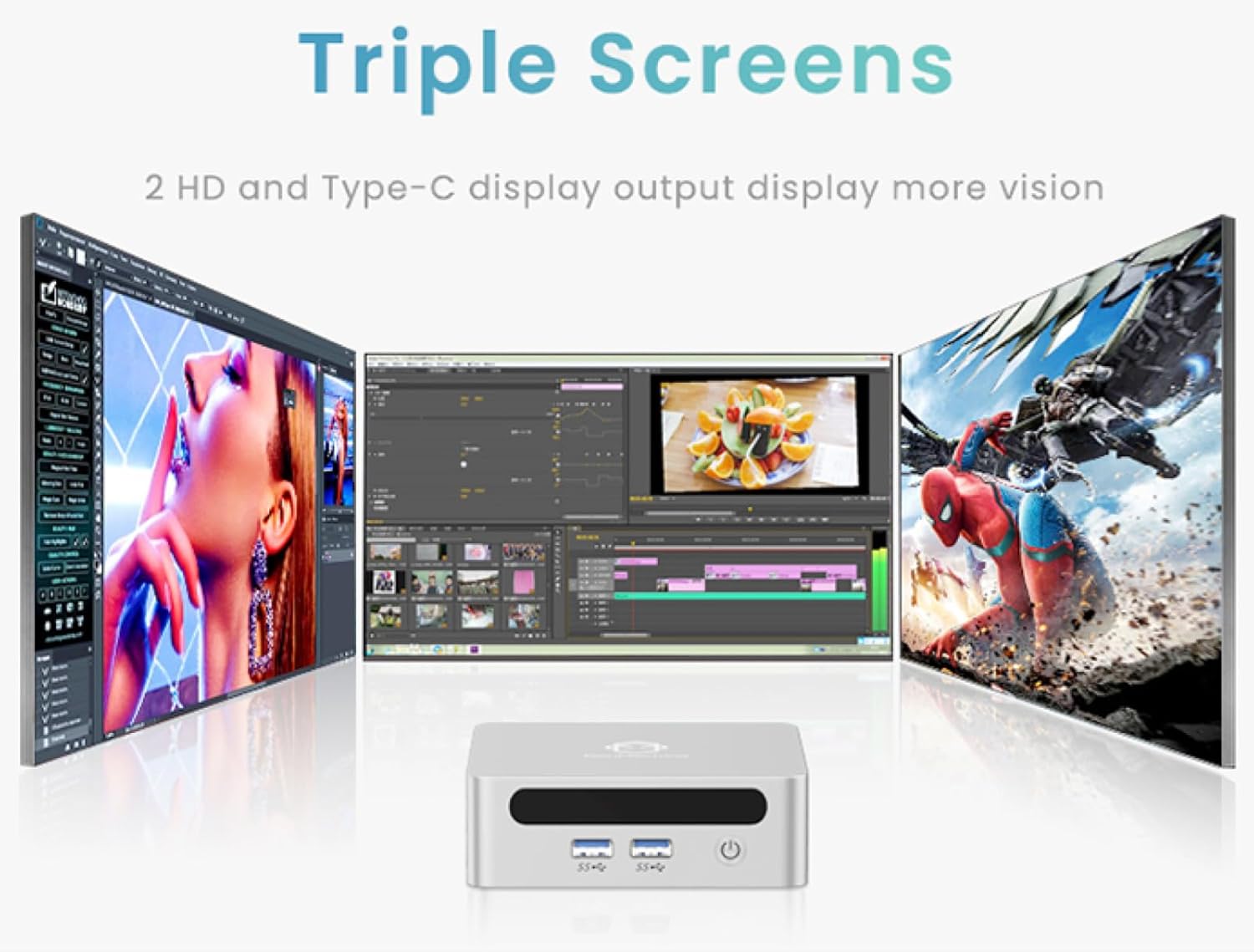
- 4K Ultra HD Visuals & Dual Display Support: Connect up to two 4K monitors for enhanced productivity or immersive entertainment.
- Wi-Fi 6 və Bluetooth 5.2: Enjoy faster and more stable wireless internet and seamless connectivity with Bluetooth peripherals.
- Compact and Quiet Design: Its small footprint and ultra-quiet cooling system make it suitable for any workspace without distraction.

6. Upgrading Components (Maintenance)
The GenMachine Mini PC allows for easy upgrades of its RAM and SSD to further enhance performance or storage capacity.
Tələb olunan alətlər:
- Kiçik Phillips başlı tornavida
- Plastic pry tool (optional, for opening the case)
- New SSD (M.2 2280 NVMe or 2.5-inch SATA SSD)
- New RAM (DDR4 SODIMM)
Prosedur:
- Power off the Mini PC and disconnect all cables.
- Carefully remove the four rubber foot pads on the bottom of the Mini PC to reveal the hidden screws.
- Dörd vintini açın.
- Gently pry open the bottom plate along the edges. Be careful with the internal clips.
- Locate the existing SSD and RAM modules.
- To remove the SSD: If fixed by screws, unscrew them. If by clips, open the clips and pull out the original SSD.
- To remove RAM: Open the clips at both ends of the memory slot and pull out the original memory vertically.
- Insert the new SSD/RAM into the respective slots, ensuring they are properly seated and secured.
- Replace the bottom plate, aligning it with the clips and screw holes.
- Screw on the previously removed screws and reattach the foot pads.
7. Montaj Seçimləri
The GenMachine Mini PC can be mounted behind a VESA-compatible monitor using the included mounting bracket, saving desk space and creating a clean setup.

8. Spesifikasiyalar
| Xüsusiyyət | Detal |
|---|---|
| Prosessor | AMD Ryzen 3 4300U (2.7 GHz) |
| RAM | 8 GB DDR4 SDRAM |
| Saxlama | 256GB 2280 SSD (PCIE x 16 interface) |
| Qrafika | İnteqrasiya olunmuş AMD Radeon Qrafika |
| Əməliyyat sistemi | OS (Windows 11 pre-installed) |
| Bağlantı | Wi-Fi 6, Bluetooth 5.2, Ethernet |
| Video Çıxışı | 2x HDMI (4K @ 60Hz), USB-C (DisplayPort Alt Mode) |
| USB Portları | 2x USB 3.0, 2x USB 2.0, 1x USB-C |
| Ölçülər | 6.26 x 6.26 x 3.6 düym |
| Çəki | 2 funt sterlinq |
9. Giderme
- Güc yoxdur: Enerji adapterinin həm Mini PC-yə, həm də işləyən elektrik rozetkasına etibarlı şəkildə qoşulduğundan əmin olun.
- Ekran yoxdur: Verify that the HDMI cable(s) are correctly connected to the monitor(s) and the Mini PC. Check monitor input source settings.
- No Internet (Wi-Fi): Ensure Wi-Fi is enabled in Windows settings and you are connected to the correct network.
- No Internet (Wired): Check the Ethernet cable connection and ensure your router is functioning correctly.
- Yavaş Performans: Close unnecessary applications. Check for background updates. Consider upgrading RAM or SSD if issues persist.
10. Zəmanət və Dəstək
For warranty information, technical support, or service inquiries, please refer to the contact details provided in your product packaging or visit the official GenMachine webSayt. Zəmanət iddiaları üçün alış qəbzini saxlayın.


