1. Giriş
The Audizio Avola is a comprehensive audio system designed to provide a wide range of listening options. It integrates Internet Radio, DAB+, FM radio, a CD player, and Bluetooth connectivity into a single, elegant unit. This manual will guide you through the setup, operation, and maintenance of your Avola system, ensuring you can fully utilize its features for an optimal audio experience.
2. Təhlükəsizlik Təlimatları
- Enerji təchizatı: Yalnız verilən güc adapterindən istifadə edin. Səs səviyyəsinintage regionunuzun tələblərinə uyğundur.
- Su və nəm: Do not expose the unit to rain, moisture, or liquids. Avoid placing objects filled with liquids, such as vases, on the unit.
- Havalandırma: Cihazın ətrafında adekvat ventilyasiya olmasını təmin edin. Havalandırma deliklərini bağlamayın.
- İstilik mənbələri: Cihazı radiatorlar, istilik registrləri, sobalar və ya istilik yaradan digər cihazlar kimi istilik mənbələrindən uzaq tutun.
- Təmizləmə: Disconnect the unit from the power supply before cleaning. Use a soft, dry cloth. Do not use liquid cleaners or aerosol cleaners.
- Xidmət: Cihaza özünüz xidmət göstərməyə çalışmayın. Bütün xidmətlər üçün ixtisaslı xidmət personalına müraciət edin.
- CD pleyer: Do not insert foreign objects into the CD tray. Handle CDs by their edges to avoid scratches.
3. Paketin məzmunu
Bütün əşyaların qablaşdırmada olduğunu yoxlayın:
- 1x Audizio Avola Internet Radio
- 1x Uzaqdan İdarəetmə
- 1x Enerji Adapteri
- 1x User Manual (Quick Start Guide)

Image: Audizio Avola unit shown with its remote control and power adapter.
4. Məhsul bitdiview
4.1 Ön Panel

Şəkil: Ön view of the Audizio Avola with the CD tray closed.
The front panel features the main display, control buttons, a CD tray, and input ports.
- Ekran: Color display for navigation and information.
- Nəzarət Düymələri: MENU, INFO, REC/DEL, PRESET/REPEAT, STANDBY, I/R, Play/Pause, Stop, Skip/Fast Forward/Rewind.
- CD qabı: Audio CD-ləri daxil etmək üçün.
- TUNE/SEÇ Düyməsi: Rotate to navigate menus, press to select.
- VOLUME düyməsi: Audio çıxış səviyyəsini tənzimləyir.
- USB Port: USB yaddaş cihazlarını birləşdirmək üçün.
- SD Kart Yuvası: SD yaddaş kartlarının daxil edilməsi üçün.
- AUX Girişi: 3.5mm jack for external audio sources.
- Qulaqlıq Jack: Şəxsi dinləmə üçün 3.5 mm jak.

Image: Close-up of the Audizio Avola front panel showing USB, SD, AUX, and headphone ports.
4.2 Arxa Panel
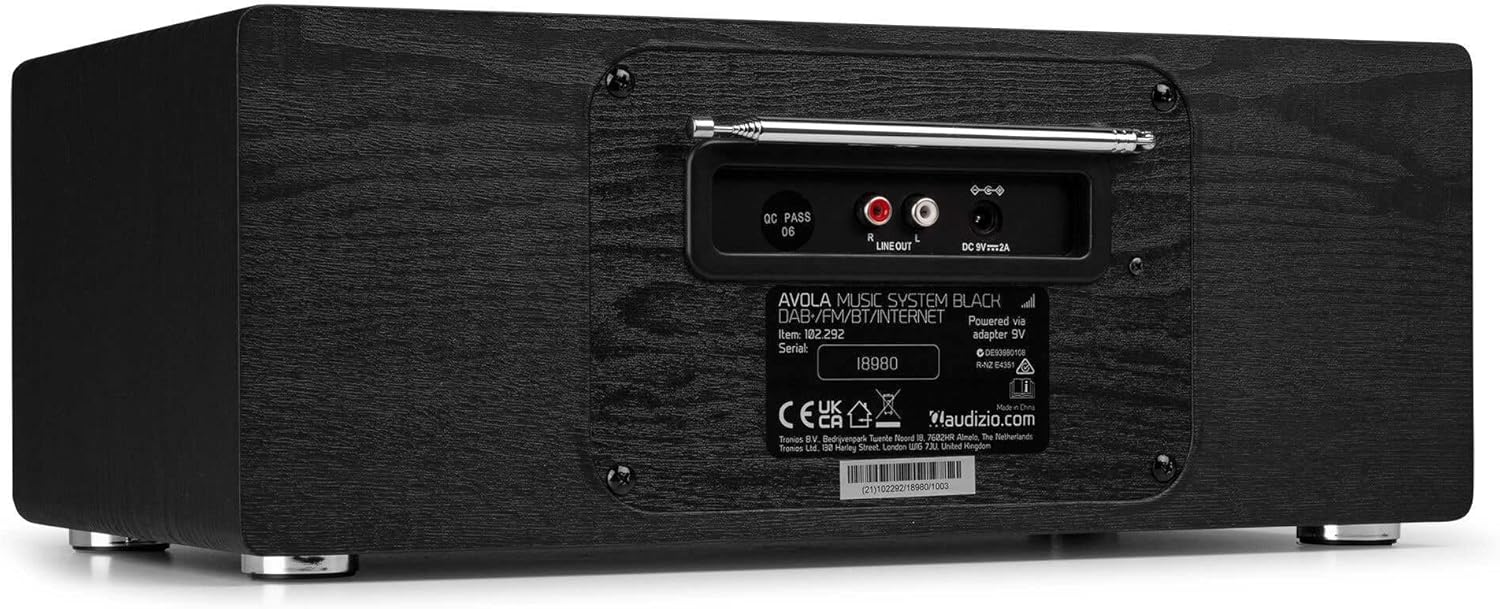
Şəkil: arxa view of the Audizio Avola, highlighting the antenna and connection ports.
The rear panel houses essential connections:
- Teleskopik antena: DAB+ və FM radio qəbulu üçün. Ən yaxşı siqnal üçün tam uzatın.
- XƏTT ÇIXIŞI (RCA): Xarici qoşulma üçün ampqaldırıcılar və ya dinamiklər.
- DC 9V 2A Power Input: Güc adapterini birləşdirmək üçün.
5. Quraşdırma
5.1 Enerji Bağlantısı
- Connect the power adapter to the DC 9V 2A input on the rear of the Avola unit.
- Elektrik adapterini uyğun divar rozetkasına qoşun.
- The unit will enter standby mode. Press the STANDBY button on the unit or remote control to power on.
5.2 Antenanın qurulması
For optimal DAB+ and FM radio reception, fully extend the telescopic antenna located on the rear panel. Adjust its position for the best signal quality.
5.3 Initial Setup (WLAN Connection)
To access Internet Radio features, the Avola must be connected to a Wi-Fi network.
- Upon first power-on, the unit may prompt you to set up the network connection. If not, press MENU, navigate to 'System Settings' and then 'Network'.
- Select 'Wi-Fi Network' and choose 'Scan' to find available networks.
- Siyahıdan Wi-Fi şəbəkənizi seçin.
- Enter your Wi-Fi password using the TUNE/SELECT knob to navigate characters and press to confirm each character.
- Once connected, the display will show a Wi-Fi icon.
6. Əməliyyat rejimləri
6.1 İnternet radiosu
Access thousands of radio stations worldwide via your Wi-Fi connection.
- Press the MENU button and select 'Internet Radio'.
- Stansiyalara yeri, janrı üzrə baxa və ya müəyyən stansiyaları axtara bilərsiniz.
- Use the TUNE/SELECT knob to navigate and select.
- To save a station as a preset, press and hold the PRESET/REPEAT button until the preset menu appears, then select a preset number.

Image: The Audizio Avola display showing the Internet Radio interface.
6.2 DAB+ Radio
Digital Audio Broadcasting Plus offers high-quality digital radio.
- Press the MENU button and select 'DAB Radio'.
- The unit will automatically scan for available DAB+ stations.
- Use the TUNE/SELECT knob to browse and select stations.
- Save presets as described for Internet Radio.
6.3 FM Radio
Listen to traditional analog FM radio broadcasts.
- Press the MENU button and select 'FM Radio'.
- Use the TUNE/SELECT knob to manually tune or press and hold to auto-scan for stations.
- Save presets as described for Internet Radio.
6.4 CD pleyer
Play your favorite audio CDs.
- Press the MENU button and select 'CD Player'.
- Press the 'Open' button next to the CD tray to open it.
- Carefully place an audio CD onto the tray with the label side facing up.
- Press the 'Open' button again to close the tray. The unit will begin playing the CD automatically.
- Use the Play/Pause, Stop, and Skip buttons for playback control.
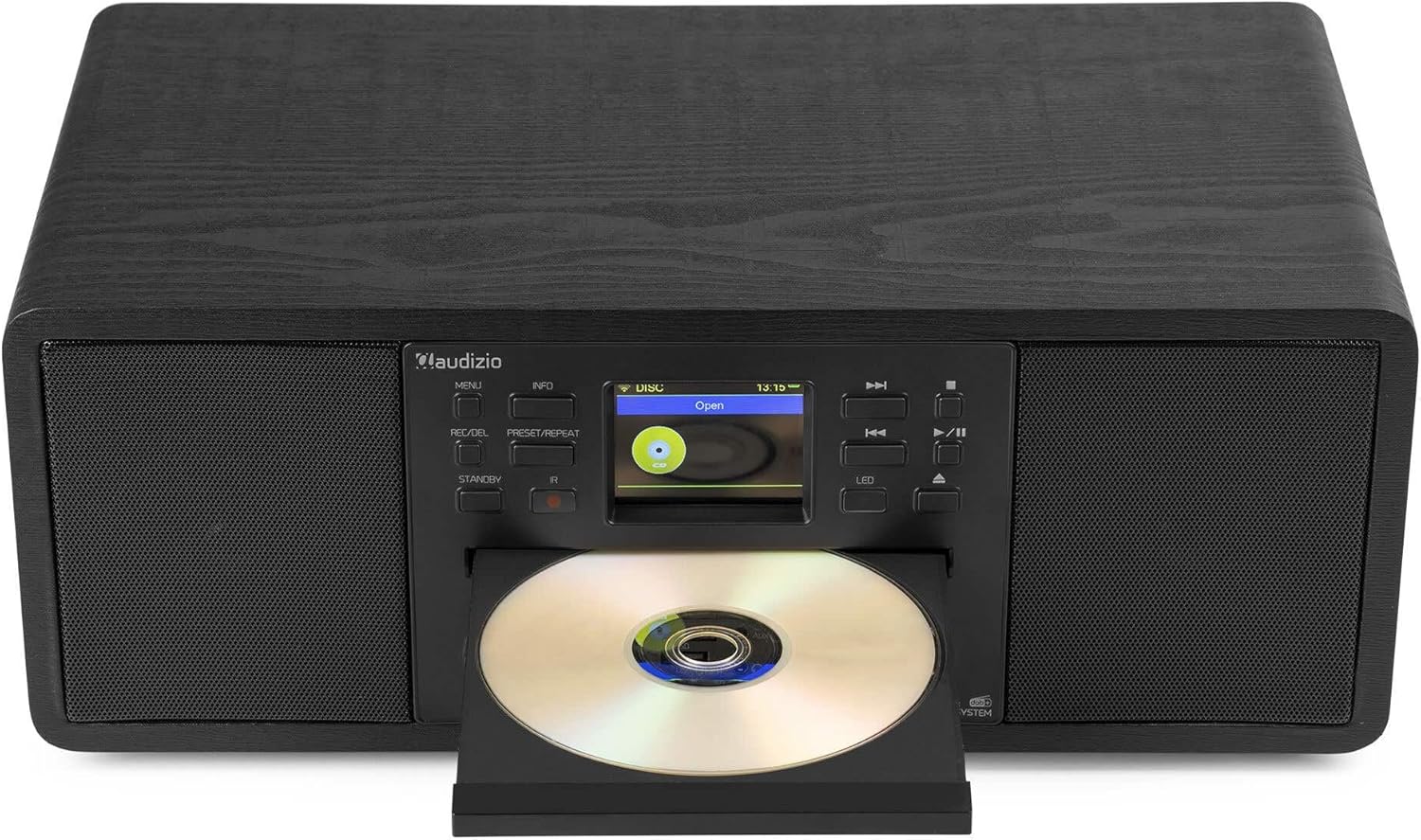
Image: The Audizio Avola with its CD tray open, ready for disc insertion.
6.5 Bluetooth bağlantısı
Smartfonunuzdan, planşetinizdən və ya digər Bluetooth dəstəkli cihazlarınızdan simsiz olaraq səs yayımlayın.
- Press the MENU button and select 'Bluetooth'.
- The Avola will enter pairing mode and become discoverable.
- On your Bluetooth device, search for 'Audizio Avola' in the Bluetooth settings and select it to pair.
- Once connected, the display will show 'BT Connected'. You can now play audio from your device through the Avola.

Image: The Audizio Avola display indicating a successful Bluetooth connection.
6.6 USB/SD oxutma
Audio çalın files from USB drives or SD cards.
- Insert a USB drive into the USB port or an SD card into the SD card slot on the front panel.
- Press the MENU button and select 'USB' or 'SD' (the unit may automatically switch to the correct mode).
- Sizin vasitəsilə gedin files and folders using the TUNE/SELECT knob.
- Press the TUNE/SELECT knob to play a selected track.
7. Baxım
- Cihazın təmizlənməsi: Use a soft, dry, lint-free cloth to clean the exterior of the unit. Do not use abrasive cleaners, waxes, or solvents.
- CD Linza Təmizlənməsi: CD oxutma nizamsız olarsa, lazer linzasını təmizləmək üçün kommersiya məqsədli CD linza təmizləyici diskdən istifadə edin.
- Yaddaş: Cihazı uzun müddət saxlayacaqsınızsa, onu elektrik şəbəkəsindən ayırın və sərin, quru yerdə saxlayın.
8. Giderme
| Problem | Mümkün Səbəb | Həll |
|---|---|---|
| Güc yoxdur | Enerji adapteri qoşulmayıb və ya nasaz çıxış. | Elektrik bağlantılarını yoxlayın. Fərqli çıxışı sınayın. |
| Səs yoxdur | Səs çox aşağıdır, səssiz rejim aktivdir və ya səhv mənbə seçilib. | Increase volume. Check if mute is active. Ensure correct input source is selected. |
| İnternet Radio qoşulmur | Incorrect Wi-Fi password, weak signal, or network issue. | Re-enter Wi-Fi password. Move unit closer to router. Check router status. |
| DAB+/FM reception poor | Antenna uzadılmadı və ya zəif siqnal sahəsi. | Teleskopik antenanı tam uzadın və tənzimləyin. Cihazın yerini dəyişdirməyə çalışın. |
| CD oxunmur | CD inserted incorrectly, dirty/scratched CD, or unsupported format. | Ensure CD is inserted label-side up. Clean or replace CD. Verify CD format (supports CD-DA, MP3). |
| Bluetooth qoşalaşmır | Device not in pairing mode, or Avola not discoverable. | Ensure both devices are in pairing mode. Check Bluetooth settings on your device. |
9. Spesifikasiyalar
| Xüsusiyyət | Spesifikasiya |
|---|---|
| Model Adı | Avola |
| Maddə nömrəsi | 102.292 |
| Ölçülər (UxGxY) | 45.8 x 25.8 x 19.7 sm |
| Çəki | 4 kq |
| Güc Girişi | 220 Volt (güc adapteri vasitəsilə) |
| Speaker Output Power (Max) | 60 Vt |
| Səs Çıxış Modu | Stereo |
| Dəstəklənən Audio Formatlar | CD-DA, MP3 |
| Bağlantı texnologiyası | WLAN, Bluetooth, AUX, RCA |
| Uyğun Cihazlar | MP3 Player, PC, Smartphone, Tablet |
| Rəng | Qara |
10. Zəmanət və Dəstək
Audizio products are designed and manufactured to the highest standards. In the unlikely event of a problem with your product, please contact your retailer for assistance. Keep your proof of purchase for warranty claims. For further support or inquiries, please refer to the official Audizio websaytına daxil olun və ya müştəri xidmətləri ilə əlaqə saxlayın.


