Giriş
Welcome to your JLab Go Lux ANC Wireless Headphones. This manual provides detailed instructions to help you get the most out of your new headphones, covering setup, operation, maintenance, and troubleshooting.
Qutuda nə var
- JLab Go Lux ANC Wireless Headphones
- USB-C şarj kabeli

Image: JLab Go Lux ANC Headphones and included USB-C charging cable.
Məhsul Bitdiview
Familiarize yourself with the key components and controls of your JLab Go Lux ANC Wireless Headphones.

Şəkil: Yaxından view of the right earcup, highlighting the power button, volume controls, and ANC/Be Aware mode button.
Əsas Xüsusiyyətlər:
- Hybrid Active Noise Cancelling (ANC): Reduces external distractions by up to 30 dB.
- Be Aware Mode: Audioya qulaq asarkən ətrafınızı eşitməyə imkan verir.
- Cloud Foam Comfort: Ergonomically shaped Form-Fit Earcups with 1-inch Cloud Foam cushions and adjustable hinges for extended comfort.
- JLab App Customization: Personalize ANC/Be Aware settings, touch controls, and sound preferences.
- Crystal Clear Zənglər: Equipped with noise-canceling microphones for clear communication.
- Bluetooth Multipoint: Eyni anda iki cihaza qoşulun.
- Wireless Share Mode: Share audio wirelessly between two Lux headphones.
- Google Fast Pair və Microsoft Swift Pair: Effortless pairing with Android and Windows devices.
- Google Find My Device: Locate your headphones if misplaced.
- Katlanabilir Dizayn: Rotating earcups for compact storage and portability.
Quraşdırma
1. İlkin Doldurma
Before first use, fully charge your headphones using the provided USB-C cable. The LED indicator will show charging status.
2. Gücü yandırın/söndürün
- Güc Aktivdir: LED göstəricisi yanana qədər güc düyməsini basıb saxlayın.
- Söndürmək: LED göstəricisi sönənə qədər güc düyməsini basıb saxlayın.
3. Bluetooth Cütləşdirmə
- Turn on your JLab Go Lux ANC headphones.
- The headphones will automatically enter pairing mode (LED will flash blue/red).
- On your device (smartphone, laptop, etc.), open Bluetooth settings and select "JLab Go Lux ANC" from the list of available devices.
- Once connected, the LED will turn solid blue.
Google Fast Pair və Microsoft Swift Pair: For supported Android and Windows 10/11 devices, simply turn on your headphones near the device, and a pop-up notification will prompt you to connect with a single click.
4. JLab App Customization
Download the JLab App from the App Store or Google Play Store to unlock full customization options for your headphones.
- Customize ANC/Be Aware settings.
- Adjust touch controls.
- Fine-tune sound with the equalizer (JLab Signature, Balance, Bass Boost presets available).
- Enable Safe Hearing with volume limits.
- Receive software updates.

Image: The JLab App interface on a smartphone, demonstrating sound and noise control customization options.
Əməliyyat Təlimatları
1. Active Noise Cancelling (ANC) & Be Aware Mode
Toggle between ANC, Be Aware, and ANC Off modes using the dedicated button on the earcup.
- Hibrid ANC: Eliminates external distractions for an immersive audio experience.
- Be Aware Mode: Ətraf mühit səslərinin keçməsinə imkan verir və ətrafınızdakılardan xəbərdar olmağınıza kömək edir.

Image: A person wearing the headphones, demonstrating the use of ANC or Be Aware mode in a public environment.
2. Zəng funksiyaları
The built-in noise-canceling microphones ensure clear calls.
- Zəngə Cavab Vermək/Bitirmək: Çox funksiyalı düyməni bir dəfə basın.
- Zəngi rədd edin: Çoxfunksiyalı düyməni basıb saxlayın.
- Səs köməkçisini aktivləşdirin: Çoxfunksiyalı düyməni iki dəfə basın.

Image: A person engaged in a phone call while wearing JLab Go Lux ANC headphones, emphasizing the clear call feature.
3. Musiqinin Çalınması
- Oynat/Pauza: Çox funksiyalı düyməni bir dəfə basın.
- Həcmi artır: '+' düyməsini qısa basın.
- Səs azaldı: '-' düyməsini qısa basın.
- Növbəti trek: '+' düyməsini uzun müddət basın.
- Əvvəlki Track: '-' düyməsini uzun müddət basın.
4. Bluetooth Multipoint
Connect your headphones to two devices simultaneously. For example, connect to your laptop for work calls and your phone for music. The headphones will intelligently switch between devices.
5. Wireless Share Mode
Share your audio with another pair of JLab Lux headphones. Refer to the JLab App or JLab support for detailed instructions on activating Wireless Share Mode.
6. Google Find My Device
If you misplace your headphones, use the Google Find My Device feature to locate them. Ensure this feature is enabled and configured on your connected Android device.

Image: A person using the Google Find My Device app on a smartphone to locate their JLab headphones.
Rahatlıq və Uyğunluq
The JLab Go Lux ANC headphones are designed for comfort during extended use.
- Form-Fit Earcups: Ergonomically shaped to the natural outline of the ear.
- Cloud Foam Cushions: 1-inch thick cushions provide plush comfort.
- Adjustable Hinges: Customize the fit for various head sizes and shapes.

Image: A person wearing JLab Go Lux ANC headphones, showcasing the comfortable Cloud Foam earcups.
Doldurma və Batareyanın Ömrü
Your JLab Go Lux ANC headphones offer extended battery life.
- Batareyanın ömrü: Up to 70+ hours of playtime (40+ hours with ANC on).
- Doldurulur: Use the included USB-C cable to charge. A full charge typically takes a few hours.
- LED Göstərici: The LED light on the earcup indicates charging status and battery level.
Baxım
- Clean headphones with a soft, damp parça. Sərt kimyəvi maddələrdən çəkinin.
- İstifadə edilmədikdə sərin, quru yerdə saxlayın.
- Həddindən artıq temperatura və ya nəmə məruz qalmayın.
- The headphones are not water resistant. Avoid contact with liquids.
- The foldable design with rotating earcups allows for compact storage.
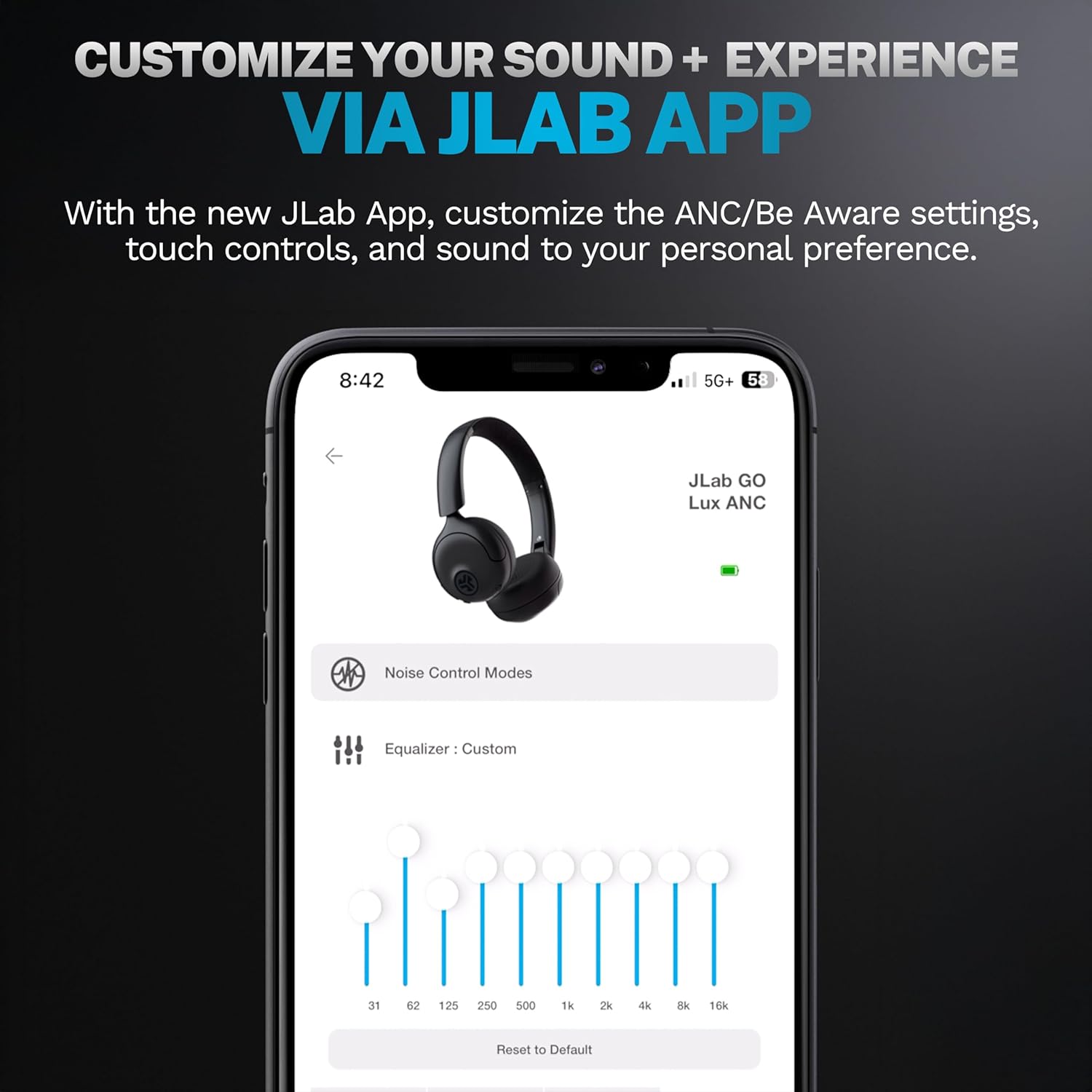
Image: JLab Go Lux ANC headphones in their folded position, demonstrating portability.
Problemlərin aradan qaldırılması
| Problem | Həll |
|---|---|
| Qulaqlıqlar açılmır | Ensure headphones are charged. Press and hold the power button for 3-5 seconds. |
| Cihazla qoşalana bilməz | Make sure Bluetooth is enabled on your device. Ensure headphones are in pairing mode (flashing blue/red LED). Forget the device in your Bluetooth settings and re-pair. |
| Səs və ya aşağı səs yoxdur | Check volume levels on both headphones and your connected device. Ensure headphones are properly connected. |
| ANC effektiv işləmir | Ensure ANC mode is activated. Adjust headphone fit to ensure a good seal around your ears. |
| Zəng keyfiyyəti problemləri | Ensure microphones are not obstructed. Check your device's connection and signal strength. |
Spesifikasiyalar
| Xüsusiyyət | Detal |
|---|---|
| Model Adı | HBGOLUXANCMVE20WEB |
| Bağlantı texnologiyası | Simsiz (Bluetooth) |
| Bluetooth versiyası | 5.0 |
| Qulaqlıq forması | Qulaq üstü |
| Səs-küyə Nəzarət Xüsusiyyətləri | Hybrid Active Noise Canceling, Be Aware Mode |
| Audio sürücü növü | Dinamik Sürücü (40 mm) |
| Tezliyə cavab | 20 Hz - 20 KHz |
| Həssaslıq | 104 dB |
| Batareya Ömrü | Up to 70+ hours (40+ hours with ANC) |
| Nəzarət metodu | Toxunma, Tətbiq Nəzarəti |
| Maddə Çəkisi | 10.6 unsiya (0.3 Kiloqram) |
| Məhsul Ölçüləri | 2.95 x 6.1 x 7.48 düym |
| Suya davamlılıq səviyyəsi | Suya davamlı deyil |
Zəmanət və Dəstək
Your JLab Go Lux ANC Wireless Headphones come with a JLab 2 Year Warranty.
For detailed warranty information, product support, or to contact customer service, please visit the official JLab websaytına daxil olun və ya məhsulunuza daxil olan zəmanət kartına baxın.
Siz də ziyarət edə bilərsiniz JLab Store on Amazon Daha çox məlumat və aksesuarlar üçün.


