Giriş
This manual provides detailed instructions for the setup, operation, and maintenance of your Taiahiro Wireless Gaming Keyboard and Mouse Combo. This combo features a 98-key RGB backlit mechanical keyboard with blue switches and an ergonomic wireless gaming mouse, offering versatile connectivity options (USB-C, 2.4G, Bluetooth 5.0) for various devices.
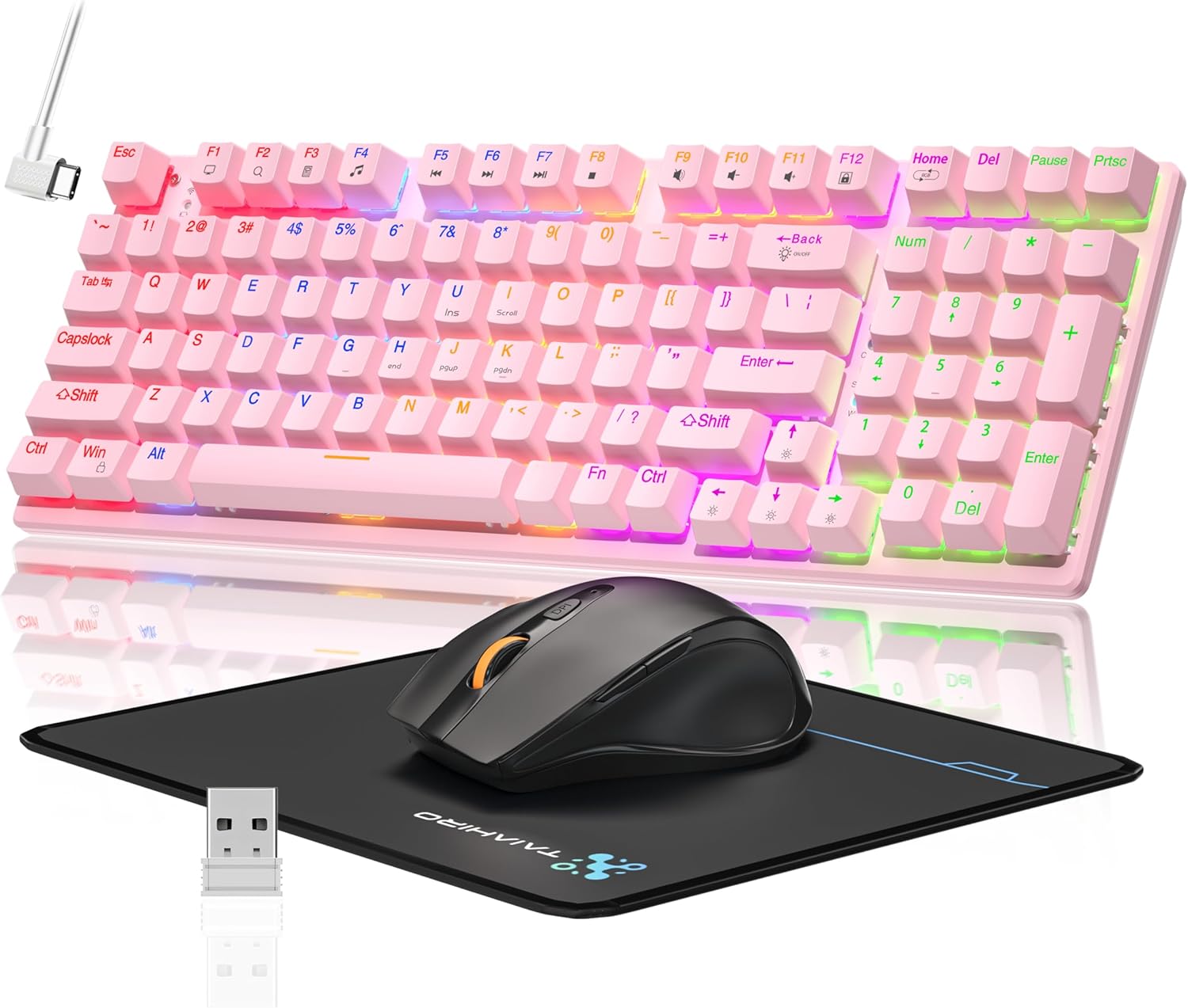
Image: The Taiahiro Wireless Gaming Keyboard and Mouse Combo, featuring a pink 98-key mechanical keyboard with RGB backlighting, a black ergonomic mouse, and a mouse pad. A USB receiver is also visible.
Paketin məzmunu
- Simsiz mexaniki klaviatura
- Simsiz Oyun Siçanı
- USB-C kabeli
- 2.4G USB Qəbuledici
- Siçan altlığı
- İstifadəçi Təlimatı (bu sənəd)
Quraşdırma
Klaviatura Quraşdırma
The keyboard supports three connectivity modes: USB-C wired, 2.4G wireless, and Bluetooth 5.0.
- USB-C Wired Connection: Connect the provided USB-C cable from the keyboard to an available USB port on your computer. The keyboard will be recognized automatically.
- 2.4G Simsiz Bağlantı:
- Locate the 2.4G USB receiver, typically stored in the mouse or keyboard compartment.
- 2.4G USB qəbuledicisini kompüterinizdə mövcud USB portuna qoşun.
- Ensure the keyboard's mode switch (usually on the back or side) is set to 2.4G mode.
- Klaviatura avtomatik qoşulmalıdır.
- Bluetooth 5.0 Bağlantısı:
- Ensure the keyboard's mode switch is set to Bluetooth mode.
- Cihazınızda (PC, noutbuk, planşet, smartfon) Bluetooth-u aktivləşdirin və yeni cihazları axtarın.
- Select "Taiahiro Keyboard" (or similar name) from the list of available devices.
- Cütləşdirməni başa çatdırmaq üçün ekrandakı istənilən göstərişlərə əməl edin.

Image: A pink mechanical keyboard connected to various devices (monitor, laptop, tablet) illustrating its triple-mode connectivity via Bluetooth, 2.4GHz, and USB-C.
Siçan Quraşdırması
The mouse supports 2.4G wireless and Bluetooth connectivity.
- 2.4G Simsiz Bağlantı:
- Insert 1 AA battery (not included) into the mouse.
- Plug the 2.4G USB receiver (shared with keyboard) into an available USB port on your computer.
- Ensure the mouse's power switch is turned ON.
- Siçan avtomatik olaraq qoşulmalıdır.
- Bluetooth bağlantısı:
- Insert 1 AA battery (not included) into the mouse.
- Ensure the mouse's power switch is turned ON and set to Bluetooth mode.
- Cihazınızda Bluetooth-u aktiv edin və yeni cihazları axtarın.
- Select "Taiahiro Mouse" (or similar name) from the list of available devices.
- Cütləşdirməni başa çatdırmaq üçün ekrandakı istənilən göstərişlərə əməl edin.

Image: A wireless gaming mouse highlighting its 4 adjustable DPI levels and showing the battery compartment with a tiny USB receiver and space for a 1AA battery.
Əməliyyat Təlimatları
Klaviatura Funksiyaları
- RGB arxa işıqlandırma: The keyboard features 8 different RGB lighting modes.
- basın Fn + Ev işıqlandırma rejimləri arasında dövrə vurmaq.
- basın Fn + ↑/↓ to adjust brightness (5 levels).
- basın Fn + ←/→ to adjust breathing speed (5 levels).
- Multimedia açarları: istifadə edin Fn key in combination with F-keys for multimedia controls (e.g., Fn+F1 for media player, Fn+F2 for volume down, etc.). Refer to the keycap legends for specific functions.
- Tənzimlənən Ayaqlar: The keyboard has adjustable feet on the underside to change the typing angle for ergonomic comfort.
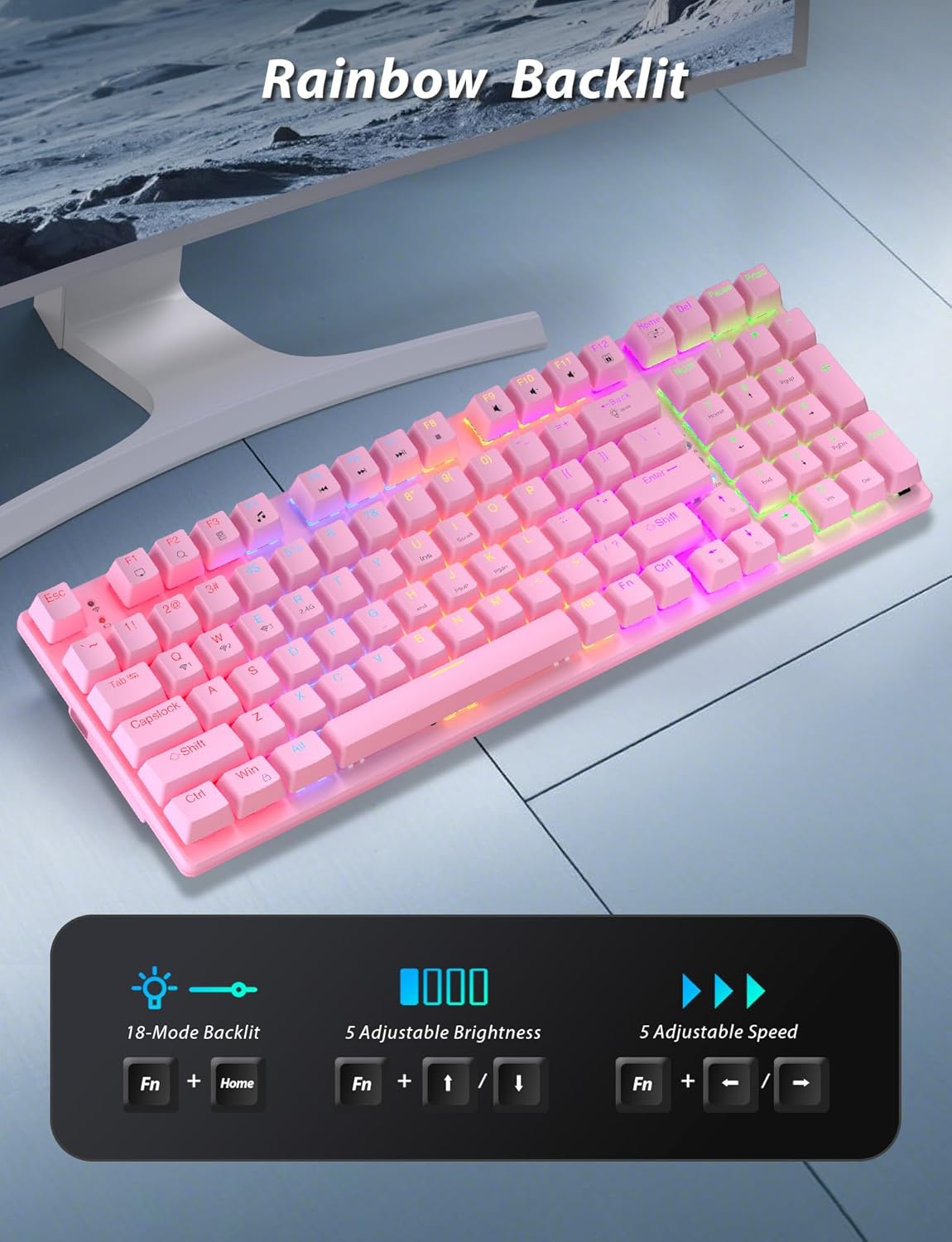
Image: A pink mechanical keyboard displaying its rainbow backlit keys, with an overlay showing the key combinations (Fn + Home, Fn + ↑/↓, Fn + ←/→) for controlling 8 modes, 5 adjustable brightness levels, and 5 adjustable speeds.

Şəkil: Yaxın plan view of the side of the pink mechanical keyboard, showing its ergonomic sloped design and the adjustable feet extended for comfortable typing. The accompanying mouse is also shown on a mousepad.
Siçan funksiyaları
- DPI Tənzimlənməsi: The mouse features 4 adjustable DPI levels (800/1600/2400/3200). Press the DPI button (usually located behind the scroll wheel) to cycle through the sensitivity settings.
- Erqonomik Dizayn: The contoured shape of the mouse is designed to fit comfortably in your hand, reducing fatigue during extended use.
- Anti-skid Scroll Wheel: Provides precise scrolling control.

Image: A wireless gaming mouse with a prominent scroll wheel and DPI button, illustrating its 4 adjustable DPI levels (800/1600/2400/3200), ergonomic shape, and forward/back buttons.
Baxım
- Təmizləmə: Use a soft, dry cloth to clean the surfaces of the keyboard and mouse. For deeper cleaning, a slightly damp cloth can be used, ensuring no liquid enters the internal components. Avoid harsh chemicals or abrasive materials.
- Batareyanın dəyişdirilməsi: For the mouse, replace the AA battery when performance degrades. For the keyboard, recharge via the USB-C cable when the battery indicator shows low power.
- Yaddaş: Uzun müddət istifadə edilmədikdə, kombinasiyanı sərin, quru yerdə, birbaşa günəş işığından və həddindən artıq temperaturdan uzaq saxlayın.
Problemlərin aradan qaldırılması
| Problem | Həll |
|---|---|
| Keyboard/Mouse not connecting via 2.4G. |
|
| Keyboard/Mouse not connecting via Bluetooth. |
|
| RGB backlighting not working or dim. |
|
| Siçan kursoru qeyri-sabit və ya reaksiya vermir. |
|
Spesifikasiyalar
| Xüsusiyyət | Detal |
|---|---|
| Model nömrəsi | BK6301 |
| Klaviatura növü | 98-Key Mechanical Keyboard |
| Keçid Tipi | Mavi açarlar |
| Klaviatura Bağlantısı | USB-C (Wired), 2.4G Wireless, Bluetooth 5.0 |
| Mouse Connectivity | 2.4G Simsiz, Bluetooth |
| Siçan DPI Səviyyələri | 800/1600/2400/3200 |
| Arxa işıqlandırma | RGB (8 Modes, 5 Brightness, 5 Speed) |
| Uyğun Cihazlar | PC, Laptop, Smartphone, Tablet (Windows, macOS, Android) |
| Keyboard Key Life | 50 milyon klik |
| Klaviatura ölçüləri | Approx. 14.96 x 5.51 x 3.15 inches (from Package Dimensions) |
| Maddə Çəkisi | 2.72 pounds (combo weight) |
| Siçan batareyası | 1 x AA batareya (daxil deyil) |
| Klaviatura batareyası | 1 x C batareya (daxildir) Note: This seems unusual for a keyboard, usually Li-ion. Based on input "1 C batteries required. (included)". Will state as per input. |

Şəkil: Yaxın plan view of the mechanical blue switches on the keyboard, showing the keycap removed and the switch mechanism, along with specifications like 50,000,000 keystrokes life, key force, and stroke travel.
Zəmanət və Dəstək
Taiahiro products are designed for reliability and performance. For warranty information or technical support, please refer to the contact details provided on the product packaging or visit the official Taiahiro webSayt. Zəmanət iddiaları üçün alış qəbzini saxlayın.
For further assistance, you may contact Taiahiro customer service through their official channels. Please provide your product model number (BK6301) and a detailed description of the issue when seeking support.