1. Məhsul bitdiview
The TOWODE 16 Channel H.265+ Security DVR System is a comprehensive surveillance solution designed for various environments, including homes, offices, warehouses, and retail spaces. This system supports up to 16 cameras simultaneously, offering versatile monitoring capabilities. It features 5MP ultra-high-definition cameras, advanced H.265+ video compression for efficient storage, and intelligent alarm functions. Remote access via mobile app and PC ensures you can monitor your property from anywhere.

Şəkil: Bitdiview of the TOWODE 16 Channel Security DVR System, showing the DVR unit, four bullet cameras, and a 1TB hard drive.
2. Qutuda nə var
- 1x 16CH DVR recorder
- 4x 5MP HD Cameras
- 1x 1TB HDD (Əvvəlcədən quraşdırılmış)
- 4x 15 meters integrated video/power cables
- 4x 12V2A power supply for cameras
3. Əsas Xüsusiyyətlər
- 16-Channel High Capacity: Connects up to 16 surveillance cameras, supporting AHD/TVI/CVI/CVBS/IP camera 5-in-1 access mode for flexible monitoring.
- 5MP Ultra High Definition: Cameras record 5MP video at 25fps (2592*1944 HD), capturing clear details. Features a 3.6mm lens and 80-foot infrared night vision range.
- IP66 Havaya davamlı: Cameras are constructed from high-quality metal aluminum, designed to withstand outdoor conditions including rain and snow.
- H.265+ Efficient Video Compression: Advanced H.265+ encoding improves compression ratio, offering longer recording times and up to 80% storage savings compared to H.264 systems.
- Intelligent Alarm System: Features mobile detection that triggers alarms and sends notifications via email or mobile phone upon detecting abnormal activity.
- Rahat Uzaqdan Əməliyyat: Supports remote access for real-time viewing and video playback via mobile phones, computers, and other network-connected devices.
- Genişləndirilə bilən yaddaş: Includes a pre-installed 1TB HDD, expandable up to 14TB for extensive recording needs.
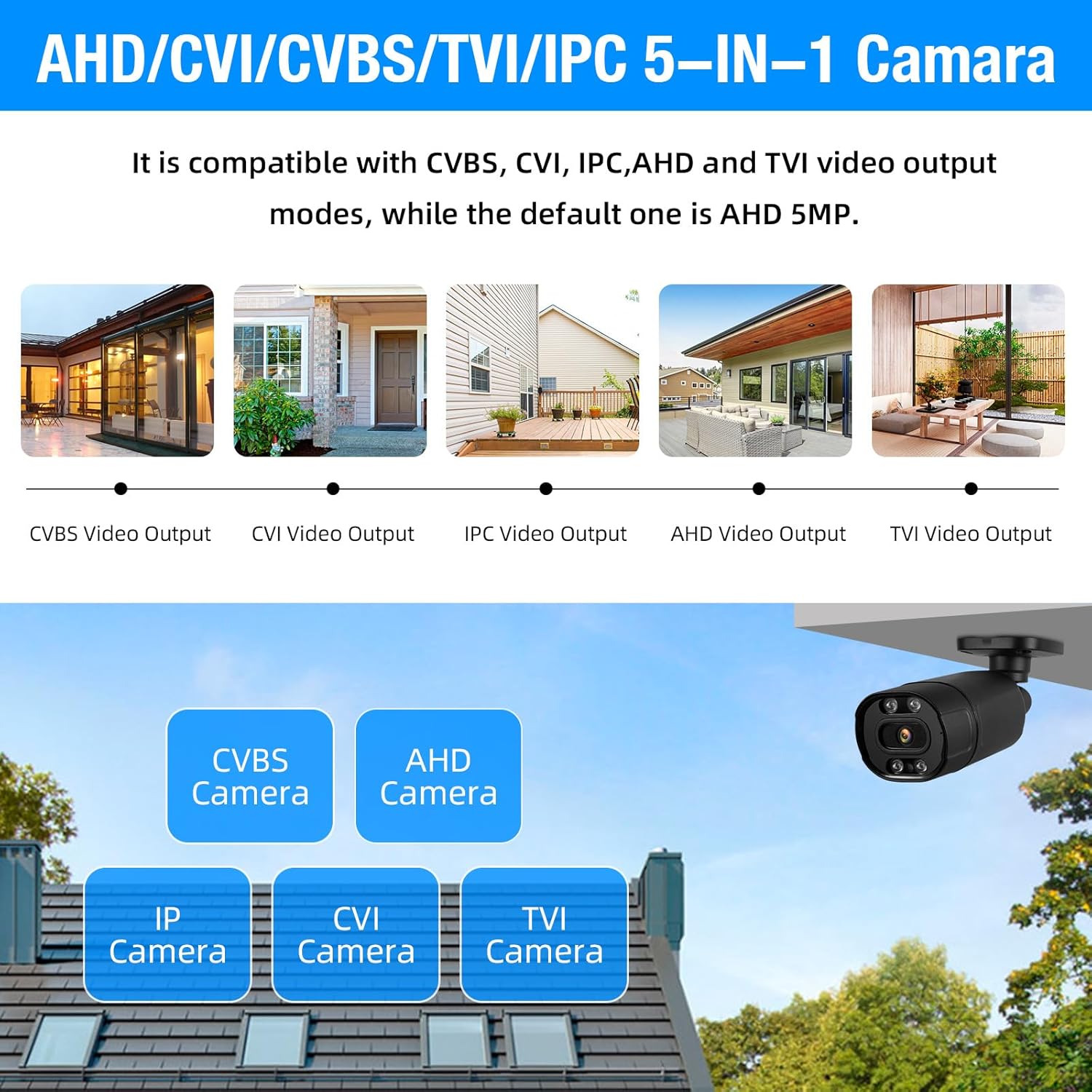
Image: Diagram illustrating the 5-in-1 compatibility of the cameras with CVBS, CVI, IPC, AHD, and TVI video output modes.

Image: Comparison showing the benefits of H.265+ video compression over H.264, highlighting smoother viewing and reduced memory space.
4. Quraşdırma və Quraşdırma
4.1 DVR and Camera Connection
Follow these steps to connect your DVR and cameras:
- Connect your monitor to the DVR using an HDMI or VGA cable.
- Plug in the USB mouse to the DVR's USB port.
- Connect the DVR to its power supply.
- Connect each camera to the DVR using the provided video cables (BNC connectors).
- Connect the camera power cables to the camera power supplies.
- For remote access, connect the DVR to your network router using an Ethernet cable.

Image: Detailed diagram showing the various ports on the DVR (Video In, Video Out, HDMI, VGA, USB, Network, Audio In/Out, Power) and how to connect a camera with its video and power cables.
4.2 Initial DVR Setup
Upon first power-up, the DVR will guide you through an initial setup wizard. This typically includes setting the date/time, creating an administrator password, and configuring network settings. Ensure DHCP is enabled for automatic IP address assignment, or configure a static IP if required by your network.
4.3 Mobil Tətbiqin Qurulması
To enable remote monitoring, download the recommended mobile application (e.g., XMeye or ICSee, as indicated in product images) from your device's app store. Follow these steps:
- Open the mobile app and register an account if you don't have one.
- Navigate to the 'Add Device' section.
- QR kodunu skan etmək üçün seçimi seçin.
- On your DVR's monitor, go to the Network settings to find the QR code for device binding. Scan this QR code with your mobile app.
- Follow the on-screen prompts to add the device. Once added, you should be able to view live feeds and playback recordings remotely.
Video: A step-by-step guide on how to bind the DVR to a mobile application, demonstrating scanning a QR code for remote access.
Video: Bitdiview of the 16-channel DVR system with 4 cameras, showcasing the connection process and basic interface.
5. Əməliyyat Təlimatları
5.1 Canlı View
After successful setup, the DVR will display live feeds from all connected cameras on your monitor. You can switch between single-camera view, çoxkameralı şəbəkə views (e.g., 4-screen, 9-screen, 16-screen), and customize the display layout using the DVR's menu or the mobile app.

Image: A monitor displaying a 16-channel live view grid from the security cameras, showing various surveillance scenes.
5.2 Yazma və Oynatma
The system supports 24/7 continuous recording to the pre-installed 1TB HDD. You can also configure motion-triggered recording to save storage space. To play back recorded footage:
- Access the 'Playback' option from the DVR's main menu or the mobile app.
- Select the desired date and time range.
- Choose the camera channel you wish to review.
- Football-da naviqasiya etmək üçün oxutma idarəetmələrindən (oxutma, fasilə, irəli, geri çəkmə) istifadə edintage.

Image: A visual representation of the smart playback feature, showing a timeline with detected events and corresponding video snippets.
5.3 Motion Detection and Alarms
Configure motion detection settings to receive alerts when activity is detected. This system supports human detection and can send push notifications to your mobile app or email. Adjust sensitivity and detection zones to minimize false alarms.

Image: Illustration of AI motion and face detection, showing detected individuals highlighted and mobile app notification for motion detection alarm.
5.4 Uzaqdan giriş
Utilize the mobile app or PC client (VMS software) to access your DVR system remotely. This allows you to view live feeds, play back recordings, and manage settings from any location with an internet connection.

Şəkil: Bir şəxs viewing live camera feeds on a smartphone, demonstrating the remote monitoring capability of the system.
6. Baxım
- Daimi Təmizlik: Periodically clean camera lenses and DVR vents to ensure optimal performance and prevent overheating.
- Firmware Güncellemeleri: İstehsalçı yoxlayın websisteminizin ən son xüsusiyyətlərə və təhlükəsizlik yamalarına malik olmasını təmin etmək üçün proqram təminatı yeniləmələri üçün sayt.
- Sərt Disk Sağlamlığı: Monitor the health of your hard drive through the DVR's system settings. Consider backing up important footage müntəzəm.
- Kabel yoxlaması: Inspect all cables for wear and tear, especially outdoor cables, to prevent signal loss or power issues.
7. Giderme
7.1 Video Ekranı Yoxdur
- Bağlantıları yoxlayın: Ensure all video cables (BNC) are securely connected between cameras and DVR, and the monitor is correctly connected to the DVR (HDMI/VGA).
- Enerji təchizatı: Verify that the DVR and all cameras are receiving power. Check power adapters and outlets.
- Monitor Girişi: Confirm your monitor is set to the correct input source (HDMI or VGA).
7.2 Uzaqdan Giriş Problemləri
- Şəbəkə bağlantısı: Ensure the DVR is connected to the internet via an Ethernet cable and your router is functioning correctly.
- Tətbiq Konfiqurasiyası: Double-check that the device is correctly added to your mobile app using the QR code or serial number.
- Firewall/Router Settings: Your router's firewall or network settings might be blocking access. Consult your router's manual or ISP for port forwarding or UPnP settings if necessary.
7.3 Qeyd Problemləri
- Hard Drive Status: Check the DVR's system settings to ensure the 1TB HDD is detected and functioning correctly.
- Qeyd Cədvəli: Verify that the recording schedule is properly configured for continuous or motion-triggered recording.
- Saxlama sahəsi: If the hard drive is full, configure it to overwrite older footage or consider upgrading to a larger capacity HDD.
8. Spesifikasiyalar
| Xüsusiyyət | Spesifikasiya |
|---|---|
| Brend | TOWODE |
| Model nömrəsi | A6516L2 |
| Bağlantı texnologiyası | Simli |
| Video çəkiliş həlli | 2592p (5MP) |
| Kanalların sayı | 16 |
| Yaddaş Saxlama Tutumu | 1 TB (Pre-installed), expandable up to 14 TB |
| Güc mənbəyi | Kabelli Elektrik |
| DVR Ölçüləri (U x E x H) | 8.28 x 7.87 x 1.57 düym |
| Uyğun Cihazlar | Smartphones, Personal Computers, Cameras |
| Digər Kamera Xüsusiyyətləri | 5MP, Night Vision, Indoor/Outdoor Use |
| Gecə Görmə Aralığı | 80 Fut |
| Çərçivə Tezliyi | 25 fps |
| Qeyd rejimi | Davamlı, Hərəkət Aşkarlanması |
| Video Girişi | BNC |
| Xüsusi Xüsusiyyətlər | App Control, Audio Recording, Human Detection, Image Sensor, Motion Sensor |
9. Zəmanət və Dəstək
For warranty information, technical support, or service inquiries, please refer to the official TOWODE websaytına daxil olun və ya birbaşa müştəri xidmətləri ilə əlaqə saxlayın. Satınalma qəbzinizi zəmanət iddiaları üçün satınalmanın sübutu kimi saxlayın.
Onlayn Resurslar:
- ziyarət edin TOWODE Store on Amazon for product updates and related information.


