1. Giriş
This manual provides detailed instructions for the SOLAKAKA SM805 Lightweight Wireless Gaming Mouse. Please read this manual thoroughly before using the product to ensure proper operation and to maximize your gaming and work experience.

Şəkil 1: Ön view of the SOLAKAKA SM805 mouse, showcasing its ergonomic shape and the included 2.4GHz USB receiver.
2. Məhsul bitdiview və Xüsusiyyətlər
The SOLAKAKA SM805 is a versatile gaming mouse designed for performance and comfort. Key features include:
- Üç rejimli əlaqə: Supports 2.4GHz wireless, Bluetooth 5.0, and Type-C wired connections.
- Yüksək Dəqiqlik Sensor: Equipped with the PAW3311 sensor, offering adjustable DPI from 100 to 24000.
- Yüngül Dizayn: Weighs approximately 66g (without cable) for reduced wrist burden.
- Erqonomik tutuş: Contoured shape designed for comfortable right-hand use.
- Proqramlaşdırıla bilən düymələr: Features 6 customizable buttons for personalized functions and macros.
- Uzun Batareya Ömrü: Integrated 800mAh high-capacity rechargeable battery with intelligent sleep design.
- Yüksək səsvermə dərəcəsi: Up to 1000Hz polling rate for responsive tracking.

Şəkil 2: Artıqview of the SOLAKAKA SM805 mouse's main features, including its connectivity options, sensor capabilities, button count, weight, polling rate, and battery capacity.
3. Paketin məzmunu
Zəhmət olmasa paketi aşağıdakı maddələr üçün yoxlayın:
- SOLAKAKA SM805 Wireless Gaming Mouse
- 2.4GHz USB Alıcısı
- C tipli şarj kabeli
- İstifadəçi təlimatı
- AAA Battery (pre-installed or included separately)
4. Quraşdırma
4.1 Siçanın doldurulması
Before first use, it is recommended to fully charge the mouse. Connect the Type-C charging cable to the mouse's front port and the other end to a USB power source (e.g., computer USB port, USB wall adapter). The mouse can be used while charging.
4.2 Siçanın qoşulması
The SM805 mouse offers three connection modes:

Figure 3: Image illustrating the three connectivity modes (Bluetooth, 2.4GHz wireless, and Type-C wired) of the SM805 mouse, along with its 800mAh rechargeable battery.
2.4GHz Simsiz rejimi:
- Locate the 2.4GHz USB receiver, usually stored in a compartment on the underside of the mouse.
- USB qəbuledicisini kompüterinizdə mövcud olan USB portuna qoşun.
- On the underside of the mouse, slide the mode switch to the '2.4G' position. The mouse should connect automatically.
Bluetooth 5.0 rejimi:
- On the underside of the mouse, slide the mode switch to the 'BT' position.
- Kompüterinizdə və ya cihazınızda Bluetooth-u aktivləşdirin və yeni cihazlar axtarın.
- Select 'SOLAKAKA SM805' from the list of available devices to pair.
Type-C Wired Mode:
- Connect the Type-C charging cable to the mouse and the other end to your computer's USB port.
- Siçan avtomatik olaraq simli rejimə keçəcək və doldurulmağa başlayacaq.
5. Əməliyyat Təlimatları
5.1 DPI Tənzimlənməsi
The SM805 mouse features a dedicated DPI button, typically located behind the scroll wheel, allowing you to cycle through preset DPI levels (800-1200-1600-3200-12000-22000). The DPI indicator light will change to reflect the current setting. Fine-tuning of DPI (100-24000 DPI) is available via the software.
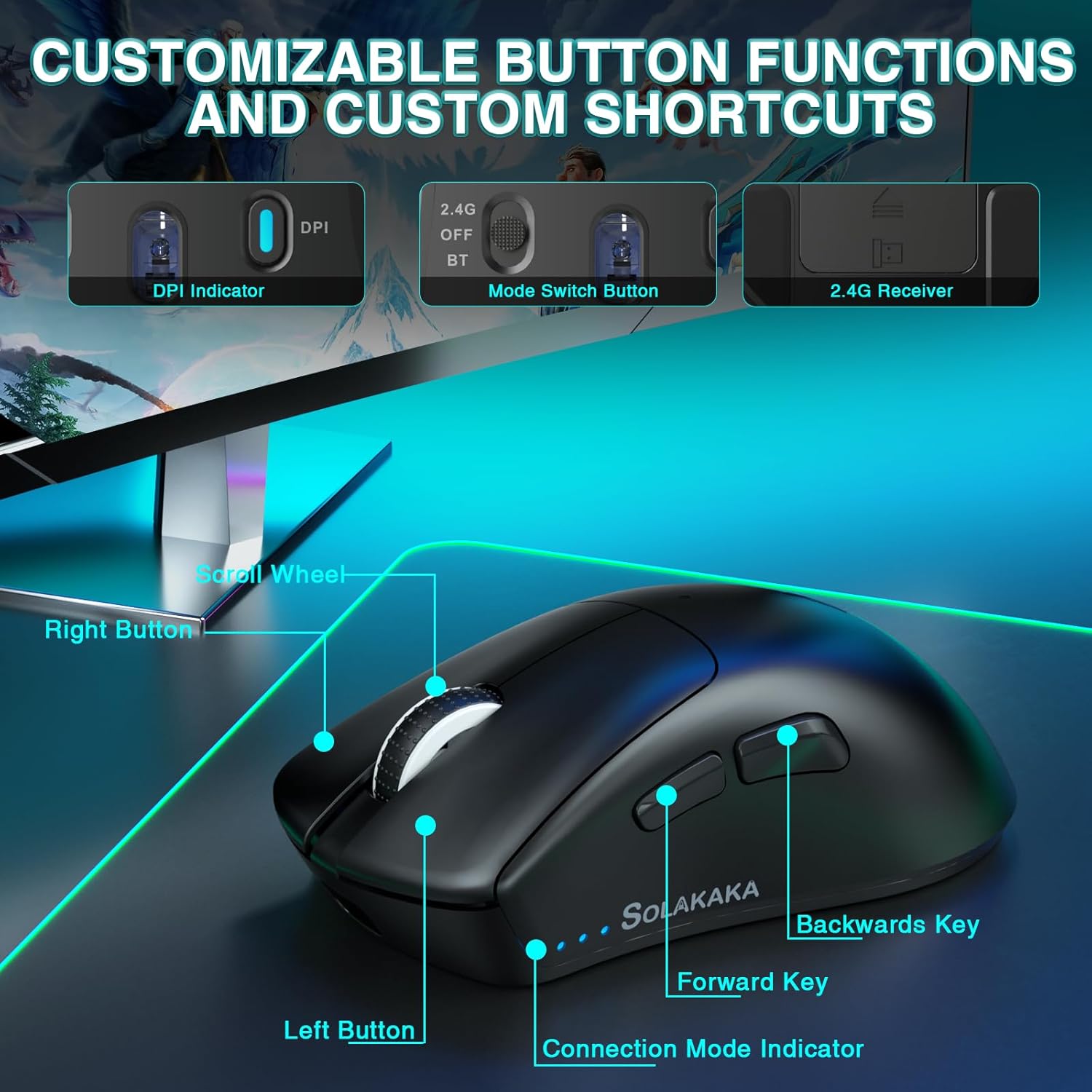
Figure 4: A detailed diagram pointing out the various buttons and indicators on the SM805 mouse, including the DPI indicator, mode switch, scroll wheel, and side buttons.
5.2 proqramlaşdırıla bilən düymələr
The mouse includes 6 programmable buttons: Left Click, Right Click, Middle Click (Scroll Wheel), Forward Key, Backward Key, and DPI Switch. These buttons can be customized using the SOLAKAKA software.
5.3 Ağıllı Enerji Qənaəti
To conserve battery life, the SM805 mouse is equipped with an intelligent sleep design. If the mouse is inactive for a certain period, it will automatically enter hibernation mode. To wake it up, simply click any button.
6. Customization (Software)
For advanced customization, download the official SOLAKAKA software (compatible with Windows). The software allows you to:
- Program all 6 buttons with various functions, multimedia keys, or fire keys.
- Create and assign macro files for complex command sequences.
- Adjust DPI settings in increments of 100, up to 24000 DPI.
- Set the polling rate (report rate) from 125Hz to 1000Hz.
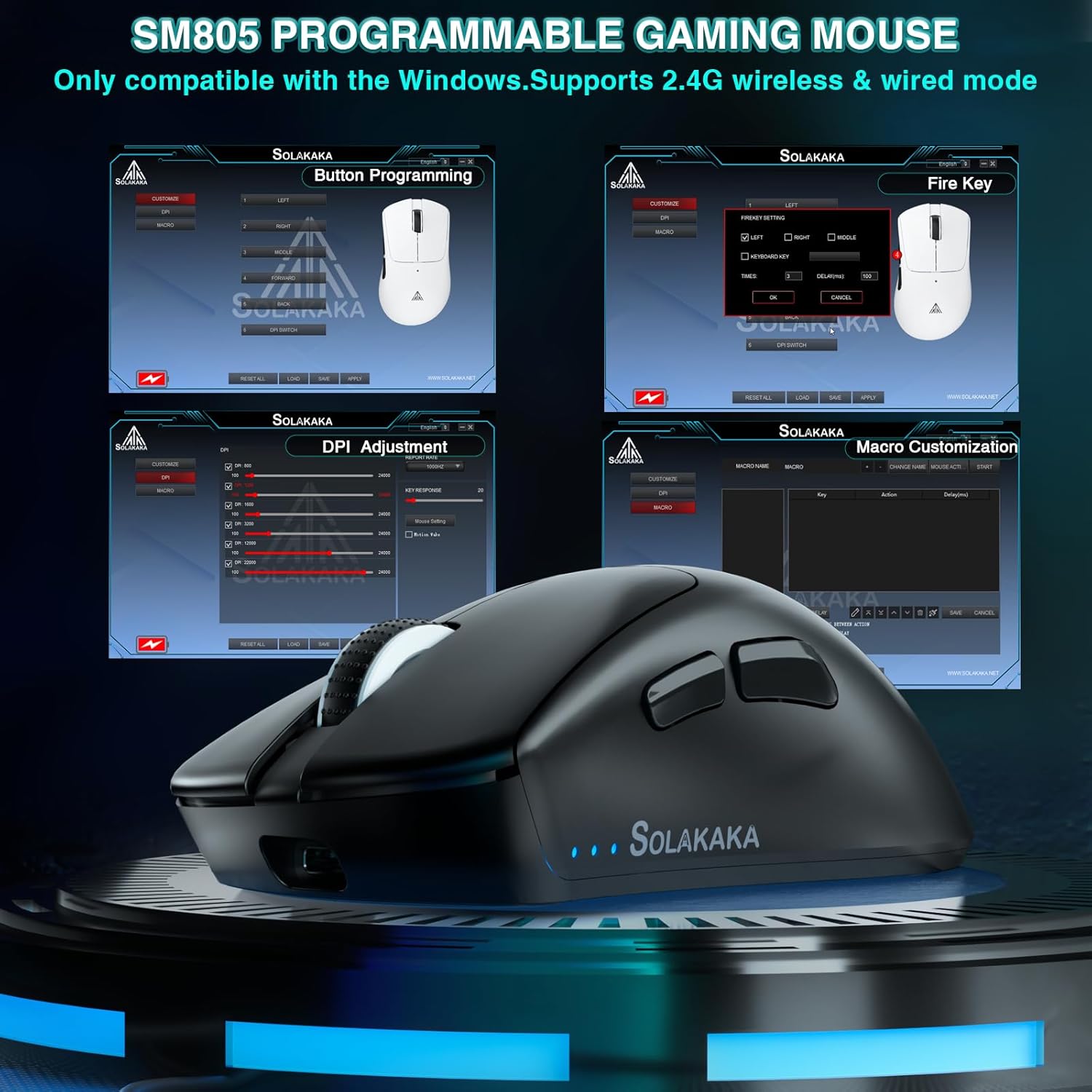
Figure 5: A visual representation of the SM805 mouse's software interface, demonstrating its capabilities for button programming, DPI settings, and macro creation.
Video 1: Bu video vizual olaraq təqdim edirview of the SOLAKAKA SM805 Lightweight Wireless Gaming Mouse, demonstrating its design, tri-mode connectivity, adjustable DPI settings, and customizable features through its software. It shows the mouse in use and highlights its ergonomic shape and lightweight construction.
7. Baxım
- Təmizləmə: Siçanı təmizləmək üçün yumşaq, quru parça istifadə edin. Sərt kimyəvi maddələrdən və ya aşındırıcı materiallardan istifadə etməkdən çəkinin.
- Yaddaş: Siçanı birbaşa günəş işığından və həddindən artıq temperaturdan uzaq sərin, quru yerdə saxlayın.
- Batareyaya qulluq: For optimal battery longevity, avoid fully discharging the battery frequently. Charge the mouse when the battery indicator is low.
8. Giderme
8.1 Bağlantı problemləri
- No connection in 2.4GHz mode: Ensure the USB receiver is securely plugged in and the mouse switch is set to '2.4G'. Try a different USB port.
- Bluetooth qoşulma xətası: Ensure Bluetooth is enabled on your device and the mouse switch is set to 'BT'. Remove previous pairings and try pairing again.
- Fasiləli əlaqə: Ensure the mouse is within range of the receiver/device. Avoid sources of strong electromagnetic interference.
8.2 Siçan Cavab Vermir
- Check the battery level. If low, connect the charging cable.
- If in intelligent sleep mode, click any button to wake the mouse.
- Kompüterinizi yenidən başladın.
9. Spesifikasiyalar
| Xüsusiyyət | Detal |
|---|---|
| Model | SM805 |
| Bağlantı texnologiyası | 2.4GHz Wireless, Bluetooth 5.0, Type-C Wired |
| Hərəkətin aşkarlanması texnologiyası | Optik (PAW3311 Sensor) |
| DPI diapazonu | 100-24000 DPI (Adjustable via software) |
| Səsvermə dərəcəsi | 1000Hz-ə qədər |
| Düymələr | 6 proqramlaşdırıla bilən düymələr |
| Batareya Tutumu | 800 mAh |
| Maddə Çəkisi | 5.6 ounces (approx. 66g without cable) |
| Xüsusi Xüsusiyyət | Soundless (referring to silent click switches, if installed) |
| İstehsalçı | SOLAKAKA |
10. Zəmanət və Dəstək
For warranty information and technical support, please refer to the documentation included with your product or visit the official SOLAKAKA brand store. You can find more information at the SOLAKAKA Store on Amazon.


