1. Giriş
This manual provides comprehensive instructions for the installation, operation, maintenance, and troubleshooting of your NIVIAN Professional WiFi SuperHD Surveillance Camera Kit. This system is designed to provide reliable and efficient security monitoring for your home or business.
Düzgün quraşdırma və optimal performansı təmin etmək üçün məhsuldan istifadə etməzdən əvvəl bu təlimatı diqqətlə oxuyun. Gələcəkdə istinad üçün bu təlimatı saxlayın.
2. Məhsul bitdiview
The NIVIAN CCTV Kit is a professional 2K SuperHD WiFi surveillance system featuring 6 IP cameras and a 10-channel Network Video Recorder (NVR) with a pre-installed 1TB hard drive. Key features include:
- 2K SuperHD Image Resolution: Aydın və ətraflı video foo təmin edirtage (3MP).
- AI İnsan Algılaması: Intelligent motion detection to reduce false alarms.
- İki yollu səs: Real vaxt rejimində ünsiyyət üçün daxili mikrofon və dinamik.
- Dual Night Vision: Infrared mode for discreet monitoring and white LED mode for full-color night vision activated by motion.
- WiFi-6 Long Range Connectivity: Stable wireless connection up to 250 meters with repeater function.
- IP66 Weatherproof Cameras: Davamlı metal casing suitable for outdoor use.
- Professional səsyazma: Continuous or event-based recording to the included 1TB hard drive.
- HDMI çıxışı: Connect to a monitor or TV for live viewing.
- EseeCloud App: Remote access and control from mobile devices.
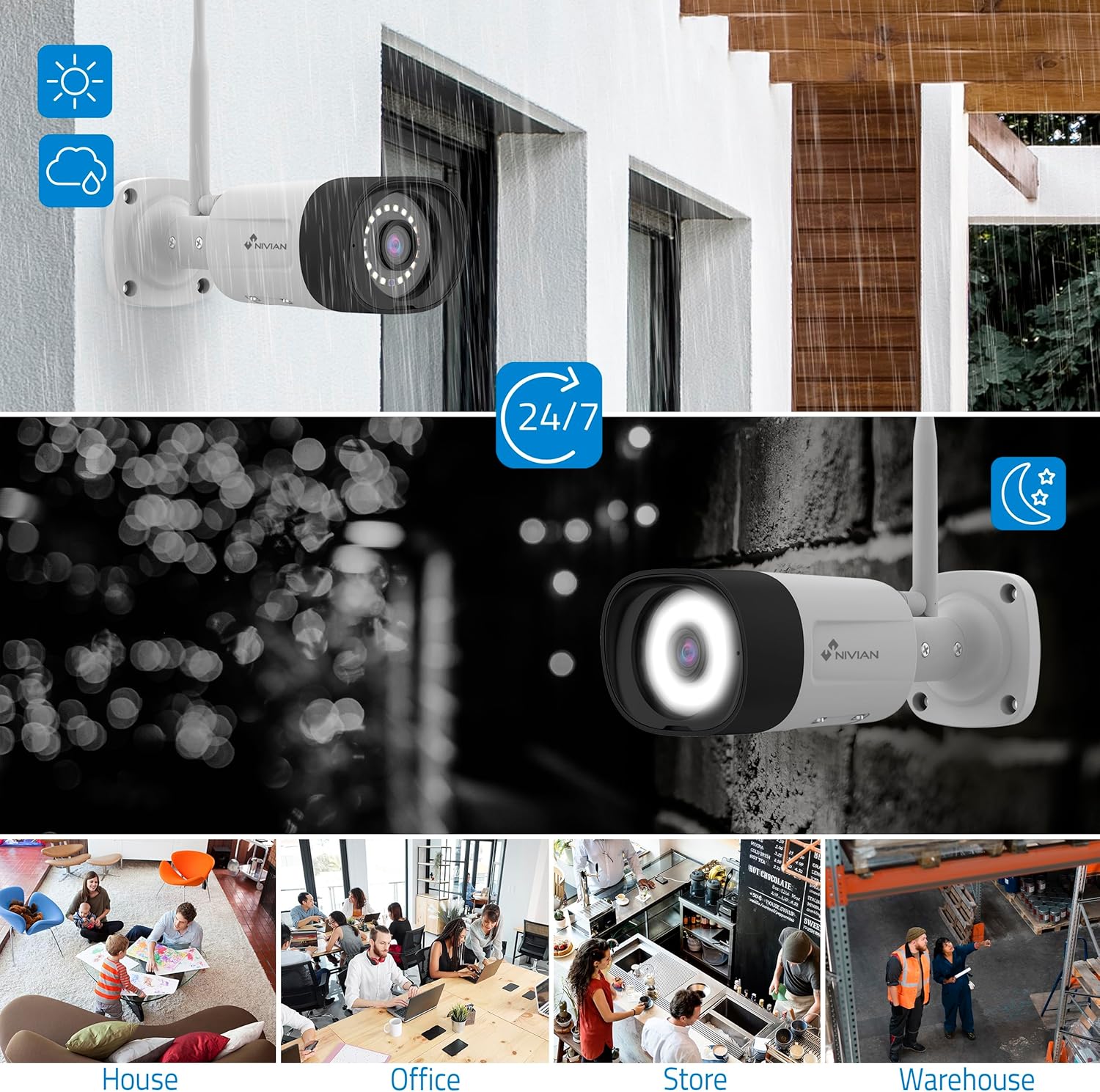
Image: NIVIAN CCTV Camera with day and night vision capabilities, showing weatherproof design and application in various environments like house, office, store, and warehouse.

Image: Comparison of 1080p Full HD video quality versus 2K Super HD video quality, demonstrating enhanced detail with 2K resolution.
3. Paketin məzmunu
Bütün əşyaların paketinizdə olduğunu yoxlayın:
- 1x 10-Channel NVR (Network Video Recorder) with 1TB Hard Drive
- 6x NIVIAN 2K SuperHD WiFi IP Cameras
- NVR və Kameralar üçün Güc Adapterləri
- USB Siçan
- Ethernet kabeli
- Montaj Vintləri və Tıxacları
- Tez Başlanğıc Bələdçisi (ətraflı təlimatlar üçün bu təlimata baxın)
4. Quraşdırma
4.1. NVR Installation
- NVR-ni qoşun:
- NVR-i verilən güc adapterindən istifadə edərək elektrik rozetkasına qoşun.
- Connect the NVR to a monitor or TV via the HDMI port for local viewing.
- USB siçanı NVR-nin USB portuna qoşun.
- For internet access, connect the NVR to your router using the Ethernet cable.
- Güc Aktivdir: Turn on the NVR. Follow the on-screen prompts for initial setup, including language selection and network configuration.
4.2. Kamera Quraşdırılması
- Quraşdırma yeri: Kameralarınız üçün uyğun yerləri seçin və onların aydın bir sahəyə sahib olduğundan əmin olun. view and are within range of the NVR's WiFi signal. The IP66 rating allows for outdoor installation.
- Kameraları işə salın: Hər bir kameranı xüsusi güc adapterindən istifadə edərək elektrik rozetkasına qoşun.
- Cütləşmə (Avtomatik): The cameras are pre-paired with the NVR. Once powered on, they should automatically connect to the NVR's WiFi network. You will see the camera feeds appear on the connected monitor.
- Signal Repetition Function: If a camera is too far from the NVR, you can use another camera as a repeater to extend the WiFi range up to 250m. Refer to the NVR's on-screen menu for configuring this feature.

Image: Diagram illustrating various connection options for the NIVIAN CCTV system, including direct WiFi-6 connection to NVR, HDMI output to a monitor, and NVR connection to a router via LAN for remote access via Eseecloud app. Also shows signal repetition function.
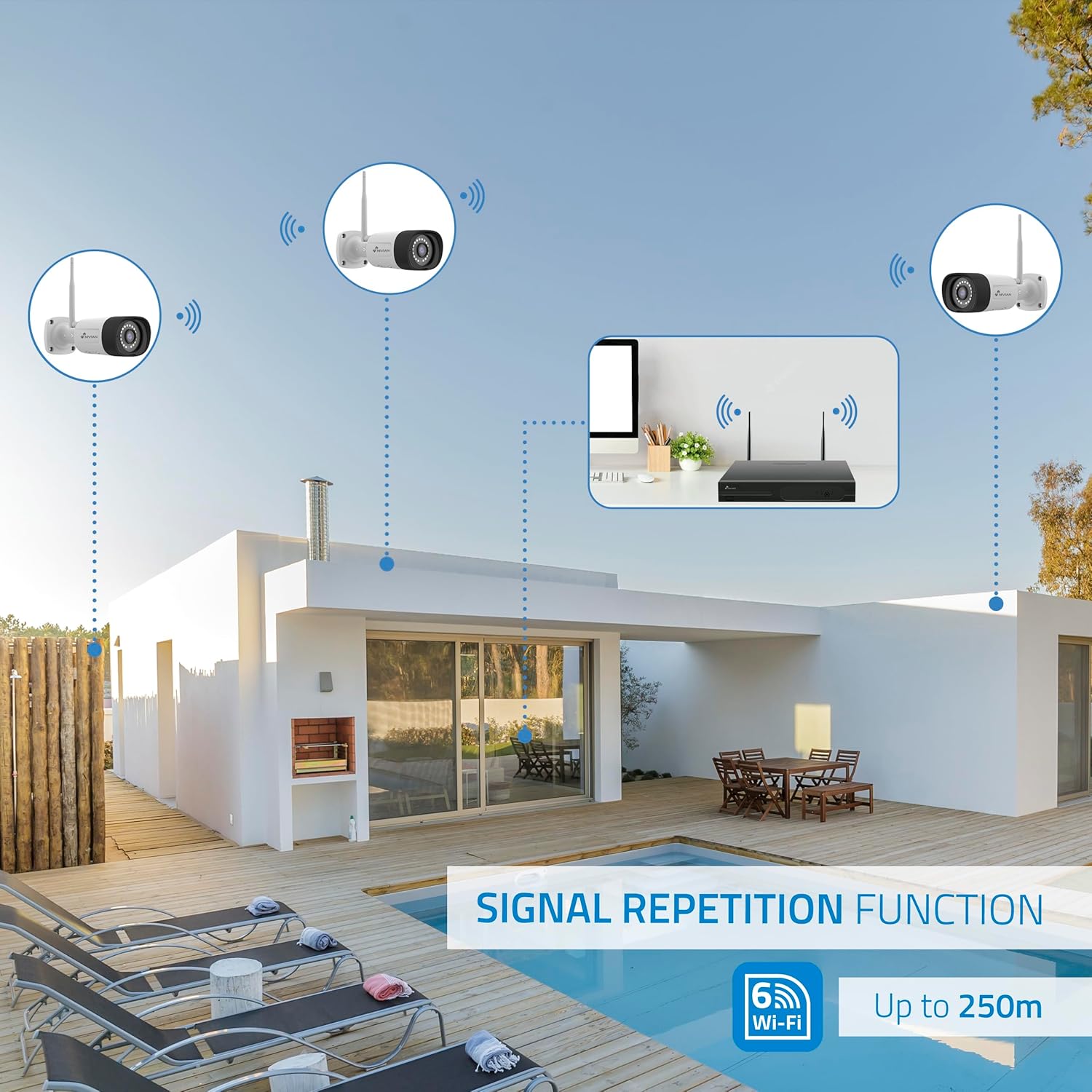
Image: Diagram showing the signal repetition function of the NIVIAN WiFi CCTV system, where cameras can extend the WiFi range up to 250 meters from the NVR.
4.3. EseeCloud App Setup
- Tətbiqi yükləyin: Download the "EseeCloud" app from your mobile device's app store (available for iOS, Android).
- Qeydiyyat Hesabı: Tətbiqi açın və yeni hesab yaradın və ya artıq varsa, daxil olun.
- Cihaz əlavə edin: Follow the in-app instructions to add your NVR system. This typically involves scanning a QR code displayed on the NVR's monitor or entering the device ID manually.
- Uzaqdan Viewing: Bir dəfə əlavə edə bilərsiniz view live feeds, access recordings, and configure settings remotely.

Image: Smartphone screen displaying the EseeCloud app interface for managing the security system, showing live camera feeds and control options, with NIVIAN cameras and a laptop in the background.
5. Əməliyyat Təlimatları
5.1. Canlı View
Access live camera feeds through the NVR connected to a monitor or via the EseeCloud mobile app. The NVR interface allows you to switch between single-camera view və çoxkameralı şəbəkə view.
5.2. Qeyd
- Davamlı qeyd: The system is configured for continuous recording by default to the 1TB hard drive.
- Hərəkət Algılama Qeydləri: Configure cameras to record only when motion is detected. This can be scheduled via the NVR settings or EseeCloud app.
- H.265+ Codec: The system uses H.265+ video compression to optimize storage space while maintaining video quality.
5.3. İzləmə
Qeydə alınmış foo-ya daxil oluntage through the NVR's playback menu or the EseeCloud app. You can search recordings by date, time, and event type (e.g., motion detection).
5.4. AI Human Detection
The cameras feature advanced AI human detection to differentiate human movement from other objects, significantly reducing false alarms. When human motion is detected, the system can trigger recordings, send notifications, and activate the white LED night vision for color footage.

Image: NIVIAN camera detecting a person at night, with the white LED light activated for color night vision, and a mobile notification indicating motion detection.
5.5. İki tərəfli audio
Use the EseeCloud app to utilize the two-way audio feature. This allows you to listen to audio from the camera's location and speak through the camera's built-in speaker.
5.6. Gecə Görmə Rejimləri
- Infrared (IR) Mode: Provides black and white video in low-light conditions for discreet surveillance.
- Ağ LED rejimi: When motion is detected in low light, the camera's white LEDs activate, providing full-color video and acting as a deterrent.
6. Baxım
- Kamera Təmizləmə: Regularly clean the camera lenses with a soft, damp Təsvirin aydın keyfiyyətini təmin etmək üçün parça istifadə edin. Sərt kimyəvi maddələrdən istifadə etməyin.
- Firmware Güncellemeleri: Check for firmware updates for the NVR and cameras through the EseeCloud app or NVR settings. Keep your system updated for optimal performance and security.
- Sərt Disk İdarəetmə: 1TB sabit disk dolu olduqda avtomatik olaraq ən köhnə yazıların üzərinə yazacaq. Xüsusi foo qorumaq lazımdırsatage, back it up to an external device.
- Enerji təchizatı yoxlanışı: Ensure all power adapters are securely connected and free from damage.
7. Giderme
7.1. No Camera Feed
- Gücü yoxlayın: Ensure the camera is powered on and its adapter is working.
- WiFi siqnalı: Verify the camera is within the NVR's WiFi range. Use the signal repetition function if necessary.
- Kameranı yenidən təmir edin: If issues persist, try re-pairing the camera with the NVR through the NVR's menu.
7.2. Zəif Şəkil Keyfiyyəti
- Təmiz Lens: Kamera linzasını hər hansı bir kir və ya ləkədən təmizləyin.
- İşıqlandırma: Ensure adequate lighting for optimal image quality, especially at night.
- WiFi müdaxiləsi: Reduce potential WiFi interference by moving the camera or NVR, or by using the signal repetition function.
7.3. Remote Access Issues (EseeCloud App)
- İnternet bağlantısı: Ensure both your NVR and mobile device have a stable internet connection.
- NVR Network Settings: Verify the NVR is correctly connected to your router and has internet access.
- Tətbiq versiyası: Ensure your EseeCloud app is updated to the latest version.
7.4. Hard Drive Full / Recording Issues
- Yaddaşı yoxlayın: Verify the hard drive status in the NVR settings.
- Qeyd Cədvəli: Qeyd cədvəllərinin düzgün qurulduğundan əmin olun.
- Sərt Disk Sağlamlığı: If issues persist, the hard drive may need to be checked or replaced.
8. Spesifikasiyalar
| Brend | NIVIAN |
| Model nömrəsi | NV-KIT830W-8CAM |
| Məhsulun Ölçüləri (U x G x Y) | 23 x 12 x 8 sm; 6.2 kiloqram |
| Bağlantı texnologiyası | Wireless (WiFi-6) |
| Video Qeydiyyatın Çözünürlüğü | 2K (3MP) |
| Kanalların sayı | 10 (NVR) |
| Kameraların sayı | 6 |
| Saxlama Tutumu | 1 TB Hard Drive (included) |
| Kamera Xüsusiyyətləri | IP Cameras SuperHD with PTZ, Night Vision, AI Human Detection, Two-Way Audio |
| Çərçivə Tezliyi | 15 kadr, 24 kadr, 30 kadr |
| Uyğun Cihazlar | Television (via HDMI) |
| Elektrik Prizinin Tipi | Divar montajı |
| Mənşə Ölkə | Çin |
9. Zəmanət və Dəstək
NIVIAN offers technical support to all customers. If you have any questions, suggestions, or encounter any issues with your WiFi surveillance camera kit, please do not hesitate to contact us.
You can reach us through Amazon messages or via any official NIVIAN brand channel. Please refer to your purchase documentation for specific warranty terms and contact details.


