Giriş
This manual provides essential information for the proper use and maintenance of your Maxcom MM835 4G VoLTE Flip Phone. Please read these instructions carefully before using your device to ensure optimal performance and longevity. This phone is designed for ease of use, featuring large displays and a simplified interface.
Məhsul Bitdiview
The Maxcom MM835 is a 4G VoLTE flip phone designed for clear communication and user convenience. It features a dual-screen design, large backlit keys, and essential functions like an SOS button and HAC (Hearing Aid Compatibility).
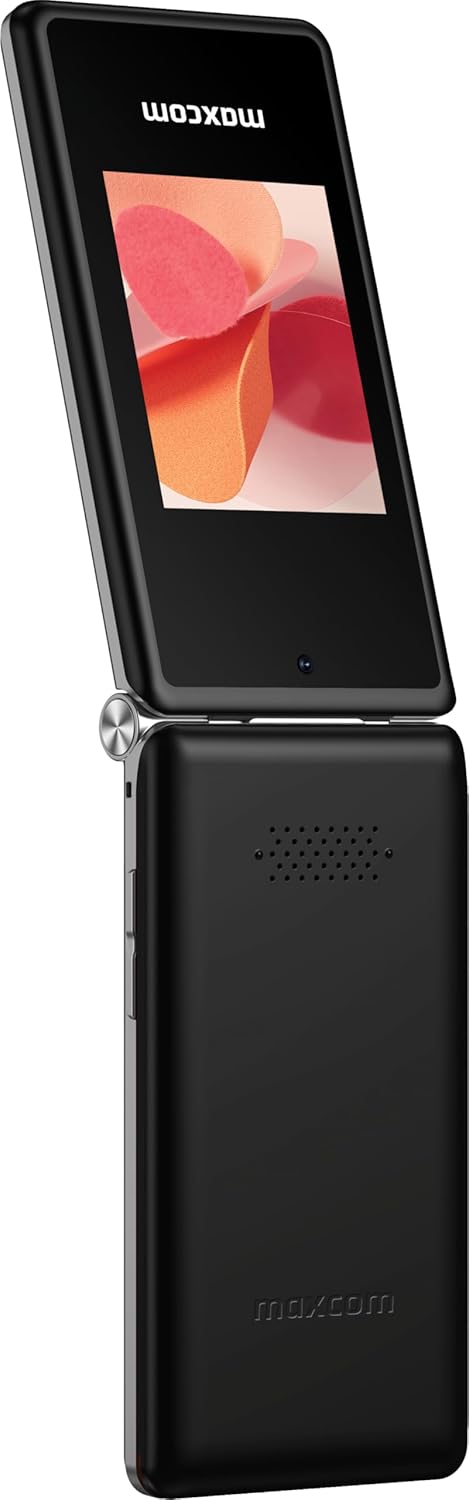
Şəkil 1: Maxcom MM835 Flip Phone (Closed View). The external 2.4-inch screen displays time, date, battery status, and missed calls without opening the phone.
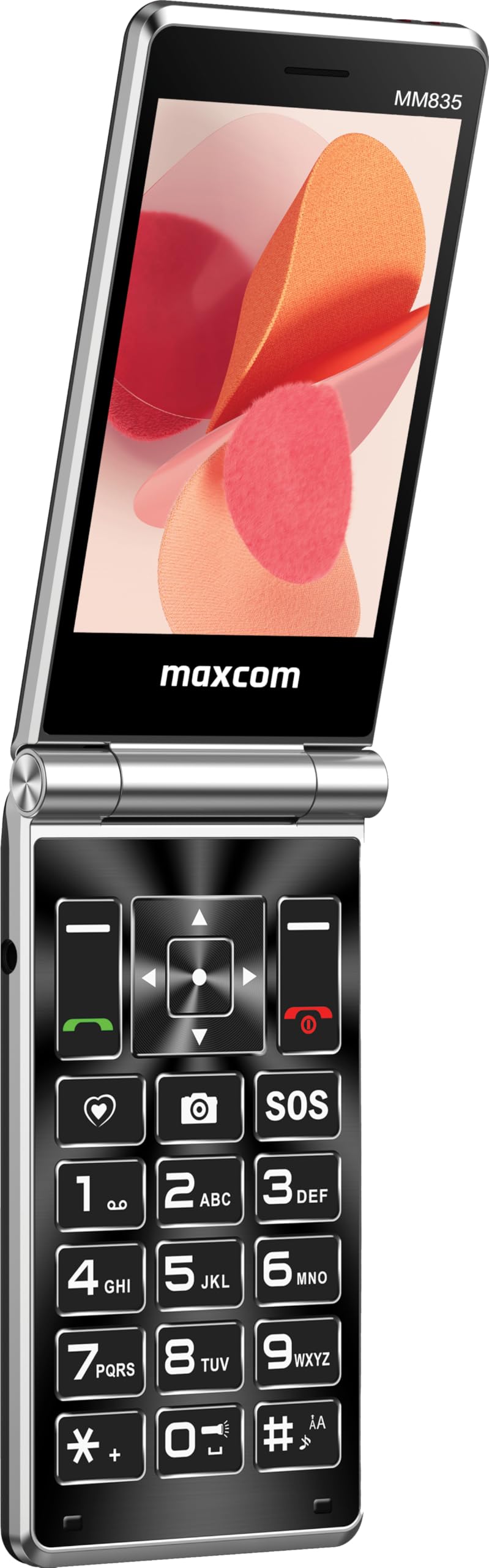
Şəkil 2: Maxcom MM835 Flip Phone (Open View). The internal 3.5-inch screen provides a clear interface for contacts and messages, complemented by large, comfortable keys.

Şəkil 3: Yan view of the Maxcom MM835, illustrating the volume control buttons for easy audio adjustment.

Şəkil 4: Aşağı view of the Maxcom MM835, highlighting the USB-C charging port for convenient power connection.

Şəkil 5: Detail of the Maxcom MM835 keyboard, featuring the prominent SOS button for emergency contacts.

Şəkil 6: The Maxcom MM835 is Hearing Aid Compatible (HAC), ensuring clear audio for users with hearing aids.
Quraşdırma
1. Batareyanın quraşdırılması və doldurulması
- Arxa qapağı açın: Telefonun arxa qapağını yavaşca çıxarın.
- Batareyanı daxil edin: Place the included Lithium-ion battery into its compartment, ensuring the contacts align correctly.
- Arxa qapağı dəyişdirin: Arxa qapağı etibarlı şəkildə bağlayın.
- Telefonu doldurun: Connect the provided USB-C cable to the phone's charging port (Figure 4) and to a compatible USB power adapter (not included). Allow the phone to charge fully before first use. The external screen will indicate charging status.
2. SİM kartın quraşdırılması
The Maxcom MM835 supports dual SIM cards.
- Remove the back cover and battery: Follow the steps above to access the SIM card slots.
- SIM kartları daxil edin: Carefully slide your SIM card(s) into the designated slot(s). Ensure the gold contacts face downwards and the notched corner aligns with the slot.
- Reinstall battery and cover: Batareyanı və arxa qapağı dəyişdirin.
3. Açma / Söndürmə
- Yandırmaq üçün: Ekran işıqlanana qədər Güc/Zəngi Bitir düyməsini (qırmızı düymə) basıb saxlayın.
- Söndürmək üçün: Söndürmə seçimləri görünənə qədər Yandır/Zəngi Bitir düyməsini basıb saxlayın, sonra "Söndür" seçin.
Əməliyyat Təlimatları
1. Əsas Naviqasiya
- Daxili Ekran: The 3.5-inch internal screen is your primary interface for menus and content.
- Xarici ekran: The 2.4-inch external screen shows essential information like time, date, battery, and caller ID when the phone is closed.
- Naviqasiya düymələri: Use the directional keys (up, down, left, right) and the central OK button to navigate through menus.
- Yumşaq düymələr: The keys directly below the screen perform functions indicated on the display (e.g., "Menu", "Back").
- Call Keys: The green button initiates calls, and the red button ends calls or powers the phone on/off.
2. Zənglərin edilməsi və qəbulu
- Zəng etmək üçün:
- Telefonu açın.
- Klaviaturadan istifadə edərək nömrəni yığın.
- Press the green Call button to initiate the call.
- Zəngə cavab vermək üçün:
- When the phone rings, open the flip or press the green Call button.
- Zəngi bitirmək üçün: Qırmızı Zəngi bitir düyməsini basın.
3. Mesajların Göndərilməsi və Qəbul Edilməsi
- "Mesajlar" menyusuna keçin.
- Select "New Message" to compose a text.
- Alıcının nömrəsini daxil edin və ya kontaktlardan seçin.
- Klaviaturadan istifadə edərək mesajınızı yazın.
- "Göndər" düyməsini basın.
4. SOS Button Functionality
The SOS button (Figure 5) is located on the main keypad and is designed for emergency situations.
- Quraşdırma: Before use, configure emergency contacts in the phone's settings. Refer to the "SOS Settings" section in the phone's menu.
- Aktivləşdirmə: In an emergency, press and hold the SOS button. The phone will automatically send pre-defined notifications to your emergency contacts and may initiate calls to them.
5. Kamera
The phone includes a basic camera for capturing photos.
- Əsas menyudan kameraya daxil olun.
- Daxili displeydən istifadə edərək kadrınızı çərçivəyə salın.
- Press the central OK button to take a picture.
6. FM Radio
Enjoy listening to FM radio stations on your device.
- Navigate to the "FM Radio" application in the menu.
- Connect headphones (not included) to act as an antenna for optimal reception.
- Stansiyaları skan etmək və ya əl ilə tənzimləmək üçün naviqasiya düymələrindən istifadə edin.
Baxım
- Təmizləmə: Use a soft, dry cloth to clean the phone's exterior. Avoid liquid cleaners or abrasive materials.
- Batareyaya qulluq: To prolong battery life, avoid extreme temperatures. Charge the phone regularly, but do not leave it fully discharged for extended periods.
- Yaddaş: İstifadə edilmədikdə telefonu günəş işığından və nəmdən uzaq, sərin, quru yerdə saxlayın.
- Proqram təminatı: While software updates are not explicitly guaranteed, ensure your phone's settings are optimized for performance.
Problemlərin aradan qaldırılması
If you encounter issues with your Maxcom MM835, refer to the following common solutions:
| Problem | Mümkün Həll |
|---|---|
| Telefon açılmır | Ensure the battery is correctly installed and fully charged. Connect the charger and try again. |
| Zəng etmək və ya qəbul etmək mümkün deyil | Check if the SIM card is properly inserted. Verify that you have network signal. Contact your service provider if the issue persists. |
| Zəif batareya ömrü | Ensure the phone is fully charged. Reduce screen brightness or close unused applications. Battery performance can degrade over time. |
| "Emergency Call Only" message | This indicates a lack of network signal or an issue with your SIM card/service. Try moving to an area with better reception or reinserting your SIM card. |
| Açarlar cavab vermir | Restart the phone. If the issue continues, ensure no debris is obstructing the keys. |
Spesifikasiyalar
| Xüsusiyyət | Detal |
|---|---|
| Brend | Maxcom |
| Model Adı | MM835 |
| Məhsul növü | Flip Telefon |
| Rəng | Qara |
| Əməliyyat sistemi | Maxcom OS |
| Internal Screen Size | 3.5 düym |
| Xarici Ekran Ölçüsü | 2.4 düym |
| Bağlantı | 4G, VoLTE |
| Xüsusi Xüsusiyyətlər | Dual SIM, SOS Button, HAC (Hearing Aid Compatible), Large Keys |
| Batareyanın tərkibi | Litium-ion |
| Batareya Tutumu | 1400 mAh |
| Doldurma Portu | USB Tip C |
| Yaddaş Saxlama Tutumu | 32 GB |
| CPU Modeli | ARMv7 |
| Ekran həlli | 640 x 360 |
| Simsiz Taşıyıcı | Bütün operatorlar (Kilidsiz) |
Zəmanət və Dəstək
For warranty information and customer support, please refer to the documentation provided with your purchase or contact the seller directly. Maxcom strives to provide reliable products, and support is available for any manufacturing defects or operational queries.
- İstehsalçı: Maxcom
- Satıcı: You Get - Innovation & Technology
- Qaytarma Siyasəti: Typically 30 days for refund/replacement (check with seller for specifics).


