1. Giriş
This manual provides essential information for the safe and efficient operation, maintenance, and troubleshooting of your MOVA P20 Ultra Robot Vacuum Cleaner. Please read this manual thoroughly before using the product and retain it for future reference.
The MOVA P20 Ultra is designed to automate your home cleaning, offering advanced features such as 75°C hot water mop cleaning, MopExtend technology, and powerful 12,800Pa suction. It is engineered to handle various floor types, including hardwood, tile, and low-pile carpet.
2. Təhlükəsizlik Məlumatı
Always follow basic safety precautions when using electrical appliances to reduce the risk of fire, electric shock, or injury. This device is for indoor household use only.
- Uşaqların robotla oynamasına icazə verməyin. Robot işləyərkən uşaqlara və ev heyvanlarına nəzarət edin.
- Güc adapterinin səsini təmin edintage yerli enerji təchizatınızla uyğundur.
- Robotu nəm mühitdə və ya suya yaxın yerlərdə işlətməyin.
- Saçları, boş paltarları, barmaqları və bütün bədən hissələrini deliklərdən və hərəkət edən hissələrdən uzaq tutun.
- Do not use the robot to pick up large objects, sharp objects, or burning/smoking materials.
- Before cleaning or performing maintenance, ensure the robot is turned off and unplugged from the charging base.
- Yalnız istehsalçı tərəfindən göstərilən qoşma və aksessuarlardan istifadə edin.
3. Paketin məzmunu
Carefully unpack your MOVA P20 Ultra and check that all items are present. If any items are missing or damaged, please contact customer support.
- MOVA P20 Ultra Robot Tozsoran
- Baza stansiyası
- HyperStream Detangling Brush (pre-installed or separate accessory)
- Dust Bag (one pre-installed, additional may be included)
- Water Tank (for clean water and dirty water)
- Mop Pads (set of two)
- Cleaning Pad (for base station washboard)
- Elektrik kabeli
- İstifadəçi Təlimatı (bu sənəd)
4. Məhsul bitdiview
Familiarize yourself with the components of your robot vacuum and base station.
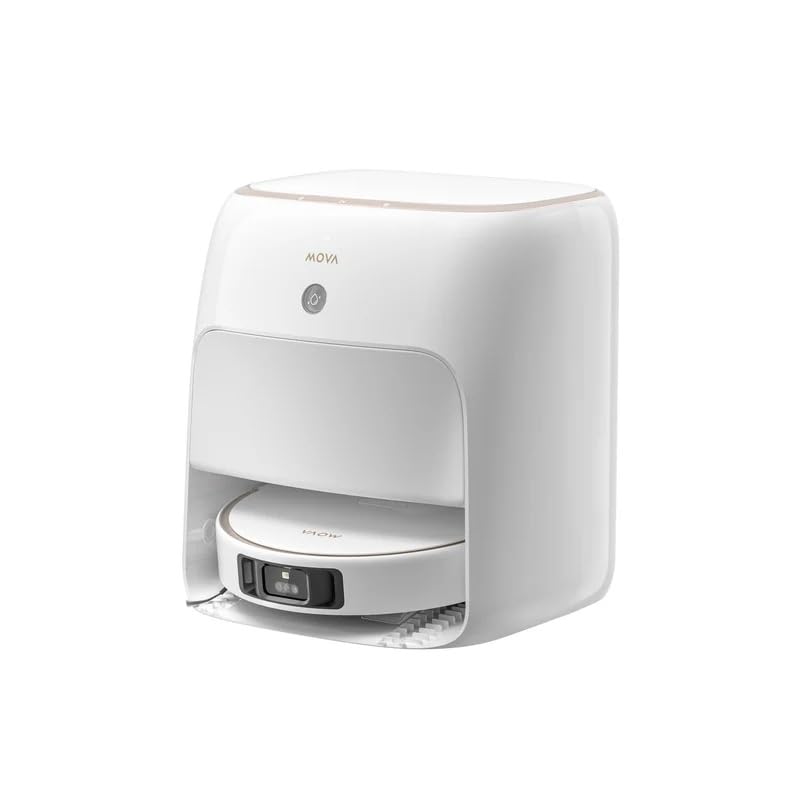
Image: The MOVA P20 Ultra Robot Vacuum Cleaner docked in its base station. The robot is round and white, with sensors visible on top. The base station is a larger white unit designed to automatically empty dust, refill water, and clean the mop pads.
Robot Vakuum Xüsusiyyətləri:
- MopExtend RoboSwing: Exclusive auto mop extension and retraction for thorough cleaning in corners and under low furniture.
- 12,800Pa Sorma Gücü: Provides strong vacuuming for effective dirt, dust, and hair removal.
- HyperStream Detangling Brush: Designed to prevent hair tangles, ensuring consistent cleaning performance.
- Navigation Mapping Sensor: Utilizes Dual-Line Laser, 3D Structured Light + AI for precise navigation and 3D mapping.
- Object Recognition & Avoidance: Advanced sensors help the robot identify and avoid obstacles.
Baza Stansiyasının Xüsusiyyətləri:
- Auto Self-Cleaning Washboard 2.0: Cleans the mop pads and washboard with 75°C hot water.
- İsti hava qurutma: Dries mop pads after cleaning to prevent odors and mildew.
- Auto Dust-Emptying: Automatically empties the robot's dustbin into a 2.5L dust bag, providing up to 75 days of hands-free cleaning.
- Auto Refilling of Water & Detergent: Automatically refills the robot's water tank and adds Mova cleaning solution for effective mopping.
- 99.99% End-to-End Sterilisation: Helps eliminate mold and odors in the dust bag and water tank.
5. Quraşdırma
5.1 Qabın açılması və yerləşdirilməsi
- Remove all packaging materials and protective films from the robot and base station.
- Place the base station on a hard, level surface against a wall. Ensure there is at least 0.5 meters of clear space on both sides and 1.5 meters in front of the base station for optimal robot navigation.
- Plug the power cord into the base station and then into a wall outlet. Ensure the power indicator on the base station illuminates.
5.2 İlkin Doldurma
Place the robot onto the charging contacts of the base station. Ensure the robot is properly aligned and the charging indicator on the robot or base station confirms charging has begun. For first-time use, fully charge the robot before operation, which typically takes several hours.
5.3 Proqram Əlaqəsi
- Download the official MOVA app from your smartphone's app store (iOS or Android).
- Proqramı açın və hesab yaradın və ya daxil olun.
- Follow the in-app instructions to add your MOVA P20 Ultra. This typically involves connecting the robot to your home Wi-Fi network (2.4GHz only).
- Once connected, the app will guide you through initial mapping of your home.
6. Əməliyyat Təlimatları
The MOVA P20 Ultra offers various cleaning modes and smart features for a customized cleaning experience.
6.1 Təmizləmə dövrünə başlamaq
- Robot vasitəsilə: Press the power button on the robot once to start a standard cleaning cycle. Press again to pause.
- Tətbiq vasitəsilə: Open the MOVA app, select your device, and tap "Start Cleaning". You can choose specific rooms, zones, or cleaning modes (e.g., vacuum only, mop only, vacuum & mop).
6.2 Təmizləmə Rejimləri və Xüsusiyyətləri
- Tozsoran: The robot provides 12,800Pa suction power for effective dry cleaning. It automatically boosts suction on carpets.
- Süpürmək: The MopExtend RoboSwing feature ensures thorough mopping, reaching into corners and along edges. The base station supplies 75°C hot water for effective stain removal.
- Planlaşdırılmış Təmizlik: Use the MOVA app to set up daily or weekly cleaning schedules.
- Səslə Nəzarət: Integrate your robot with Google Assistant, Amazon Alexa, or Siri for hands-free control. Refer to the app for specific voice commands.
- Remote Video Supervision: Utilize the app for remote monitoring of your home via the robot's camera.
7. Baxım
Regular maintenance ensures optimal performance and extends the lifespan of your MOVA P20 Ultra.
7.1 Robot Baxımı
- HyperStream Detangling Brush: Periodically check the main brush for tangled hair or debris. Use the included cleaning tool to remove any obstructions.
- Yan Fırçalar: Inspect and clean side brushes regularly. Replace if worn or damaged.
- Filters (Cloth, Foam): The robot's internal filters should be cleaned weekly and replaced every 3-6 months, depending on usage. Tap out dust and rinse if washable (check specific instructions in the app).
- Sensorlar: Düzgün işləməsini təmin etmək üçün bütün sensorları (uçurum sensorları, divar sensorları, şarj kontaktları) təmiz və quru bir parça ilə silin.
7.2 Baza Stansiyasının Texniki Xidməti
- Toz torbası: The 2.5L dust bag in the base station needs replacement approximately every 75 days, or when the app indicates it is full.
- Su çənləri: Regularly empty the dirty water tank and refill the clean water tank. Clean both tanks to prevent mold and odors.
- Self-Cleaning Washboard 2.0: The base station automatically cleans its washboard. However, occasional manual cleaning of the washboard and cleaning pad may be necessary to remove stubborn residue.
- Paspaslar: The robot's mop pads are automatically cleaned and dried by the base station. Replace mop pads every 1-3 months depending on usage and wear.
8. Giderme
If you encounter issues with your MOVA P20 Ultra, refer to the following common problems and solutions. For more detailed troubleshooting, consult the MOVA app or customer support.
| Problem | Mümkün Səbəb | Həll |
|---|---|---|
| Robot işə başlamır və cavab vermir. | Aşağı batareya; elektrik açarı; robot ilişib. | Charge the robot; ensure power switch is ON; clear any obstructions. |
| Zəif təmizləmə performansı. | Full dustbin; clogged brushes/filters; worn mop pads. | Empty dustbin; clean/replace brushes and filters; replace mop pads. |
| Robot baza stansiyasına qayıda bilmir. | Base station obstructed; robot too far; dirty charging contacts. | Clear area around base station; manually place robot on base; clean charging contacts. |
| Tətbiq bağlantısı problemləri. | Yanlış Wi-Fi parolu; 5GHz Wi-Fi şəbəkəsi; robot routerdən çox uzaqdadır. | Verify Wi-Fi password; ensure 2.4GHz network; move robot closer to router or reset Wi-Fi. |
9. Spesifikasiyalar
| Brend | Mova |
| Model Adı | P20 Ultra |
| Hissə nömrəsi | MV-P20U+EXW-1Y |
| Robot Ölçüləri (U x E x H) | 35 x 35 x 10.8 sm |
| Base Station Dimensions (L x W x H) | 39.6 x 41.5 x 45.7 sm |
| Emiş gücü | 12,800Pa |
| Water Tank Capacity (Base Station) | 4.5L (Clean Water) / 4L (Dirty Water) |
| Toz Torbası Tutumu (Baza Stansiyası) | 2.5L (Up to 75 Days) |
| Mop Raising Height | 10.5 mm |
| Mop Cleaning Temperature | 75°C Hot Water |
| Naviqasiya sistemi | Dual-Line Laser, 3D Structured Light + AI, 3D Mapping |
| Object Recognition & Avoidance | Bəli |
| Bağlantı | Wi-Fi (2.4GHz), Smartphone App |
| Səs köməkçisi uyğunluğu | Google Assistant, Amazon Alexa, Siri |
| Səthi tövsiyə | Hardwood, Tile, Low-pile Carpet |
| Güc mənbəyi | Batareya ilə işləyir |
10. Zəmanət və Dəstək
Your MOVA P20 Ultra Robot Vacuum Cleaner comes with a 2 il yerli zəmanətBu zəmanət istehsal qüsurlarını əhatə edir və məhsulunuzun normal istifadə zamanı gözlənildiyi kimi işləməsini təmin edir. Zəhmət olmasa, zəmanət iddiaları üçün alış sənədinizi saxlayın.
For technical support, warranty claims, or further assistance, please contact MOVA customer service through the official MOVA app or website. Our support team is available to help you with any questions or issues you may encounter.


